
Computer freezing randomly for half a second!

Speluncus

New member
Member
VIP
Local time
9:00 PM
Messages
108
Location
Vadsø
Hello everyone!

I have an issue with my computer that I can't seem to solve. I have tried a few things to get rid of the issue but none of them seems to do the trick.

My computer is freezing for half a second as stated in the title, and on a daily basis for the most part. The sound is also freezing causing a "brr" sound. (The sound usually changed depending on the sound coming through the headphones/speakers)

What I have done so far:
-Updated a ton of drivers (and flashed bios)
-Scanned my system for malware and viruses with MSE
-Ran a memtest with Memtest86+

Spec:
Tower - Coolermaster Elite 430 Midi
GPU - Asus Radeon HD 7950 3GB "DirectCU II TOP"
RAM - 8GB DDR3
PSU - Fractal Design Tesla 650W Standard
CPU - Intel Core i5 2500K Quad Core 3.3 Ghz
SSD - Kingston HyperX 120GB 2.5" 555MB/510MB
OS - Windows 7 Home Premium 64bit
HDD - Seagate Barracuda 1TB 7200 RPM
MOBO - Gigabyte GA-Z68X-UD3H-B3, Socket-1155

Everything else;
Monitor - Samsung 27" LED SyncMaster S27B350 & Asus 24" VW246H
Mousepad - Corsair Vengeance MM600
Mouse - Logitech G600
Headset - Astro A40 2014 w/ mixamp pro
Keyboard - Razer Black Widow 2011
Controller - Xbox 360 USB controller

Everything is stock, nothing is overclocked.

HERE is the link of the event viewer. When my system crashes completely witch it rarely does, as mentioned, that kernel-power 41 event pops up. Not sure what it means myself, but you might :)

Rarely the system will decide to crash completely, similar to a BSOD. The only difference is that I can't use the reset-button at all, and the monitor isn't blue but instead black because they turn off. (More or less blinking to a permanent black, as when you're updating GPU drivers.)

This makes me think it is caused by the motherboard, PSU or GPU, although I think the first two of the three are most likely the cause.

I go to school so I wont be able to reply until after 3 PM at all.

English isn't my native language so there may be some typo's lurking around.

Thank you all in advance :)

-Hauk
 

My Computer

Computer type
PC/Desktop
Computer Manufacturer/Model Number
Custom build
OS
Microsoft Windows 7 64-bit
CPU
Intel Core i5 2500K Quad Core 3.3 Ghz
Motherboard
Gigabyte GA-Z68X-UD3H-B3, Socket-1155
Memory
Corsair Vengeance 2x4GB
Graphics Card(s)
Asus Radeon HD 7950 3GB "DirectCU II TOP"
Sound Card
Realtek High Definition Audio (MOBO - DOLBY)
Monitor(s) Displays
Samsung 27" LED SyncMaster S27B350 & Asus 24" VW246H
Screen Resolution
1920x1080
Hard Drives
Seagate Barracuda 1TB 7200 RPM
Kingston HyperX 120GB 2.5" 555MB/510MB
PSU
Fractal Design Tesla 650W Standard
Case
Coolermaster Elite 430 Midi
Cooling
Stock
Keyboard
Razer Black Widow 2011
Mouse
Logitech G600
Internet Speed
60 / 60
Antivirus
Microsoft Security Essentials
Browser
Google Chrome
Other Info
Mousepad - Corsair Vengeance MM600
Headset - Astro A40 2014 w/ mixamp pro
Bump! I know it isn't really appreciated, but since the problem still persists I figured I should give it a try! :)
 

My Computer

Computer type
PC/Desktop
Computer Manufacturer/Model Number
Custom build
OS
Microsoft Windows 7 64-bit
CPU
Intel Core i5 2500K Quad Core 3.3 Ghz
Motherboard
Gigabyte GA-Z68X-UD3H-B3, Socket-1155
Memory
Corsair Vengeance 2x4GB
Graphics Card(s)
Asus Radeon HD 7950 3GB "DirectCU II TOP"
Sound Card
Realtek High Definition Audio (MOBO - DOLBY)
Monitor(s) Displays
Samsung 27" LED SyncMaster S27B350 & Asus 24" VW246H
Screen Resolution
1920x1080
Hard Drives
Seagate Barracuda 1TB 7200 RPM
Kingston HyperX 120GB 2.5" 555MB/510MB
PSU
Fractal Design Tesla 650W Standard
Case
Coolermaster Elite 430 Midi
Cooling
Stock
Keyboard
Razer Black Widow 2011
Mouse
Logitech G600
Internet Speed
60 / 60
Antivirus
Microsoft Security Essentials
Browser
Google Chrome
Other Info
Mousepad - Corsair Vengeance MM600
Headset - Astro A40 2014 w/ mixamp pro
Hauk mate try these scans I use these as well as my main security


http://www.superantispyware.com/

http://www.malwarebytes.org/products/malwarebytes_free/

http://www.bleepingcomputer.com/download/adwcleaner/

download from bleeping computer – delete any rubbishthese find.


Also run Speccy and let us know what the temperatures are doing Speccy - Download

to post results use this
How to Use the Snipping Tool in Vista > click on Manage Attachments and then go to where you save the snip via browse and then Upload that snip.
 

My Computer

Computer type
PC/Desktop
Computer Manufacturer/Model Number
Own build (new) Desk1 / Asus ROG Win 7 / Desk2 1st build
OS
Desk1 7 Home Prem / Desk2 10 Pro / Main lap Asus ROG 10 Pro 2 laptop Toshiba 7 Pro Asus P2520 7 & 10
CPU
Desk1 i5 3750K / Laptop i7 GTX 860M / Desk2 i5 2500
Motherboard
Desk1 Asus P877-V / Desk2 Gigabyte H67 UD3H / Laptop ?
Memory
Desk1 8GB (1866) / Desk2 16GB (1333) / Laptop 8Gb DDR3
Graphics Card(s)
Desk 1& 2NVidia GTX 650 & Laptops on board Intel
Sound Card
Desk 1 & 2 -XONAR DG Realtek High Def audio Laptop
Monitor(s) Displays
Desk 1 Benq HD 2450 / Desk2 Philips 24" / Laptop 17.5"
Screen Resolution
1920x1080 D1 & D2 & Laptop 1
Hard Drives
Desk1 Samsung 120GB 830 SSD
Asus ROG 256GB 850 Pro SSD
Desk2 Samsung 840 256 SSD
Toshiba 120GB EVO
PSU
Desk 1 Corsair HX 1050/ Laptop ? / Desk 2 Corsair HX 650
Case
Desk 1 Cooler HAF XM ? Toshiba laptop / Desk2 Coolermaster
Cooling
Fans on all Desk1 -2 Desk2 - all Coolermasters 5 Laptop ?
Keyboard
Desk 1 MS Sidewinder X6 Desk 2 MS Sidewinder X 4
Mouse
Desk 1&2 - Gigabyte MS 900 gamer - laptop - Logitec wireless
Internet Speed
ADSL2+
Other Info
One other Desktop (tester) and spare Toshba laptop both with SSD's
Running Kaspersky 2016 ISS on all machines config'd identically
Logitec audio stereo systems on each machine (x3)
Canon MG5250MFC
Router/modem TP-Link running WPA2SK

My Computer

Computer type
PC/Desktop
Computer Manufacturer/Model Number
Custom build
OS
Microsoft Windows 7 64-bit
CPU
Intel Core i5 2500K Quad Core 3.3 Ghz
Motherboard
Gigabyte GA-Z68X-UD3H-B3, Socket-1155
Memory
Corsair Vengeance 2x4GB
Graphics Card(s)
Asus Radeon HD 7950 3GB "DirectCU II TOP"
Sound Card
Realtek High Definition Audio (MOBO - DOLBY)
Monitor(s) Displays
Samsung 27" LED SyncMaster S27B350 & Asus 24" VW246H
Screen Resolution
1920x1080
Hard Drives
Seagate Barracuda 1TB 7200 RPM
Kingston HyperX 120GB 2.5" 555MB/510MB
PSU
Fractal Design Tesla 650W Standard
Case
Coolermaster Elite 430 Midi
Cooling
Stock
Keyboard
Razer Black Widow 2011
Mouse
Logitech G600
Internet Speed
60 / 60
Antivirus
Microsoft Security Essentials
Browser
Google Chrome
Other Info
Mousepad - Corsair Vengeance MM600
Headset - Astro A40 2014 w/ mixamp pro
Now the CPU is running tad hot for my liking Hauk but not so bad it is likely to burn. Having said that the Tcase see this http://ark.intel.com/products/52210 is set at 72.6C which to me is an indicator of what not to get near with the CPU temp. In other words it is the temp at which the CPU will shut down to prevent wrecking it.

So as a precaution I would be redoing the thermal compound Hauk and make sure the cooling is up to scratch. However doing that on a laptop is quite a fiddly thing to do and I suppose as long as you do not get those temps over the max's you show then it's ok.

Just one thing you can try is this.

CLEANINGLAPTOPS

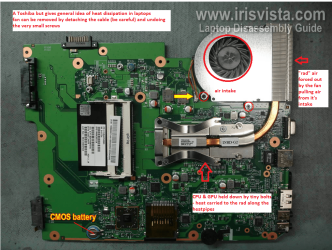
What you can do is to check the air intake aperture and the"rad" and to do that shine a very bright light into the fan apertureand look through from the outlet grill
1. You will see if there is a lot of dust in the fan intake and fan blades and2. you will see if the "rad" is blocked in any way when you lookthrough from the outside.

Now to clean you can blow the dust out using compressed air but first makesure you insert something into the fan blades before you do - to stop the fanfrom spinningas spinning the fan withair will cause it to spin at much higher revs than it was designed for and canwreck the bearing.
The rad you can use those chenille wire play things to very gently clean therad from outside the machine and again blow the dust out. It is fiddly buteffective.
In my pic (just an example) you can see what is typically the set up for cooling and the light should be directed down into that fan and you look through the grill into the "rad" and dust, hair and crud should be cleaned out using the above.
But as in my ditty be very gentle doing this.

For posting pics mate just to make life easier for you read this.
How to Use the Snipping Tool in Vista
 

Attachments

  • LAPTOP BOARD 2.PNG
    LAPTOP BOARD 2.PNG
    443.8 KB · Views: 1

My Computer

Computer type
PC/Desktop
Computer Manufacturer/Model Number
Own build (new) Desk1 / Asus ROG Win 7 / Desk2 1st build
OS
Desk1 7 Home Prem / Desk2 10 Pro / Main lap Asus ROG 10 Pro 2 laptop Toshiba 7 Pro Asus P2520 7 & 10
CPU
Desk1 i5 3750K / Laptop i7 GTX 860M / Desk2 i5 2500
Motherboard
Desk1 Asus P877-V / Desk2 Gigabyte H67 UD3H / Laptop ?
Memory
Desk1 8GB (1866) / Desk2 16GB (1333) / Laptop 8Gb DDR3
Graphics Card(s)
Desk 1& 2NVidia GTX 650 & Laptops on board Intel
Sound Card
Desk 1 & 2 -XONAR DG Realtek High Def audio Laptop
Monitor(s) Displays
Desk 1 Benq HD 2450 / Desk2 Philips 24" / Laptop 17.5"
Screen Resolution
1920x1080 D1 & D2 & Laptop 1
Hard Drives
Desk1 Samsung 120GB 830 SSD
Asus ROG 256GB 850 Pro SSD
Desk2 Samsung 840 256 SSD
Toshiba 120GB EVO
PSU
Desk 1 Corsair HX 1050/ Laptop ? / Desk 2 Corsair HX 650
Case
Desk 1 Cooler HAF XM ? Toshiba laptop / Desk2 Coolermaster
Cooling
Fans on all Desk1 -2 Desk2 - all Coolermasters 5 Laptop ?
Keyboard
Desk 1 MS Sidewinder X6 Desk 2 MS Sidewinder X 4
Mouse
Desk 1&2 - Gigabyte MS 900 gamer - laptop - Logitec wireless
Internet Speed
ADSL2+
Other Info
One other Desktop (tester) and spare Toshba laptop both with SSD's
Running Kaspersky 2016 ISS on all machines config'd identically
Logitec audio stereo systems on each machine (x3)
Canon MG5250MFC
Router/modem TP-Link running WPA2SK
I am actually not using a laptop, so I'll see what I can do :)
But is the CPU temperature likely to be the problem?
 

My Computer

Computer type
PC/Desktop
Computer Manufacturer/Model Number
Custom build
OS
Microsoft Windows 7 64-bit
CPU
Intel Core i5 2500K Quad Core 3.3 Ghz
Motherboard
Gigabyte GA-Z68X-UD3H-B3, Socket-1155
Memory
Corsair Vengeance 2x4GB
Graphics Card(s)
Asus Radeon HD 7950 3GB "DirectCU II TOP"
Sound Card
Realtek High Definition Audio (MOBO - DOLBY)
Monitor(s) Displays
Samsung 27" LED SyncMaster S27B350 & Asus 24" VW246H
Screen Resolution
1920x1080
Hard Drives
Seagate Barracuda 1TB 7200 RPM
Kingston HyperX 120GB 2.5" 555MB/510MB
PSU
Fractal Design Tesla 650W Standard
Case
Coolermaster Elite 430 Midi
Cooling
Stock
Keyboard
Razer Black Widow 2011
Mouse
Logitech G600
Internet Speed
60 / 60
Antivirus
Microsoft Security Essentials
Browser
Google Chrome
Other Info
Mousepad - Corsair Vengeance MM600
Headset - Astro A40 2014 w/ mixamp pro
I am actually not using a laptop, so I'll see what I can do :)
But is the CPU temperature likely to be the problem?
Oops my mistake mate I saw your specs and naturally went gung ho on that. So what machine are you dealing with? and what is the cooling arrangement because using the stock CPU cooler and some of the other methods are light years apart in performance ie stock - very basic and depends a lot on fast fan speeds and the liquid coolers that are more efficient because the liquid dissipates heat far more rapidly because there is more of it and it has a greater surface cooling area in the radiator. Some of the aftermarket air coolers are good but tend to be really on the very large side and heavy as well not to mention expensive.
 

My Computer

Computer type
PC/Desktop
Computer Manufacturer/Model Number
Own build (new) Desk1 / Asus ROG Win 7 / Desk2 1st build
OS
Desk1 7 Home Prem / Desk2 10 Pro / Main lap Asus ROG 10 Pro 2 laptop Toshiba 7 Pro Asus P2520 7 & 10
CPU
Desk1 i5 3750K / Laptop i7 GTX 860M / Desk2 i5 2500
Motherboard
Desk1 Asus P877-V / Desk2 Gigabyte H67 UD3H / Laptop ?
Memory
Desk1 8GB (1866) / Desk2 16GB (1333) / Laptop 8Gb DDR3
Graphics Card(s)
Desk 1& 2NVidia GTX 650 & Laptops on board Intel
Sound Card
Desk 1 & 2 -XONAR DG Realtek High Def audio Laptop
Monitor(s) Displays
Desk 1 Benq HD 2450 / Desk2 Philips 24" / Laptop 17.5"
Screen Resolution
1920x1080 D1 & D2 & Laptop 1
Hard Drives
Desk1 Samsung 120GB 830 SSD
Asus ROG 256GB 850 Pro SSD
Desk2 Samsung 840 256 SSD
Toshiba 120GB EVO
PSU
Desk 1 Corsair HX 1050/ Laptop ? / Desk 2 Corsair HX 650
Case
Desk 1 Cooler HAF XM ? Toshiba laptop / Desk2 Coolermaster
Cooling
Fans on all Desk1 -2 Desk2 - all Coolermasters 5 Laptop ?
Keyboard
Desk 1 MS Sidewinder X6 Desk 2 MS Sidewinder X 4
Mouse
Desk 1&2 - Gigabyte MS 900 gamer - laptop - Logitec wireless
Internet Speed
ADSL2+
Other Info
One other Desktop (tester) and spare Toshba laptop both with SSD's
Running Kaspersky 2016 ISS on all machines config'd identically
Logitec audio stereo systems on each machine (x3)
Canon MG5250MFC
Router/modem TP-Link running WPA2SK

My Computer

Computer type
PC/Desktop
Computer Manufacturer/Model Number
Home made Desktop
OS
Windows 10 Pro. 64/ version 1709 Windows 7 Pro/64
CPU
Intel i7-6800K @ 4.3
Motherboard
ASUS X-99 Deluxe II
Memory
Corsair Platinum 16 gig @2400
Graphics Card(s)
EVGA GTX 1070 OC
Monitor(s) Displays
Asus 27" LED LCD/VE278Q
Screen Resolution
1920-1080 or 1280-720 HDMI
Hard Drives
INTEL SSD 730-240 Gb Sata 3.0/
PSU
EVGA Platium 1200W
Case
Phanteks Luxe Tempered Glass 8 fans/ one radiator
Cooling
XSPC/ Water Cooled CPU
Keyboard
Das 4 Professional
Mouse
Logitech M705/MX Anywhere 2-S
Internet Speed
100 mbits
Antivirus
Microsoft Security Essentials/ Malwarebytes Premium 3.0/ SAS
Browser
I.E. 11 default/Firefox/ ISP Time Warner Cable/Spectrum
Other Info
LG BluRay Burner/
Sound system-KLipsch-THX/
Icy Dock ssd Hot Swap bays.
I am dealing with a desktop, the specs are posted in #1. I am using the stock fan, but haven't overclocked the CPU so I figured I didn't need an aftermarket one. I'd love to get some liquid-cooling going, but I don't have any money to fix something like that at the moment. :(

'OBS' stands for Open Broadcaster Software. You can stream to webpages such as twitch.tv or hitbox.tv.

And did you want me to re-post the pictures as you linked me those tutorials? :)
 

My Computer

Computer type
PC/Desktop
Computer Manufacturer/Model Number
Custom build
OS
Microsoft Windows 7 64-bit
CPU
Intel Core i5 2500K Quad Core 3.3 Ghz
Motherboard
Gigabyte GA-Z68X-UD3H-B3, Socket-1155
Memory
Corsair Vengeance 2x4GB
Graphics Card(s)
Asus Radeon HD 7950 3GB "DirectCU II TOP"
Sound Card
Realtek High Definition Audio (MOBO - DOLBY)
Monitor(s) Displays
Samsung 27" LED SyncMaster S27B350 & Asus 24" VW246H
Screen Resolution
1920x1080
Hard Drives
Seagate Barracuda 1TB 7200 RPM
Kingston HyperX 120GB 2.5" 555MB/510MB
PSU
Fractal Design Tesla 650W Standard
Case
Coolermaster Elite 430 Midi
Cooling
Stock
Keyboard
Razer Black Widow 2011
Mouse
Logitech G600
Internet Speed
60 / 60
Antivirus
Microsoft Security Essentials
Browser
Google Chrome
Other Info
Mousepad - Corsair Vengeance MM600
Headset - Astro A40 2014 w/ mixamp pro
Posting using that tutorial is the preferred way on this forum.
Many members including me will not go off site to see these things.
It's much safer for other members if you use the forms method.
I have no idea what is going to happen if I tick on those sites and I don't want to know.

Now I will go back to post #1 and start over. Maybe something will come to my brain.

Your English is fine.
I'm some what confused. What happens in 1/2 of a second is almost impossible to diag. After the 1/2 second are you having any other problems?

What I'm searching for is a problem you are having other than that 1/2 second thing.
We don't want to give wrong guidance because we don't understand clearly your problem.
 

My Computer

Computer type
PC/Desktop
Computer Manufacturer/Model Number
Home made Desktop
OS
Windows 10 Pro. 64/ version 1709 Windows 7 Pro/64
CPU
Intel i7-6800K @ 4.3
Motherboard
ASUS X-99 Deluxe II
Memory
Corsair Platinum 16 gig @2400
Graphics Card(s)
EVGA GTX 1070 OC
Monitor(s) Displays
Asus 27" LED LCD/VE278Q
Screen Resolution
1920-1080 or 1280-720 HDMI
Hard Drives
INTEL SSD 730-240 Gb Sata 3.0/
PSU
EVGA Platium 1200W
Case
Phanteks Luxe Tempered Glass 8 fans/ one radiator
Cooling
XSPC/ Water Cooled CPU
Keyboard
Das 4 Professional
Mouse
Logitech M705/MX Anywhere 2-S
Internet Speed
100 mbits
Antivirus
Microsoft Security Essentials/ Malwarebytes Premium 3.0/ SAS
Browser
I.E. 11 default/Firefox/ ISP Time Warner Cable/Spectrum
Other Info
LG BluRay Burner/
Sound system-KLipsch-THX/
Icy Dock ssd Hot Swap bays.
I don't have any issues after the freezes. When it occurs the computer basically stops, and after the freeze it continues, and nothing happens under the freeze other than a horrible sound. Everything basically comes to a halt for 1/2 a sec.

As mentioned the freezes happen randomly, but at times they happen a lot more frequently than others. It can happen once a day to three times in ten seconds, which is pretty frustrating.

I don't know much about hardware and how they would work regarding this issue, but since everything stops I thought that the cause could be either the PSU or Motherboard as they more or less control the rest of the system. I have a feeling that if the GPU would cause it drivers would have stopped etc, and wouldn't result in a freeze.

Well I don't really know what I am talking about here but that's everything I can think of to write down here.

Thanks for the replies :)
 

My Computer

Computer type
PC/Desktop
Computer Manufacturer/Model Number
Custom build
OS
Microsoft Windows 7 64-bit
CPU
Intel Core i5 2500K Quad Core 3.3 Ghz
Motherboard
Gigabyte GA-Z68X-UD3H-B3, Socket-1155
Memory
Corsair Vengeance 2x4GB
Graphics Card(s)
Asus Radeon HD 7950 3GB "DirectCU II TOP"
Sound Card
Realtek High Definition Audio (MOBO - DOLBY)
Monitor(s) Displays
Samsung 27" LED SyncMaster S27B350 & Asus 24" VW246H
Screen Resolution
1920x1080
Hard Drives
Seagate Barracuda 1TB 7200 RPM
Kingston HyperX 120GB 2.5" 555MB/510MB
PSU
Fractal Design Tesla 650W Standard
Case
Coolermaster Elite 430 Midi
Cooling
Stock
Keyboard
Razer Black Widow 2011
Mouse
Logitech G600
Internet Speed
60 / 60
Antivirus
Microsoft Security Essentials
Browser
Google Chrome
Other Info
Mousepad - Corsair Vengeance MM600
Headset - Astro A40 2014 w/ mixamp pro
If it was my computer and something happened for a split second I wouldn't worry about it.
A split second of doing or not doing something is not a freeze.

From your post #11

Everything basically comes to a halt for 1/2 a sec.

From your post #1

My computer is freezing for half a second as stated in the title,

I have no idea how to work with 1/2 seconds.

Have a nice day.
 

My Computer

Computer type
PC/Desktop
Computer Manufacturer/Model Number
Home made Desktop
OS
Windows 10 Pro. 64/ version 1709 Windows 7 Pro/64
CPU
Intel i7-6800K @ 4.3
Motherboard
ASUS X-99 Deluxe II
Memory
Corsair Platinum 16 gig @2400
Graphics Card(s)
EVGA GTX 1070 OC
Monitor(s) Displays
Asus 27" LED LCD/VE278Q
Screen Resolution
1920-1080 or 1280-720 HDMI
Hard Drives
INTEL SSD 730-240 Gb Sata 3.0/
PSU
EVGA Platium 1200W
Case
Phanteks Luxe Tempered Glass 8 fans/ one radiator
Cooling
XSPC/ Water Cooled CPU
Keyboard
Das 4 Professional
Mouse
Logitech M705/MX Anywhere 2-S
Internet Speed
100 mbits
Antivirus
Microsoft Security Essentials/ Malwarebytes Premium 3.0/ SAS
Browser
I.E. 11 default/Firefox/ ISP Time Warner Cable/Spectrum
Other Info
LG BluRay Burner/
Sound system-KLipsch-THX/
Icy Dock ssd Hot Swap bays.
Hauk try this for starters
Using HW Info

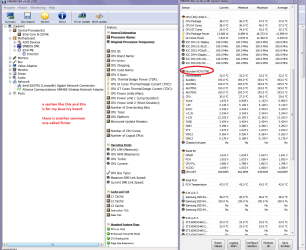
You can test the volts on the PSU with HWInfo HWiNFO, HWiNFO32/64 -Download < download the right bit version andclose the right hand window select Sensors and scroll down to the power sectionwhere you will see what the volts are doing see my pic. You will know it is the right section because it will include the rail voltages as well as the CMOS battery volts - Vbatt

The original right hand window shows themachine running and is handy for that but for looking at the components in some detail close it and use themain left hand side panel


FOR OTHER COMPONENTS

Open each + down into the componentitself and then click on it - in theright hand side will appear all sorts of details including brands speeds andother essential info that device. See pic for example.
An alternative is this but please use a digital meter if you do because an analogue meter injects typically 9v into a circuit for testing and that would be no good into a 3.3v rail!!
http://www.sevenforums.com/tutorials/301799-psu-test-dc-output-voltage.html
 

Attachments

  • HW INFO PSU RAILS.PNG
    HW INFO PSU RAILS.PNG
    64.2 KB · Views: 2

My Computer

Computer type
PC/Desktop
Computer Manufacturer/Model Number
Own build (new) Desk1 / Asus ROG Win 7 / Desk2 1st build
OS
Desk1 7 Home Prem / Desk2 10 Pro / Main lap Asus ROG 10 Pro 2 laptop Toshiba 7 Pro Asus P2520 7 & 10
CPU
Desk1 i5 3750K / Laptop i7 GTX 860M / Desk2 i5 2500
Motherboard
Desk1 Asus P877-V / Desk2 Gigabyte H67 UD3H / Laptop ?
Memory
Desk1 8GB (1866) / Desk2 16GB (1333) / Laptop 8Gb DDR3
Graphics Card(s)
Desk 1& 2NVidia GTX 650 & Laptops on board Intel
Sound Card
Desk 1 & 2 -XONAR DG Realtek High Def audio Laptop
Monitor(s) Displays
Desk 1 Benq HD 2450 / Desk2 Philips 24" / Laptop 17.5"
Screen Resolution
1920x1080 D1 & D2 & Laptop 1
Hard Drives
Desk1 Samsung 120GB 830 SSD
Asus ROG 256GB 850 Pro SSD
Desk2 Samsung 840 256 SSD
Toshiba 120GB EVO
PSU
Desk 1 Corsair HX 1050/ Laptop ? / Desk 2 Corsair HX 650
Case
Desk 1 Cooler HAF XM ? Toshiba laptop / Desk2 Coolermaster
Cooling
Fans on all Desk1 -2 Desk2 - all Coolermasters 5 Laptop ?
Keyboard
Desk 1 MS Sidewinder X6 Desk 2 MS Sidewinder X 4
Mouse
Desk 1&2 - Gigabyte MS 900 gamer - laptop - Logitec wireless
Internet Speed
ADSL2+
Other Info
One other Desktop (tester) and spare Toshba laptop both with SSD's
Running Kaspersky 2016 ISS on all machines config'd identically
Logitec audio stereo systems on each machine (x3)
Canon MG5250MFC
Router/modem TP-Link running WPA2SK
The issue did not happen only once, it has happened several times, possibly with warnings showing up in the event viewer as already stated in #1. I thought it was apparent that it has happened more than once, but hey!

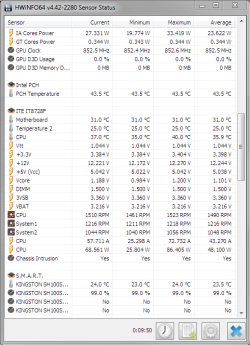
I am not sure what to make of the voltages, as I don't know what to look for, but here is a picture showing what I think you wanted to know ICit2lol :)

volts.png
 

My Computer

Computer type
PC/Desktop
Computer Manufacturer/Model Number
Custom build
OS
Microsoft Windows 7 64-bit
CPU
Intel Core i5 2500K Quad Core 3.3 Ghz
Motherboard
Gigabyte GA-Z68X-UD3H-B3, Socket-1155
Memory
Corsair Vengeance 2x4GB
Graphics Card(s)
Asus Radeon HD 7950 3GB "DirectCU II TOP"
Sound Card
Realtek High Definition Audio (MOBO - DOLBY)
Monitor(s) Displays
Samsung 27" LED SyncMaster S27B350 & Asus 24" VW246H
Screen Resolution
1920x1080
Hard Drives
Seagate Barracuda 1TB 7200 RPM
Kingston HyperX 120GB 2.5" 555MB/510MB
PSU
Fractal Design Tesla 650W Standard
Case
Coolermaster Elite 430 Midi
Cooling
Stock
Keyboard
Razer Black Widow 2011
Mouse
Logitech G600
Internet Speed
60 / 60
Antivirus
Microsoft Security Essentials
Browser
Google Chrome
Other Info
Mousepad - Corsair Vengeance MM600
Headset - Astro A40 2014 w/ mixamp pro
Spot on mate and the volts look good to me:)
 

My Computer

Computer type
PC/Desktop
Computer Manufacturer/Model Number
Own build (new) Desk1 / Asus ROG Win 7 / Desk2 1st build
OS
Desk1 7 Home Prem / Desk2 10 Pro / Main lap Asus ROG 10 Pro 2 laptop Toshiba 7 Pro Asus P2520 7 & 10
CPU
Desk1 i5 3750K / Laptop i7 GTX 860M / Desk2 i5 2500
Motherboard
Desk1 Asus P877-V / Desk2 Gigabyte H67 UD3H / Laptop ?
Memory
Desk1 8GB (1866) / Desk2 16GB (1333) / Laptop 8Gb DDR3
Graphics Card(s)
Desk 1& 2NVidia GTX 650 & Laptops on board Intel
Sound Card
Desk 1 & 2 -XONAR DG Realtek High Def audio Laptop
Monitor(s) Displays
Desk 1 Benq HD 2450 / Desk2 Philips 24" / Laptop 17.5"
Screen Resolution
1920x1080 D1 & D2 & Laptop 1
Hard Drives
Desk1 Samsung 120GB 830 SSD
Asus ROG 256GB 850 Pro SSD
Desk2 Samsung 840 256 SSD
Toshiba 120GB EVO
PSU
Desk 1 Corsair HX 1050/ Laptop ? / Desk 2 Corsair HX 650
Case
Desk 1 Cooler HAF XM ? Toshiba laptop / Desk2 Coolermaster
Cooling
Fans on all Desk1 -2 Desk2 - all Coolermasters 5 Laptop ?
Keyboard
Desk 1 MS Sidewinder X6 Desk 2 MS Sidewinder X 4
Mouse
Desk 1&2 - Gigabyte MS 900 gamer - laptop - Logitec wireless
Internet Speed
ADSL2+
Other Info
One other Desktop (tester) and spare Toshba laptop both with SSD's
Running Kaspersky 2016 ISS on all machines config'd identically
Logitec audio stereo systems on each machine (x3)
Canon MG5250MFC
Router/modem TP-Link running WPA2SK
That's good to hear! I was kind of convinced that the PSU was the issue.. :D

But now that we've come this far, what could be the issue?
 

My Computer

Computer type
PC/Desktop
Computer Manufacturer/Model Number
Custom build
OS
Microsoft Windows 7 64-bit
CPU
Intel Core i5 2500K Quad Core 3.3 Ghz
Motherboard
Gigabyte GA-Z68X-UD3H-B3, Socket-1155
Memory
Corsair Vengeance 2x4GB
Graphics Card(s)
Asus Radeon HD 7950 3GB "DirectCU II TOP"
Sound Card
Realtek High Definition Audio (MOBO - DOLBY)
Monitor(s) Displays
Samsung 27" LED SyncMaster S27B350 & Asus 24" VW246H
Screen Resolution
1920x1080
Hard Drives
Seagate Barracuda 1TB 7200 RPM
Kingston HyperX 120GB 2.5" 555MB/510MB
PSU
Fractal Design Tesla 650W Standard
Case
Coolermaster Elite 430 Midi
Cooling
Stock
Keyboard
Razer Black Widow 2011
Mouse
Logitech G600
Internet Speed
60 / 60
Antivirus
Microsoft Security Essentials
Browser
Google Chrome
Other Info
Mousepad - Corsair Vengeance MM600
Headset - Astro A40 2014 w/ mixamp pro
Hauk just going back a bit when you say half a second is that when the machine first starts up or is a random buzzing sound?
I am now thinking maybe it has something to do with what you have hooked up to the machine ie the headset etc
The audio I take it you are running from the back or front panel and not a sound card as I don't see one listed in the specs post #1.
 

My Computer

Computer type
PC/Desktop
Computer Manufacturer/Model Number
Own build (new) Desk1 / Asus ROG Win 7 / Desk2 1st build
OS
Desk1 7 Home Prem / Desk2 10 Pro / Main lap Asus ROG 10 Pro 2 laptop Toshiba 7 Pro Asus P2520 7 & 10
CPU
Desk1 i5 3750K / Laptop i7 GTX 860M / Desk2 i5 2500
Motherboard
Desk1 Asus P877-V / Desk2 Gigabyte H67 UD3H / Laptop ?
Memory
Desk1 8GB (1866) / Desk2 16GB (1333) / Laptop 8Gb DDR3
Graphics Card(s)
Desk 1& 2NVidia GTX 650 & Laptops on board Intel
Sound Card
Desk 1 & 2 -XONAR DG Realtek High Def audio Laptop
Monitor(s) Displays
Desk 1 Benq HD 2450 / Desk2 Philips 24" / Laptop 17.5"
Screen Resolution
1920x1080 D1 & D2 & Laptop 1
Hard Drives
Desk1 Samsung 120GB 830 SSD
Asus ROG 256GB 850 Pro SSD
Desk2 Samsung 840 256 SSD
Toshiba 120GB EVO
PSU
Desk 1 Corsair HX 1050/ Laptop ? / Desk 2 Corsair HX 650
Case
Desk 1 Cooler HAF XM ? Toshiba laptop / Desk2 Coolermaster
Cooling
Fans on all Desk1 -2 Desk2 - all Coolermasters 5 Laptop ?
Keyboard
Desk 1 MS Sidewinder X6 Desk 2 MS Sidewinder X 4
Mouse
Desk 1&2 - Gigabyte MS 900 gamer - laptop - Logitec wireless
Internet Speed
ADSL2+
Other Info
One other Desktop (tester) and spare Toshba laptop both with SSD's
Running Kaspersky 2016 ISS on all machines config'd identically
Logitec audio stereo systems on each machine (x3)
Canon MG5250MFC
Router/modem TP-Link running WPA2SK
The sound card is integrated in the motherboard, so I don't have one listed in the specs.

The freezing happens completely at random, for 1/2 a second with a buzzing or "brrr" sound accompanying it.
Some days my computer doesn't freeze, and sometimes it does - up to several times.
Rarely the computer might completely lock up, the same "brrr" sound occurs and I have to use the power-button to turn off and restart the PC. The screen is completely black as well, so I can't tell if it's a BSOD or not "underneath" the black screen. The reset button doesn't do anything either, so I have to use the power-button if I don't want to pull the power cable out..

Might be a bit hard to explain and understand, but that is what happens. :/
 

My Computer

Computer type
PC/Desktop
Computer Manufacturer/Model Number
Custom build
OS
Microsoft Windows 7 64-bit
CPU
Intel Core i5 2500K Quad Core 3.3 Ghz
Motherboard
Gigabyte GA-Z68X-UD3H-B3, Socket-1155
Memory
Corsair Vengeance 2x4GB
Graphics Card(s)
Asus Radeon HD 7950 3GB "DirectCU II TOP"
Sound Card
Realtek High Definition Audio (MOBO - DOLBY)
Monitor(s) Displays
Samsung 27" LED SyncMaster S27B350 & Asus 24" VW246H
Screen Resolution
1920x1080
Hard Drives
Seagate Barracuda 1TB 7200 RPM
Kingston HyperX 120GB 2.5" 555MB/510MB
PSU
Fractal Design Tesla 650W Standard
Case
Coolermaster Elite 430 Midi
Cooling
Stock
Keyboard
Razer Black Widow 2011
Mouse
Logitech G600
Internet Speed
60 / 60
Antivirus
Microsoft Security Essentials
Browser
Google Chrome
Other Info
Mousepad - Corsair Vengeance MM600
Headset - Astro A40 2014 w/ mixamp pro
Hauk these are the drivers for that board and I input Europe the audio you can see as one of them
GIGABYTE - Motherboard - Socket 1155 - GA-Z68X-UD3H-B3 (rev. 1.0)
I am just wondering if the motherboard needs updating on all of the drivers or maybe faulty.


Now can you boot into safe mode as I have a person I ma trying to fix up at the moment with that black screen issue and it is safe mode he cannot get into.
 

My Computer

Computer type
PC/Desktop
Computer Manufacturer/Model Number
Own build (new) Desk1 / Asus ROG Win 7 / Desk2 1st build
OS
Desk1 7 Home Prem / Desk2 10 Pro / Main lap Asus ROG 10 Pro 2 laptop Toshiba 7 Pro Asus P2520 7 & 10
CPU
Desk1 i5 3750K / Laptop i7 GTX 860M / Desk2 i5 2500
Motherboard
Desk1 Asus P877-V / Desk2 Gigabyte H67 UD3H / Laptop ?
Memory
Desk1 8GB (1866) / Desk2 16GB (1333) / Laptop 8Gb DDR3
Graphics Card(s)
Desk 1& 2NVidia GTX 650 & Laptops on board Intel
Sound Card
Desk 1 & 2 -XONAR DG Realtek High Def audio Laptop
Monitor(s) Displays
Desk 1 Benq HD 2450 / Desk2 Philips 24" / Laptop 17.5"
Screen Resolution
1920x1080 D1 & D2 & Laptop 1
Hard Drives
Desk1 Samsung 120GB 830 SSD
Asus ROG 256GB 850 Pro SSD
Desk2 Samsung 840 256 SSD
Toshiba 120GB EVO
PSU
Desk 1 Corsair HX 1050/ Laptop ? / Desk 2 Corsair HX 650
Case
Desk 1 Cooler HAF XM ? Toshiba laptop / Desk2 Coolermaster
Cooling
Fans on all Desk1 -2 Desk2 - all Coolermasters 5 Laptop ?
Keyboard
Desk 1 MS Sidewinder X6 Desk 2 MS Sidewinder X 4
Mouse
Desk 1&2 - Gigabyte MS 900 gamer - laptop - Logitec wireless
Internet Speed
ADSL2+
Other Info
One other Desktop (tester) and spare Toshba laptop both with SSD's
Running Kaspersky 2016 ISS on all machines config'd identically
Logitec audio stereo systems on each machine (x3)
Canon MG5250MFC
Router/modem TP-Link running WPA2SK
Sorry for a late answer!
I have installed the audio driver driver from the webpage you linked :)
I will post another reply later tonight or whenever I can to verify if it worked or not.
 

My Computer

Computer type
PC/Desktop
Computer Manufacturer/Model Number
Custom build
OS
Microsoft Windows 7 64-bit
CPU
Intel Core i5 2500K Quad Core 3.3 Ghz
Motherboard
Gigabyte GA-Z68X-UD3H-B3, Socket-1155
Memory
Corsair Vengeance 2x4GB
Graphics Card(s)
Asus Radeon HD 7950 3GB "DirectCU II TOP"
Sound Card
Realtek High Definition Audio (MOBO - DOLBY)
Monitor(s) Displays
Samsung 27" LED SyncMaster S27B350 & Asus 24" VW246H
Screen Resolution
1920x1080
Hard Drives
Seagate Barracuda 1TB 7200 RPM
Kingston HyperX 120GB 2.5" 555MB/510MB
PSU
Fractal Design Tesla 650W Standard
Case
Coolermaster Elite 430 Midi
Cooling
Stock
Keyboard
Razer Black Widow 2011
Mouse
Logitech G600
Internet Speed
60 / 60
Antivirus
Microsoft Security Essentials
Browser
Google Chrome
Other Info
Mousepad - Corsair Vengeance MM600
Headset - Astro A40 2014 w/ mixamp pro
Back
Top