
Can I assign a letter to the SYSTEM partition?

Annaa

New member
Local time
12:31 AM
Messages
24
Hi,

I have a new HP laptop running Windows 7 Home Premium 64 bits.

As I am about to tinker with the partitions, I wanted to save the MBR and the first 3 (FAT32) / 7 (NTFS) sectors of each partition, but the software I'm using to do this won't show me any info for the small active partition called "SYSTEM". I suspect it's because there's no letter assigned to it.

Do you think I can assign a letter to SYSTEM without it messing with the boot?

Thanks!
icon_smile.gif
 

My Computer My Computer

At a glance

Windows 7 Home Premium 64 bits
Computer type
Laptop
Computer Manufacturer/Model Number
HP Pavilion
OS
Windows 7 Home Premium 64 bits
Antivirus
Antivir
Browser
Firefox

My Computer My Computer

At a glance

Vista, Windows7, Mint Mate, Zorin, Windows 8from 1.6GHz Duo to i7
Computer Manufacturer/Model Number
HP, Dell, Gateway, Toshiba - 4 laptops and 2 desktops
OS
Vista, Windows7, Mint Mate, Zorin, Windows 8
CPU
from 1.6GHz Duo to i7
Monitor(s) Displays
2x HP w2207
Hard Drives
5x HDD, 7x SSD, 12x Externals
Keyboard
with trackball - no mices
Mouse
Trackball mice
Internet Speed
DSL 6000
There is no reason to. You should leave it be.
 

My Computer My Computer

At a glance

Windows 10 Pro x64Intel Core i7 6700KGSkill TridentZ RGB 16GB 3600 16-16-16-36EVGA GTX 980 Ti SC x2
Computer type
PC/Desktop
Computer Manufacturer/Model Number
Skylake Special #666
OS
Windows 10 Pro x64
CPU
Intel Core i7 6700K
Motherboard
Asus Sabertooth Z170 Mark 1
Memory
GSkill TridentZ RGB 16GB 3600 16-16-16-36
Graphics Card(s)
EVGA GTX 980 Ti SC x2
Sound Card
Realtek High Definition
Monitor(s) Displays
AOC G2460PG
Screen Resolution
1920 x 1080 144Hz
Hard Drives
Samsung 860 Pro 256GB, Seagate Barracuda 4TB x2
PSU
EVGA 1000 P2, EVGA White Custom Braided Cables
Case
Corsair Vengeance C70 Gunmetal Black
Cooling
Corsair H100i v2, Corsair ML120 x2, Thermal Grizzly Kryonaut
Keyboard
Logitech G910 Orion Spectrum
Mouse
Logitech G700s
Internet Speed
Verizon Fios Quantum Gateway 75/75
Antivirus
Windows Defender, Malwarebytes Free 3.8.3
Browser
Chrome
Other Info
Corsair SP120 x4, LG Blu-ray Drive, Durabrand HT-395 100 Watt Dolby Digital Amp, Corsair H2100 Wireless 7.1 Headset
I certainly second the notion on leaving things "as is" as far as the hidden recovery partition at least until you have either created a set of recovery disks or a full system image backup of the main drive. http://www.sevenforums.com/tutorials/663-backup-complete-computer-create-image-backup.html

If you don't have a second drive(external) to store a full system image on the set of recovery disks will wipe the present drive to see the factory preinstall restored in the event you need to take that route. Assigning a drive letter to the boot or recovery partition also exposes it to any potential risk of malwares like root kits, etc.
 

My Computers My Computers

  • At a glance

    W7 Ultimate x64/W10 Pro x64/W11 Pro Triple Bo...AMD Phenom II X4 975 Deneb 3.6ghz - 965 2nd r...Kingston Hyper X DDR3 1600 1.5v 16gb - Hyper ...MSI HD Radeon 5750 1gb - MSI HD Radeon 6450 o...
    Computer type
    PC/Desktop
    Computer Manufacturer/Model Number
    Custom builds = 2
    OS
    W7 Ultimate x64/W10 Pro x64/W11 Pro Triple Boot - Main PC W7 Remote PC Micro ATX W7 Pro x64/W11 Pro
    CPU
    AMD Phenom II X4 975 Deneb 3.6ghz - 965 2nd remote pc
    Motherboard
    Gigabyte GA-790XTA-UD4-Gigabyte GA-880GM-D2H remote pc
    Memory
    Kingston Hyper X DDR3 1600 1.5v 16gb - Hyper X Fury 8gb 2nd
    Graphics Card(s)
    MSI HD Radeon 5750 1gb - MSI HD Radeon 6450 on mini tower
    Sound Card
    Creative Labs X-Fi Xtreme Audio P - Realtek onooard 2nd case
    Monitor(s) Displays
    ASUS VW199T-P 19" HP 2082a Main-HP 2082a 20" remote pc
    Screen Resolution
    Asus 1440x900 - HP 1600x900
    Hard Drives
    WD Black 1TB HD per OS W7, W10, and pending W11 presently on 500gb OS Drive - Pending Triple 1TB HDs for Spanned Storage/backup volume
    Single 2TB external USB enclosure, single 1TB System 7 Host/Boot drive, Pending 8TB external HD for system image b
    PSU
    Corsair 750TX - primary / Corsair CX600 - second
    Case
    Antec 900-2 - SSD compatible / NZXT Vulcan mini tower
    Cooling
    Zalman CNPS9900A
    Keyboard
    AZIO L70 Backlit Letters Gaming - ONN Cordless/USB
    Mouse
    MSI DS200 Programmable, Logitech Cordless
    Internet Speed
    30mbps upgrade - primary hard wired - mini tower usb WiFi
    Antivirus
    GFI VIPRE Internet Security 2014 on W7 2016 beta on W10,
    Browser
    Cyberfox, WaterFox 64bit FF variants, FireFox x64, Pale Moon
    Other Info
    Accomdata fan cooled usb 2.0 PIDE/Sata II, III external enclosure.
    Sambient usb/eSata PATA/Sata II, III external enclosure.
  • At a glance

    W7 Pro x64/W11 ProAMD Deneb 3.6ghz - 965Kingston Hyper X Fury 8gbMSI HD Radeon 6450 DVI Output
    Computer type
    PC/Desktop
    System Manufacturer/Model Number
    CUSTOM ASSEMBLY
    OS
    W7 Pro x64/W11 Pro
    CPU
    AMD Deneb 3.6ghz - 965
    Motherboard
    Gigabyte GA-880GM-D2H remote pc
    Memory
    Kingston Hyper X Fury 8gb
    Graphics Card(s)
    MSI HD Radeon 6450 DVI Output
    Sound Card
    Realtek onooard Creative or Other separate PENDING
    Monitor(s) Displays
    VIZIO 32" LCD TV Separate LCD Pending
    Screen Resolution
    1600x1080
    Hard Drives
    WD 500GB OS Host/Boot WD Green 1TB Storage/Backup
    PSU
    Corsair 600W - THERMALTAKE 600W spare case
    Case
    NZXT Vulcan mini tower
    Cooling
    Twin 120mm Top Fans - 240mm Side Cover
    Keyboard
    ONN Cordless/USB Logitech Cordless
    Mouse
    ONN USB/Cordless - Logitech Cordless
    Internet Speed
    DSL 5G
    Browser
    MS Edge, FireFox, WaterFox x64, FireFox Nightly
    Other Info
    OS Testing-Remote Access to Main TeamViewer
Apparently he is only trying to save the beginning of each partition as well as the mbr. Any imaging ware will simply grab an entire partition when creating a backup image. A full disk image will automatically include the mbr along with everything else.

The "tinker with partitions" sounds like repartitioning is the main idea. The image backup would still be advised in case of any mishap.
 

My Computers My Computers

  • At a glance

    W7 Ultimate x64/W10 Pro x64/W11 Pro Triple Bo...AMD Phenom II X4 975 Deneb 3.6ghz - 965 2nd r...Kingston Hyper X DDR3 1600 1.5v 16gb - Hyper ...MSI HD Radeon 5750 1gb - MSI HD Radeon 6450 o...
    Computer type
    PC/Desktop
    Computer Manufacturer/Model Number
    Custom builds = 2
    OS
    W7 Ultimate x64/W10 Pro x64/W11 Pro Triple Boot - Main PC W7 Remote PC Micro ATX W7 Pro x64/W11 Pro
    CPU
    AMD Phenom II X4 975 Deneb 3.6ghz - 965 2nd remote pc
    Motherboard
    Gigabyte GA-790XTA-UD4-Gigabyte GA-880GM-D2H remote pc
    Memory
    Kingston Hyper X DDR3 1600 1.5v 16gb - Hyper X Fury 8gb 2nd
    Graphics Card(s)
    MSI HD Radeon 5750 1gb - MSI HD Radeon 6450 on mini tower
    Sound Card
    Creative Labs X-Fi Xtreme Audio P - Realtek onooard 2nd case
    Monitor(s) Displays
    ASUS VW199T-P 19" HP 2082a Main-HP 2082a 20" remote pc
    Screen Resolution
    Asus 1440x900 - HP 1600x900
    Hard Drives
    WD Black 1TB HD per OS W7, W10, and pending W11 presently on 500gb OS Drive - Pending Triple 1TB HDs for Spanned Storage/backup volume
    Single 2TB external USB enclosure, single 1TB System 7 Host/Boot drive, Pending 8TB external HD for system image b
    PSU
    Corsair 750TX - primary / Corsair CX600 - second
    Case
    Antec 900-2 - SSD compatible / NZXT Vulcan mini tower
    Cooling
    Zalman CNPS9900A
    Keyboard
    AZIO L70 Backlit Letters Gaming - ONN Cordless/USB
    Mouse
    MSI DS200 Programmable, Logitech Cordless
    Internet Speed
    30mbps upgrade - primary hard wired - mini tower usb WiFi
    Antivirus
    GFI VIPRE Internet Security 2014 on W7 2016 beta on W10,
    Browser
    Cyberfox, WaterFox 64bit FF variants, FireFox x64, Pale Moon
    Other Info
    Accomdata fan cooled usb 2.0 PIDE/Sata II, III external enclosure.
    Sambient usb/eSata PATA/Sata II, III external enclosure.
  • At a glance

    W7 Pro x64/W11 ProAMD Deneb 3.6ghz - 965Kingston Hyper X Fury 8gbMSI HD Radeon 6450 DVI Output
    Computer type
    PC/Desktop
    System Manufacturer/Model Number
    CUSTOM ASSEMBLY
    OS
    W7 Pro x64/W11 Pro
    CPU
    AMD Deneb 3.6ghz - 965
    Motherboard
    Gigabyte GA-880GM-D2H remote pc
    Memory
    Kingston Hyper X Fury 8gb
    Graphics Card(s)
    MSI HD Radeon 6450 DVI Output
    Sound Card
    Realtek onooard Creative or Other separate PENDING
    Monitor(s) Displays
    VIZIO 32" LCD TV Separate LCD Pending
    Screen Resolution
    1600x1080
    Hard Drives
    WD 500GB OS Host/Boot WD Green 1TB Storage/Backup
    PSU
    Corsair 600W - THERMALTAKE 600W spare case
    Case
    NZXT Vulcan mini tower
    Cooling
    Twin 120mm Top Fans - 240mm Side Cover
    Keyboard
    ONN Cordless/USB Logitech Cordless
    Mouse
    ONN USB/Cordless - Logitech Cordless
    Internet Speed
    DSL 5G
    Browser
    MS Edge, FireFox, WaterFox x64, FireFox Nightly
    Other Info
    OS Testing-Remote Access to Main TeamViewer
Thanks for the replies, guys!
Night Hawk said:
If you don't have a second drive(external) to store a full system image on the set of recovery disks will wipe the present drive to see the factory preinstall restored in the event you need to take that route.
I'm not sure I get this, could you please rephrase? Thanks.

gregrocker said:
What is it exactly that you want to do?
I want to save the first 7 sectors of the NTFS partition called SYSTEM.

Night Hawk said:
Assigning a drive letter to the boot or recovery partition also exposes it to any potential risk of malwares like root kits, etc.
Very interesting. Hadn't thought of that.
Well, I could assign a letter to the boot partition, save the first 7 sectors, then remove the letter, I guess?
Also, when I bought the laptop, the Recovery partition came with a letter assigned. Do you think I should remove it then?

Night Hawk said:
The "tinker with partitions" sounds like repartitioning is the main idea.
Yes. My problem was quite common: I bought a laptop which already had 4 primary partitions, and I want to 1) install Ubuntu 2) have my data on a separate partition. Hence the need to "tinker".

I'm planning on:
* shrinking the size of C:
* converting Recovery into a logical partition using the Partition Wizard Bootable Disk (following Method two here, except I'm converting Recovery instead of C: )
* extending the size of the newly created extended partition to encompass all of the non allocated disk space I freed when shrinking C:
* using an Ubuntu live-CD, creating 3 new logical partitions in that huge extended partition: 1) root 2) swap 3) a storage partition in NTFS
 

My Computer My Computer

At a glance

Windows 7 Home Premium 64 bits
Computer type
Laptop
Computer Manufacturer/Model Number
HP Pavilion
OS
Windows 7 Home Premium 64 bits
Antivirus
Antivir
Browser
Firefox
Night Hawk said:
If you don't have a second drive(external) to store a full system image on the set of recovery disks will wipe the present drive to see the factory preinstall restored in the event you need to take that route.
I'm not sure I get this, could you please rephrase? Thanks.

I'm guessing he means that you can always use recovery disks to restore the computer to factory specifications if necessary.

Unfortunately, burned recovery disks are not highly reliable, judging from complaints on this forum.
 

My Computer My Computer

At a glance

Windows 7 Home Premium SP1, 64-bitIntel Skylake i5-6600K, not overclocked8 GB HyperX DDR4-2666 (2 x 4 GB)none; graphics are integrated on CPU
Computer type
PC/Desktop
Computer Manufacturer/Model Number
Ignatz Special; 4 speed manual gearbox; factory air conditioning; one of one
OS
Windows 7 Home Premium SP1, 64-bit
CPU
Intel Skylake i5-6600K, not overclocked
Motherboard
AsRock Z170M Extreme 4, micro ATX
Memory
8 GB HyperX DDR4-2666 (2 x 4 GB)
Graphics Card(s)
none; graphics are integrated on CPU
Sound Card
onboard: Realtek ALC1150; external: USB Behringer UF0-202
Monitor(s) Displays
Dell S2340M 23 inch IPS
Screen Resolution
1600 x 900
Hard Drives
System: Crucial MX100 series SSD, 128 GB;
Data: Samsung Spinpoint 103SJ, 1 TB;
Backup: WD Caviar Green WD30EZRX-00D8PB0, 3 TB
PSU
Rosewill SilentNight 500 watt fanless, semi-modular
Case
Antec Solo II
Cooling
Noctua NH-U12S; Noctua F12 intake, Noctua S12A exhaust
Keyboard
Microsoft 200 6JH-00001 USB
Mouse
Dell or Microsoft optical wired; USB
Antivirus
Microsoft Security Essentials and Malwarebytes Premium
Browser
Pale Moon
Other Info
All fans PWM; speeds at idle: CPU circa 500 rpm; intake circa 600 rpm; exhaust circa 600 rpm; CPU temps 27 idle and 47 C load in a warm room (27 C/81 F) when running Intel Extreme Tuning Utility stress test.
Please post back a screenshot of your maximized Disk Management drive map and listings:

1. Type Disk Management in Start Search box.
2. Open Disk Mgmt. window and maximize it.
3. Type Snipping Tool in Start Search box.
4. Open Snipping Tool, choose Rectangular Snip, draw a box around full map and all listings.
5, Save Snip, attach using paper clip in Reply Box.

Tell us what is on each partition and which you want to keep or delete. We will give you the steps for how to safely create a new partition of the size desired for your Linux distro.
 
Thanks for explaining, ignatzatsonic. And thanks for offering to help, gregrocker.

Ok, I posted a screencap. Apologies in advance for it being in French.
redface.gif


We will give you the steps for how to safely create a new partition of the size desired for your Linux distro.
I take it you don't like what I had in mind much? What's wrong with it?

Tell us what is on each partition and which you want to keep or delete.
C: => Windows 7, I'm keeping it
SYSTEM => the boot, I'm keeping it
HP_TOOLS => HP diagnostic tools, I'm keeping it
Recovery => the recovery partition, AKA probably the most dispensable partition of the four (although ignatzatsonic has me a bit worried about the DVDs now)... Still, I would like to try to keep it by turning it into a logical disk

What do you think?
 

Attachments

  • HpPartitions.png
    HpPartitions.png
    20.1 KB · Views: 22

My Computer My Computer

At a glance

Windows 7 Home Premium 64 bits
Computer type
Laptop
Computer Manufacturer/Model Number
HP Pavilion
OS
Windows 7 Home Premium 64 bits
Antivirus
Antivir
Browser
Firefox
The System partition is more or less similar to the new System Reserved boot partition seen when using the 7 dvd's drive tools to partition a drive when performing a custom install of 7 onto a new drive or one that's been wiped completely of everything.

For creating and storing a full system image backup of the main drive the way it is you only have the one main drive and would need to have either a ton of blank dvds for a multidisk session type backup or an external hard drive plugged into a usb port if not an external enclosure to place a second drive in. Or you would need a network location to store the image made.

As for as custom installing ubuntu to the same drive without help of something like the Wubi boot loader the ubuntu installer will replace the 7 mbr with the Grub loader automatically. Some would prefer running any distro on a VM rather then trashing the Windows boot sector to simply run it as a file on the drive. A VHD(Virtual Hard Disk) is another thought to consider.

Here I simply custom installed Linux Mint Debian a much larger Debian based distro on a 32gb flash drive and can boot it from any machine. Put a 4.5gb root partition as a second partition and the rest formatted to NTFS to make up a live data recovery stick. Grub installed to the flash drive however not the main drive. The second root partition is assigned as the mount point "/".
 

My Computers My Computers

  • At a glance

    W7 Ultimate x64/W10 Pro x64/W11 Pro Triple Bo...AMD Phenom II X4 975 Deneb 3.6ghz - 965 2nd r...Kingston Hyper X DDR3 1600 1.5v 16gb - Hyper ...MSI HD Radeon 5750 1gb - MSI HD Radeon 6450 o...
    Computer type
    PC/Desktop
    Computer Manufacturer/Model Number
    Custom builds = 2
    OS
    W7 Ultimate x64/W10 Pro x64/W11 Pro Triple Boot - Main PC W7 Remote PC Micro ATX W7 Pro x64/W11 Pro
    CPU
    AMD Phenom II X4 975 Deneb 3.6ghz - 965 2nd remote pc
    Motherboard
    Gigabyte GA-790XTA-UD4-Gigabyte GA-880GM-D2H remote pc
    Memory
    Kingston Hyper X DDR3 1600 1.5v 16gb - Hyper X Fury 8gb 2nd
    Graphics Card(s)
    MSI HD Radeon 5750 1gb - MSI HD Radeon 6450 on mini tower
    Sound Card
    Creative Labs X-Fi Xtreme Audio P - Realtek onooard 2nd case
    Monitor(s) Displays
    ASUS VW199T-P 19" HP 2082a Main-HP 2082a 20" remote pc
    Screen Resolution
    Asus 1440x900 - HP 1600x900
    Hard Drives
    WD Black 1TB HD per OS W7, W10, and pending W11 presently on 500gb OS Drive - Pending Triple 1TB HDs for Spanned Storage/backup volume
    Single 2TB external USB enclosure, single 1TB System 7 Host/Boot drive, Pending 8TB external HD for system image b
    PSU
    Corsair 750TX - primary / Corsair CX600 - second
    Case
    Antec 900-2 - SSD compatible / NZXT Vulcan mini tower
    Cooling
    Zalman CNPS9900A
    Keyboard
    AZIO L70 Backlit Letters Gaming - ONN Cordless/USB
    Mouse
    MSI DS200 Programmable, Logitech Cordless
    Internet Speed
    30mbps upgrade - primary hard wired - mini tower usb WiFi
    Antivirus
    GFI VIPRE Internet Security 2014 on W7 2016 beta on W10,
    Browser
    Cyberfox, WaterFox 64bit FF variants, FireFox x64, Pale Moon
    Other Info
    Accomdata fan cooled usb 2.0 PIDE/Sata II, III external enclosure.
    Sambient usb/eSata PATA/Sata II, III external enclosure.
  • At a glance

    W7 Pro x64/W11 ProAMD Deneb 3.6ghz - 965Kingston Hyper X Fury 8gbMSI HD Radeon 6450 DVI Output
    Computer type
    PC/Desktop
    System Manufacturer/Model Number
    CUSTOM ASSEMBLY
    OS
    W7 Pro x64/W11 Pro
    CPU
    AMD Deneb 3.6ghz - 965
    Motherboard
    Gigabyte GA-880GM-D2H remote pc
    Memory
    Kingston Hyper X Fury 8gb
    Graphics Card(s)
    MSI HD Radeon 6450 DVI Output
    Sound Card
    Realtek onooard Creative or Other separate PENDING
    Monitor(s) Displays
    VIZIO 32" LCD TV Separate LCD Pending
    Screen Resolution
    1600x1080
    Hard Drives
    WD 500GB OS Host/Boot WD Green 1TB Storage/Backup
    PSU
    Corsair 600W - THERMALTAKE 600W spare case
    Case
    NZXT Vulcan mini tower
    Cooling
    Twin 120mm Top Fans - 240mm Side Cover
    Keyboard
    ONN Cordless/USB Logitech Cordless
    Mouse
    ONN USB/Cordless - Logitech Cordless
    Internet Speed
    DSL 5G
    Browser
    MS Edge, FireFox, WaterFox x64, FireFox Nightly
    Other Info
    OS Testing-Remote Access to Main TeamViewer
For HP owners who wish to keep the Recovery and Diagnostics tools partitions bootable to run Recovery or hardware diagnostics, what we've recommended for years here is to convert C to Logical, shrink it to the desired size, then create a Logical partition in the shrink space for the Dual Boot install.

The tool which works best for this is free Partition Wizard bootable CD which will not fail while all other partitioners other than Disk Mgmt can fail.

Download and burn PW to CD using Windows Image Burner or ImgBurn at 4x speed. Rightclick on C to Modify: Set as Logical: How to set partition as Primary or Logical video

Then rightclick on the C again to Resize, slide right border to the left to the size you want to shrink C: Partition Wizard Move/Resize Partition - Video Help.

Now rightclick in the shrink space to create a Logical NTFS partition, label and letter it: Partition Wizard Create Partition - Video Help

Be aware that having GRUB on the HD can corrupt Win7 beyond repair. This has improved somewhat with GRUB 2 so that these reports are coming less frequently, however I would use these methods: Dual boot Ubuntu-Win7
Dual Boot Ubuntu - EasyBCD - NeoSmart Technologies Wiki

I shouldn't fail to mention that a much better alternative for Dual Boot is using separate HD's booted via the BIOS, if this is even an option.
 
Last edited:
If you had a second internal drive a dual boot across the two drives using the EasyBCD method would be the preferred since you can check off the "Grub isn't installed in bootsector" option there.

On the other thread I would pay attention to the advice Barman58 was providing. Grub isn't installed to the first sector on the drive but to the root partition being made the mount point "/" for the distro. The Wubi option is the best suited for dual booting the two OSs on the same drive for sure.

The VM and flash drive methods are also considerations just making sure you install Grub to the flash drive not the root there however while still seeing the root made the mount point "/". One guide for a creating a live data recovery stick was posted using ubuntu as the distro of choice at the time can be looked over at Using the "Other OS" For a USB Rescue Device?

The larger Linux Mint Debian distro was later selected since it contains install options for some 200 apps while not being ubuntu compatible however. Linux Mint 13 is while not faring so well on VM or a flash drive attempt. With a live stick the advantage of simply selecting the usb hard drive option from the F12 or other F key assigned to bring up the boot device menu avoids any changes to the main 7 drive while still providing a dual boot you can take with you.
 

My Computers My Computers

  • At a glance

    W7 Ultimate x64/W10 Pro x64/W11 Pro Triple Bo...AMD Phenom II X4 975 Deneb 3.6ghz - 965 2nd r...Kingston Hyper X DDR3 1600 1.5v 16gb - Hyper ...MSI HD Radeon 5750 1gb - MSI HD Radeon 6450 o...
    Computer type
    PC/Desktop
    Computer Manufacturer/Model Number
    Custom builds = 2
    OS
    W7 Ultimate x64/W10 Pro x64/W11 Pro Triple Boot - Main PC W7 Remote PC Micro ATX W7 Pro x64/W11 Pro
    CPU
    AMD Phenom II X4 975 Deneb 3.6ghz - 965 2nd remote pc
    Motherboard
    Gigabyte GA-790XTA-UD4-Gigabyte GA-880GM-D2H remote pc
    Memory
    Kingston Hyper X DDR3 1600 1.5v 16gb - Hyper X Fury 8gb 2nd
    Graphics Card(s)
    MSI HD Radeon 5750 1gb - MSI HD Radeon 6450 on mini tower
    Sound Card
    Creative Labs X-Fi Xtreme Audio P - Realtek onooard 2nd case
    Monitor(s) Displays
    ASUS VW199T-P 19" HP 2082a Main-HP 2082a 20" remote pc
    Screen Resolution
    Asus 1440x900 - HP 1600x900
    Hard Drives
    WD Black 1TB HD per OS W7, W10, and pending W11 presently on 500gb OS Drive - Pending Triple 1TB HDs for Spanned Storage/backup volume
    Single 2TB external USB enclosure, single 1TB System 7 Host/Boot drive, Pending 8TB external HD for system image b
    PSU
    Corsair 750TX - primary / Corsair CX600 - second
    Case
    Antec 900-2 - SSD compatible / NZXT Vulcan mini tower
    Cooling
    Zalman CNPS9900A
    Keyboard
    AZIO L70 Backlit Letters Gaming - ONN Cordless/USB
    Mouse
    MSI DS200 Programmable, Logitech Cordless
    Internet Speed
    30mbps upgrade - primary hard wired - mini tower usb WiFi
    Antivirus
    GFI VIPRE Internet Security 2014 on W7 2016 beta on W10,
    Browser
    Cyberfox, WaterFox 64bit FF variants, FireFox x64, Pale Moon
    Other Info
    Accomdata fan cooled usb 2.0 PIDE/Sata II, III external enclosure.
    Sambient usb/eSata PATA/Sata II, III external enclosure.
  • At a glance

    W7 Pro x64/W11 ProAMD Deneb 3.6ghz - 965Kingston Hyper X Fury 8gbMSI HD Radeon 6450 DVI Output
    Computer type
    PC/Desktop
    System Manufacturer/Model Number
    CUSTOM ASSEMBLY
    OS
    W7 Pro x64/W11 Pro
    CPU
    AMD Deneb 3.6ghz - 965
    Motherboard
    Gigabyte GA-880GM-D2H remote pc
    Memory
    Kingston Hyper X Fury 8gb
    Graphics Card(s)
    MSI HD Radeon 6450 DVI Output
    Sound Card
    Realtek onooard Creative or Other separate PENDING
    Monitor(s) Displays
    VIZIO 32" LCD TV Separate LCD Pending
    Screen Resolution
    1600x1080
    Hard Drives
    WD 500GB OS Host/Boot WD Green 1TB Storage/Backup
    PSU
    Corsair 600W - THERMALTAKE 600W spare case
    Case
    NZXT Vulcan mini tower
    Cooling
    Twin 120mm Top Fans - 240mm Side Cover
    Keyboard
    ONN Cordless/USB Logitech Cordless
    Mouse
    ONN USB/Cordless - Logitech Cordless
    Internet Speed
    DSL 5G
    Browser
    MS Edge, FireFox, WaterFox x64, FireFox Nightly
    Other Info
    OS Testing-Remote Access to Main TeamViewer
Thanks for the answers! Sorry I've been away for a few days!
For HP owners who wish to keep the Recovery and Diagnostics tools partitions bootable to run Recovery or hardware diagnostics, what we've recommended for years here is to convert C to Logical
Yeah... But in the event of a hard disk failure, doesn't that make you much more vulnerable? Since both systems + the data would be in one big extended partition?

That's why I thought I would convert Recovery instead... bearing in mind of course that I might lose the possibility to boot on it if it doesn't work... but I'll still have the DVDs.

I'll be honest, I'm not sure what to do at this point! :shock:
 

My Computer My Computer

At a glance

Windows 7 Home Premium 64 bits
Computer type
Laptop
Computer Manufacturer/Model Number
HP Pavilion
OS
Windows 7 Home Premium 64 bits
Antivirus
Antivir
Browser
Firefox

My Computer My Computer

At a glance

W 7 64-bit UltimateIntel Q9550 Yorkfield8GB Dominator 8500C5DATI : XFX 5870
Computer Manufacturer/Model Number
* BFK Customs *
OS
W 7 64-bit Ultimate
CPU
Intel Q9550 Yorkfield
Motherboard
ASUS P5Q Pro
Memory
8GB Dominator 8500C5D
Graphics Card(s)
ATI : XFX 5870
Sound Card
Realtek HD Audio 7-1
Monitor(s) Displays
1x 47" LCD HDMI & 3x 26" LCD HDMI
Screen Resolution
1920x1080P & 1920x1200
Hard Drives
1x 80GB Intel X25-M G2 SSD : 1x 500GB & 1x 640GB WD Caviar Black(s)
PSU
Corsair 620HX
Case
Cooler Master RC-690
Cooling
Tuniq Tower 120, 2x 140mm and 3x 120mm case fans
Keyboard
Microsoft 500
Mouse
Razer Diamondback 3G
Internet Speed
14 Mb/s
Other Info
1x Koutech 3Gb/s SATA HDD Hot Swap Rack
Thanks for the answers! Sorry I've been away for a few days!
For HP owners who wish to keep the Recovery and Diagnostics tools partitions bootable to run Recovery or hardware diagnostics, what we've recommended for years here is to convert C to Logical
Yeah... But in the event of a hard disk failure, doesn't that make you much more vulnerable? Since both systems + the data would be in one big extended partition?

That's why I thought I would convert Recovery instead... bearing in mind of course that I might lose the possibility to boot on it if it doesn't work... but I'll still have the DVDs.

I'll be honest, I'm not sure what to do at this point! :shock:

Hello? :confused: If there is a HD failure then you'll lose everything on that HD anyway, which is why you should make your HP Recovery DIsks and/or save a System Image, and files should be backed up at all times. Recovery using HP Recovery Disks
Backup Complete Computer - Create an Image Backup

I thought you wanted to keep Recovery and HP Diagnostics tools bootable, in which case I gave the Best Practice.

If you don't care about keeping those bootable, then you can delete them and create new partitions, resizing as you wish using Partition Wizard bootable CD Resize Partition - Video Help.
 
Thanks for the answers!

Yeah... But in the event of a hard disk failure, doesn't that make you much more vulnerable? Since both systems + the data would be in one big extended partition?

That's why I thought I would convert Recovery instead... bearing in mind of course that I might lose the possibility to boot on it if it doesn't work... but I'll still have the DVDs.

I'll be honest, I'm not sure what to do at this point! :shock:

What I did here for an older Vista laptop when the owner wanted a new faster drive was simple. Swap the old 120gb out for the new 500gb model. When the new drive unfortunately did fail the replacement also saw a full clean install put on. They still didn't follow the recommendation to use the larger drive for a storage/backup device since they have and external 2.5" usb enclosure with the old 120gb in it instead since that originally saw a clean install following a malware infection and subsequestion full wipe of C.

There you had mentioned assigning a drive letter to the 200mb boot partition which can be done but not reversed later. If you nuke the D Recovery and E HP_Tools partitions you can easily create a single 24gb storage partition or simply expand C to fill in the gap created to see a single 465gb C primary.

On the other hand if you plan to keep the HP_Tools partition and reuse D for storage 20gb is rather small. You would then shrink C to some extent to expand D first moving it forward to expand out into the additional drive space freed up when C is reduced in size.

The recommendation for a full system image backup before and after provided you have a second drive to store any image on is still the word however in case of any mishap during the changes being planned.
 

My Computers My Computers

  • At a glance

    W7 Ultimate x64/W10 Pro x64/W11 Pro Triple Bo...AMD Phenom II X4 975 Deneb 3.6ghz - 965 2nd r...Kingston Hyper X DDR3 1600 1.5v 16gb - Hyper ...MSI HD Radeon 5750 1gb - MSI HD Radeon 6450 o...
    Computer type
    PC/Desktop
    Computer Manufacturer/Model Number
    Custom builds = 2
    OS
    W7 Ultimate x64/W10 Pro x64/W11 Pro Triple Boot - Main PC W7 Remote PC Micro ATX W7 Pro x64/W11 Pro
    CPU
    AMD Phenom II X4 975 Deneb 3.6ghz - 965 2nd remote pc
    Motherboard
    Gigabyte GA-790XTA-UD4-Gigabyte GA-880GM-D2H remote pc
    Memory
    Kingston Hyper X DDR3 1600 1.5v 16gb - Hyper X Fury 8gb 2nd
    Graphics Card(s)
    MSI HD Radeon 5750 1gb - MSI HD Radeon 6450 on mini tower
    Sound Card
    Creative Labs X-Fi Xtreme Audio P - Realtek onooard 2nd case
    Monitor(s) Displays
    ASUS VW199T-P 19" HP 2082a Main-HP 2082a 20" remote pc
    Screen Resolution
    Asus 1440x900 - HP 1600x900
    Hard Drives
    WD Black 1TB HD per OS W7, W10, and pending W11 presently on 500gb OS Drive - Pending Triple 1TB HDs for Spanned Storage/backup volume
    Single 2TB external USB enclosure, single 1TB System 7 Host/Boot drive, Pending 8TB external HD for system image b
    PSU
    Corsair 750TX - primary / Corsair CX600 - second
    Case
    Antec 900-2 - SSD compatible / NZXT Vulcan mini tower
    Cooling
    Zalman CNPS9900A
    Keyboard
    AZIO L70 Backlit Letters Gaming - ONN Cordless/USB
    Mouse
    MSI DS200 Programmable, Logitech Cordless
    Internet Speed
    30mbps upgrade - primary hard wired - mini tower usb WiFi
    Antivirus
    GFI VIPRE Internet Security 2014 on W7 2016 beta on W10,
    Browser
    Cyberfox, WaterFox 64bit FF variants, FireFox x64, Pale Moon
    Other Info
    Accomdata fan cooled usb 2.0 PIDE/Sata II, III external enclosure.
    Sambient usb/eSata PATA/Sata II, III external enclosure.
  • At a glance

    W7 Pro x64/W11 ProAMD Deneb 3.6ghz - 965Kingston Hyper X Fury 8gbMSI HD Radeon 6450 DVI Output
    Computer type
    PC/Desktop
    System Manufacturer/Model Number
    CUSTOM ASSEMBLY
    OS
    W7 Pro x64/W11 Pro
    CPU
    AMD Deneb 3.6ghz - 965
    Motherboard
    Gigabyte GA-880GM-D2H remote pc
    Memory
    Kingston Hyper X Fury 8gb
    Graphics Card(s)
    MSI HD Radeon 6450 DVI Output
    Sound Card
    Realtek onooard Creative or Other separate PENDING
    Monitor(s) Displays
    VIZIO 32" LCD TV Separate LCD Pending
    Screen Resolution
    1600x1080
    Hard Drives
    WD 500GB OS Host/Boot WD Green 1TB Storage/Backup
    PSU
    Corsair 600W - THERMALTAKE 600W spare case
    Case
    NZXT Vulcan mini tower
    Cooling
    Twin 120mm Top Fans - 240mm Side Cover
    Keyboard
    ONN Cordless/USB Logitech Cordless
    Mouse
    ONN USB/Cordless - Logitech Cordless
    Internet Speed
    DSL 5G
    Browser
    MS Edge, FireFox, WaterFox x64, FireFox Nightly
    Other Info
    OS Testing-Remote Access to Main TeamViewer
There you had mentioned assigning a drive letter to the 200mb boot partition which can be done but not reversed later.
Thanks. That's one of the things I wanted to know. I won't do it then.

For HP owners who wish to keep the Recovery and Diagnostics tools partitions bootable to run Recovery or hardware diagnostics, what we've recommended for years here is to convert C to Logical
Yeah... But in the event of a hard disk failure, doesn't that make you much more vulnerable? Since both systems + the data would be in one big extended partition?
Hello? :confused: If there is a HD failure then you'll lose everything on that HD anyway (...)
I thought you wanted to keep Recovery and HP Diagnostics tools bootable, in which case I gave the Best Practice.

I'm not very well versed in hard disk matters... Ok. Let me rephrase: I was going to follow the entirety of Method Two, but I asked for help on an Ubuntu forum, and those guys said it was a bit risky to put the Seven install, the Ubuntu install and the data all in the same extended partition. Or maybe I misunderstood!

Isn't it possible to have like, a partial hard disk failure that would affect one partition only? Meaning it would be safer not to put everything in an extended?

Basically, my question is:

(I'm not including Recovery and HP_TOOLS here so it's less cluttered, but yes I want to keep them, and bootable if possible... if possible.)

If there's an option a): [primary: SYSTEM][primary: Seven install][extended: Ubuntu + data]
and an option b): [primary: SYSTEM][extended: Seven install + Ubuntu install + data]

Am I more at risk of losing stuff/running into problems with option b), or is it gonna be the exact same?
 

My Computer My Computer

At a glance

Windows 7 Home Premium 64 bits
Computer type
Laptop
Computer Manufacturer/Model Number
HP Pavilion
OS
Windows 7 Home Premium 64 bits
Antivirus
Antivir
Browser
Firefox
You can add as well as remove a drive letter to System Reserved partition. It is not irreversible as suggested. It is also not advisable.

Anna if you are enough of a tech enthusiast to install Linux then I would consider backing up Recovery Disks and possibly a full-disk image, so that you can delete the REcovery and Tools partitions. This is because they are in service to the worst preinstalled factory crapware and useless duplicate utilities in the industry on an HP install. No tech enthusiast would run such an install.

What I would do is boot the WIn7 installer, delete all partitions during a Clean Reinstall - Factory OEM Windows 7 then add a Dual Boot Ubuntu - EasyBCD - NeoSmart Technologies Wiki.

Anyway this gives you something else to consider, and better practices as well.
 
Last edited:
And then watch as the ubuntu installer replaces the 7 mbr with Grub when seeing the distro installed onto the same drive! The Wubi boot loader is the preferred option for a Windows/Linux dual boot on the same drive. Windows installer for Ubuntu Desktop

The EasyBCD wiki works when ubuntu is installed onto a second drive where you then use the NeoGrub option and check off the "Grub isn't installed in bootsector" box to avoid seeing Grub replace 7's own boot information. Unfortunately the NeoGrub wouldn't work for other distros looked at when trying out dual boots across two drives.

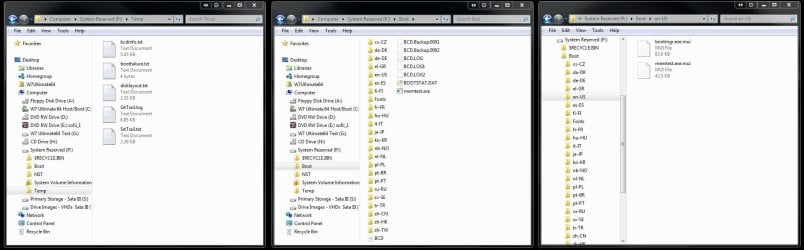
As far as the 100mb System Reserved as you would see it with a custom install of 7 I had a drive letter assigned for both host and a second for a test image restored to the second OS drive here. Once each was to see a drive letter assigned in order to view the contents of the BCD store as well as boot files the drive needed a wipe later when performing a clean install with the 100mb. The second drive was simply wiped.
 

Attachments

  • System Reserved 4 100mb Extended View.jpg
    System Reserved 4 100mb Extended View.jpg
    129.2 KB · Views: 3

My Computers My Computers

  • At a glance

    W7 Ultimate x64/W10 Pro x64/W11 Pro Triple Bo...AMD Phenom II X4 975 Deneb 3.6ghz - 965 2nd r...Kingston Hyper X DDR3 1600 1.5v 16gb - Hyper ...MSI HD Radeon 5750 1gb - MSI HD Radeon 6450 o...
    Computer type
    PC/Desktop
    Computer Manufacturer/Model Number
    Custom builds = 2
    OS
    W7 Ultimate x64/W10 Pro x64/W11 Pro Triple Boot - Main PC W7 Remote PC Micro ATX W7 Pro x64/W11 Pro
    CPU
    AMD Phenom II X4 975 Deneb 3.6ghz - 965 2nd remote pc
    Motherboard
    Gigabyte GA-790XTA-UD4-Gigabyte GA-880GM-D2H remote pc
    Memory
    Kingston Hyper X DDR3 1600 1.5v 16gb - Hyper X Fury 8gb 2nd
    Graphics Card(s)
    MSI HD Radeon 5750 1gb - MSI HD Radeon 6450 on mini tower
    Sound Card
    Creative Labs X-Fi Xtreme Audio P - Realtek onooard 2nd case
    Monitor(s) Displays
    ASUS VW199T-P 19" HP 2082a Main-HP 2082a 20" remote pc
    Screen Resolution
    Asus 1440x900 - HP 1600x900
    Hard Drives
    WD Black 1TB HD per OS W7, W10, and pending W11 presently on 500gb OS Drive - Pending Triple 1TB HDs for Spanned Storage/backup volume
    Single 2TB external USB enclosure, single 1TB System 7 Host/Boot drive, Pending 8TB external HD for system image b
    PSU
    Corsair 750TX - primary / Corsair CX600 - second
    Case
    Antec 900-2 - SSD compatible / NZXT Vulcan mini tower
    Cooling
    Zalman CNPS9900A
    Keyboard
    AZIO L70 Backlit Letters Gaming - ONN Cordless/USB
    Mouse
    MSI DS200 Programmable, Logitech Cordless
    Internet Speed
    30mbps upgrade - primary hard wired - mini tower usb WiFi
    Antivirus
    GFI VIPRE Internet Security 2014 on W7 2016 beta on W10,
    Browser
    Cyberfox, WaterFox 64bit FF variants, FireFox x64, Pale Moon
    Other Info
    Accomdata fan cooled usb 2.0 PIDE/Sata II, III external enclosure.
    Sambient usb/eSata PATA/Sata II, III external enclosure.
  • At a glance

    W7 Pro x64/W11 ProAMD Deneb 3.6ghz - 965Kingston Hyper X Fury 8gbMSI HD Radeon 6450 DVI Output
    Computer type
    PC/Desktop
    System Manufacturer/Model Number
    CUSTOM ASSEMBLY
    OS
    W7 Pro x64/W11 Pro
    CPU
    AMD Deneb 3.6ghz - 965
    Motherboard
    Gigabyte GA-880GM-D2H remote pc
    Memory
    Kingston Hyper X Fury 8gb
    Graphics Card(s)
    MSI HD Radeon 6450 DVI Output
    Sound Card
    Realtek onooard Creative or Other separate PENDING
    Monitor(s) Displays
    VIZIO 32" LCD TV Separate LCD Pending
    Screen Resolution
    1600x1080
    Hard Drives
    WD 500GB OS Host/Boot WD Green 1TB Storage/Backup
    PSU
    Corsair 600W - THERMALTAKE 600W spare case
    Case
    NZXT Vulcan mini tower
    Cooling
    Twin 120mm Top Fans - 240mm Side Cover
    Keyboard
    ONN Cordless/USB Logitech Cordless
    Mouse
    ONN USB/Cordless - Logitech Cordless
    Internet Speed
    DSL 5G
    Browser
    MS Edge, FireFox, WaterFox x64, FireFox Nightly
    Other Info
    OS Testing-Remote Access to Main TeamViewer
Back
Top