adding a letter to a drive

hvymtlgds

New member
Local time
10:31 AM
Messages
5
Hi,
I have a dell precision 490 dual core set up. It has twin 130g drives, and I added the 160g drive from my old xp machine. It is in slot 2 for sata drives. I went to F2 and turned on the power to it and then when I go to computer management the drive is there and partitioned into 3 segments. The first is only about 30 meg, the second i am sure has the window xp and all my folders are at, the third is a 3.5g section. The 3.5 g segment is formatable and i can assign it a letter but it wont let me assign a letter to either of the first two sections. The menu showes up but all that is highlighted in blck is delete volume and I can't do that else I will lose all the pictures music ect. Other than taking apart my tera drive and dropping this xp drive into it ( to try to gain access via usb port) into it how can I assign a drive letter to the segment so i can access my folders. After that is done I would have no problem formating the drive to make it one partition.
 

My Computer

Computer Manufacturer/Model Number
Dell Precision 490
OS
windows 7
CPU
dual core
Graphics Card(s)
nvidia 6800
Monitor(s) Displays
std
Hard Drives
two 130g with windows 7 and 1 160g windows xp

My Computer

Computer type
Laptop
Computer Manufacturer/Model Number
MSI GE72VR Apache Pro-416
OS
Windows 10x64 Build 1709
CPU
Intel i7 7700HQ Kaby Lake
Motherboard
Micro-Star Intl. MS-179B (U3C1)
Memory
16 GB DDR4 @2400
Graphics Card(s)
Nvidia Geforce GTX 1060
Screen Resolution
1920x1080 120Hz
Hard Drives
256 GB Nvme M.2 SSD

1TB HDD@7200
Cooling
Cooler Blast 4
Keyboard
Steel Series
Antivirus
Bit Defender Free
Browser
Edge
Thanks for the welcome and suggestions as well. I thought maybe the comand prompt tutorial would help but it only sees what has an assigned letter. I have looked through the other threads as well and still nothing. Any other suggestions?
 

My Computer

Computer Manufacturer/Model Number
Dell Precision 490
OS
windows 7
CPU
dual core
Graphics Card(s)
nvidia 6800
Monitor(s) Displays
std
Hard Drives
two 130g with windows 7 and 1 160g windows xp
Command prompt will see all drives connected to your machine whether they have a drive letter or not. click start, all programs, accessories, right click command prompt and select 'run as administrator'. Type each command and press enter and wait for the cmd prompt to respond.
diskpart
list disk
select disk 1 (or whatever number is assigned to the disk)
list partition
select partition 2 (or the partition number you want to assign a letter to)
assign
exit (to exit diskpart)
exit (To exit command prompt)
 

My Computers

System One System Two

  • Computer type
    PC/Desktop
    Computer Manufacturer/Model Number
    ALWAYS UNDER CONSTRUCTION
    OS
    Windows 11 Pro
    CPU
    Ryzen 9 5900X
    Motherboard
    Asus X570 Crosshair Viii Hero
    Memory
    32GB G Skill DDR4-3600
    Graphics Card(s)
    EVGA RTX 3080 FTW 3 Ultra
    Sound Card
    On Board/Sennheiser PC37X Headset
    Monitor(s) Displays
    3 X Asus 27"
    Screen Resolution
    2560x1440
    Hard Drives
    2 X 1 TB NVME drives
    PSU
    EVGA 850
    Case
    Phanteks Eclipse P400A
    Cooling
    EVGA 280 AIO
    Keyboard
    Logitech G510s/ Logitech G13
    Mouse
    Logitech G502
    Internet Speed
    24/1
    Antivirus
    ESET/MBAM Pro/SAS Pro
    Browser
    Chrome/ Firefox/ Edge
  • Computer type
    Laptop
    System Manufacturer/Model Number
    Dell 16 Plus
    OS
    Windows 11 Pro
    CPU
    Intel Ultra 9 288V
    Memory
    32 GB LPDDR5X 8533
    Monitor(s) Displays
    16" Mini-LED HDR600 Touch 90 Hz
    Screen Resolution
    2560X1600
    Hard Drives
    1 TB NVME
It did see all three drives but it wouldn't let me assign a letter to partition 2 which is the main one that has my folders in it. I did change the third partition from g to h but you can do that in the management section too. I even tried to just assign a letter to the disk itself but i got the same error message. Any other suggestions? I am just about ready to open my seagate 2 t drive and pull the drive out and insert the xp drive into it and plug it in as a usb to see if I can access the folders that way.

any other suggestions anyone?
 

My Computer

Computer Manufacturer/Model Number
Dell Precision 490
OS
windows 7
CPU
dual core
Graphics Card(s)
nvidia 6800
Monitor(s) Displays
std
Hard Drives
two 130g with windows 7 and 1 160g windows xp
Download and burn to dvd Ubuntu v.12.10

Pop it into your optical, and boot up with it. Make sure your dvd drive is first in your boot order in BIOS. Alternatively, hit the hot key (whatever POST shows you) for a boot menu.

DO NOT INSTALL IT. Just run. See what the Linux shows you on that drive you want to extract data from.
 

My Computer

Computer Manufacturer/Model Number
8 home-builds from the 80's into 2004
OS
W7 Home Premium 32bit

My Computer

Computer type
PC/Desktop
Computer Manufacturer/Model Number
Own build (new) Desk1 / Asus ROG Win 7 / Desk2 1st build
OS
Desk1 7 Home Prem / Desk2 10 Pro / Main lap Asus ROG 10 Pro 2 laptop Toshiba 7 Pro Asus P2520 7 & 10
CPU
Desk1 i5 3750K / Laptop i7 GTX 860M / Desk2 i5 2500
Motherboard
Desk1 Asus P877-V / Desk2 Gigabyte H67 UD3H / Laptop ?
Memory
Desk1 8GB (1866) / Desk2 16GB (1333) / Laptop 8Gb DDR3
Graphics Card(s)
Desk 1& 2NVidia GTX 650 & Laptops on board Intel
Sound Card
Desk 1 & 2 -XONAR DG Realtek High Def audio Laptop
Monitor(s) Displays
Desk 1 Benq HD 2450 / Desk2 Philips 24" / Laptop 17.5"
Screen Resolution
1920x1080 D1 & D2 & Laptop 1
Hard Drives
Desk1 Samsung 120GB 830 SSD
Asus ROG 256GB 850 Pro SSD
Desk2 Samsung 840 256 SSD
Toshiba 120GB EVO
PSU
Desk 1 Corsair HX 1050/ Laptop ? / Desk 2 Corsair HX 650
Case
Desk 1 Cooler HAF XM ? Toshiba laptop / Desk2 Coolermaster
Cooling
Fans on all Desk1 -2 Desk2 - all Coolermasters 5 Laptop ?
Keyboard
Desk 1 MS Sidewinder X6 Desk 2 MS Sidewinder X 4
Mouse
Desk 1&2 - Gigabyte MS 900 gamer - laptop - Logitec wireless
Internet Speed
ADSL2+
Other Info
One other Desktop (tester) and spare Toshba laptop both with SSD's
Running Kaspersky 2016 ISS on all machines config'd identically
Logitec audio stereo systems on each machine (x3)
Canon MG5250MFC
Router/modem TP-Link running WPA2SK
pscowboy - not sure what you are asking me to do, I did change the drives position and the bios did not like the fact that an XP drive was the lead bood drive. I got the blue screen of death even in safe mode. I know the bios for 7 and xp are different. I also pulled apart my 2 t drive and dropped in my xp drive into it and attached it to my older 7 machine. It sees it, gave it a drive letter, but wants to format the drive as the folder system is not recognized. Any way I can get around the format?? There are too many programs save folders and pictures that i need to get off this drive.
 

My Computer

Computer Manufacturer/Model Number
Dell Precision 490
OS
windows 7
CPU
dual core
Graphics Card(s)
nvidia 6800
Monitor(s) Displays
std
Hard Drives
two 130g with windows 7 and 1 160g windows xp
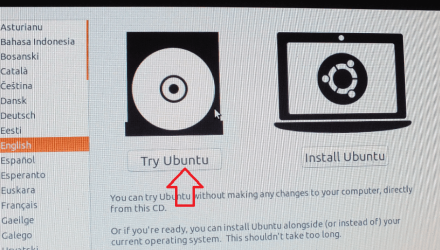
No mate what cowboy is saying is - I think - boot the machine to the "TRY" Ubuntu OS then you can open the other drives once inside the Ubuntu - it will list all drives that are attached and can be dug down into for file retrieval.

It is just like opening the drives using Computer in windows and right clicking on the drive - open then dig down to find the programs and then the files in them.
 

My Computer

Computer type
PC/Desktop
Computer Manufacturer/Model Number
Own build (new) Desk1 / Asus ROG Win 7 / Desk2 1st build
OS
Desk1 7 Home Prem / Desk2 10 Pro / Main lap Asus ROG 10 Pro 2 laptop Toshiba 7 Pro Asus P2520 7 & 10
CPU
Desk1 i5 3750K / Laptop i7 GTX 860M / Desk2 i5 2500
Motherboard
Desk1 Asus P877-V / Desk2 Gigabyte H67 UD3H / Laptop ?
Memory
Desk1 8GB (1866) / Desk2 16GB (1333) / Laptop 8Gb DDR3
Graphics Card(s)
Desk 1& 2NVidia GTX 650 & Laptops on board Intel
Sound Card
Desk 1 & 2 -XONAR DG Realtek High Def audio Laptop
Monitor(s) Displays
Desk 1 Benq HD 2450 / Desk2 Philips 24" / Laptop 17.5"
Screen Resolution
1920x1080 D1 & D2 & Laptop 1
Hard Drives
Desk1 Samsung 120GB 830 SSD
Asus ROG 256GB 850 Pro SSD
Desk2 Samsung 840 256 SSD
Toshiba 120GB EVO
PSU
Desk 1 Corsair HX 1050/ Laptop ? / Desk 2 Corsair HX 650
Case
Desk 1 Cooler HAF XM ? Toshiba laptop / Desk2 Coolermaster
Cooling
Fans on all Desk1 -2 Desk2 - all Coolermasters 5 Laptop ?
Keyboard
Desk 1 MS Sidewinder X6 Desk 2 MS Sidewinder X 4
Mouse
Desk 1&2 - Gigabyte MS 900 gamer - laptop - Logitec wireless
Internet Speed
ADSL2+
Other Info
One other Desktop (tester) and spare Toshba laptop both with SSD's
Running Kaspersky 2016 ISS on all machines config'd identically
Logitec audio stereo systems on each machine (x3)
Canon MG5250MFC
Router/modem TP-Link running WPA2SK
I Cit-- ok i think i understand what you are saying, now to get to the "try" ubuntu os -- never seen that. how do i get there?
 

My Computer

Computer Manufacturer/Model Number
Dell Precision 490
OS
windows 7
CPU
dual core
Graphics Card(s)
nvidia 6800
Monitor(s) Displays
std
Hard Drives
two 130g with windows 7 and 1 160g windows xp
Ok Heavy you first need to download the Ubuntu to Downloads (I keep mine on the desktop for ease of use - that just entails Start > type downloads > right click > send to desktop).

Then

http://www.sevenforums.com/tutorials/548-burn-disc-image-iso-img-file.html

Set the BIOS to boot from the optical drive > insert the disk and exit the BIOS using the new settings.

The machine will then go to the Ubuntu disk and load that OS You will get a screen with two options TRY and INSTALL - DO NOT INSTALL!!

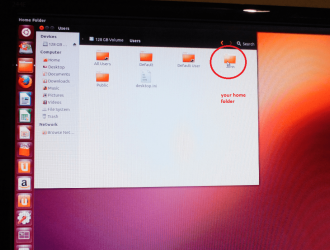
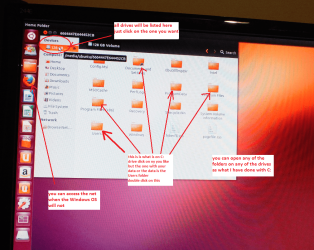
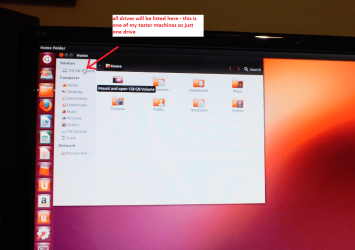
It will then load the Ubuntu. On the screen there will a list of the drives connected to the machine at bottom left and at the top left as in the pics not the bottom in the pics but they will be there.

Then it is just matter of clicking on each drive and opening it up just as you would with the Windows Computer > Disk Management > ie C: > then open or explore.
Then you can do what you like with the files copy /paste to another drive? stick or delete - whatever. Some files will not open as the Ubuntu is not compatible with all types

I have included a few pics if you get stuck ask
 

Attachments

  • U2.PNG
    U2.PNG
    306.8 KB · Views: 1
  • U4.PNG
    U4.PNG
    260 KB · Views: 1
  • U6.PNG
    U6.PNG
    352.2 KB · Views: 1
  • U5.PNG
    U5.PNG
    381.2 KB · Views: 2

My Computer

Computer type
PC/Desktop
Computer Manufacturer/Model Number
Own build (new) Desk1 / Asus ROG Win 7 / Desk2 1st build
OS
Desk1 7 Home Prem / Desk2 10 Pro / Main lap Asus ROG 10 Pro 2 laptop Toshiba 7 Pro Asus P2520 7 & 10
CPU
Desk1 i5 3750K / Laptop i7 GTX 860M / Desk2 i5 2500
Motherboard
Desk1 Asus P877-V / Desk2 Gigabyte H67 UD3H / Laptop ?
Memory
Desk1 8GB (1866) / Desk2 16GB (1333) / Laptop 8Gb DDR3
Graphics Card(s)
Desk 1& 2NVidia GTX 650 & Laptops on board Intel
Sound Card
Desk 1 & 2 -XONAR DG Realtek High Def audio Laptop
Monitor(s) Displays
Desk 1 Benq HD 2450 / Desk2 Philips 24" / Laptop 17.5"
Screen Resolution
1920x1080 D1 & D2 & Laptop 1
Hard Drives
Desk1 Samsung 120GB 830 SSD
Asus ROG 256GB 850 Pro SSD
Desk2 Samsung 840 256 SSD
Toshiba 120GB EVO
PSU
Desk 1 Corsair HX 1050/ Laptop ? / Desk 2 Corsair HX 650
Case
Desk 1 Cooler HAF XM ? Toshiba laptop / Desk2 Coolermaster
Cooling
Fans on all Desk1 -2 Desk2 - all Coolermasters 5 Laptop ?
Keyboard
Desk 1 MS Sidewinder X6 Desk 2 MS Sidewinder X 4
Mouse
Desk 1&2 - Gigabyte MS 900 gamer - laptop - Logitec wireless
Internet Speed
ADSL2+
Other Info
One other Desktop (tester) and spare Toshba laptop both with SSD's
Running Kaspersky 2016 ISS on all machines config'd identically
Logitec audio stereo systems on each machine (x3)
Canon MG5250MFC
Router/modem TP-Link running WPA2SK
You boot the Ubuntu dvd. Not the XP hd. That's why I instructed to change your boot order to have the DVD drive first.

When Ubuntu first loads, DO NOT INSTALL, just run it.

When it presents its desktop, see what it gives you as to that drive you're worried about. If it presents folders and files, copy them to something!

EDIT: Sorry, John, to step over your post. Didn't see it. I responded to the OP through email.
 

My Computer

Computer Manufacturer/Model Number
8 home-builds from the 80's into 2004
OS
W7 Home Premium 32bit
You boot the Ubuntu dvd. Not the XP hd. That's why I instructed to change your boot order to have the DVD drive first.

When Ubuntu first loads, DO NOT INSTALL, just run it.

When it presents its desktop, see what it gives you as to that drive you're worried about. If it presents folders and files, copy them to something!

EDIT: Sorry, John, to step over your post. Didn't see it. I responded to the OP through email.
No probs mate two heads better than one:D
 

My Computer

Computer type
PC/Desktop
Computer Manufacturer/Model Number
Own build (new) Desk1 / Asus ROG Win 7 / Desk2 1st build
OS
Desk1 7 Home Prem / Desk2 10 Pro / Main lap Asus ROG 10 Pro 2 laptop Toshiba 7 Pro Asus P2520 7 & 10
CPU
Desk1 i5 3750K / Laptop i7 GTX 860M / Desk2 i5 2500
Motherboard
Desk1 Asus P877-V / Desk2 Gigabyte H67 UD3H / Laptop ?
Memory
Desk1 8GB (1866) / Desk2 16GB (1333) / Laptop 8Gb DDR3
Graphics Card(s)
Desk 1& 2NVidia GTX 650 & Laptops on board Intel
Sound Card
Desk 1 & 2 -XONAR DG Realtek High Def audio Laptop
Monitor(s) Displays
Desk 1 Benq HD 2450 / Desk2 Philips 24" / Laptop 17.5"
Screen Resolution
1920x1080 D1 & D2 & Laptop 1
Hard Drives
Desk1 Samsung 120GB 830 SSD
Asus ROG 256GB 850 Pro SSD
Desk2 Samsung 840 256 SSD
Toshiba 120GB EVO
PSU
Desk 1 Corsair HX 1050/ Laptop ? / Desk 2 Corsair HX 650
Case
Desk 1 Cooler HAF XM ? Toshiba laptop / Desk2 Coolermaster
Cooling
Fans on all Desk1 -2 Desk2 - all Coolermasters 5 Laptop ?
Keyboard
Desk 1 MS Sidewinder X6 Desk 2 MS Sidewinder X 4
Mouse
Desk 1&2 - Gigabyte MS 900 gamer - laptop - Logitec wireless
Internet Speed
ADSL2+
Other Info
One other Desktop (tester) and spare Toshba laptop both with SSD's
Running Kaspersky 2016 ISS on all machines config'd identically
Logitec audio stereo systems on each machine (x3)
Canon MG5250MFC
Router/modem TP-Link running WPA2SK
Back
Top