
Solved Can I Delete These Files ?

bej

New member
Power User
Local time
5:40 AM
Messages
325
Location
NV, Amerika
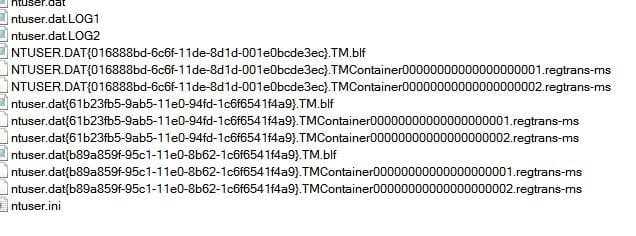
They are located in the root of "User1" (My folder) and showed up after
I reinstalled Windows 7.
 

Attachments

  • Capture.JPG
    Capture.JPG
    41.7 KB · Views: 50

My Computer

Computer type
PC/Desktop
Computer Manufacturer/Model Number
Home Built
OS
Windows 7 Home Pro SP1 64bit
CPU
Intel Xeon E-3 1240v2
Motherboard
HP
Memory
8GB
Graphics Card(s)
NVIDIA 300
Sound Card
Onboard
Monitor(s) Displays
Hanns G 25"
Screen Resolution
1920x1080
Hard Drives
Hitachi 2GB
PSU
Seasonic 430W
Case
Antec
Cooling
Stock
Keyboard
Logitech
Mouse
Logitech
Internet Speed
5MB
Absolutely no.

These form a part of the registry (namely the HKEY_CURRENT_USER hive) and most of these files are locked by the system anyway. You don't want to delete them.
 

My Computer

Computer type
PC/Desktop
Computer Manufacturer/Model Number
Custom-built
OS
Windows 7 Professional SP1 32-bit
CPU
Intel Core 2 Duo E6600 2.4GHz
Motherboard
Asus PL5D2
Memory
4GB DDR2-667 (4x1GB in dual-channel config)
Graphics Card(s)
nVidia GeForce 9800 GT
Sound Card
Creative X-Fi XtremeMusic
Monitor(s) Displays
Acer P236H
Screen Resolution
1920x1200 (DVI)
Hard Drives
OCZ SSD Vertex Plus 60GB SATA (Firmware 3.55), 64MB cache
Hitachi HD321KJ SATA, 320GB, 7200rpm, 16MB cache
PSU
Antec TruePower 2.0
Case
Cooler Master Centurion
Cooling
Too many fans
Keyboard
Standard
Mouse
Microsoft wireless optical mouse
Internet Speed
AT&T U-verse (18mbit/sec)
Antivirus
Microsoft Security Essentials
Browser
Firefox
Other Info
Other devices:
Compaq CQ-60 laptop
Google Nexus 7 (2012) tablet
Nvidia SHIELD tablet (US/LTE)
Hardkernel ODROID-XU single-board computer (Samsung Exynos 5420)
Appreciate your reply
 

My Computer

Computer type
PC/Desktop
Computer Manufacturer/Model Number
Home Built
OS
Windows 7 Home Pro SP1 64bit
CPU
Intel Xeon E-3 1240v2
Motherboard
HP
Memory
8GB
Graphics Card(s)
NVIDIA 300
Sound Card
Onboard
Monitor(s) Displays
Hanns G 25"
Screen Resolution
1920x1080
Hard Drives
Hitachi 2GB
PSU
Seasonic 430W
Case
Antec
Cooling
Stock
Keyboard
Logitech
Mouse
Logitech
Internet Speed
5MB
Why are the files in the "User" folder and not in the registry ?
I don't have to "regedit" to see them.
 

My Computer

Computer type
PC/Desktop
Computer Manufacturer/Model Number
Home Built
OS
Windows 7 Home Pro SP1 64bit
CPU
Intel Xeon E-3 1240v2
Motherboard
HP
Memory
8GB
Graphics Card(s)
NVIDIA 300
Sound Card
Onboard
Monitor(s) Displays
Hanns G 25"
Screen Resolution
1920x1080
Hard Drives
Hitachi 2GB
PSU
Seasonic 430W
Case
Antec
Cooling
Stock
Keyboard
Logitech
Mouse
Logitech
Internet Speed
5MB
The registry is a set of files, the registry editor is merely a tool to make it easier for the user to view / edit the data. They are in the User area due to your recent upgrade where there were other files present from the previous install

There is some information as to file locations here ....

http://en.wikipedia.org/wiki/Windows_Registry
 

My Computers

System One System Two

  • Computer type
    PC/Desktop
    Computer Manufacturer/Model Number
    ChillBlast - Custom to my design
    OS
    Windows 11 Pro x64 [Latest Release and Release Preview]
    CPU
    Ryzen 9 5950X, 3.8 - 5.2 MHz
    Motherboard
    Asus Prime X570-Pro
    Memory
    64GB [2 x 32GB] DDR4 3200MHz
    Graphics Card(s)
    4GB NVIDIA GEFORCE GTX 1650 Ti
    Sound Card
    On-board SPDIF to 5.1 System + HDMI [5.1 system]
    Monitor(s) Displays
    32" UHD 32 Bit HDR Monitor + 43" UHD 4K 32Bit HDR TV
    Screen Resolution
    2 x 3840 x 2160 @60Hz
    Hard Drives
    1TB M2 SSD OS, 500GB Fast Access SSD, 2 x 8TB Data + Various Externals from 1TB to 4TB, 10TB NAS
    PSU
    NZXT C750 80 PLUS Gold 750W Modular PSU
    Case
    Workstation Case [Matt Black]
    Cooling
    NZXT Kraken X63 280mm CPU Cooler +2x Quiet Case fans
    Keyboard
    Logitech Wireless MX Keys & K400 + others
    Mouse
    Logitech Wireless MX Master 3S
    Internet Speed
    920 MB Down 50 MB Up
    Antivirus
    BitDefender Total Security Pro
    Browser
    Chrome (always run latest Non-Beta)
    Other Info
    Also run ...
    Laptop - Quad 8GB - Windows 10 Pro x64
    Nexus 7 Android tablet x2
    Samsung 10.2" tablet
    Blackview TAB 8 4G Android Tablet c/w Keyboard
    Wacom Intuos Pro Medium Pen Pad
    Wacom Intuos Pro Small Pen Pad
    Wacom Expresskeys Remote
    Loopdeck+ Graphics Controller
    Shuttle Pro v2 Control
  • Computer type
    Laptop
    System Manufacturer/Model Number
    Dell XPS 17 10750H
    OS
    Windows 11 Pro x64 Latest RP
    CPU
    Intel I7 10750H 5.0GHz
    Motherboard
    Dell XPS
    Memory
    32GB [2x16GB] DDR4 2933 MHz
    Graphics Card(s)
    nVidia GTX1650Ti 4 GB GDDR6
    Sound Card
    Stock [Realtek] 4 Speaker
    Monitor(s) Displays
    17" IPS UHD+ Infinity Edge Touchscreen
    Screen Resolution
    3840 x 2400
    Hard Drives
    2TB M2 NVMe, 4TB External + various 500GB & 1TB External NVMe (also have access to spinner HDD from
    PSU
    Stock
    Case
    Stock XPS Aluminium & Carbon Fibre
    Cooling
    Stock - Active Fan Control
    Keyboard
    Backlit + Various Logitech
    Mouse
    Stock Track Pad + Logitech MX Trackball
    Internet Speed
    72 MB Down 18MB Up
    Browser
    Chrome
    Other Info
    Also run ...
    Laptop - Quad 8GB - Windows 10 Pro x64
    Nexus 7 Android tablet x2
    10.2" tablet
    Sony Z3 Android Smartphone
    Wacom Intuos Pro Medium Pen Pad
    Wacom Intuos Pro Small Pen Pad
    Wacom Expresskeys Remote
    Loopdeck+ Graphics Controller
    Shuttle Pro v2 Control Pad
    10TB NAS
Most registry hives are stored in Windows\system32\config, but each user also has their own hive stored in the user profile folder, like yours.
 

My Computer

Computer type
PC/Desktop
Computer Manufacturer/Model Number
Custom-built
OS
Windows 7 Professional SP1 32-bit
CPU
Intel Core 2 Duo E6600 2.4GHz
Motherboard
Asus PL5D2
Memory
4GB DDR2-667 (4x1GB in dual-channel config)
Graphics Card(s)
nVidia GeForce 9800 GT
Sound Card
Creative X-Fi XtremeMusic
Monitor(s) Displays
Acer P236H
Screen Resolution
1920x1200 (DVI)
Hard Drives
OCZ SSD Vertex Plus 60GB SATA (Firmware 3.55), 64MB cache
Hitachi HD321KJ SATA, 320GB, 7200rpm, 16MB cache
PSU
Antec TruePower 2.0
Case
Cooler Master Centurion
Cooling
Too many fans
Keyboard
Standard
Mouse
Microsoft wireless optical mouse
Internet Speed
AT&T U-verse (18mbit/sec)
Antivirus
Microsoft Security Essentials
Browser
Firefox
Other Info
Other devices:
Compaq CQ-60 laptop
Google Nexus 7 (2012) tablet
Nvidia SHIELD tablet (US/LTE)
Hardkernel ODROID-XU single-board computer (Samsung Exynos 5420)
Open the Users Folder> Organize> Folder and search options> View tab> Check Hide protected operating system files (Recommended)> Apply> OK

66d74y.jpg


The files will no longer be visible. A Guy
 

My Computer

Computer type
PC/Desktop
OS
Windows 10 Home x64
CPU
INTEL Core i5-750 Quad-Core 3.37GHz
Motherboard
ASUS P7P55D
Memory
HyperX Fury Black Series 8GB (2 x 4GB) 1866Mhz
Graphics Card(s)
EVGA GeForce GTX 750 Superclocked 1GB 128-Bit GDDR5
Monitor(s) Displays
LG 32MA68HY 32" IPS
Screen Resolution
1920 x 1080
Hard Drives
Samsung 840 Evo 120GB, SEAGATE 500GB Barracuda® 7200.12, SATA 3 Gb/s, 7200 RPM, 16MB cache
PSU
ANTEC TruePower New TP-550, 80 PLUS, 550W
Case
ANTEC Three Hundred Illusion
Cooling
COOLER MASTER Hyper 212 Plus, 4 x 120mm 1 x 140mm Noctua's
Internet Speed
85 + Mbps
Antivirus
Avast
Browser
Vivaldi
Again, I appreciate all the replies. I did "Google" a couple of the file extentions
which gave me some more insight into the purpose of the files.
I use "Free Commander" rather than explorer which is why I see the files there and
not in "Explorer". No matter. The files are now safe in their present location.
 

My Computer

Computer type
PC/Desktop
Computer Manufacturer/Model Number
Home Built
OS
Windows 7 Home Pro SP1 64bit
CPU
Intel Xeon E-3 1240v2
Motherboard
HP
Memory
8GB
Graphics Card(s)
NVIDIA 300
Sound Card
Onboard
Monitor(s) Displays
Hanns G 25"
Screen Resolution
1920x1080
Hard Drives
Hitachi 2GB
PSU
Seasonic 430W
Case
Antec
Cooling
Stock
Keyboard
Logitech
Mouse
Logitech
Internet Speed
5MB
Back
Top