
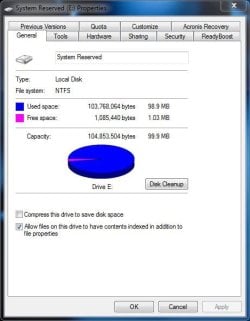
Solved can I increase the "System Reserve Partition" of 100 MB

trinaz

New member
Member
VIP
Local time
5:45 PM
Messages
477
Location
Phoenix
Have a Win7 Pro 32bit machine...I am getting a warning that the System Reserve Partition is running out of space.

I know you don't mess with this partition...but can I increase it to stop this constant/annoying pop up from showing up ?

Thanks...TRinAZ
 

Attachments

  • srp.jpg
    srp.jpg
    39 KB · Views: 60

My Computer My Computer

At a glance

Windows 7 Pro 64bit SP1AMD FX-6100 Six-Core Processor2ea Corsair-1333MHz-PC3-10666-240-pin-CMX4GX3...NVIDIA GeForce GT 630 - 1023MB (EVGA)
Computer type
PC/Desktop
Computer Manufacturer/Model Number
Self built
OS
Windows 7 Pro 64bit SP1
CPU
AMD FX-6100 Six-Core Processor
Motherboard
M5A78L-M LX PLUS
Memory
2ea Corsair-1333MHz-PC3-10666-240-pin-CMX4GX3M1A1333C9
Graphics Card(s)
NVIDIA GeForce GT 630 - 1023MB (EVGA)
Sound Card
OnBoard Via High Def Audio
Monitor(s) Displays
Samsung 204B main - ASUS VS228 secondary
Screen Resolution
1920x1080 main - 1920x1080 secondary
Hard Drives
Samsung SSD 840 128GB Win7 Pro 64bit - Western Digital WDC 465GB - Seagate 640GB Sata B/U - Maxtor 500GB Sata B/U - Maxtor 200GB Sata
PSU
Antec 650 watt
Cooling
Multiple case fans
Keyboard
MS USB dual Wireless Keyboard - IntelliType Pro
Mouse
MS USB dual Wireless Mouse - IntelliPoint
Internet Speed
Cox Cable
Antivirus
Bitdefender IS 2014
Browser
FireFox Primary - IE 11
Other Info
Hauppaguge Win TV HVR-1250 (Model 22xxx, Hybrid ATSC/QAM)
Samsung HD103SI USB 1TB Desktop Drive - Backup & Disk Image storage
Yes, you can.

Partition Wizard may be your best bet: http://www.sevenforums.com/tutorials/93322-partition-wizard-use-bootable-cd.html

After you've created your PW boot disc you can boot into it, shrink your C drive from the left a tad, then extend System Reserved to take up the empty space.

Apply your changes and wait for PW to complete the task then boot back into Windows.

An alternative solution is to delete the system reserved partition, and then run a startup repair to move the boot files to the Windows drive: http://www.sevenforums.com/tutorials/71363-system-reserved-partition-delete.html

This method needs particular care, because if you screw up you could leave your computer in an unbootable state.
 

My Computer My Computer

At a glance

Windows 7 Ultimate SP1 64-BitIntel Core i7 870 @ 2.93GHz8Gb Dual-Channel DDR3 @ 664MHznVidia GeForce GTX 460 1024MB dedicated RAM
Computer Manufacturer/Model Number
HP Pavilion Elite 495UK
OS
Windows 7 Ultimate SP1 64-Bit
CPU
Intel Core i7 870 @ 2.93GHz
Motherboard
MSI 2A9C (CPU1)
Memory
8Gb Dual-Channel DDR3 @ 664MHz
Graphics Card(s)
nVidia GeForce GTX 460 1024MB dedicated RAM
Sound Card
Realtek HD Audio
Monitor(s) Displays
HP2310i
Screen Resolution
1920 x 1080
Hard Drives
1x1954GB Hitachi HDS22020ALA 330 (RAID), 1x1954GB Hitachi External for backup and storage
PSU
460W
Case
HP Elite
Cooling
Air cooled
Keyboard
Logitech K750 solar-powered keyboard
Mouse
Logitech Wireless M180 mouse
Internet Speed
2Mb
Other Info
Pure Avanti Flow Internet Radio with iPod Dock, 64Gb iPod, HP USB Speakers, Sony MDR-V500 Headphones, Sony Vaio F-Series Laptop
What are you adding to the System Reserved Partition?
Also the System Reserved Partition should not have a letter.
 

My Computer My Computer

At a glance

ME/XP/Vista/Win7
OS
ME/XP/Vista/Win7
What are you adding to the System Reserved Partition?

After installing the latest version of Bitdefender Internet Security 2012 these pop ups started. There are numerous other boot entries in "E"...and Bitdefender has always added items to "E"

BD has some kind of "rescue" option and I assume that's the reason for the E drive entries ?

Also the System Reserved Partition should not have a letter.

Yes I have seen this mentioned many times...howerver...the "E" drive has always been there since the clean install of Win 7....and items (E Drive) have always shown up also in Acronis when saving an image...I have to save both "C" and "E" in Acronis when creating my tib files for complete restore from my external USB drive ???

Thanks...TRinAZ
 

My Computer My Computer

At a glance

Windows 7 Pro 64bit SP1AMD FX-6100 Six-Core Processor2ea Corsair-1333MHz-PC3-10666-240-pin-CMX4GX3...NVIDIA GeForce GT 630 - 1023MB (EVGA)
Computer type
PC/Desktop
Computer Manufacturer/Model Number
Self built
OS
Windows 7 Pro 64bit SP1
CPU
AMD FX-6100 Six-Core Processor
Motherboard
M5A78L-M LX PLUS
Memory
2ea Corsair-1333MHz-PC3-10666-240-pin-CMX4GX3M1A1333C9
Graphics Card(s)
NVIDIA GeForce GT 630 - 1023MB (EVGA)
Sound Card
OnBoard Via High Def Audio
Monitor(s) Displays
Samsung 204B main - ASUS VS228 secondary
Screen Resolution
1920x1080 main - 1920x1080 secondary
Hard Drives
Samsung SSD 840 128GB Win7 Pro 64bit - Western Digital WDC 465GB - Seagate 640GB Sata B/U - Maxtor 500GB Sata B/U - Maxtor 200GB Sata
PSU
Antec 650 watt
Cooling
Multiple case fans
Keyboard
MS USB dual Wireless Keyboard - IntelliType Pro
Mouse
MS USB dual Wireless Mouse - IntelliPoint
Internet Speed
Cox Cable
Antivirus
Bitdefender IS 2014
Browser
FireFox Primary - IE 11
Other Info
Hauppaguge Win TV HVR-1250 (Model 22xxx, Hybrid ATSC/QAM)
Samsung HD103SI USB 1TB Desktop Drive - Backup & Disk Image storage
Your System Reserved partition should neither be that small or have a letter assigned. How did it get that way?

In addition it seems that your AV bloatware has written to it to clog it and cause these problems.

It may be easiest at this time to recover the SysReserved boot files and space into the Win7 partition.

If you'll post back a screenshot of your maximized Disk Management drive map with listings then we'll give you the options based on the configuration. Screen Shots
 
If you'll post back a screenshot of your maximized Disk Management drive map with listings then we'll give you the options based on the configuration. Screen Shots

OK here it is....this box was set up 2 years ago so I don't remember how the "E" drive was created. This was an HP Media Center system tho before upgrading to Win 7 Pro 32bit ?

Thanks
 

Attachments

  • system.jpg
    system.jpg
    76 KB · Views: 124

My Computer My Computer

At a glance

Windows 7 Pro 64bit SP1AMD FX-6100 Six-Core Processor2ea Corsair-1333MHz-PC3-10666-240-pin-CMX4GX3...NVIDIA GeForce GT 630 - 1023MB (EVGA)
Computer type
PC/Desktop
Computer Manufacturer/Model Number
Self built
OS
Windows 7 Pro 64bit SP1
CPU
AMD FX-6100 Six-Core Processor
Motherboard
M5A78L-M LX PLUS
Memory
2ea Corsair-1333MHz-PC3-10666-240-pin-CMX4GX3M1A1333C9
Graphics Card(s)
NVIDIA GeForce GT 630 - 1023MB (EVGA)
Sound Card
OnBoard Via High Def Audio
Monitor(s) Displays
Samsung 204B main - ASUS VS228 secondary
Screen Resolution
1920x1080 main - 1920x1080 secondary
Hard Drives
Samsung SSD 840 128GB Win7 Pro 64bit - Western Digital WDC 465GB - Seagate 640GB Sata B/U - Maxtor 500GB Sata B/U - Maxtor 200GB Sata
PSU
Antec 650 watt
Cooling
Multiple case fans
Keyboard
MS USB dual Wireless Keyboard - IntelliType Pro
Mouse
MS USB dual Wireless Mouse - IntelliPoint
Internet Speed
Cox Cable
Antivirus
Bitdefender IS 2014
Browser
FireFox Primary - IE 11
Other Info
Hauppaguge Win TV HVR-1250 (Model 22xxx, Hybrid ATSC/QAM)
Samsung HD103SI USB 1TB Desktop Drive - Backup & Disk Image storage
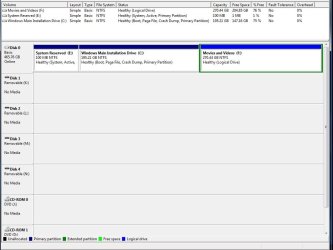
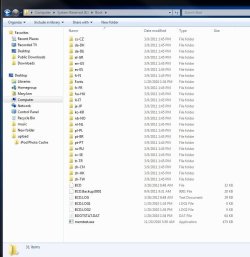
Something is writing to the System Reserved partition which is why it should not have a drive letter. But use the letter to give us a screenshot of the maximized, expanded folder contents inside E after unhiding System and Hidden files in Control Panel>Folder Options>View.

It will be simplest to help you delete the intruders, remove the Drive letter in Disk Mgmt, then try saving a WIn7 backup image externally which will test if the partition is working correctly.

Otherwise you could recover the SysReserved boot files and disk space into Win7 partition, but it is trouble and involves some risk so let's try to clean out E first.
 
Something is writing to the System Reserved partition which is why it should not have a drive letter. But use the letter to give us a screenshot of the maximized, expanded folder contents inside E after unhiding System and Hidden files in Control Panel>Folder Options>View.

Have a valid and working Acronis backup of system including C: & E: drives in one image file...
 

Attachments

  • E-drive1.jpg
    E-drive1.jpg
    65.7 KB · Views: 49
  • E-drive2.jpg
    E-drive2.jpg
    82.1 KB · Views: 43

My Computer My Computer

At a glance

Windows 7 Pro 64bit SP1AMD FX-6100 Six-Core Processor2ea Corsair-1333MHz-PC3-10666-240-pin-CMX4GX3...NVIDIA GeForce GT 630 - 1023MB (EVGA)
Computer type
PC/Desktop
Computer Manufacturer/Model Number
Self built
OS
Windows 7 Pro 64bit SP1
CPU
AMD FX-6100 Six-Core Processor
Motherboard
M5A78L-M LX PLUS
Memory
2ea Corsair-1333MHz-PC3-10666-240-pin-CMX4GX3M1A1333C9
Graphics Card(s)
NVIDIA GeForce GT 630 - 1023MB (EVGA)
Sound Card
OnBoard Via High Def Audio
Monitor(s) Displays
Samsung 204B main - ASUS VS228 secondary
Screen Resolution
1920x1080 main - 1920x1080 secondary
Hard Drives
Samsung SSD 840 128GB Win7 Pro 64bit - Western Digital WDC 465GB - Seagate 640GB Sata B/U - Maxtor 500GB Sata B/U - Maxtor 200GB Sata
PSU
Antec 650 watt
Cooling
Multiple case fans
Keyboard
MS USB dual Wireless Keyboard - IntelliType Pro
Mouse
MS USB dual Wireless Mouse - IntelliPoint
Internet Speed
Cox Cable
Antivirus
Bitdefender IS 2014
Browser
FireFox Primary - IE 11
Other Info
Hauppaguge Win TV HVR-1250 (Model 22xxx, Hybrid ATSC/QAM)
Samsung HD103SI USB 1TB Desktop Drive - Backup & Disk Image storage
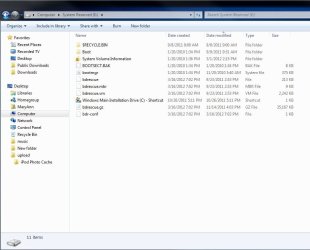
Those bdrescue files are from Bitdefender. Unless you have a scheme using BitDefender bloatware to restore from boot then they should not be there.

In fact I would uninstall Bitdefender and install recommended lightweight free Microsoft Security Essentials for best performance and to avoid nonsense like this.

If Bitdefender doesn't uninstall the bdrescue files I would do it myself and then remove the drive letter from System Reserved in Disk Mgmt, since it shouldn't have one anyway.
 
...If Bitdefender doesn't uninstall the bdrescue files I would do it myself and then remove the drive letter from System Reserved in Disk Mgmt, since it shouldn't have one anyway.

OK..if I can get the BD files out of there...and remove the "E" letter....I will still have a 'System Reserve' partiton correct...even tho it doesn't have a drive letter.

Will Acronis then still backup the System Reserve in a full system image backup even if there is no drive letter assigned to the System Reserve partition on the "C" drive?
 

My Computer My Computer

At a glance

Windows 7 Pro 64bit SP1AMD FX-6100 Six-Core Processor2ea Corsair-1333MHz-PC3-10666-240-pin-CMX4GX3...NVIDIA GeForce GT 630 - 1023MB (EVGA)
Computer type
PC/Desktop
Computer Manufacturer/Model Number
Self built
OS
Windows 7 Pro 64bit SP1
CPU
AMD FX-6100 Six-Core Processor
Motherboard
M5A78L-M LX PLUS
Memory
2ea Corsair-1333MHz-PC3-10666-240-pin-CMX4GX3M1A1333C9
Graphics Card(s)
NVIDIA GeForce GT 630 - 1023MB (EVGA)
Sound Card
OnBoard Via High Def Audio
Monitor(s) Displays
Samsung 204B main - ASUS VS228 secondary
Screen Resolution
1920x1080 main - 1920x1080 secondary
Hard Drives
Samsung SSD 840 128GB Win7 Pro 64bit - Western Digital WDC 465GB - Seagate 640GB Sata B/U - Maxtor 500GB Sata B/U - Maxtor 200GB Sata
PSU
Antec 650 watt
Cooling
Multiple case fans
Keyboard
MS USB dual Wireless Keyboard - IntelliType Pro
Mouse
MS USB dual Wireless Mouse - IntelliPoint
Internet Speed
Cox Cable
Antivirus
Bitdefender IS 2014
Browser
FireFox Primary - IE 11
Other Info
Hauppaguge Win TV HVR-1250 (Model 22xxx, Hybrid ATSC/QAM)
Samsung HD103SI USB 1TB Desktop Drive - Backup & Disk Image storage
Yes, you'll still have a 'System Reserved' partition after removing the drive letter. As gregrocker was saying, it wasn't supposed to have a drive letter to begin with...
 

My Computer My Computer

At a glance

Windows 7 Ultimate x64
OS
Windows 7 Ultimate x64
Acronis won't be affected by some BitDefender bloatware which you were using. Can you explain what this was?

Most imaging suites require some free space on SysReserved partition to expand a paging file. This is the reason why no other programs should be allowed to write to it. Perhaps BitDefender had a backup using those bd files?

Did you uninstall BitDefender to replace with MSE, and did those files go with it? If not I would delete them.
 
Acronis won't be affected by some BitDefender bloatware which you were using. Can you explain what this was?...

From Bitdefender: Bitdefender Rescue Mode

Obvious user issues: Forum Search Engine

This is/was new in BD2012...hadn't even looked into it...but it appears - according to BD support - to be for scanning and removing of Malware issues without starting the Windows OS...they claim it is much more effective/foolproof than running a removal tool from within Windows ??

Thanks for all the help & imput...
 

My Computer My Computer

At a glance

Windows 7 Pro 64bit SP1AMD FX-6100 Six-Core Processor2ea Corsair-1333MHz-PC3-10666-240-pin-CMX4GX3...NVIDIA GeForce GT 630 - 1023MB (EVGA)
Computer type
PC/Desktop
Computer Manufacturer/Model Number
Self built
OS
Windows 7 Pro 64bit SP1
CPU
AMD FX-6100 Six-Core Processor
Motherboard
M5A78L-M LX PLUS
Memory
2ea Corsair-1333MHz-PC3-10666-240-pin-CMX4GX3M1A1333C9
Graphics Card(s)
NVIDIA GeForce GT 630 - 1023MB (EVGA)
Sound Card
OnBoard Via High Def Audio
Monitor(s) Displays
Samsung 204B main - ASUS VS228 secondary
Screen Resolution
1920x1080 main - 1920x1080 secondary
Hard Drives
Samsung SSD 840 128GB Win7 Pro 64bit - Western Digital WDC 465GB - Seagate 640GB Sata B/U - Maxtor 500GB Sata B/U - Maxtor 200GB Sata
PSU
Antec 650 watt
Cooling
Multiple case fans
Keyboard
MS USB dual Wireless Keyboard - IntelliType Pro
Mouse
MS USB dual Wireless Mouse - IntelliPoint
Internet Speed
Cox Cable
Antivirus
Bitdefender IS 2014
Browser
FireFox Primary - IE 11
Other Info
Hauppaguge Win TV HVR-1250 (Model 22xxx, Hybrid ATSC/QAM)
Samsung HD103SI USB 1TB Desktop Drive - Backup & Disk Image storage
Back
Top