Solved Can I migrate OS + software from 120GB SSD to 1TB HD w/ 60GB software?

gfr92y

New member
Member
Local time
11:57 AM
Messages
81
Location
Richmond, Virginia
When I reinstalled my operating system on a Gateway DX4831-01e, at my son's encouragement, I installed the OS, Win 7 Pro, on a 120 GB SSD (c:\) and attempted to install all of the software on a 1 TB hard drive (p:\).

Installing software on a drive uniquely different from the OS proved to be problematic and so I began installing software on the SSD.

Now I only have 11 GB free on the drive that contains my operating system and do not have any discretionary space to free up.

My question is... Can I migrate the OS and software installed on the SSD to the 1 TB hard drive, which contains 60 GB of software, without reinstalling the OS and software, again?

Thank you very much.

gfr92y
 
Last edited:

My Computer My Computer

At a glance

Windows 10 Home C1H12.30 gigahertz Intel Core i7-10510U12GBIntel UHD Graphics
Computer type
Laptop
Computer Manufacturer/Model Number
HP Laptop 17t-by200 CTO
OS
Windows 10 Home C1H1
CPU
2.30 gigahertz Intel Core i7-10510U
Motherboard
HP 865A 64.17
Memory
12GB
Graphics Card(s)
Intel UHD Graphics
Monitor(s) Displays
HP 27es
should be doable.


Either:


1) create a shadow copy ( make a restore point)

2) use shadowcopyview to copy the entire contents of the shadow you just made onto your 1tb disk.

https://www.nirsoft.net/utils/shadow_copy_view.html

Copy a bit at a time. The windows folder for example is very large.

3) create a bootmenu entry and mark p active

at admin command, type:
diskpart
sel vol p
act
exi

(press enter after each of the above)

bcdboot p:\windows /s p:


close command prompt.

4 ) use my little program nt6repair to fix the drive letter.
https://www.sevenforums.com/attachm...e-d-but-programs-run-drive-c-nt6repairx86.zip

OR

Alternatively, create another partition at the end ( on the right ) of the 1tb disk - 100gb is plenty.
Copy/move the 60gb data onto that new partition.

Create an image of your current system and restore it to the 1tb disk P:. Then copy the 60gb back onto p:

Plenty of free imaging programs can do that. Last time I looked, minitool partition manager free edition can copy/clone partition for you, which is quicker.
 

My Computers My Computers

  • At a glance

    7 X64i5 84002x8gb 3200mhz
    Computer type
    PC/Desktop
    OS
    7 X64
    CPU
    i5 8400
    Motherboard
    gigabyte b365m ds3h
    Memory
    2x8gb 3200mhz
    Hard Drives
    various
    PSU
    pure power 11 400w cm
    Case
    Coolermaster
    Cooling
    cryorig m9i
  • At a glance

    7x64g54008gb ddr4 2400
    Computer type
    PC/Desktop
    OS
    7x64
    CPU
    g5400
    Motherboard
    ga b365m ds3h
    Memory
    8gb ddr4 2400
    PSU
    xfx pro 450w

My Computers My Computers

  • At a glance

    Windows 7 HP 64i5 6600K - 800MHz to 4200MHz4+4G GSkill DDR4 3000IG - Intel 530
    Computer type
    PC/Desktop
    Computer Manufacturer/Model Number
    custom build
    OS
    Windows 7 HP 64
    CPU
    i5 6600K - 800MHz to 4200MHz
    Motherboard
    GA-Z170-HD3P
    Memory
    4+4G GSkill DDR4 3000
    Graphics Card(s)
    IG - Intel 530
    Monitor(s) Displays
    Samsung 226BW
    Screen Resolution
    1680x1050
    Hard Drives
    (1) -1 SM951 – 128GB M.2 AHCI PCIe SSD drive for Windows 7 and Lubuntu
    (2) -1 WD SATA 3 - 1T for Data
    (3) -1 WD SATA 3 - 1T for backup
    PSU
    Thermaltake 450W TR2 gold
    Keyboard
    Old and good Chicony mechanical keyboard
    Mouse
    Logitech mX performance - 9 buttons (had to disable some)
    Internet Speed
    500Mb/s
    Browser
    Firefox 64
    Other Info
    TinyWall firewall
  • At a glance

    Windows 7 Proi7-4500U 800MHz to 3.0GHz(4+4)G DDR3 1600IG intel 4400 + NVIDIA GeForce GT 745M
    Computer type
    Laptop
    System Manufacturer/Model Number
    Asus Q550LF
    OS
    Windows 7 Pro
    CPU
    i7-4500U 800MHz to 3.0GHz
    Motherboard
    Asus Q550LF
    Memory
    (4+4)G DDR3 1600
    Graphics Card(s)
    IG intel 4400 + NVIDIA GeForce GT 745M
    Sound Card
    Realtek
    Monitor(s) Displays
    LG Display LP156WF4-SPH1
    Screen Resolution
    1920 x 1080
    Hard Drives
    BX500 120G SSD for Windows and programs +
    1T HDD for data
    Internet Speed
    500 Mb/s
    Browser
    Firefox
    Other Info
    TinyWall firewall

My Computer My Computer

At a glance

Windows 10 Home C1H12.30 gigahertz Intel Core i7-10510U12GBIntel UHD Graphics
Computer type
Laptop
Computer Manufacturer/Model Number
HP Laptop 17t-by200 CTO
OS
Windows 10 Home C1H1
CPU
2.30 gigahertz Intel Core i7-10510U
Motherboard
HP 865A 64.17
Memory
12GB
Graphics Card(s)
Intel UHD Graphics
Monitor(s) Displays
HP 27es

My Computer My Computer

At a glance

Windows 10 Home C1H12.30 gigahertz Intel Core i7-10510U12GBIntel UHD Graphics
Computer type
Laptop
Computer Manufacturer/Model Number
HP Laptop 17t-by200 CTO
OS
Windows 10 Home C1H1
CPU
2.30 gigahertz Intel Core i7-10510U
Motherboard
HP 865A 64.17
Memory
12GB
Graphics Card(s)
Intel UHD Graphics
Monitor(s) Displays
HP 27es
should be doable.

1) create a shadow copy ( make a restore point) - SUCCESSFUL

2) use shadowcopyview to copy the entire contents of the shadow you just made onto your 1tb disk. - SUCCESSFUL

https://www.nirsoft.net/utils/shadow_copy_view.html - SUCCESSFUL

Copy a bit at a time. The windows folder for example is very large. - SUCCESSFUL

3) create a bootmenu entry and mark p active - SUCCESSFUL

at admin command, type:
diskpart
sel vol p
act
exi

(press enter after each of the above)

bcdboot p:\windows /s p:
- SUCCESSFUL

close command prompt. - SUCCESSFUL

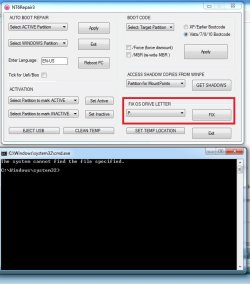
4 ) use my little program nt6repair to fix the drive letter. - NOT SUCCESSFUL: When I ran this program, I received the error message below...

https://www.sevenforums.com/attachm...e-d-but-programs-run-drive-c-nt6repairx86.zip

file
 

Attachments

  • The system cannot find the file specified.jpg
    The system cannot find the file specified.jpg
    55 KB · Views: 0

My Computer My Computer

At a glance

Windows 10 Home C1H12.30 gigahertz Intel Core i7-10510U12GBIntel UHD Graphics
Computer type
Laptop
Computer Manufacturer/Model Number
HP Laptop 17t-by200 CTO
OS
Windows 10 Home C1H1
CPU
2.30 gigahertz Intel Core i7-10510U
Motherboard
HP 865A 64.17
Memory
12GB
Graphics Card(s)
Intel UHD Graphics
Monitor(s) Displays
HP 27es
Are you pointing at the windows partition?

You might not have copied everything successfully. The file it is looking for is

firstly P:\windows\system32\config\Software

then it looks for

P:\windows\system32\config\System

Those files are hives - they have no file extension.

Take a look and see if the Software and System hives are there. You should also run it as adminstrator.
 

My Computers My Computers

  • At a glance

    7 X64i5 84002x8gb 3200mhz
    Computer type
    PC/Desktop
    OS
    7 X64
    CPU
    i5 8400
    Motherboard
    gigabyte b365m ds3h
    Memory
    2x8gb 3200mhz
    Hard Drives
    various
    PSU
    pure power 11 400w cm
    Case
    Coolermaster
    Cooling
    cryorig m9i
  • At a glance

    7x64g54008gb ddr4 2400
    Computer type
    PC/Desktop
    OS
    7x64
    CPU
    g5400
    Motherboard
    ga b365m ds3h
    Memory
    8gb ddr4 2400
    PSU
    xfx pro 450w
Are you pointing at the windows partition?

You might not have copied everything successfully. The file it is looking for is

firstly P:\windows\system32\config\Software PRESENT

then it looks for

P:\windows\system32\config\System PRESENT

Those files are hives - they have no file extension.

Take a look and see if the Software and System hives are there. You should also run it as adminstrator. SUCCESSFUL

However, it looks like it is still booting from the C; drive.
 

My Computer My Computer

At a glance

Windows 10 Home C1H12.30 gigahertz Intel Core i7-10510U12GBIntel UHD Graphics
Computer type
Laptop
Computer Manufacturer/Model Number
HP Laptop 17t-by200 CTO
OS
Windows 10 Home C1H1
CPU
2.30 gigahertz Intel Core i7-10510U
Motherboard
HP 865A 64.17
Memory
12GB
Graphics Card(s)
Intel UHD Graphics
Monitor(s) Displays
HP 27es
The OS letter will be C if that is what it was originally.
If nt6repair reported success, it will be fine.

Have a look in disk management and see if the new windows partition on the 1tb is listed as boot.

If the ssd is listed as system, you can remove the active flag from the ssd or change the boot order in bios. If the ssd is still marked active and first in the bios boot order, then you will continue to boot into the OS on the ssd.

Either remove the active flag from the ssd - tricky to do without 3rd party partitioner
or change the bios boot order putting the 1tb hd ahead of the ssd
or remove the ssd
 
Last edited:

My Computers My Computers

  • At a glance

    7 X64i5 84002x8gb 3200mhz
    Computer type
    PC/Desktop
    OS
    7 X64
    CPU
    i5 8400
    Motherboard
    gigabyte b365m ds3h
    Memory
    2x8gb 3200mhz
    Hard Drives
    various
    PSU
    pure power 11 400w cm
    Case
    Coolermaster
    Cooling
    cryorig m9i
  • At a glance

    7x64g54008gb ddr4 2400
    Computer type
    PC/Desktop
    OS
    7x64
    CPU
    g5400
    Motherboard
    ga b365m ds3h
    Memory
    8gb ddr4 2400
    PSU
    xfx pro 450w
Drawbacks going from SSD to HDD

Hi gfr92y,

I've tried that before with mixed results. SSDs don't defrag like HDD therefore the restore to the SSD is going to be "Extremely" fragmented and run slow as molasses until it gets somewhere sorted out with defragging. Just sharing my result when going backwards like that.
 

My Computer My Computer

At a glance

Win7 32 & 64bit vers.P4 3.8ghz to Intel Core 2 DuoUpto 8GBATI Radeon HD 3450's
Computer type
PC/Desktop
Computer Manufacturer/Model Number
Dell, Asus,HP, MSI.
OS
Win7 32 & 64bit vers.
CPU
P4 3.8ghz to Intel Core 2 Duo
Motherboard
MSI, Asus.
Memory
Upto 8GB
Graphics Card(s)
ATI Radeon HD 3450's
Hard Drives
Seagate's, WD's, Hitachi's, Samsung's, SanDisk SSD's, etc.
Antivirus
SEP
Browser
IE, Chrome, FireFox
:confused:
 

My Computers My Computers

  • At a glance

    7 X64i5 84002x8gb 3200mhz
    Computer type
    PC/Desktop
    OS
    7 X64
    CPU
    i5 8400
    Motherboard
    gigabyte b365m ds3h
    Memory
    2x8gb 3200mhz
    Hard Drives
    various
    PSU
    pure power 11 400w cm
    Case
    Coolermaster
    Cooling
    cryorig m9i
  • At a glance

    7x64g54008gb ddr4 2400
    Computer type
    PC/Desktop
    OS
    7x64
    CPU
    g5400
    Motherboard
    ga b365m ds3h
    Memory
    8gb ddr4 2400
    PSU
    xfx pro 450w

https://www.sevenforums.com/images/smilies/sarc.png

It works, but be prepared for that. I tried it once and after a short time just bit the bullet and did a fresh install on the HDD which ran acceptably after that. Once you go SSD it's really difficult going back because of the hugh performance hit, at least it was for me. Your mileage may vary.

You can always use the 1tb for "user data & backups" and the SSD strictly for OS and programs. That's actually a much smarter was of doing things anyway since you isolate the truly import info, your created data from the OS and program files which are easily replaceable.

Just partition the 1tb into 2 right down the middle and create 2 backups on the 2nd partition, one for the OS & prgm files and the other for User Data located on the 1st 1TB partition. If the system ever goes south on you it's a lot less time consuming simply restoring the OS & prgm files and you lose nothing and two copies of the user data. All of my systems are setup at the very least that way now. I usually do backs on separate spindles for added security, safety & reliability. For me, it was just a nature progression focused on user data vs. OS & prgm files.
 

My Computer My Computer

At a glance

Win7 32 & 64bit vers.P4 3.8ghz to Intel Core 2 DuoUpto 8GBATI Radeon HD 3450's
Computer type
PC/Desktop
Computer Manufacturer/Model Number
Dell, Asus,HP, MSI.
OS
Win7 32 & 64bit vers.
CPU
P4 3.8ghz to Intel Core 2 Duo
Motherboard
MSI, Asus.
Memory
Upto 8GB
Graphics Card(s)
ATI Radeon HD 3450's
Hard Drives
Seagate's, WD's, Hitachi's, Samsung's, SanDisk SSD's, etc.
Antivirus
SEP
Browser
IE, Chrome, FireFox
What made you think the OP is going to do a "restore to ssd".

Did you post on the wrong thread?
 

My Computers My Computers

  • At a glance

    7 X64i5 84002x8gb 3200mhz
    Computer type
    PC/Desktop
    OS
    7 X64
    CPU
    i5 8400
    Motherboard
    gigabyte b365m ds3h
    Memory
    2x8gb 3200mhz
    Hard Drives
    various
    PSU
    pure power 11 400w cm
    Case
    Coolermaster
    Cooling
    cryorig m9i
  • At a glance

    7x64g54008gb ddr4 2400
    Computer type
    PC/Desktop
    OS
    7x64
    CPU
    g5400
    Motherboard
    ga b365m ds3h
    Memory
    8gb ddr4 2400
    PSU
    xfx pro 450w
What made you think the OP is going to do a "restore to ssd".

Did you post on the wrong thread?

Nothing. It sounded like he is talking about restoring an SSD backup to an HDD. That's how I understood his post. Did I misunderstand his verbiage?

"Can I migrate OS + software from 120GB SSD to 1TB HD w/ 60GB software?
When I reinstalled my operating system on a Gateway DX4831-01e, at my son's encouragement, I installed the OS, Win 7 Pro, on a 120 GB SSD (c:\) and attempted to install all of the software on a 1 TB hard drive (p:\)."
 

My Computer My Computer

At a glance

Win7 32 & 64bit vers.P4 3.8ghz to Intel Core 2 DuoUpto 8GBATI Radeon HD 3450's
Computer type
PC/Desktop
Computer Manufacturer/Model Number
Dell, Asus,HP, MSI.
OS
Win7 32 & 64bit vers.
CPU
P4 3.8ghz to Intel Core 2 Duo
Motherboard
MSI, Asus.
Memory
Upto 8GB
Graphics Card(s)
ATI Radeon HD 3450's
Hard Drives
Seagate's, WD's, Hitachi's, Samsung's, SanDisk SSD's, etc.
Antivirus
SEP
Browser
IE, Chrome, FireFox
The OS letter will be C if that is what it was originally.

If nt6repair reported success, it will be fine.

Have a look in disk management and see if the new windows partition on the 1tb is listed as boot.

If the ssd is listed as system, you can remove the active flag from the ssd or change the boot order in bios.

If the ssd is still marked active and first in the bios boot order, then you will continue to boot into the OS on the ssd.

Either remove the active flag from the ssd - tricky to do without 3rd party partitioner or change the bios boot order putting the 1tb hd ahead of the ssd or remove the ssd

Got it... (1) I changed the BIOS boot order putting the 1TB HD P: drive ahead of the 120GB SSD C: drive, (2) Formatted the 120GB SSD C: drive and renamed it F:, (3) Changed the 1TB HD P: drive to C:, but do not remember how I did it.

Thanks!

gfr92y
 

My Computer My Computer

At a glance

Windows 10 Home C1H12.30 gigahertz Intel Core i7-10510U12GBIntel UHD Graphics
Computer type
Laptop
Computer Manufacturer/Model Number
HP Laptop 17t-by200 CTO
OS
Windows 10 Home C1H1
CPU
2.30 gigahertz Intel Core i7-10510U
Motherboard
HP 865A 64.17
Memory
12GB
Graphics Card(s)
Intel UHD Graphics
Monitor(s) Displays
HP 27es
Hi gfr92y,

I've tried that before with mixed results. SSDs don't defrag like HDD therefore the restore to the SSD is going to be "Extremely" fragmented and run slow as molasses until it gets somewhere sorted out with defragging. Just sharing my result when going backwards like that.


I followed the instruction use shadowcopyview [from nirsoft.net] to copy the entire contents of the shadow you just made onto your 1tb disk and shadowcopyview copied the Restore Point shadow to the 1TB HD folder-by-folder and file-by-file flawlessly. When I booted to the 1TB, I could not notice any difference from when I booted from the 120GB SSD.

Just curious... How did you do the transfer from the SSD to the HD?
 
Last edited:

My Computer My Computer

At a glance

Windows 10 Home C1H12.30 gigahertz Intel Core i7-10510U12GBIntel UHD Graphics
Computer type
Laptop
Computer Manufacturer/Model Number
HP Laptop 17t-by200 CTO
OS
Windows 10 Home C1H1
CPU
2.30 gigahertz Intel Core i7-10510U
Motherboard
HP 865A 64.17
Memory
12GB
Graphics Card(s)
Intel UHD Graphics
Monitor(s) Displays
HP 27es
[SNIP]

... Once you go SSD, it's really difficult going back because of the huge performance hit ...

[SNIP]


I really had no choice to migrate to the 1TB HD since the 120GB SSD filled up with software that did not give me the option where I wanted it to be installed. I had less than 11-12GB of free space on the SSD and was told that the limited free space on the OS drive was the cause of my frequent BSOD. My decision was made easier by the fact that my 12-year old Gateway did not "allow" the speed benefits of the SSD to be realized.

gfr92y


.
 

My Computer My Computer

At a glance

Windows 10 Home C1H12.30 gigahertz Intel Core i7-10510U12GBIntel UHD Graphics
Computer type
Laptop
Computer Manufacturer/Model Number
HP Laptop 17t-by200 CTO
OS
Windows 10 Home C1H1
CPU
2.30 gigahertz Intel Core i7-10510U
Motherboard
HP 865A 64.17
Memory
12GB
Graphics Card(s)
Intel UHD Graphics
Monitor(s) Displays
HP 27es
I followed the instruction use shadowcopyview [from nirsoft.net] to copy the entire contents of the shadow you just made onto your 1tb disk and shadowcopyview copied the Restore Point shadow to the 1TB HD folder-by-folder and file-by-file flawlessly. When I booted to the 1TB, I could not notice any difference from when I booted from the 120GB SSD.

Just curious... How did you do the transfer from the SSD to the HD?

I just made an image backup of the SSD drive and restored it to the HDD using Ghost 15.1. I would imagine and good imaging backup software would work.
 

My Computer My Computer

At a glance

Win7 32 & 64bit vers.P4 3.8ghz to Intel Core 2 DuoUpto 8GBATI Radeon HD 3450's
Computer type
PC/Desktop
Computer Manufacturer/Model Number
Dell, Asus,HP, MSI.
OS
Win7 32 & 64bit vers.
CPU
P4 3.8ghz to Intel Core 2 Duo
Motherboard
MSI, Asus.
Memory
Upto 8GB
Graphics Card(s)
ATI Radeon HD 3450's
Hard Drives
Seagate's, WD's, Hitachi's, Samsung's, SanDisk SSD's, etc.
Antivirus
SEP
Browser
IE, Chrome, FireFox
I really had no choice to migrate to the 1TB HD since the 120GB SSD filled up with software that did not give me the option where I wanted it to be installed. I had less than 11-12GB of free space on the SSD and was told that the limited free space on the OS drive was the cause of my frequent BSOD. My decision was made easier by the fact that my 12-year old Gateway did not "allow" the speed benefits of the SSD to be realized.

gfr92y


.

You could have simply formatted the 1TB as a Simple drive with 2 equal partitions and moved all your Documents, Music, Videos & Pictures to the 1st partition and added them to your Libraries. Then set them as the default save to folders and moved them to the top of the list.

If you filled up an 120GB SSD with program files, you must have a SHIPLOAD of software installed. It's usually the User Data that fills the drives up in the folder I listed above, not to mention Indexes & Recovery points.

Hmmmm, most of my boxes are old of which the HP DX5150's are the only ones that DON'T have ACHI, but they DO have RAID which utilizes ACHI when drives aren't setup in RAID. Even setting up your BIOS to use simple IDE with an SSD is going to be light years faster than the very fastest elctro/mech HDD's ever made.

I wish I had gotten to you sooner. I'm assuming you can have both drives installed (SSD & HDD) in the Gateway hanging off the mobo. Try my suggestion. Do a fresh Win install on the SSD (with the HDD unconnected) making the SSD the primary boot device, then reconnect your HDD so you can access it. Of course you'll need to reinstall your apps, but a fresh install usually makes all things right again. I've learned, when you're pulling your hair out troubleshooting, you're usually about 5 hours beyond when you should have just bitten the bullet and done a fresh install and reinstalls. :)

Hopefully you have a device you can move all your User Data to that is now on the HDD, then wipe the HDD and recreate a simple drive with at least 2 partitions. Use 1st one for User Data and subsequent partition(s) for Backups of both the SSD and the User Data and other storage. At least you'll have 2 copies of your User Data that way.
 

My Computer My Computer

At a glance

Win7 32 & 64bit vers.P4 3.8ghz to Intel Core 2 DuoUpto 8GBATI Radeon HD 3450's
Computer type
PC/Desktop
Computer Manufacturer/Model Number
Dell, Asus,HP, MSI.
OS
Win7 32 & 64bit vers.
CPU
P4 3.8ghz to Intel Core 2 Duo
Motherboard
MSI, Asus.
Memory
Upto 8GB
Graphics Card(s)
ATI Radeon HD 3450's
Hard Drives
Seagate's, WD's, Hitachi's, Samsung's, SanDisk SSD's, etc.
Antivirus
SEP
Browser
IE, Chrome, FireFox
You could have simply formatted the 1TB...

...you'll have 2 copies of your User Data that way.


I uninstalled all my software, moved Windows 7 Pro from the 120GB SSD to the 1TB HD, upgraded Windows 7 Pro to Windows 10 Pro, did a clean install of Windows 10 Pro, and re-installed all of my software.

Everything works perfectly except for a networking problem between my Windows 10 Pro, Windows 10 Home, Windows 7 Pro machine, and a 20-year old HP 3390 LaserJet, but I will worry about that next week.

Thanks for all you help.

Joe
 

My Computer My Computer

At a glance

Windows 10 Home C1H12.30 gigahertz Intel Core i7-10510U12GBIntel UHD Graphics
Computer type
Laptop
Computer Manufacturer/Model Number
HP Laptop 17t-by200 CTO
OS
Windows 10 Home C1H1
CPU
2.30 gigahertz Intel Core i7-10510U
Motherboard
HP 865A 64.17
Memory
12GB
Graphics Card(s)
Intel UHD Graphics
Monitor(s) Displays
HP 27es
Back
Top