Can I track Downloads in IE by MB / Desktop Icon Query

boweasel

New member
Power User
Local time
6:16 AM
Messages
678
When I used to use Windows XP, any files I was downloading would be visible in a horizontal bar indicator, indicating how many MBs had been downloaded, as well as the percentage completed. IE10 in Windows 7 does not seem to have that facility. It only gives me the % and download speed. Is there a way to get it to display the way it did in XP?

Secondly, whenever I create a desktop icon in IE it initially displays with the correct icon, but as soon as I reboot, the icon changes to a globe. If I right-click the icon and left-click Change Icon it does let me change it, but never to what it was originally.
 

My Computer My Computer

At a glance

Windows 7 home premium 64 bitAMD K103.00GB Dual-Channel DDR3 @ 532MHzATI AMD M880G with ATI Mobility Radeon HD 425...
Computer type
Laptop
OS
Windows 7 home premium 64 bit
CPU
AMD K10
Motherboard
Hewlett-Packard 1444 (Socket S1G4)
Memory
3.00GB Dual-Channel DDR3 @ 532MHz
Graphics Card(s)
ATI AMD M880G with ATI Mobility Radeon HD 4250 (HP)
Sound Card
Realtek
Screen Resolution
1366 x 768
Hard Drives
465GB Western Digital
Antivirus
MSE
I do not fully understand what you want to? As far as I know Windows 7 and IE10 give you at least as much information about the downloads than XP and older IE versions did.

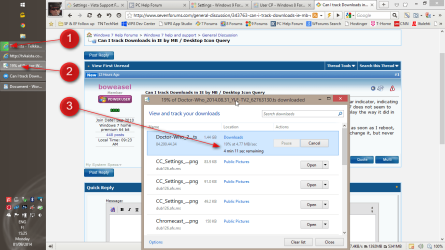
See the screenshot below (from Windows 8.1 and IE11 but still the same in 7 and IE10):

2014-09-01_15h25_08.png
(Click to enlarge.)​

  • #1 = The green indicator, relative to the size of taskbar button shows the percentage of total current downloads, the closer it is to the right edge of the taskbar button indicates bigger percentage
  • #2 = The same in digits is shown in IE Downloads tool taskbar button
  • #3 = The IE Downloads tool tells the speed of any current download at the moment and estimated time needed for the download to complete
Kari
 

My Computer My Computer

At a glance

Windows 10 Pro x64 EN-GB1.6 GHz Intel Core i7-720QM Processor6 GBATI Mobility Radeon HD 5850 Graphics
Computer type
Laptop
Computer Manufacturer/Model Number
HP ENVY 17-1150eg
OS
Windows 10 Pro x64 EN-GB
CPU
1.6 GHz Intel Core i7-720QM Processor
Memory
6 GB
Graphics Card(s)
ATI Mobility Radeon HD 5850 Graphics
Sound Card
Beats sound system with integrated subwoofer
Monitor(s) Displays
17" laptop display, 22" LED and 32" Full HD TV through HDMI
Screen Resolution
1600*900 (1), 1920*1080 (2&3)
Hard Drives
Internal: 2 x 500 GB SATA Hard Disk Drive 7200 rpm
External: 2TB for backups, 3TB USB3 network drive for media
Cooling
As Envy runs a bit warm, I have it on a Cooler Master pad
Keyboard
Logitech diNovo Media Desktop Laser (bluetooth)
Mouse
Logitech Performance Mouse MX
Internet Speed
50/10 Mbps VDSL
Antivirus
Windows Defender 4.3.9431.0
Browser
Maxthon 3.5.2., IE11
If you click on the View Downloads button at the lower right, then you will see the window Kari indicates.
 

My Computer My Computer

At a glance

Windows 10 Pro X64Intel Quad Core i7-4770 @ 3.4Ghz16.0GB PC3-12800 DDR3 SDRAM 1600 MHzIntel Integrated HD Graphics
Computer type
PC/Desktop
Computer Manufacturer/Model Number
Lenovo IdeaCenter 450
OS
Windows 10 Pro X64
CPU
Intel Quad Core i7-4770 @ 3.4Ghz
Memory
16.0GB PC3-12800 DDR3 SDRAM 1600 MHz
Graphics Card(s)
Intel Integrated HD Graphics
Sound Card
Realtek HD Audio
Monitor(s) Displays
HP 22" LCD
Screen Resolution
1680 x 1050
Hard Drives
250GB Samsung EVO SATA-3 SSD
2TB Seagate ST2000DM001 SATA-2
1.5TB Seagate ST3150041AS SATA
Keyboard
Dell USB
Mouse
Lenovo USB
Internet Speed
Cable via Road Runner 3MB Upload, 30MB Download
Antivirus
Windows Defender, MBAM Pro, MBAE
Browser
Seamonkey
Other Info
UEFI/GPT
PLDS DVD-RW DH16AERSH
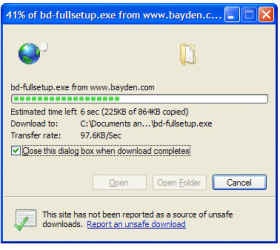
On Windows XP and IE8 when I would download something it would open up a blue window which would contain the following on the top line:

Estimated Time Left - 3 hr 45 min (1.54 MB of 714 MB completed)

I see no facility for that informational display in Windows 7 & IE10.

And what about the desktop icon?
 

My Computer My Computer

At a glance

Windows 7 home premium 64 bitAMD K103.00GB Dual-Channel DDR3 @ 532MHzATI AMD M880G with ATI Mobility Radeon HD 425...
Computer type
Laptop
OS
Windows 7 home premium 64 bit
CPU
AMD K10
Motherboard
Hewlett-Packard 1444 (Socket S1G4)
Memory
3.00GB Dual-Channel DDR3 @ 532MHz
Graphics Card(s)
ATI AMD M880G with ATI Mobility Radeon HD 4250 (HP)
Sound Card
Realtek
Screen Resolution
1366 x 768
Hard Drives
465GB Western Digital
Antivirus
MSE
I'm assuming that since this had now slipped back to page 4, either nobody knows or nobody understands (or nobody cares). If it's door number 2, here is a screen image of what the IE8 downloads looked like in XP. See the line that reads Estimated time left? See the text in parentheses? That's the information I'm looking for in IE10 /W7.
 

Attachments

  • Capture2.PNG
    Capture2.PNG
    35.7 KB · Views: 9

My Computer My Computer

At a glance

Windows 7 home premium 64 bitAMD K103.00GB Dual-Channel DDR3 @ 532MHzATI AMD M880G with ATI Mobility Radeon HD 425...
Computer type
Laptop
OS
Windows 7 home premium 64 bit
CPU
AMD K10
Motherboard
Hewlett-Packard 1444 (Socket S1G4)
Memory
3.00GB Dual-Channel DDR3 @ 532MHz
Graphics Card(s)
ATI AMD M880G with ATI Mobility Radeon HD 4250 (HP)
Sound Card
Realtek
Screen Resolution
1366 x 768
Hard Drives
465GB Western Digital
Antivirus
MSE
But you have that information in later IE browsers, too, as I explained in my previous post. It's just told in more logical and easy to understand form, in percents.
 

My Computer My Computer

At a glance

Windows 10 Pro x64 EN-GB1.6 GHz Intel Core i7-720QM Processor6 GBATI Mobility Radeon HD 5850 Graphics
Computer type
Laptop
Computer Manufacturer/Model Number
HP ENVY 17-1150eg
OS
Windows 10 Pro x64 EN-GB
CPU
1.6 GHz Intel Core i7-720QM Processor
Memory
6 GB
Graphics Card(s)
ATI Mobility Radeon HD 5850 Graphics
Sound Card
Beats sound system with integrated subwoofer
Monitor(s) Displays
17" laptop display, 22" LED and 32" Full HD TV through HDMI
Screen Resolution
1600*900 (1), 1920*1080 (2&3)
Hard Drives
Internal: 2 x 500 GB SATA Hard Disk Drive 7200 rpm
External: 2TB for backups, 3TB USB3 network drive for media
Cooling
As Envy runs a bit warm, I have it on a Cooler Master pad
Keyboard
Logitech diNovo Media Desktop Laser (bluetooth)
Mouse
Logitech Performance Mouse MX
Internet Speed
50/10 Mbps VDSL
Antivirus
Windows Defender 4.3.9431.0
Browser
Maxthon 3.5.2., IE11
But you have that information in later IE browsers, too, as I explained in my previous post. It's just told in more logical and easy to understand form, in percents.
As anyone can plainly see from the image I submitted, in IE8 the percent completed was displayed at the very top of the window, in blue. In the example I posted it says 41% of bd-fullset.exe. So I already had that information in XP. And I certainly realize that the percent completed also displays in IE10. I want to see the number of KBs or MBs downloaded.

But you tell me 'you have that information in later IE browsers, too, as I explained in my previous post'. Where exactly, is that information displayed in later browsers? If I were downloading that file in IE10 and I hit the 41% mark, where would I see '225KB of 846KB copied'?
 

My Computer My Computer

At a glance

Windows 7 home premium 64 bitAMD K103.00GB Dual-Channel DDR3 @ 532MHzATI AMD M880G with ATI Mobility Radeon HD 425...
Computer type
Laptop
OS
Windows 7 home premium 64 bit
CPU
AMD K10
Motherboard
Hewlett-Packard 1444 (Socket S1G4)
Memory
3.00GB Dual-Channel DDR3 @ 532MHz
Graphics Card(s)
ATI AMD M880G with ATI Mobility Radeon HD 4250 (HP)
Sound Card
Realtek
Screen Resolution
1366 x 768
Hard Drives
465GB Western Digital
Antivirus
MSE
I'm signing out after this, trying to explain this one more time.

What I meant is that the latest versions of IE have the information about how much is downloaded there, too, but instead of kilobytes and megabytes it's told in more understandable form, in percents.

I have not a faintest clue why anyone would also need that told in bytes; for anyone past third grade the percents make more sense. I do not know why Microsoft removed the bytes from that dialog but I wouldn't be surprised to hear that this is the reason: You do not need bytes, you have percents.

That's how IE does it nowadays. You might find what you are lookng for in other browsers.
 

My Computer My Computer

At a glance

Windows 10 Pro x64 EN-GB1.6 GHz Intel Core i7-720QM Processor6 GBATI Mobility Radeon HD 5850 Graphics
Computer type
Laptop
Computer Manufacturer/Model Number
HP ENVY 17-1150eg
OS
Windows 10 Pro x64 EN-GB
CPU
1.6 GHz Intel Core i7-720QM Processor
Memory
6 GB
Graphics Card(s)
ATI Mobility Radeon HD 5850 Graphics
Sound Card
Beats sound system with integrated subwoofer
Monitor(s) Displays
17" laptop display, 22" LED and 32" Full HD TV through HDMI
Screen Resolution
1600*900 (1), 1920*1080 (2&3)
Hard Drives
Internal: 2 x 500 GB SATA Hard Disk Drive 7200 rpm
External: 2TB for backups, 3TB USB3 network drive for media
Cooling
As Envy runs a bit warm, I have it on a Cooler Master pad
Keyboard
Logitech diNovo Media Desktop Laser (bluetooth)
Mouse
Logitech Performance Mouse MX
Internet Speed
50/10 Mbps VDSL
Antivirus
Windows Defender 4.3.9431.0
Browser
Maxthon 3.5.2., IE11
I'm signing out after this, trying to explain this one more time.

What I meant is that the latest versions of IE have the information about how much is downloaded there, too, but instead of kilobytes and megabytes it's told in more understandable form, in percents.

I have not a faintest clue why anyone would also need that told in bytes; for anyone past third grade the percents make more sense. I do not know why Microsoft removed the bytes from that dialog but I wouldn't be surprised to hear that this is the reason: You do not need bytes, you have percents.

That's how IE does it nowadays. You might find what you are lookng for in other browsers.
I had some problems with multipart rar files - although the downloads stopped at 100% the files were not complete so the extract failed. Since I then had to re-download all the parts, I was looking for a simple way to see just how many megabytes had been downloaded.

Had you simply responded to my original post by saying 'That particular download statistic is not available in later IE browsers', we all would have saved some time.

And never mind about the desktop icon shortcut problem. I solved that myself.
 

My Computer My Computer

At a glance

Windows 7 home premium 64 bitAMD K103.00GB Dual-Channel DDR3 @ 532MHzATI AMD M880G with ATI Mobility Radeon HD 425...
Computer type
Laptop
OS
Windows 7 home premium 64 bit
CPU
AMD K10
Motherboard
Hewlett-Packard 1444 (Socket S1G4)
Memory
3.00GB Dual-Channel DDR3 @ 532MHz
Graphics Card(s)
ATI AMD M880G with ATI Mobility Radeon HD 4250 (HP)
Sound Card
Realtek
Screen Resolution
1366 x 768
Hard Drives
465GB Western Digital
Antivirus
MSE
Back
Top