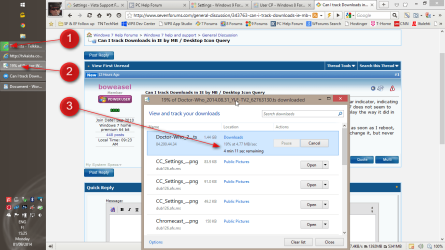
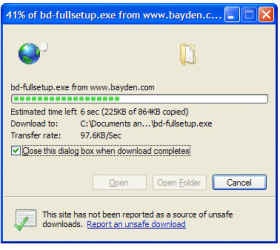
When I used to use Windows XP, any files I was downloading would be visible in a horizontal bar indicator, indicating how many MBs had been downloaded, as well as the percentage completed. IE10 in Windows 7 does not seem to have that facility. It only gives me the % and download speed. Is there a way to get it to display the way it did in XP?
Secondly, whenever I create a desktop icon in IE it initially displays with the correct icon, but as soon as I reboot, the icon changes to a globe. If I right-click the icon and left-click Change Icon it does let me change it, but never to what it was originally.
Secondly, whenever I create a desktop icon in IE it initially displays with the correct icon, but as soon as I reboot, the icon changes to a globe. If I right-click the icon and left-click Change Icon it does let me change it, but never to what it was originally.
My Computer
At a glance
Windows 7 home premium 64 bitAMD K103.00GB Dual-Channel DDR3 @ 532MHzATI AMD M880G with ATI Mobility Radeon HD 425...
- Computer type
- Laptop
- OS
- Windows 7 home premium 64 bit
- CPU
- AMD K10
- Motherboard
- Hewlett-Packard 1444 (Socket S1G4)
- Memory
- 3.00GB Dual-Channel DDR3 @ 532MHz
- Graphics Card(s)
- ATI AMD M880G with ATI Mobility Radeon HD 4250 (HP)
- Sound Card
- Realtek
- Screen Resolution
- 1366 x 768
- Hard Drives
- 465GB Western Digital
- Antivirus
- MSE