- Local time
- 10:26 AM
- Messages
- 132
I was wanting to find one of the cheapest possible ways to play Elder Scrolls Online with my wife. I am a console gamer and she is a pc gamer.
I found a cheap $80 slim HP desktop at my job.
The specs of my computer are found at this link:
HP Pavilion Slimline s5123w Desktop PC Product Specifications | HP® Customer Support
As you can see, I have a 220w power supply.
In order to get decent graphics, I bought a Geforce GT 1030. It says it recommend a power supply of 300w minimum, but after much research online it seems like people were very assuring that using it shouldn't cause problems on a 220w power supply.
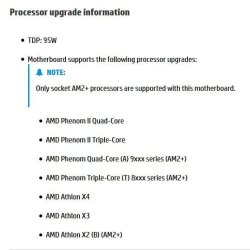
But with that being said, the processor I have is a single core processor using 45w of power. I have a AMD Athlon II (I believe it's the x2 250), and it looks like it uses 65w of power but would perform better.
I'm worried about even an extra 20w and wanted to get advice.
Based on my setup, 4 GB of RAM, THE GT 1030 video card, a cd drive (I can unplug and not use if that would help), a few usb ports, etc.
Will this upgrade hurt me? Would you consider this a safe upgrade?
Not looking for a rant about switching to another box that can fit a better power supply... I am looking to keep things slim and I want this to fit under my tv easily. I also want to keep the price as low as possible, and I already own this secondary processor. So just wanting to know if this upgrade should be safe based off my cpu specs and the power I'll be drawing
I found a cheap $80 slim HP desktop at my job.
The specs of my computer are found at this link:
HP Pavilion Slimline s5123w Desktop PC Product Specifications | HP® Customer Support
As you can see, I have a 220w power supply.
In order to get decent graphics, I bought a Geforce GT 1030. It says it recommend a power supply of 300w minimum, but after much research online it seems like people were very assuring that using it shouldn't cause problems on a 220w power supply.
But with that being said, the processor I have is a single core processor using 45w of power. I have a AMD Athlon II (I believe it's the x2 250), and it looks like it uses 65w of power but would perform better.
I'm worried about even an extra 20w and wanted to get advice.
Based on my setup, 4 GB of RAM, THE GT 1030 video card, a cd drive (I can unplug and not use if that would help), a few usb ports, etc.
Will this upgrade hurt me? Would you consider this a safe upgrade?
Not looking for a rant about switching to another box that can fit a better power supply... I am looking to keep things slim and I want this to fit under my tv easily. I also want to keep the price as low as possible, and I already own this secondary processor. So just wanting to know if this upgrade should be safe based off my cpu specs and the power I'll be drawing
Last edited:
My Computer
At a glance
Windows 7 Home Premium 64 Bit
- OS
- Windows 7 Home Premium 64 Bit