Solved Can not install Virtual PC

rftech

New member
Member
Local time
6:22 PM
Messages
43
I have tried to install Virtual PC on my computer and get this message, This update is not applicable for this computer. I have searched the internet for answers and got a couple good returns. One was to run System file Checker in command prompt, I did and the results were that nothing was found to be bad. I also ran windows update and it said that windows is up to date. Not sure what to do next, could someone please help.
I am running Windows 7 Pro SP1, 2.7ghz, AMD 64 dual core processor, 4gigs of ram. before I downloaded the Virtual PC installation file, I ran a check to see if my computer could run virtual pc, the results came back that yes it can. I proceeded to download the virtual pc installation file and then I tried to install it, that is when I got the message. I am now stumped and not sure where to go from here. I want to use XP Mode, and everything I have read about it, is that you have to install virtual pc first. Please help, I would really like get virtual pc and xp mode installed so I can use them. I have installed virtual pc before and never had that message show up before. I have used virtual box and have never had any trouble with it, Could I install it and install xp mode in it?
 

My Computer

OS
Windows 7 pro
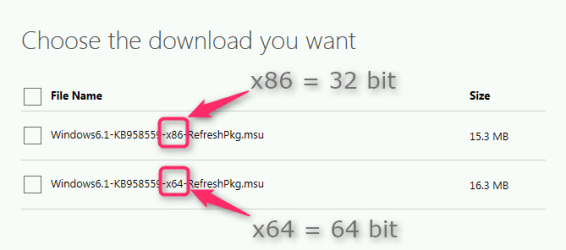
I suspect that you have tried to install a 64 bit Virtual PC on a 32 bit Windows 7, or vice versa.

The error message you get normally means you have tried to install the wrong bit version. As a 32 bit Windows can be installed on a PC running on a 64 bit processor, and you did not tell (neither does your system specs) if you have a 32 bit or a 64 bit Windows 7 Professional, I can not tell you which one you have to install.

Download and install the correct bit version of Windows Virtual PC. Screenshot from Microsoft Download Center

2013-12-03_23h51_30.png

Kari
 

My Computer

Computer type
Laptop
Computer Manufacturer/Model Number
HP ENVY 17-1150eg
OS
Windows 10 Pro x64 EN-GB
CPU
1.6 GHz Intel Core i7-720QM Processor
Memory
6 GB
Graphics Card(s)
ATI Mobility Radeon HD 5850 Graphics
Sound Card
Beats sound system with integrated subwoofer
Monitor(s) Displays
17" laptop display, 22" LED and 32" Full HD TV through HDMI
Screen Resolution
1600*900 (1), 1920*1080 (2&3)
Hard Drives
Internal: 2 x 500 GB SATA Hard Disk Drive 7200 rpm
External: 2TB for backups, 3TB USB3 network drive for media
Cooling
As Envy runs a bit warm, I have it on a Cooler Master pad
Keyboard
Logitech diNovo Media Desktop Laser (bluetooth)
Mouse
Logitech Performance Mouse MX
Internet Speed
50/10 Mbps VDSL
Antivirus
Windows Defender 4.3.9431.0
Browser
Maxthon 3.5.2., IE11
can not install virtual pc

Sorry, I forgot to mention it. I am running Windows 7 Pro 64 bit. I was trying to install the 64 bit version of virtual pc and I got that message. I would also like to thank you for the quick reply. I downloaded the file 2 different times thinking that something could have happened the first time, but when i got the same message the second time I tried searching for the answer.
 

My Computer

OS
Windows 7 pro

My Computer

Computer Manufacturer/Model Number
HP, Dell, Gateway, Toshiba - 4 laptops and 2 desktops
OS
Vista, Windows7, Mint Mate, Zorin, Windows 8
CPU
from 1.6GHz Duo to i7
Monitor(s) Displays
2x HP w2207
Hard Drives
5x HDD, 7x SSD, 12x Externals
Keyboard
with trackball - no mices
Mouse
Trackball mice
Internet Speed
DSL 6000
Thank you for the suggestion, I also like VMware Player better, I just already have VBox downloaded, so I wouldn't have to redownload it. I just thought that they probably have an new version out, so I would have to download it. I want to thank you for the reply and for the suggestion again, as I appreciate the suggestion. I am still going to figure out the reason for the initial problem.
 

My Computer

OS
Windows 7 pro
Last edited:

My Computer

Computer type
PC/Desktop
Computer Manufacturer/Model Number
Self built custom
OS
64-bit Windows 11 Pro for Workstations
CPU
Intel i7-8700K OC'd to 5 GHz
Motherboard
ASUS ROG Maximus XI Formula Z390
Memory
64 GB (4x16GB) G.SKILL TridentZ RGB DDR4 3600 MHz
Graphics Card(s)
ASUS ROG-STRIX-GTX1080TI-O11G-GAMING
Sound Card
Integrated
Monitor(s) Displays
2 x Samsung Odyssey G7 27"
Screen Resolution
2560x1440
Hard Drives
1TB Samsung 990 PRO M.2,
4TB Samsung 990 PRO PRO M.2,
TerraMaster F8 SSD Plus NAS
PSU
Seasonic Prime Titanium 850W
Case
Thermaltake Core P3
Cooling
Corsair Hydro H115i
Keyboard
Logitech wireless K800
Mouse
Logitech MX Master 4
Internet Speed
2 Gb/s Download and 100 Mb/s Upload
Antivirus
Malwarebyte Anti-Malware Premium
Browser
Google Chrome
Other Info
Logitech Z625 speaker system,
Logitech BRIO 4K Pro webcam,
HP Color LaserJet Pro MFP M477fdn,
APC SMART-UPS RT 1000 XL - SURT1000XLI,
Galaxy S23 Plus phone
Thank you Brink, I will check after I get home as I have to head off to work this morning. Thank you again for the suggestion.
 

My Computer

OS
Windows 7 pro
updated- 12-15-2013:
Note - The following Microsoft pages referenced in this post are obsolete. According to Kari's post below, KB977206 is now built-into Windows Virtual Machine and the XP Mode products.

Therefore it's no longer necessary to download and install KB977206.

Thank You Kari for clearing that up.
===============================================================

MS also has an update to be able to get around the HAV requirement. The update is the SW workaround if your PC does not include HAV.

----------------

---ref: Download KB977206 to run Windows XP Mode without hardware virtualization - Instant Fundas

Download KB977206 to run Windows XP Mode without hardware virtualization

The other day, Microsoft announced that they had done away with the hardware virtualization
requirement to run Windows XP Mode. This update KB977206 is now available for download.
If you try to install Windows Virtual PC and Windows XP Mode on a computer with a processor
that does not support hardware virtualization, you receive one of the following error
messages:
Unable to start Windows Virtual PC because hardware-assisted virtualization is disabled

---There's one for x86 and one for 64bit machines

-----------------
MS main page: Install and use Windows XP Mode in Windows 7


Find out whether your computer's CPU is capable of hardware-assisted virtualization. To check, download and run the Hardware-Assisted Virtualization Detection Tool.
  • If you receive the message “This computer is configured with hardware-assisted virtualization,” you can run Windows Virtual PC and Windows XP Mode. See the instructions below.
  • If you receive the error message "There is no hardware-assisted virtualization support in the system," your computer's CPU doesn't support hardware-assisted virtualization. You can still use Windows XP Mode by installing an update to Windows 7. See Why am I receiving errors about hardware-assisted virtualization (HAV) when I try to use Windows XP Mode and Windows Virtual PC?. Be aware that XP Mode will run much better if hardware-assisted virtualization can be enabled.
Technical info and download page (from above):

I don't know if this helps... just thought I would throw it into the mix.
 
Last edited:

My Computer

Computer type
Laptop
OS
win7 64bit Ult. using: XP Mode, in English or Español, SUA, Bitlocker
Memory
8GB - included when purchased.
Monitor(s) Displays
two: Laptop: 1366x768 and HP 1024x768.
Hard Drives
1: 750GB
Keyboard
Second: PS2 connection Compaq kboard, used w/adapter cable.
Mouse
USB mouse.
Antivirus
MS Security Essentials
Other Info
XP Mode Apps used: VC6 C++ and MSDN help as virtual PC apps - one for ea. monitor.
Tri-boot machine. Has Ubuntu 12.04 and Win 8.0 on as well - both used seldomly.
MS also has an update to be able to get around the HAV requirement. The update is the SW workaround if your PC does not include HAV.
That is old news, no longer valid after Service Pack 1. Windows 7 SP 1 can run Windows Virtual PC and XP Mode with or without HAV, no need to download and install the update mentioned in the old article Dperecky linked to above.

Really: Do not install KB977206 update.

Microsoft (http://support.microsoft.com/kb/977206/en-us):

Note

This update is included in the Windows Virtual PC package for Windows 7 Service Pack 1 systems: http://www.microsoft.com/download/en/details.aspx?displaylang=en&id=3702

A good example why these things should rather be checked from valid sources before posting, instead of referring to obsolete old articles on dubious websites.

Kari
 

My Computer

Computer type
Laptop
Computer Manufacturer/Model Number
HP ENVY 17-1150eg
OS
Windows 10 Pro x64 EN-GB
CPU
1.6 GHz Intel Core i7-720QM Processor
Memory
6 GB
Graphics Card(s)
ATI Mobility Radeon HD 5850 Graphics
Sound Card
Beats sound system with integrated subwoofer
Monitor(s) Displays
17" laptop display, 22" LED and 32" Full HD TV through HDMI
Screen Resolution
1600*900 (1), 1920*1080 (2&3)
Hard Drives
Internal: 2 x 500 GB SATA Hard Disk Drive 7200 rpm
External: 2TB for backups, 3TB USB3 network drive for media
Cooling
As Envy runs a bit warm, I have it on a Cooler Master pad
Keyboard
Logitech diNovo Media Desktop Laser (bluetooth)
Mouse
Logitech Performance Mouse MX
Internet Speed
50/10 Mbps VDSL
Antivirus
Windows Defender 4.3.9431.0
Browser
Maxthon 3.5.2., IE11
I found solution

I would like to thank everybody that replied to my post, I actually found what was happening last night, virtual pc was installed but the installation was corrupted and XP Mode was also installed. I uninstalled XP Mode and Virtual PC, downloaded both again and then installed both again, that fixed the problem. After all that everything worked as designed. I consider the problem solved.
 

My Computer

OS
Windows 7 pro
Great news. Thank you for posting back with your results. :)
 

My Computer

Computer type
PC/Desktop
Computer Manufacturer/Model Number
Self built custom
OS
64-bit Windows 11 Pro for Workstations
CPU
Intel i7-8700K OC'd to 5 GHz
Motherboard
ASUS ROG Maximus XI Formula Z390
Memory
64 GB (4x16GB) G.SKILL TridentZ RGB DDR4 3600 MHz
Graphics Card(s)
ASUS ROG-STRIX-GTX1080TI-O11G-GAMING
Sound Card
Integrated
Monitor(s) Displays
2 x Samsung Odyssey G7 27"
Screen Resolution
2560x1440
Hard Drives
1TB Samsung 990 PRO M.2,
4TB Samsung 990 PRO PRO M.2,
TerraMaster F8 SSD Plus NAS
PSU
Seasonic Prime Titanium 850W
Case
Thermaltake Core P3
Cooling
Corsair Hydro H115i
Keyboard
Logitech wireless K800
Mouse
Logitech MX Master 4
Internet Speed
2 Gb/s Download and 100 Mb/s Upload
Antivirus
Malwarebyte Anti-Malware Premium
Browser
Google Chrome
Other Info
Logitech Z625 speaker system,
Logitech BRIO 4K Pro webcam,
HP Color LaserJet Pro MFP M477fdn,
APC SMART-UPS RT 1000 XL - SURT1000XLI,
Galaxy S23 Plus phone
Good to hear that you're up and running.
 

My Computer

Computer type
Laptop
OS
win7 64bit Ult. using: XP Mode, in English or Español, SUA, Bitlocker
Memory
8GB - included when purchased.
Monitor(s) Displays
two: Laptop: 1366x768 and HP 1024x768.
Hard Drives
1: 750GB
Keyboard
Second: PS2 connection Compaq kboard, used w/adapter cable.
Mouse
USB mouse.
Antivirus
MS Security Essentials
Other Info
XP Mode Apps used: VC6 C++ and MSDN help as virtual PC apps - one for ea. monitor.
Tri-boot machine. Has Ubuntu 12.04 and Win 8.0 on as well - both used seldomly.
Back
Top