Solved Can only access Google / Yahoo websites

ltvvaughn

New member
Local time
5:19 AM
Messages
20
I have read other similar threads but none of them seem to be exactly my problem.

I have an Acer Aspire 5742z-4404 laptop with Windows 7 Home Premium, 64 bit. There are times that I am unable to access any website except Google or Yahoo. This seems to happen intermittently. I am able to use IE9 or Firefox for a few minutes to a couple hours and then I can't pull up any site except Google and sometimes Yahoo. Any other site gives me a message, "The connection to the server was reset" on Firefox, or something like that. IE simply tells me it is unable to display the page. If I walk away for a while (anywhere from 5-15 minutes) and then try to access a different site, it will work. I am currently working from a hotel room and have been in contact with their internet provider tech service numerous times. They have given me a static IP, a new default gateway, new DNS server addresses and a proxy server. These seemed to help temporarily, but then the same issue would arise again. I always have a good connection to the network.

I took my laptop back to my home wireless network where I never had issues before. Now I am having the same problem there. I have tried dnsflush, which seemed to work initially but now has little or no effect. I am able to ping the websites that will not pull up. I tried uninstalling Avast! anti virus and reinstalling with no effect. I've scanned for viruses (Avast!) and malware/adware (Spybot S&D) several times with no results. The other Windows 7 computers on my home wireless network have no issues, nor does my Android phone. The Android phone works without any issues at the hotel and on the home network as well. It appears that it is something is askew with this particular computer.

Any ideas ? ? ? ? ? ? ? ?
 

My Computer My Computer

Computer Manufacturer/Model Number
Acer
OS
Windows 7 Home Premium 64
CPU
Intel P6200 2.13 GHz
Motherboard
Acer Aspire 5742Z
Memory
3GB DDR3
Graphics Card(s)
Intel(R) HD Graphics
Sound Card
Realtek High Definition Audio
Hard Drives
WDC WD5000BPVT-22HXZT1
Sounds like a DNS issue, have you manually set this yourself?

Try going to your command prompt by going to your start menu, typing in CMD and running the search result that comes up then type in "ping websitegoeshere.com" <= But put the website you're trying to go there instead of my example.

If you're getting good response but still cant browse let us know. If you get no response but other computers/phones can see it then it'll be either DNS or Routing issue.
 

My Computer My Computer

Computer Manufacturer/Model Number
ASUS
OS
Windows 7 Ultimate x64, Windows 7 Professional x64, Windows XP x64 SP3
CPU
i7-2630QM
Memory
32.00 GB
Graphics Card(s)
nVidia GTX 560M
Monitor(s) Displays
Default 17`` & LG IPS234
Screen Resolution
1920 x 1080
Hard Drives
Internal:
120 SSD - OCZ Agility 3
750 HDD - Seagate Misc

External:
1000 HDD - Buffalo Ministation 3.0
2048 NHDD - Seagate Barracuda Green (Over 1GBPS Network)
Keyboard
tT eSports Challenger Ultimate
Mouse
Razer Deathadder Black Edition
Internet Speed
100 Mbps + 60 Mbps
DNS

I have manually set the DNS with no success; I still have the same issue. I am able to ping the websites I can't access through a browser. I disabled Internet Explorer in Windows and used only Firefox. That seemed to help for a few minutes, but then I started having the same issues again. Someone else told me to uninstall the wireless adapter and reinstall it. I've done that but still have some issues.

Any other ideas?

LtV
 

My Computer My Computer

Computer Manufacturer/Model Number
Acer
OS
Windows 7 Home Premium 64
CPU
Intel P6200 2.13 GHz
Motherboard
Acer Aspire 5742Z
Memory
3GB DDR3
Graphics Card(s)
Intel(R) HD Graphics
Sound Card
Realtek High Definition Audio
Hard Drives
WDC WD5000BPVT-22HXZT1
I have manually set the DNS with no success; I still have the same issue. I am able to ping the websites I can't access through a browser. I disabled Internet Explorer in Windows and used only Firefox. That seemed to help for a few minutes, but then I started having the same issues again. Someone else told me to uninstall the wireless adapter and reinstall it. I've done that but still have some issues.

Any other ideas?

LtV

It sounds like winsock or TCP/IP is messed up.

Winsock entries tells Windows 7 how to access your network services. Additionally, your TCP/IP protocol can be corrupted. The TCP/IP protocol is a stack of 4 layers that includes several transport layers, but when this stack is corrupt you will constantly have connectivity issues.

Enter the following commands into an elevated command prompt one at a time, hit enter after each one then reboot the system. :)
netsh winsock reset catalog (reset winsock entries)

netsh int ip reset reset.log hit (reset TCP/IP stack)
 

My Computer My Computer

Computer type
PC/Desktop
Computer Manufacturer/Model Number
Home built
OS
Windows 7 Ult, Windows 8.1 Pro,
CPU
Q9650-4.275GHz, E8600 4.5GHz, E6750-3.8GHz
Motherboard
Evga 780i FTW
Memory
G.Skill PC2 9600 1200Mhz 5 5 5 15 2T
Graphics Card(s)
GTX480
Sound Card
Asus Xonar D2
Monitor(s) Displays
HannsG
Screen Resolution
1680X1050
Hard Drives
GSkill Phoenix Pro 120GB SSD
PSU
ThermalTake Toughpower 1000Watt modular
Case
ThermalTake XaserV
Cooling
Xigmatek S1283
Keyboard
Logitech G15
Mouse
Logitech G9
Internet Speed
T1
chev65,

Thanks for the GREAT info! I ran the two commands as you suggested and things cleared up. I waited a couple of days to see if it would stay working and it has.

Thanks again for your wisdom!

LtV
 

My Computer My Computer

Computer Manufacturer/Model Number
Acer
OS
Windows 7 Home Premium 64
CPU
Intel P6200 2.13 GHz
Motherboard
Acer Aspire 5742Z
Memory
3GB DDR3
Graphics Card(s)
Intel(R) HD Graphics
Sound Card
Realtek High Definition Audio
Hard Drives
WDC WD5000BPVT-22HXZT1
Sorry to say that the problem is back. I run the "netsh" commands and reboot. It helps for a while but then the problem returns. Sometimes I can run the commands and it will work without rebooting. Sometimes I can pull up several different Google sites and then things will work. I'm beginning to think it has something to do with Google and something they put on my machine. There are tons of others having the same issue. It doesn't seem to matter whether its a MAC or PC. The only device I can say I haven't seen having this problem is my phone. Some are having the problem on wireless networks and others on a wired connection.

Any ideas on what might be causing this to reoccur? It's becoming very annoying, not to mention cutting into productivity!

HELP ! ! !

LtV
 

My Computer My Computer

Computer Manufacturer/Model Number
Acer
OS
Windows 7 Home Premium 64
CPU
Intel P6200 2.13 GHz
Motherboard
Acer Aspire 5742Z
Memory
3GB DDR3
Graphics Card(s)
Intel(R) HD Graphics
Sound Card
Realtek High Definition Audio
Hard Drives
WDC WD5000BPVT-22HXZT1
Sorry to say that the problem is back. I run the "netsh" commands and reboot. It helps for a while but then the problem returns. Sometimes I can run the commands and it will work without rebooting. Sometimes I can pull up several different Google sites and then things will work. I'm beginning to think it has something to do with Google and something they put on my machine. There are tons of others having the same issue. It doesn't seem to matter whether its a MAC or PC. The only device I can say I haven't seen having this problem is my phone. Some are having the problem on wireless networks and others on a wired connection.

Any ideas on what might be causing this to reoccur? It's becoming very annoying, not to mention cutting into productivity!

HELP ! ! !
LtV

Rather than a networking problem it sounds like a virus is on your system, have you run any scans with malware bytes or any others?

Which A/V software are you running?
 

My Computer My Computer

Computer type
PC/Desktop
Computer Manufacturer/Model Number
Home built
OS
Windows 7 Ult, Windows 8.1 Pro,
CPU
Q9650-4.275GHz, E8600 4.5GHz, E6750-3.8GHz
Motherboard
Evga 780i FTW
Memory
G.Skill PC2 9600 1200Mhz 5 5 5 15 2T
Graphics Card(s)
GTX480
Sound Card
Asus Xonar D2
Monitor(s) Displays
HannsG
Screen Resolution
1680X1050
Hard Drives
GSkill Phoenix Pro 120GB SSD
PSU
ThermalTake Toughpower 1000Watt modular
Case
ThermalTake XaserV
Cooling
Xigmatek S1283
Keyboard
Logitech G15
Mouse
Logitech G9
Internet Speed
T1
I am using Avast! anti virus and Spybot S&D. I've run several virus scans including boot time scans and have no issues. I have now removed nearly everything "Google" on my machine. I uninstalled Google Earth and removed every trace in the registry with a registry cleaner (Auslogics). It seems to have helped but I have had one incident since removing it. It cleared up very quickly so I'm not sure it was due to the same issue I've been having. I haven't checked to see if anything "Google" has reappeared yet.

I don't know if this has anything to do with it, but I was having problems with googleads.com showing up in my browser (IE9). I would go to a website and when I would click on the back arrow, nothing would happen. I right clicked on the back arrow and would see "googleads". I would have to go back 2-5 times to get past all the "googleads". It was shortly after this began that I started having the problem of being able to get only the "Google" websites sometimes.

I've found that several people have had both issues but I never put the two together until just recently.

LtV
 

My Computer My Computer

Computer Manufacturer/Model Number
Acer
OS
Windows 7 Home Premium 64
CPU
Intel P6200 2.13 GHz
Motherboard
Acer Aspire 5742Z
Memory
3GB DDR3
Graphics Card(s)
Intel(R) HD Graphics
Sound Card
Realtek High Definition Audio
Hard Drives
WDC WD5000BPVT-22HXZT1
I am using Avast! anti virus and Spybot S&D. I've run several virus scans including boot time scans and have no issues. I have now removed nearly everything "Google" on my machine. I uninstalled Google Earth and removed every trace in the registry with a registry cleaner (Auslogics). It seems to have helped but I have had one incident since removing it. It cleared up very quickly so I'm not sure it was due to the same issue I've been having. I haven't checked to see if anything "Google" has reappeared yet.

I don't know if this has anything to do with it, but I was having problems with googleads.com showing up in my browser (IE9). I would go to a website and when I would click on the back arrow, nothing would happen. I right clicked on the back arrow and would see "googleads". I would have to go back 2-5 times to get past all the "googleads". It was shortly after this began that I started having the problem of being able to get only the "Google" websites sometimes.

I've found that several people have had both issues but I never put the two together until just recently.

LtV

Yes I know that you mean, Google stuff with all it's endless add on crap is just too intrusive for me also so I don't use Google anymore.

I detest programs that take over your entire system as they eventually cause problems "Norton, Nero now Google and so on" and that is just what Google has turned into.

If you are still having problems I have another network reset tool that will flush the DNS cache among other things.
 

My Computer My Computer

Computer type
PC/Desktop
Computer Manufacturer/Model Number
Home built
OS
Windows 7 Ult, Windows 8.1 Pro,
CPU
Q9650-4.275GHz, E8600 4.5GHz, E6750-3.8GHz
Motherboard
Evga 780i FTW
Memory
G.Skill PC2 9600 1200Mhz 5 5 5 15 2T
Graphics Card(s)
GTX480
Sound Card
Asus Xonar D2
Monitor(s) Displays
HannsG
Screen Resolution
1680X1050
Hard Drives
GSkill Phoenix Pro 120GB SSD
PSU
ThermalTake Toughpower 1000Watt modular
Case
ThermalTake XaserV
Cooling
Xigmatek S1283
Keyboard
Logitech G15
Mouse
Logitech G9
Internet Speed
T1
I searched the registry again and found several items like "google.it" "goofgle.it" etc. There are around 50 or so entries that are in the registry at least twice (as outlined below). I went throught them and deleted them all. When I deleted the last one ("ygoogle.it") and continued searching the registry, the search went back up and the first "google.it" I had deleted was there again. I tried this several times with the same results. The entries are under "Computer\HKEY_CURRENT_USER\Software\Microsoft\Windows\CurrentVersion\Internet Settings\ZoneMap\Domains" and also ". . .\EscDomains".

I also wanted to change the default address bar search engine in Firefox. I went to about:config and found nothing in the string that delineates the default search engine. I was able to change it though.

I'd like to get rid of all the "google" entries under "Domains" in the registry if possible. Any ideas?

LtV
 

My Computer My Computer

Computer Manufacturer/Model Number
Acer
OS
Windows 7 Home Premium 64
CPU
Intel P6200 2.13 GHz
Motherboard
Acer Aspire 5742Z
Memory
3GB DDR3
Graphics Card(s)
Intel(R) HD Graphics
Sound Card
Realtek High Definition Audio
Hard Drives
WDC WD5000BPVT-22HXZT1
I discovered that the "google.it" and similar registry entries are a result of blocked sites from Spybot S&D, so they are okay.

I'm still having issues with being able to pull up only Google websites. When i execute the "netsh" commands, things clear up but it always seems to return. When I removed all the Google registry entries it cleared up for a couple of days but has now returned. I can't understand why only Google websites would be available unless it has something to do with Google.

Any ideas please?

LtV
 

My Computer My Computer

Computer Manufacturer/Model Number
Acer
OS
Windows 7 Home Premium 64
CPU
Intel P6200 2.13 GHz
Motherboard
Acer Aspire 5742Z
Memory
3GB DDR3
Graphics Card(s)
Intel(R) HD Graphics
Sound Card
Realtek High Definition Audio
Hard Drives
WDC WD5000BPVT-22HXZT1
After reading around some about this problem it seems that the type of wireless security being used can cause this problem to occur depending on the wireless driver being used.

Windows 7 approved wireless drivers are set up to use WPA-2 security with AES encryption but if the driver is old and not approved it may work better with WEP security. So you should update the wireless driver to a Windows 7 approved version or try to change the security and check to see if that has an effect on the problem.
 

My Computer My Computer

Computer type
PC/Desktop
Computer Manufacturer/Model Number
Home built
OS
Windows 7 Ult, Windows 8.1 Pro,
CPU
Q9650-4.275GHz, E8600 4.5GHz, E6750-3.8GHz
Motherboard
Evga 780i FTW
Memory
G.Skill PC2 9600 1200Mhz 5 5 5 15 2T
Graphics Card(s)
GTX480
Sound Card
Asus Xonar D2
Monitor(s) Displays
HannsG
Screen Resolution
1680X1050
Hard Drives
GSkill Phoenix Pro 120GB SSD
PSU
ThermalTake Toughpower 1000Watt modular
Case
ThermalTake XaserV
Cooling
Xigmatek S1283
Keyboard
Logitech G15
Mouse
Logitech G9
Internet Speed
T1
I just checked the drivers and they are up to date & Windows 7 approved. I have also changed the security/encryption when on my home network and it didn't make a difference. I am unable to change the security/encryption on the network I am on most of the time since it is not my network. The problem seems to occur regardless of what network I'm on. I still can't grasp why I would only be able to access Google sites. What is different about the way Google is accessed from other sites, or is there any difference? There's something that's got to be going on with my machine.

LtV
 

My Computer My Computer

Computer Manufacturer/Model Number
Acer
OS
Windows 7 Home Premium 64
CPU
Intel P6200 2.13 GHz
Motherboard
Acer Aspire 5742Z
Memory
3GB DDR3
Graphics Card(s)
Intel(R) HD Graphics
Sound Card
Realtek High Definition Audio
Hard Drives
WDC WD5000BPVT-22HXZT1
That is pretty much everything I could find on this problem.

Maybe flushing the DNS and a complete reset of everything related to the network will help. Unzip the file and run the file, your machine will reboot.
 

Attachments

My Computer My Computer

Computer type
PC/Desktop
Computer Manufacturer/Model Number
Home built
OS
Windows 7 Ult, Windows 8.1 Pro,
CPU
Q9650-4.275GHz, E8600 4.5GHz, E6750-3.8GHz
Motherboard
Evga 780i FTW
Memory
G.Skill PC2 9600 1200Mhz 5 5 5 15 2T
Graphics Card(s)
GTX480
Sound Card
Asus Xonar D2
Monitor(s) Displays
HannsG
Screen Resolution
1680X1050
Hard Drives
GSkill Phoenix Pro 120GB SSD
PSU
ThermalTake Toughpower 1000Watt modular
Case
ThermalTake XaserV
Cooling
Xigmatek S1283
Keyboard
Logitech G15
Mouse
Logitech G9
Internet Speed
T1
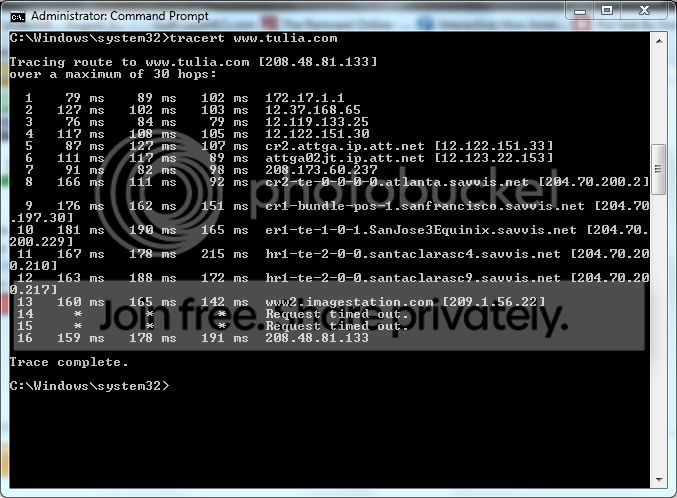
I downloaded and executed the IP Reset. It helped until last night when the Google monster hit again! I tried the DNS flush but that didn't cure the problem. Someone suggested executing a "tracert" command when this occurs. They seemed to think it is a DNS issue. The settings are to obtain a DNS server automatically. I executed the tracert command last night but I'm not sure where to go with it. Here's a screenshot.

tracert.jpg
tracert.jpg


Maybe you can help me interpret it.
 
Last edited:

My Computer My Computer

Computer Manufacturer/Model Number
Acer
OS
Windows 7 Home Premium 64
CPU
Intel P6200 2.13 GHz
Motherboard
Acer Aspire 5742Z
Memory
3GB DDR3
Graphics Card(s)
Intel(R) HD Graphics
Sound Card
Realtek High Definition Audio
Hard Drives
WDC WD5000BPVT-22HXZT1
I'm still having issues ! ! !

Any ideas? This is getting very old and very frustrating ! ! !
 

My Computer My Computer

Computer Manufacturer/Model Number
Acer
OS
Windows 7 Home Premium 64
CPU
Intel P6200 2.13 GHz
Motherboard
Acer Aspire 5742Z
Memory
3GB DDR3
Graphics Card(s)
Intel(R) HD Graphics
Sound Card
Realtek High Definition Audio
Hard Drives
WDC WD5000BPVT-22HXZT1
I'm still having issues ! ! !

Any ideas? This is getting very old and very frustrating ! ! !

Have you tried using a wired connection to see if the problem persists?

Everything I've read about this says it has to do with the routers wireless settings or an incompatible modem.

More specifically the wireless mode may need to be changed G, B or N or mixed mode needs to be changed to something else. Other than that the type of wireless security seems to have an effect so you might try changing that in your routers settings and see what happens.

I also read that the modem being used can have this effect on certain machines, especially if it's a Westell.

So apparently replacing the modem with another updated version has fixed this problem for many people.
 
Last edited:

My Computer My Computer

Computer type
PC/Desktop
Computer Manufacturer/Model Number
Home built
OS
Windows 7 Ult, Windows 8.1 Pro,
CPU
Q9650-4.275GHz, E8600 4.5GHz, E6750-3.8GHz
Motherboard
Evga 780i FTW
Memory
G.Skill PC2 9600 1200Mhz 5 5 5 15 2T
Graphics Card(s)
GTX480
Sound Card
Asus Xonar D2
Monitor(s) Displays
HannsG
Screen Resolution
1680X1050
Hard Drives
GSkill Phoenix Pro 120GB SSD
PSU
ThermalTake Toughpower 1000Watt modular
Case
ThermalTake XaserV
Cooling
Xigmatek S1283
Keyboard
Logitech G15
Mouse
Logitech G9
Internet Speed
T1
I haven't been able to try the wired connection but I plan on getting an ethernet cable this week and trying it. If the wired connection is problem free, what should be my next step? Is it possible that my network adapter has some hardware problems? If so, that would probably be unrepairable on a laptop. I did reinstall the adapter and drivers without solving the problem.

Unfortunately, I am unable to change the router settings because the network I'm using is at the hotel where I'm staying. I did try to change the security settings on my home network router and it didn't seem to help.

I do have a Westell modem on my home wireless network, but I'm not sure what kind of modem is being used at the hotel where I'm staying. I can't imagine it would be the same type of Westell modem I have read causes this problem, but it might be worth asking the hotel staff.

I'll post again after I've tried the wired connection and find out about the modems.

Thanks for not giving up on my problem!
 

My Computer My Computer

Computer Manufacturer/Model Number
Acer
OS
Windows 7 Home Premium 64
CPU
Intel P6200 2.13 GHz
Motherboard
Acer Aspire 5742Z
Memory
3GB DDR3
Graphics Card(s)
Intel(R) HD Graphics
Sound Card
Realtek High Definition Audio
Hard Drives
WDC WD5000BPVT-22HXZT1
Besides the Westell modem causing this problem apparently only on certain machines I can't seem to find anything else that describes this problem.

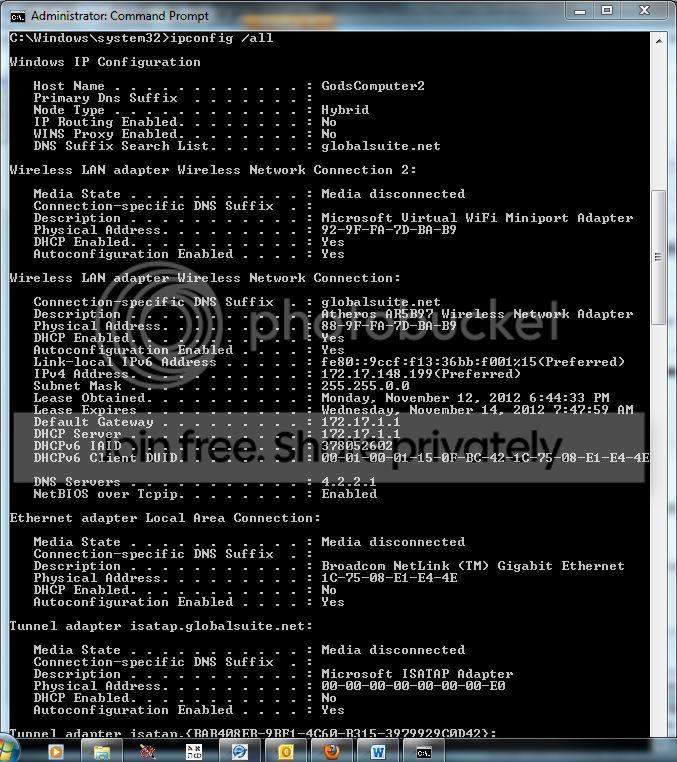
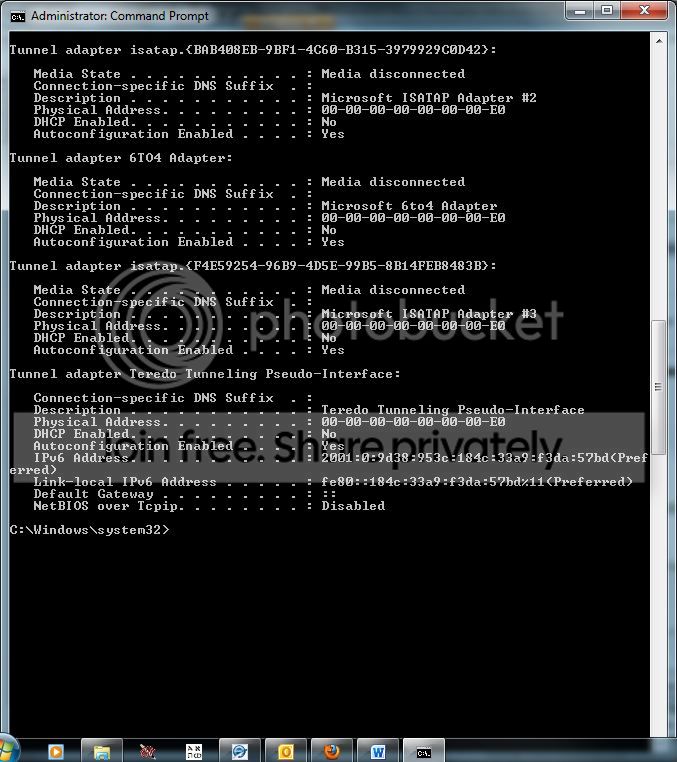
If you can post a screen shot of the ipconfig/all I might be able to spot other problems.
 

My Computer My Computer

Computer type
PC/Desktop
Computer Manufacturer/Model Number
Home built
OS
Windows 7 Ult, Windows 8.1 Pro,
CPU
Q9650-4.275GHz, E8600 4.5GHz, E6750-3.8GHz
Motherboard
Evga 780i FTW
Memory
G.Skill PC2 9600 1200Mhz 5 5 5 15 2T
Graphics Card(s)
GTX480
Sound Card
Asus Xonar D2
Monitor(s) Displays
HannsG
Screen Resolution
1680X1050
Hard Drives
GSkill Phoenix Pro 120GB SSD
PSU
ThermalTake Toughpower 1000Watt modular
Case
ThermalTake XaserV
Cooling
Xigmatek S1283
Keyboard
Logitech G15
Mouse
Logitech G9
Internet Speed
T1
Here are the ipconfig /all screenshots:

ipconfigall1.jpg


ipconfigall2.jpg


Let me know if anything is out of order.

Thank you,

LtV
 

My Computer My Computer

Computer Manufacturer/Model Number
Acer
OS
Windows 7 Home Premium 64
CPU
Intel P6200 2.13 GHz
Motherboard
Acer Aspire 5742Z
Memory
3GB DDR3
Graphics Card(s)
Intel(R) HD Graphics
Sound Card
Realtek High Definition Audio
Hard Drives
WDC WD5000BPVT-22HXZT1
Back
Top