cancel nero backitup

jackdash

New member
Local time
2:02 PM
Messages
168
I have Nero 10 installed and one of its sub programs is Backitup which somehow without my knowledge keeps starting up and doing a backup which I do not want.
Short of deleting the program I would like to know it there is any other way of stopping it.


Thanks
jack
 

My Computer

Computer Manufacturer/Model Number
Packard Bell
OS
Windows 7 Home Premium
CPU
Intel(R) Core(TM2) Quad CPU Q8300 @ 2.50Mhz 4 Core(s)
Motherboard
Packard Bell EG43M
Memory
6.00 GB
Graphics Card(s)
Geforce GT220
Hard Drives
1.5 TB
Keyboard
Logitech Wireless
Mouse
Logitech Wireless
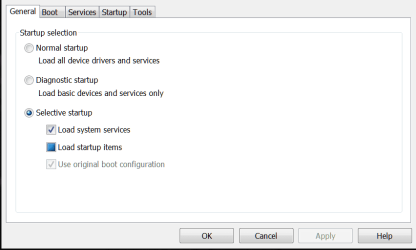
Hi Jack, and welcome to SevenForums... You can open msconfig from the startbar, go to the startup section, and disable it from starting up there ...

Capture.PNG
 

My Computer

Computer type
PC/Desktop
Computer Manufacturer/Model Number
LENOVO K450 @3.0GHZ
OS
64-bit Windows 8.1 Pro
CPU
Core(TM) i5 CPU 4330 Haswell @ 3.20GHz
Motherboard
LENOVO
Memory
12.00 GB
Graphics Card(s)
Intel(R) HD Graphics
Sound Card
Intel HD integtrated
Monitor(s) Displays
HP 25' ISP Monitor
Screen Resolution
1900/1020
Hard Drives
(1) ST1000DM003-1CH162 (2) Generic STORAGE DEVICE USB Device (3) Generic STORAGE DEVICE USB Device
Internet Speed
100mb down/10mb up
Click on Start orb, type services.msc, then locate the service named Nero Backitup Scheduler, double click the service, then first stop the service and after that set its startup type to disabled.
 

My Computer

Computer Manufacturer/Model Number
Too many to describe...
OS
Windows 7 x64 pro/ Windows 7 x86 Pro/ XP SP3 x86
Thanks guys
I went into msconfig then to the Startup Tab and unchecked Nero Backitup clicked Apply so that should be it.
Hopefully case resolved.

Thanks
jack
 

My Computer

Computer Manufacturer/Model Number
Packard Bell
OS
Windows 7 Home Premium
CPU
Intel(R) Core(TM2) Quad CPU Q8300 @ 2.50Mhz 4 Core(s)
Motherboard
Packard Bell EG43M
Memory
6.00 GB
Graphics Card(s)
Geforce GT220
Hard Drives
1.5 TB
Keyboard
Logitech Wireless
Mouse
Logitech Wireless
So I thought, 10minutes later the bloody thing is still running!
I think major surgery is going to be needed here.
Also it was not listed under Services tab the only Nero in there was Nero Update

jack
 
Last edited:

My Computer

Computer Manufacturer/Model Number
Packard Bell
OS
Windows 7 Home Premium
CPU
Intel(R) Core(TM2) Quad CPU Q8300 @ 2.50Mhz 4 Core(s)
Motherboard
Packard Bell EG43M
Memory
6.00 GB
Graphics Card(s)
Geforce GT220
Hard Drives
1.5 TB
Keyboard
Logitech Wireless
Mouse
Logitech Wireless
Did you reboot after editing msconfig??
 

My Computer

Computer type
PC/Desktop
Computer Manufacturer/Model Number
LENOVO K450 @3.0GHZ
OS
64-bit Windows 8.1 Pro
CPU
Core(TM) i5 CPU 4330 Haswell @ 3.20GHz
Motherboard
LENOVO
Memory
12.00 GB
Graphics Card(s)
Intel(R) HD Graphics
Sound Card
Intel HD integtrated
Monitor(s) Displays
HP 25' ISP Monitor
Screen Resolution
1900/1020
Hard Drives
(1) ST1000DM003-1CH162 (2) Generic STORAGE DEVICE USB Device (3) Generic STORAGE DEVICE USB Device
Internet Speed
100mb down/10mb up
Did you disable the service?
 

My Computer

Computer Manufacturer/Model Number
Too many to describe...
OS
Windows 7 x64 pro/ Windows 7 x86 Pro/ XP SP3 x86
Hi,

If you were to reinstall Nero, You could select the advanced options and it should be an option to not install Nero Back it up!

However disabling it in services.msc should stop it all together but you do need to reboot your PC after.
 

My Computer

Computer Manufacturer/Model Number
Custom Built
OS
Windows 7 Pro x64
CPU
AMD Sempron 2600 MHz
Motherboard
ASRock N68-S
Memory
2x 1GB DDR2 RAM
Graphics Card(s)
NVIDIA GeForce 210
Sound Card
nVIDIA GT218 - High Definition Audio Controller
Monitor(s) Displays
Relisys RE550
Hard Drives
2x 500GB Western Digital Green (SATA)
PSU
OCZ 500W
Cooling
2 Fan's
Keyboard
Microsoft Comfort Curve (Wired)
Mouse
Microsoft Explorer Mouse (Wireless)
Internet Speed
Upto 16MBs
I rebooted after msconfig.
In answer to Biil2 after typing in services.msc at the start button it went into services but there was no Nero Backitup listed, only Nero Update alongside of which it said:
Provides access to Nero application updates and manages Nero applications.
jack
 

My Computer

Computer Manufacturer/Model Number
Packard Bell
OS
Windows 7 Home Premium
CPU
Intel(R) Core(TM2) Quad CPU Q8300 @ 2.50Mhz 4 Core(s)
Motherboard
Packard Bell EG43M
Memory
6.00 GB
Graphics Card(s)
Geforce GT220
Hard Drives
1.5 TB
Keyboard
Logitech Wireless
Mouse
Logitech Wireless
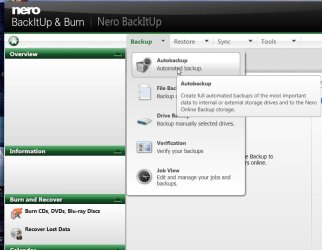
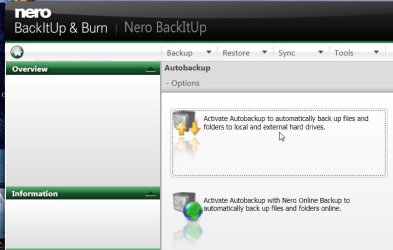
The following screenshots should, hopefully, help you to deactivate the auto backup.

ABup1.jpg

ABup2.jpg

ABup3.jpg
 

My Computer

Computer Manufacturer/Model Number
self-assembled
OS
Windows 7 Ultimate 32bit
CPU
AMD Phenom II X3 720 Processor
Motherboard
Gigabyte GA-MA78GM-S2H Revision 1.0
Memory
Transcend DDR2 (PC2 6400) 4 X 1GB
Graphics Card(s)
Integrated + ATI Radeon 4550
Sound Card
Integrated Realtek ALC 889A
Monitor(s) Displays
DELL 1704 FPT
Screen Resolution
1280 x 1024
Hard Drives
Western Digital Caviar SE16 250 GB x2 in RAID 0
PSU
Coolermaster 400 W
Case
Zebronics Cube
Cooling
stock
Keyboard
Microsoft - wired
Mouse
Microsoft - wired
Internet Speed
ADSL 256-512Kbps
Back
Top