Cannot boot from a bootable CD through USB

KarolR

New member
Local time
10:41 AM
Messages
33
I can't boot from a separate CD that is connected with USB to too laptops: DELL running WIN 8.1 and a Lenovo S400 running WIN 7. i tested the CD in an old XP machine with an internal CD and it worked.
I think once my DELL booted from an other bootable CD using USB but i am not 100% sure.
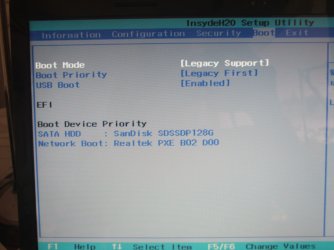
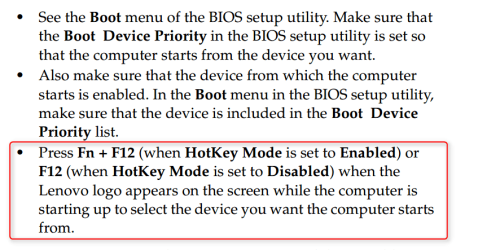
I set the BIOS on the Lenovo to enable boot from USB. there aren't many devices to choose from in the Lenovo BIOS, only 2: the hard drive and to boot from network.
Both computers booted from the internal hard drive.
How do i make a screen shot of the BIOS?
thanks
 

My Computer

Computer type
Laptop
Computer Manufacturer/Model Number
Lenovo Ideapad S400 Model 9630
OS
Microsoft Windows 7 Professional 64-bit 7601 Multiprocessor Free Service Pack 1
CPU
Intel(R) Core(TM) i3-3217U CPU @ 1.80GHz
Motherboard
LENOVO INVALID
Memory
8.00 GB
Graphics Card(s)
(1) Intel(R) HD Graphics 4000 (2) AMD Radeon HD 7400M Seri
Sound Card
(1) Realtek High Definition Audio (2) Intel(R) Display Aud
Screen Resolution
1366 x 768 x 32 bits (4294967296 colors) @ 60 Hz
Hard Drives
SanDisk SDSSDP128G ATA Device
Browser
Chrome
You can't make a screen shot of bios. You must use a camera and then post them.
 

My Computer

Computer type
PC/Desktop
Computer Manufacturer/Model Number
Home made Desktop
OS
Windows 10 Pro. 64/ version 1709 Windows 7 Pro/64
CPU
Intel i7-6800K @ 4.3
Motherboard
ASUS X-99 Deluxe II
Memory
Corsair Platinum 16 gig @2400
Graphics Card(s)
EVGA GTX 1070 OC
Monitor(s) Displays
Asus 27" LED LCD/VE278Q
Screen Resolution
1920-1080 or 1280-720 HDMI
Hard Drives
INTEL SSD 730-240 Gb Sata 3.0/
PSU
EVGA Platium 1200W
Case
Phanteks Luxe Tempered Glass 8 fans/ one radiator
Cooling
XSPC/ Water Cooled CPU
Keyboard
Das 4 Professional
Mouse
Logitech M705/MX Anywhere 2-S
Internet Speed
100 mbits
Antivirus
Microsoft Security Essentials/ Malwarebytes Premium 3.0/ SAS
Browser
I.E. 11 default/Firefox/ ISP Time Warner Cable/Spectrum
Other Info
LG BluRay Burner/
Sound system-KLipsch-THX/
Icy Dock ssd Hot Swap bays.
I uploaded the snapshot of the Lenovo S400 with WIN 7
 

Attachments

  • DSCF8378.JPG
    DSCF8378.JPG
    259.7 KB · Views: 0

My Computer

Computer type
Laptop
Computer Manufacturer/Model Number
Lenovo Ideapad S400 Model 9630
OS
Microsoft Windows 7 Professional 64-bit 7601 Multiprocessor Free Service Pack 1
CPU
Intel(R) Core(TM) i3-3217U CPU @ 1.80GHz
Motherboard
LENOVO INVALID
Memory
8.00 GB
Graphics Card(s)
(1) Intel(R) HD Graphics 4000 (2) AMD Radeon HD 7400M Seri
Sound Card
(1) Realtek High Definition Audio (2) Intel(R) Display Aud
Screen Resolution
1366 x 768 x 32 bits (4294967296 colors) @ 60 Hz
Hard Drives
SanDisk SDSSDP128G ATA Device
Browser
Chrome

My Computer

Computer type
PC/Desktop
Computer Manufacturer/Model Number
Self Built
OS
Win 10 Pro x64
CPU
Intel I5-2500K @3.3GHz
Motherboard
Asrock P67 Extreme4
Memory
16GB G.Skill Ripjaws X (4x4GB)
Graphics Card(s)
EVGA GeForce 750 Ti SC 2GB
Sound Card
ASUS Xonar DG 5.1 Channels 24-bit 96KHz PCI Interface Sound
Monitor(s) Displays
auria eq2367
Screen Resolution
1920 x 1080
Hard Drives
250GB Samsung 850 EVO SSD
1TB WD Blue
1TB Hitachi
PSU
SeaSonic X 650W 80 Plus Gold
Case
Corsair Obsidian 750D
Cooling
Corsair H60, Three 140mm case fans
Keyboard
Logitech Wireless Keyboard K520
Mouse
Logitech Wireless Mouse M310
Internet Speed
Wave Broadband ~ 100 dn 5 up
Antivirus
Windows Defender, Malwarebytes Premium
Browser
Edge, IE11, Chrome
Other Info
Laptop specs: HP g7-1365dx /
CPU: AMD A6-3420M APU with Radeon(tm) HD Graphics /
RAM: Crucial 8Gb (2x4Gb) /
SSD: Crucial M4-CT128M4SSD2 ATA Device/ FW 000F /
GFX: AMD Radeon HD 6520G /
OS: Windows 10 Pro x64
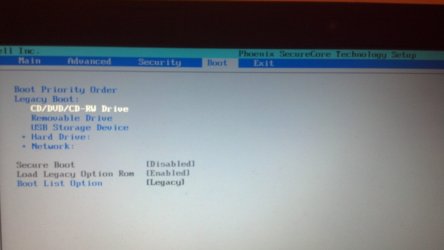
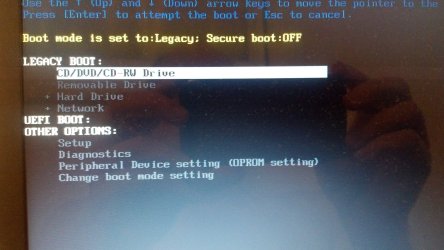
It worked for the Lenovo but the Dell doesn't boot from USB CD. i attach both pictures, the BIOS and the boot menu.
There is a line in the BIOS setup: USB Storage Device. this line disappears in the boot menu, as you can see in the pictures.
What does the last line in the Boot menu mean: Boot List Option [Legacy]?
And what happens if i change the value from legacy to something else? i tried but was afraid because there was a severe warning.
 

Attachments

  • BIOS Boot Menu.jpg
    BIOS Boot Menu.jpg
    390.9 KB · Views: 1
  • Boot menu.jpg
    Boot menu.jpg
    591.1 KB · Views: 0

My Computer

Computer type
Laptop
Computer Manufacturer/Model Number
Lenovo Ideapad S400 Model 9630
OS
Microsoft Windows 7 Professional 64-bit 7601 Multiprocessor Free Service Pack 1
CPU
Intel(R) Core(TM) i3-3217U CPU @ 1.80GHz
Motherboard
LENOVO INVALID
Memory
8.00 GB
Graphics Card(s)
(1) Intel(R) HD Graphics 4000 (2) AMD Radeon HD 7400M Seri
Sound Card
(1) Realtek High Definition Audio (2) Intel(R) Display Aud
Screen Resolution
1366 x 768 x 32 bits (4294967296 colors) @ 60 Hz
Hard Drives
SanDisk SDSSDP128G ATA Device
Browser
Chrome
Is the USB CD recognized as CD/DVD/CD-RW Drive or as a USB Storage Device?
 

My Computer

Computer type
Laptop
Computer Manufacturer/Model Number
Lenovo Ideapad S400 Model 9630
OS
Microsoft Windows 7 Professional 64-bit 7601 Multiprocessor Free Service Pack 1
CPU
Intel(R) Core(TM) i3-3217U CPU @ 1.80GHz
Motherboard
LENOVO INVALID
Memory
8.00 GB
Graphics Card(s)
(1) Intel(R) HD Graphics 4000 (2) AMD Radeon HD 7400M Seri
Sound Card
(1) Realtek High Definition Audio (2) Intel(R) Display Aud
Screen Resolution
1366 x 768 x 32 bits (4294967296 colors) @ 60 Hz
Hard Drives
SanDisk SDSSDP128G ATA Device
Browser
Chrome
I know nothing about Lenovo bios.

To the best of my memory any thing attached using USB port will be recognized as a USB device.

Why do use USB to hook up a DVD player? A optical Drive should be used internal with a desktop and hooked to a sata port on the motherboard.
 

My Computer

Computer type
PC/Desktop
Computer Manufacturer/Model Number
Home made Desktop
OS
Windows 10 Pro. 64/ version 1709 Windows 7 Pro/64
CPU
Intel i7-6800K @ 4.3
Motherboard
ASUS X-99 Deluxe II
Memory
Corsair Platinum 16 gig @2400
Graphics Card(s)
EVGA GTX 1070 OC
Monitor(s) Displays
Asus 27" LED LCD/VE278Q
Screen Resolution
1920-1080 or 1280-720 HDMI
Hard Drives
INTEL SSD 730-240 Gb Sata 3.0/
PSU
EVGA Platium 1200W
Case
Phanteks Luxe Tempered Glass 8 fans/ one radiator
Cooling
XSPC/ Water Cooled CPU
Keyboard
Das 4 Professional
Mouse
Logitech M705/MX Anywhere 2-S
Internet Speed
100 mbits
Antivirus
Microsoft Security Essentials/ Malwarebytes Premium 3.0/ SAS
Browser
I.E. 11 default/Firefox/ ISP Time Warner Cable/Spectrum
Other Info
LG BluRay Burner/
Sound system-KLipsch-THX/
Icy Dock ssd Hot Swap bays.
The pictures here are of a Dell laptop, not a Lenovo. the problem with the Lenovo was solved, thanks to your help.
I don't have an internal CD in my laptop, so i connect a USB CD.
 

My Computer

Computer type
Laptop
Computer Manufacturer/Model Number
Lenovo Ideapad S400 Model 9630
OS
Microsoft Windows 7 Professional 64-bit 7601 Multiprocessor Free Service Pack 1
CPU
Intel(R) Core(TM) i3-3217U CPU @ 1.80GHz
Motherboard
LENOVO INVALID
Memory
8.00 GB
Graphics Card(s)
(1) Intel(R) HD Graphics 4000 (2) AMD Radeon HD 7400M Seri
Sound Card
(1) Realtek High Definition Audio (2) Intel(R) Display Aud
Screen Resolution
1366 x 768 x 32 bits (4294967296 colors) @ 60 Hz
Hard Drives
SanDisk SDSSDP128G ATA Device
Browser
Chrome
Back
Top