Solved Cannot Boot From Recovery CD

I did make a good Linux DVD (by burning it correctly this time). The DVD worked, and File explorer opened when I inserted an external drive. But alas, I still cannot see my files--Under OS, message says "Failed to mount OS". Error mounting /dev/sda3 etc. So close, and yet so far.
 

My Computer

Computer type
Laptop
Computer Manufacturer/Model Number
Dell
OS
Windows 7 Home Premium 64 bit
Antivirus
Microsoft Security Essentials
I do think Windows 7 is still operating...chkdsk /f found no problems. I think I just made a mistake with the disk partition command, and need to change it so that Windows is visible, or mounts.
 

My Computer

Computer type
Laptop
Computer Manufacturer/Model Number
Dell
OS
Windows 7 Home Premium 64 bit
Antivirus
Microsoft Security Essentials
My Computers

System One System Two

  • Computer type
    PC/Desktop
    OS
    7 X64
    CPU
    i5 8400
    Motherboard
    gigabyte b365m ds3h
    Memory
    2x8gb 3200mhz
    Hard Drives
    various
    PSU
    pure power 11 400w cm
    Case
    Coolermaster
    Cooling
    cryorig m9i
  • Computer type
    PC/Desktop
    OS
    7x64
    CPU
    g5400
    Motherboard
    ga b365m ds3h
    Memory
    8gb ddr4 2400
    PSU
    xfx pro 450w
SIW2, I downloaded the ISO file, and the 7-Zip, but I cannot figure out how to get the ISO into the Zip program. Excuse my ignorance, but I could use some instructions.
 

My Computer

Computer type
Laptop
Computer Manufacturer/Model Number
Dell
OS
Windows 7 Home Premium 64 bit
Antivirus
Microsoft Security Essentials
7 zip is a powerful program to open / extract compressed files like *.zip ,*.rar and *.iso.
It can open and extract *.iso files.
Once you install 7 zip, right click on the iso file and open.
 

My Computers

System One System Two

  • Computer type
    PC/Desktop
    Computer Manufacturer/Model Number
    custom build
    OS
    Windows 7 HP 64
    CPU
    i5 6600K - 800MHz to 4200MHz
    Motherboard
    GA-Z170-HD3P
    Memory
    4+4G GSkill DDR4 3000
    Graphics Card(s)
    IG - Intel 530
    Monitor(s) Displays
    Samsung 226BW
    Screen Resolution
    1680x1050
    Hard Drives
    (1) -1 SM951 – 128GB M.2 AHCI PCIe SSD drive for Windows 7 and Lubuntu
    (2) -1 WD SATA 3 - 1T for Data
    (3) -1 WD SATA 3 - 1T for backup
    PSU
    Thermaltake 450W TR2 gold
    Keyboard
    Old and good Chicony mechanical keyboard
    Mouse
    Logitech mX performance - 9 buttons (had to disable some)
    Internet Speed
    500Mb/s
    Browser
    Firefox 64
    Other Info
    TinyWall firewall
  • Computer type
    Laptop
    System Manufacturer/Model Number
    Asus Q550LF
    OS
    Windows 7 Pro
    CPU
    i7-4500U 800MHz to 3.0GHz
    Motherboard
    Asus Q550LF
    Memory
    (4+4)G DDR3 1600
    Graphics Card(s)
    IG intel 4400 + NVIDIA GeForce GT 745M
    Sound Card
    Realtek
    Monitor(s) Displays
    LG Display LP156WF4-SPH1
    Screen Resolution
    1920 x 1080
    Hard Drives
    BX500 120G SSD for Windows and programs +
    1T HDD for data
    Internet Speed
    500 Mb/s
    Browser
    Firefox
    Other Info
    TinyWall firewall
Also, I loaded the drivers from the Windows Recovery disk, and saw that C is labeled Recovery. Is there anything I can do in diskpart commands to make Windows visible again, with these alternate ISOs, so that I could recover my data?

Thanks
 

My Computer

Computer type
Laptop
Computer Manufacturer/Model Number
Dell
OS
Windows 7 Home Premium 64 bit
Antivirus
Microsoft Security Essentials
The ISO file is not in the same place as the zip program, and I don't know how to get it there. When I right click on the ISO file, no zip program is an option for opening it.
 

My Computer

Computer type
Laptop
Computer Manufacturer/Model Number
Dell
OS
Windows 7 Home Premium 64 bit
Antivirus
Microsoft Security Essentials
Have you installed 7zip?
 

My Computers

System One System Two

  • Computer type
    PC/Desktop
    Computer Manufacturer/Model Number
    custom build
    OS
    Windows 7 HP 64
    CPU
    i5 6600K - 800MHz to 4200MHz
    Motherboard
    GA-Z170-HD3P
    Memory
    4+4G GSkill DDR4 3000
    Graphics Card(s)
    IG - Intel 530
    Monitor(s) Displays
    Samsung 226BW
    Screen Resolution
    1680x1050
    Hard Drives
    (1) -1 SM951 – 128GB M.2 AHCI PCIe SSD drive for Windows 7 and Lubuntu
    (2) -1 WD SATA 3 - 1T for Data
    (3) -1 WD SATA 3 - 1T for backup
    PSU
    Thermaltake 450W TR2 gold
    Keyboard
    Old and good Chicony mechanical keyboard
    Mouse
    Logitech mX performance - 9 buttons (had to disable some)
    Internet Speed
    500Mb/s
    Browser
    Firefox 64
    Other Info
    TinyWall firewall
  • Computer type
    Laptop
    System Manufacturer/Model Number
    Asus Q550LF
    OS
    Windows 7 Pro
    CPU
    i7-4500U 800MHz to 3.0GHz
    Motherboard
    Asus Q550LF
    Memory
    (4+4)G DDR3 1600
    Graphics Card(s)
    IG intel 4400 + NVIDIA GeForce GT 745M
    Sound Card
    Realtek
    Monitor(s) Displays
    LG Display LP156WF4-SPH1
    Screen Resolution
    1920 x 1080
    Hard Drives
    BX500 120G SSD for Windows and programs +
    1T HDD for data
    Internet Speed
    500 Mb/s
    Browser
    Firefox
    Other Info
    TinyWall firewall
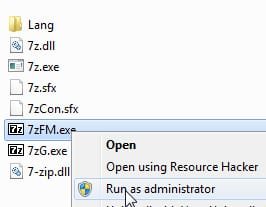
Rt click on 7zfm.exe and browse to the iso file.

7z1.jpg

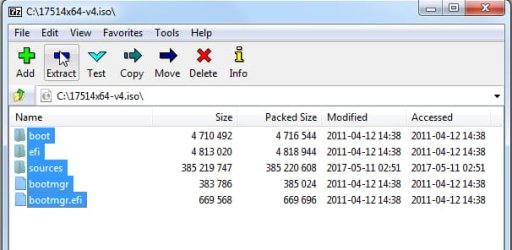
click on all the folders inside the iso to highlght them, then click Extract

7z2.jpg


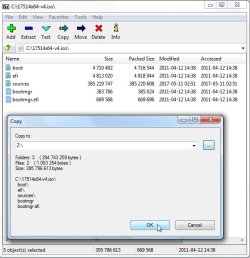
It asks where you want to copy (extract) them to. Browse to your usb drive leter ( in my case it is Z:\ ). Then click ok.

7z3jpg.jpg
 

My Computers

System One System Two

  • Computer type
    PC/Desktop
    OS
    7 X64
    CPU
    i5 8400
    Motherboard
    gigabyte b365m ds3h
    Memory
    2x8gb 3200mhz
    Hard Drives
    various
    PSU
    pure power 11 400w cm
    Case
    Coolermaster
    Cooling
    cryorig m9i
  • Computer type
    PC/Desktop
    OS
    7x64
    CPU
    g5400
    Motherboard
    ga b365m ds3h
    Memory
    8gb ddr4 2400
    PSU
    xfx pro 450w
When I right-click on 7zfm (there is no 7zfm.exe), there is no browse option. If I click Run as Administrator, it takes me to tthe 7 Zip program, with no chance to copy the ISO files.
 

My Computer

Computer type
Laptop
Computer Manufacturer/Model Number
Dell
OS
Windows 7 Home Premium 64 bit
Antivirus
Microsoft Security Essentials
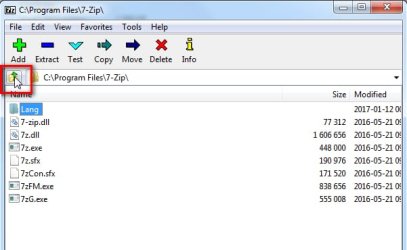
You can't see .exe because you don't have file extensions showing. That is not important.

Browse like this:

7z4.jpg
 

My Computers

System One System Two

  • Computer type
    PC/Desktop
    OS
    7 X64
    CPU
    i5 8400
    Motherboard
    gigabyte b365m ds3h
    Memory
    2x8gb 3200mhz
    Hard Drives
    various
    PSU
    pure power 11 400w cm
    Case
    Coolermaster
    Cooling
    cryorig m9i
  • Computer type
    PC/Desktop
    OS
    7x64
    CPU
    g5400
    Motherboard
    ga b365m ds3h
    Memory
    8gb ddr4 2400
    PSU
    xfx pro 450w
I browsed in 7-Zip to the ISO file (which was in users/downloads). extracted to USB, inserted USB into problem computer, but when I tried to boot to USB from Windows Recovery disk, says Operating System missing. I wonder if I'm doing something wrong with the ISO file...shoulld it be somewhere besides download file?
 

My Computer

Computer type
Laptop
Computer Manufacturer/Model Number
Dell
OS
Windows 7 Home Premium 64 bit
Antivirus
Microsoft Security Essentials
Tried again, sure looked like files were extracted and sent to USB drive, but when USB inserted and booted to that, still says Operating System Missing. Files on USB drive are:
3 folders (boot, efi, sources) and 2 files (bootmgr and bootmgr.efi
 

My Computer

Computer type
Laptop
Computer Manufacturer/Model Number
Dell
OS
Windows 7 Home Premium 64 bit
Antivirus
Microsoft Security Essentials

My Computers

System One System Two

  • Computer type
    PC/Desktop
    OS
    7 X64
    CPU
    i5 8400
    Motherboard
    gigabyte b365m ds3h
    Memory
    2x8gb 3200mhz
    Hard Drives
    various
    PSU
    pure power 11 400w cm
    Case
    Coolermaster
    Cooling
    cryorig m9i
  • Computer type
    PC/Desktop
    OS
    7x64
    CPU
    g5400
    Motherboard
    ga b365m ds3h
    Memory
    8gb ddr4 2400
    PSU
    xfx pro 450w

My Computers

System One System Two

  • Computer type
    PC/Desktop
    OS
    7 X64
    CPU
    i5 8400
    Motherboard
    gigabyte b365m ds3h
    Memory
    2x8gb 3200mhz
    Hard Drives
    various
    PSU
    pure power 11 400w cm
    Case
    Coolermaster
    Cooling
    cryorig m9i
  • Computer type
    PC/Desktop
    OS
    7x64
    CPU
    g5400
    Motherboard
    ga b365m ds3h
    Memory
    8gb ddr4 2400
    PSU
    xfx pro 450w
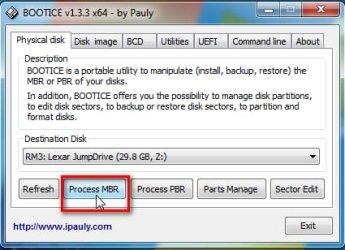
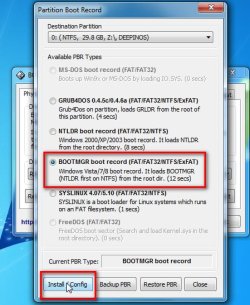
Okay, a big thanks for all your work. It seems advanced for my skills (or lack of), so I will tackle in a.m., when I have more time. But before I do, should I run or save Bootice? And if save, where should that be on this confusing Windows 10 computer? I have trouble finding what I've downloaded...so I fear I may not install it properly.
 

My Computer

Computer type
Laptop
Computer Manufacturer/Model Number
Dell
OS
Windows 7 Home Premium 64 bit
Antivirus
Microsoft Security Essentials

My Computers

System One System Two

  • Computer type
    PC/Desktop
    OS
    7 X64
    CPU
    i5 8400
    Motherboard
    gigabyte b365m ds3h
    Memory
    2x8gb 3200mhz
    Hard Drives
    various
    PSU
    pure power 11 400w cm
    Case
    Coolermaster
    Cooling
    cryorig m9i
  • Computer type
    PC/Desktop
    OS
    7x64
    CPU
    g5400
    Motherboard
    ga b365m ds3h
    Memory
    8gb ddr4 2400
    PSU
    xfx pro 450w
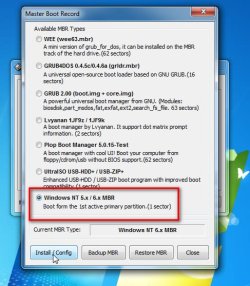
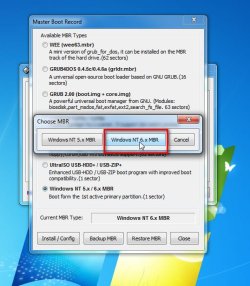
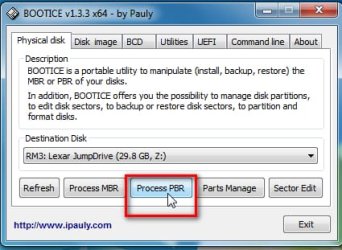
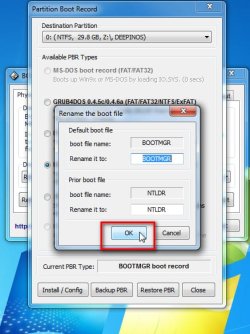
SIW2, I downloaded bootice, followed your directions carefully. Seemed to work fine, but there are no files on USB drive. TI made sure it said destination was USB. Tried it twice. What am I doing wrong?
 

My Computer

Computer type
Laptop
Computer Manufacturer/Model Number
Dell
OS
Windows 7 Home Premium 64 bit
Antivirus
Microsoft Security Essentials
Oops, hold on. I put the ISO files back on the USB drive (had deleted them, thinking they might confuse the issue, duh) Tried Bootice again, plugged USB into dead computer, and Windows came up! Will let you know if I can find files I need. Thanks again!
 

My Computer

Computer type
Laptop
Computer Manufacturer/Model Number
Dell
OS
Windows 7 Home Premium 64 bit
Antivirus
Microsoft Security Essentials
Well, shoot. Under Computer, Hard Disk Drives, there is "Recovery (C:). Just all the functional stuff, no documents or files. But that's 8 GB free of 15GB, so I know that's my real C, I just can't get to it. I think there is a partition problem,.

Also under Hard Drives is a local Disk E, but when I clicked on that, it froze the computer. Time circle still going. I hate to shut down again for fear I will never get back this far. Advice?
 

My Computer

Computer type
Laptop
Computer Manufacturer/Model Number
Dell
OS
Windows 7 Home Premium 64 bit
Antivirus
Microsoft Security Essentials
Back
Top