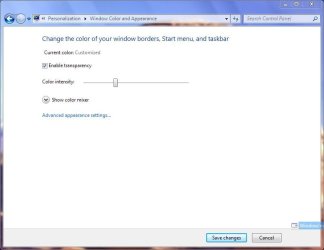
J jalexladd New member Local time 3:28 PM Messages 5 Apr 14, 2010 #1 I am having a problem changing my window color. I used to be able to do it but now all it shows is option to enable/disable transparency and the color intensity slider. I have attached a screenshot of this. What can I do to fix this? Attachments 001.jpg 36.6 KB · Views: 85 My Computer Computer Manufacturer/Model NumberDell Inspiron 530OSWindows 7 ProfessionalCPUIntel Pentium Dual CPU E2160 @ 1.80 GHzGraphics Card(s)Intel G33/G31 Express Chipset
I am having a problem changing my window color. I used to be able to do it but now all it shows is option to enable/disable transparency and the color intensity slider. I have attached a screenshot of this. What can I do to fix this?
tbone1321 good evening infidels Guru Local time 3:28 PM Messages 381 Apr 14, 2010 #2 What did you install last or when did it stop working? Edit Try this http://www.sevenforums.com/tutorials/3716-window-color-appearance-enable-disable-change.html Last edited: Apr 14, 2010 My Computer Computer typePC/DesktopComputer Manufacturer/Model NumberCustom BuildOSWindows 7 Pro 64bitCPUIntel Core i7 2600K @ 3.40GHzMotherboardASUSTeK Computer INC. P8P67 PRO (LGA1155)Memory16.0GB Dual-Channel DDR3 @ 799MHzGraphics Card(s)Dual GTX 560TISound CardRealtek High Definition AudioMonitor(s) Displays23" and 24" monitorScreen Resolution1920-1080Hard Drives128GB SSD 2TB HDInternet Speed100MB
What did you install last or when did it stop working? Edit Try this http://www.sevenforums.com/tutorials/3716-window-color-appearance-enable-disable-change.html
J jalexladd New member Thread Starter Local time 3:28 PM Messages 5 Apr 14, 2010 #3 it stopped working a few weeks ago....but i haven't installed anything since My Computer Computer Manufacturer/Model NumberDell Inspiron 530OSWindows 7 ProfessionalCPUIntel Pentium Dual CPU E2160 @ 1.80 GHzGraphics Card(s)Intel G33/G31 Express Chipset
tbone1321 good evening infidels Guru Local time 3:28 PM Messages 381 Apr 14, 2010 #4 Try that link download and see if it works My Computer Computer typePC/DesktopComputer Manufacturer/Model NumberCustom BuildOSWindows 7 Pro 64bitCPUIntel Core i7 2600K @ 3.40GHzMotherboardASUSTeK Computer INC. P8P67 PRO (LGA1155)Memory16.0GB Dual-Channel DDR3 @ 799MHzGraphics Card(s)Dual GTX 560TISound CardRealtek High Definition AudioMonitor(s) Displays23" and 24" monitorScreen Resolution1920-1080Hard Drives128GB SSD 2TB HDInternet Speed100MB
J jalexladd New member Thread Starter Local time 3:28 PM Messages 5 Apr 14, 2010 #5 no that didn't work...it still just says customized My Computer Computer Manufacturer/Model NumberDell Inspiron 530OSWindows 7 ProfessionalCPUIntel Pentium Dual CPU E2160 @ 1.80 GHzGraphics Card(s)Intel G33/G31 Express Chipset
Jonathan_King New member Guru SF Team Local time 4:28 PM Messages 13,322 Location Rednecksville Apr 14, 2010 #6 Try a system restore to get to a point before the troubles began. My Computer Computer Manufacturer/Model NumberCustomOSWindows 7 Professional x64CPUIntel i7 2600K OC'd @ 4620 MHzMotherboardAsus P8Z68-V ProMemory16GB GSkill Sniper 2133 Mhz (4x4GB)Graphics Card(s)EVGA GeForce GTX 480 SuperClocked+Sound CardRealtek High Definition AudioMonitor(s) Displays2x Acer S273HLbmii 27"Screen Resolution2 x 1920x1080Hard Drives64GB Crucial M4 SSD Storage: Hitachi 1TB 5400RPM, Samsung 1.5TB 5400RPMPSUCorsair HW Series 750w (modular)CaseCooler Master HAF 932 Advanced Blue EditionCoolingCM Hyper 212+ CPU cooler, 3x 230mm + 1x 140mm case fansKeyboardLogitech MK320 (wireless)MouseLogitech MK320 (wireless)Internet Speed30 Mb/s : 2 Mb/s
J jalexladd New member Thread Starter Local time 3:28 PM Messages 5 Apr 14, 2010 #7 yeah i did that too and it didnt work either My Computer Computer Manufacturer/Model NumberDell Inspiron 530OSWindows 7 ProfessionalCPUIntel Pentium Dual CPU E2160 @ 1.80 GHzGraphics Card(s)Intel G33/G31 Express Chipset
Jonathan_King New member Guru SF Team Local time 4:28 PM Messages 13,322 Location Rednecksville Apr 14, 2010 #8 Try changing themes. If that does not work, try a repair install. My Computer Computer Manufacturer/Model NumberCustomOSWindows 7 Professional x64CPUIntel i7 2600K OC'd @ 4620 MHzMotherboardAsus P8Z68-V ProMemory16GB GSkill Sniper 2133 Mhz (4x4GB)Graphics Card(s)EVGA GeForce GTX 480 SuperClocked+Sound CardRealtek High Definition AudioMonitor(s) Displays2x Acer S273HLbmii 27"Screen Resolution2 x 1920x1080Hard Drives64GB Crucial M4 SSD Storage: Hitachi 1TB 5400RPM, Samsung 1.5TB 5400RPMPSUCorsair HW Series 750w (modular)CaseCooler Master HAF 932 Advanced Blue EditionCoolingCM Hyper 212+ CPU cooler, 3x 230mm + 1x 140mm case fansKeyboardLogitech MK320 (wireless)MouseLogitech MK320 (wireless)Internet Speed30 Mb/s : 2 Mb/s
tbone1321 good evening infidels Guru Local time 3:28 PM Messages 381 Apr 14, 2010 #9 try a http://www.sevenforums.com/tutorials/3413-repair-install.html Edit: Sorry didn't see someone posted it already Last edited: Apr 14, 2010 My Computer Computer typePC/DesktopComputer Manufacturer/Model NumberCustom BuildOSWindows 7 Pro 64bitCPUIntel Core i7 2600K @ 3.40GHzMotherboardASUSTeK Computer INC. P8P67 PRO (LGA1155)Memory16.0GB Dual-Channel DDR3 @ 799MHzGraphics Card(s)Dual GTX 560TISound CardRealtek High Definition AudioMonitor(s) Displays23" and 24" monitorScreen Resolution1920-1080Hard Drives128GB SSD 2TB HDInternet Speed100MB
try a http://www.sevenforums.com/tutorials/3413-repair-install.html Edit: Sorry didn't see someone posted it already
richc46 Moderator VIP SF Team Local time 4:28 PM Messages 17,783 Location CT Apr 14, 2010 #10 Various suggestions listed here, with success. See if any apply in your situation How to Turn On and Enable Aero in Windows 7 (Enable Aero Peek) My Digital Life Toward the middle (end) of the article, mention is made of color. My Computer Computer typePC/DesktopComputer Manufacturer/Model NumberDell XPS 420OSWindows 10, Home Clean InstallCPUIntel Core2 processsor Q8200(2.33Ghz 1333FSB) Quad Core TechMotherboardDellMemory6 gbGraphics Card(s)ATI Radeon 256MB HD3650Sound CardIntergrated 7.1 Channel AudioMonitor(s) DisplaysDell SP2009W 20"Hard Drives640 GB Serial ATA Hard driveCoolingFanKeyboardDell USB KeyboardMouseDell Premium Optical USBInternet SpeedDSL 2.85
Various suggestions listed here, with success. See if any apply in your situation How to Turn On and Enable Aero in Windows 7 (Enable Aero Peek) My Digital Life Toward the middle (end) of the article, mention is made of color.
J jalexladd New member Thread Starter Local time 3:28 PM Messages 5 Apr 14, 2010 #11 Awesome guys. Thanks for your help. I did a repair install and its fixed now. Thanks again! My Computer Computer Manufacturer/Model NumberDell Inspiron 530OSWindows 7 ProfessionalCPUIntel Pentium Dual CPU E2160 @ 1.80 GHzGraphics Card(s)Intel G33/G31 Express Chipset