
Cannot connect paired bluetooth headset (+)

fmilovanov

New member
Local time
10:50 PM
Messages
2
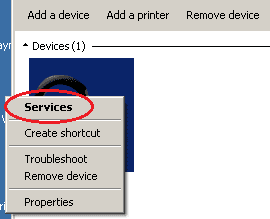
I've just installed a new Win7 Pro 64 on newly assembled PC (i3-6300, B150 chipset - if it's important), but can not connect BT headset to it. Installed gazillion of updates, installed latest drivers (BT dongle - ASUS USB-BT400) from Broadcom site -- and I can't connect my BT headset to it. It pairs w/out a problem, but once paired and I right-click mouse on it (in BT devices) - there is no Services in the menu, and - as a result - no way to connect. (The attached image is from my laptop, where it works).

BT mouse that I have connects and works fine.

Sorry if I posted in the wrong forum - please, move to the appropriate one, if needed.
 

Attachments
  • BT.png
    BT.png
    1.7 KB · Views: 5

My Computer My Computer

Computer type
PC/Desktop
OS
Win 7 Pro 64
CPU
i3-6100
Motherboard
MSI B150
Memory
8gb
Graphics Card(s)
PowerColor RX 470
Hi and welcome to SevenForums,
That is sort of one of the perks of KB3172605
Known issues in this update


  • Issue 1

    Symptom
    After you install KB 3133977, the software for Intel Bluetooth devices may not be fully functional because of existing software issues in the Intel Bluetooth driver software. These issues may affect Bluetooth keyboards, mice, audio streaming devices, and voice headsets. You may also not be able to pair new Bluetooth devices. Intel is currently working on an update to address their software incompatibilities.

    Workaround
    If you require Intel Bluetooth support on Windows 7 before the revised software is available, the only known workaround at this time is to uninstall this update temporarily and then reinstall it after Intel has updated their software.
 

My Computer My Computer

Computer type
PC/Desktop
Computer Manufacturer/Model Number
Custom assembled by me :}
OS
Win-7-Pro64bit 7-H-Prem-64bit
CPU
i7-5930K 2nd i9-9940x both water blocked VRM's too
Motherboard
ASUS SABERTOOTH X99 2nd ASUS x299 Apex
Memory
Trident-z 3200C14 2nd Trident-z 3600C16
Graphics Card(s)
EVGA 1080ti ftw3 2nd Titan Xp both water blocked
Sound Card
Built-in Realtek
Monitor(s) Displays
1-AOC G2460PG 24"G-Sync 144Hz/ 2nd 1-ASUS VG248QE 24" 144Hz
Screen Resolution
1920 x 1080 144Hz
Hard Drives
2-Samsung M.2 Evo & Evo Plus
2-Samsung 850 EVO 500GB SSD's/ 3-2.5 W.D. Black 1tb-&3-1tb/3-3.5 WD Black 1tb hdd's
PSU
EVGA SuperNOVA 1000-P2 2nd 1200-P2
Case
2-Corsair Obsidian Series 450D Black ATX Mid Tower
Cooling
Custom water loops
Keyboard
Logitech G710+/ 2nd Logitech G910
Mouse
2-RedDragon M901 Perdition 16400 dpi Gaming mouse = wired
Internet Speed
Comcast Ping 19ms 89.31mbps download speed 6.12mbps upload
Antivirus
Malwarebytes Pro/ Superantispyware Pro
Browser
FireFox & Pale moon
Other Info
2nd ASUS X299 Apex/Intel i9-9940x with Custom water loop/7H-Prem-x64/Corsair 450D case/Ram Trident-z 3600C16 4x8gb / Samsung970Evo plus 500gb SSD/Dual ssd EZ swap evo/PSU EVGA SuperNova 1200w-P2 80+Platinum/GPU Titan Xp /8-ML-140 on push-pull on 2-280GTX rads
ThrashZone - is it KB3172605 or KB3133977? Either way - I've uninstalled both, and it did not help: same missing Services in the context menu.
 

My Computer My Computer

Computer type
PC/Desktop
OS
Win 7 Pro 64
CPU
i3-6100
Motherboard
MSI B150
Memory
8gb
Graphics Card(s)
PowerColor RX 470
Hi,
That one was another story about secure boot and bitlocker on asus mother boards which I passed on it mainly because home premium and 7 pro can't use bitlocker anyway so it was a sort of silly update for feature we can not use :)
https://support.microsoft.com/en-us/kb/3133977
Known issues in this update


After you install update 3133977 on a Windows 7 x64-based system that includes an ASUS-based main board, the system does not start, and it generates a Secure Boot error on the ASUS BIOS screen. This problem occurs because ASUS allowed the main board to enable the Secure Boot process even though Windows 7 does not support this feature.

To resolve this problem, go to the following ASUS support website to learn how to disable Secure Boot for Windows 7:

After installing Microsoft Update KB3133977 for Windows 7, some users may encounter a "Secure Boot Violation" , which makes the system fail to boot into the operating system.
Note The Secure Boot feature is supported in Windows 10. To learn more about the security advantages of this feature and about the upgrade path from Windows 7 to Windows 10, go to the following Windows website:

Outside of that not sure at all what would be the problem ?
 

My Computer My Computer

Computer type
PC/Desktop
Computer Manufacturer/Model Number
Custom assembled by me :}
OS
Win-7-Pro64bit 7-H-Prem-64bit
CPU
i7-5930K 2nd i9-9940x both water blocked VRM's too
Motherboard
ASUS SABERTOOTH X99 2nd ASUS x299 Apex
Memory
Trident-z 3200C14 2nd Trident-z 3600C16
Graphics Card(s)
EVGA 1080ti ftw3 2nd Titan Xp both water blocked
Sound Card
Built-in Realtek
Monitor(s) Displays
1-AOC G2460PG 24"G-Sync 144Hz/ 2nd 1-ASUS VG248QE 24" 144Hz
Screen Resolution
1920 x 1080 144Hz
Hard Drives
2-Samsung M.2 Evo & Evo Plus
2-Samsung 850 EVO 500GB SSD's/ 3-2.5 W.D. Black 1tb-&3-1tb/3-3.5 WD Black 1tb hdd's
PSU
EVGA SuperNOVA 1000-P2 2nd 1200-P2
Case
2-Corsair Obsidian Series 450D Black ATX Mid Tower
Cooling
Custom water loops
Keyboard
Logitech G710+/ 2nd Logitech G910
Mouse
2-RedDragon M901 Perdition 16400 dpi Gaming mouse = wired
Internet Speed
Comcast Ping 19ms 89.31mbps download speed 6.12mbps upload
Antivirus
Malwarebytes Pro/ Superantispyware Pro
Browser
FireFox & Pale moon
Other Info
2nd ASUS X299 Apex/Intel i9-9940x with Custom water loop/7H-Prem-x64/Corsair 450D case/Ram Trident-z 3600C16 4x8gb / Samsung970Evo plus 500gb SSD/Dual ssd EZ swap evo/PSU EVGA SuperNova 1200w-P2 80+Platinum/GPU Titan Xp /8-ML-140 on push-pull on 2-280GTX rads
Back
Top