Solved Cannot Connect to Internet or Network (sometimes)

KurtVV

New member
Local time
2:41 PM
Messages
7
I recently built a desktop computer with a friend and we installed Windows 7 Home Premium 64-bit. After doing so I went out and bought this wifi card.

Currently, my desktop cannot connect to my network, but it has occasionally (I would say 10% of the time.) And when I do connect to the network I get "Unidentified Network, No Internet Access."

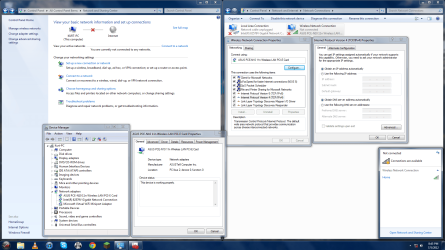
I've tried to remedy the problem myself by searching online using my laptop, which connects with no issues. I've seen problems that look just like mine but can't fix it. I don't have security software currently, so there should be a conflict there. I've tried restarting my router (absolutely no change), and I've tried disabling and enabling the network card, seen above.

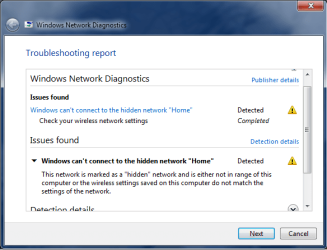
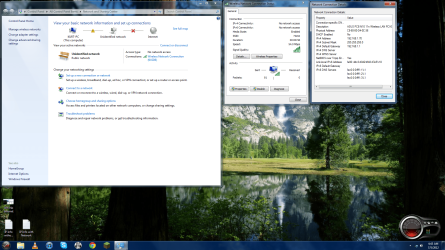
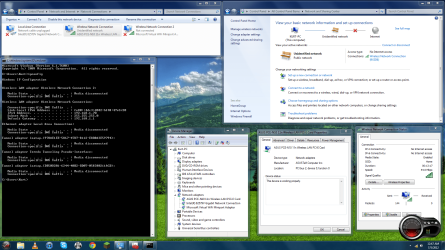
I've attached a screenshot of all the info I thought might be useful. I've also attached the troubleshooting report I usually get when i can't connect to my network.

The farthest I got was yesterday. I was connected to the internet for about an hour, maybe more, and was able to install some of my usual software like iTunes, Skype, and the likes. Haven't been connected since.

I did have the networking software for the wifi card installed, but have uninstalled it since. I can still see that my router is within range and I have 4-5 bars of signal usually.

And here is my "ipconfig /all" when I am connected.


Microsoft Windows [Version 6.1.7600]
Copyright (c) 2009 Microsoft Corporation. All rights reserved.

C:\Users\Kurt>ipconfig /all

Windows IP Configuration

Host Name . . . . . . . . . . . . : Kurt-PC
Primary Dns Suffix . . . . . . . :
Node Type . . . . . . . . . . . . : Hybrid
IP Routing Enabled. . . . . . . . : No
WINS Proxy Enabled. . . . . . . . : No

Wireless LAN adapter Wireless Network Connection 2:

Media State . . . . . . . . . . . : Media disconnected
Connection-specific DNS Suffix . :
Description . . . . . . . . . . . : Microsoft Virtual WiFi Miniport Adapter
Physical Address. . . . . . . . . : C8-60-00-D4-0C-36
DHCP Enabled. . . . . . . . . . . : Yes
Autoconfiguration Enabled . . . . : Yes

Wireless LAN adapter Wireless Network Connection:

Connection-specific DNS Suffix . :
Description . . . . . . . . . . . : ASUS PCE-N10 11n Wireless LAN PCI-E Card
Physical Address. . . . . . . . . : C8-60-00-D4-0C-36
DHCP Enabled. . . . . . . . . . . : No
Autoconfiguration Enabled . . . . : Yes
Link-local IPv6 Address . . . . . : fe80::4dc3:d042:bf48:47e5%20(Preferred)
IPv4 Address. . . . . . . . . . . : 192.168.1.70(Preferred)
Subnet Mask . . . . . . . . . . . : 255.255.255.0
Default Gateway . . . . . . . . . : 192.168.1.1
DHCPv6 IAID . . . . . . . . . . . : 432562176
DHCPv6 Client DUID. . . . . . . . : 00-01-00-01-17-86-3E-09-C8-60-00-D4-0C-36

DNS Servers . . . . . . . . . . . : fec0:0:0:ffff::1%1
fec0:0:0:ffff::2%1
fec0:0:0:ffff::3%1
NetBIOS over Tcpip. . . . . . . . : Enabled

Ethernet adapter Local Area Connection:

Media State . . . . . . . . . . . : Media disconnected
Connection-specific DNS Suffix . :
Description . . . . . . . . . . . : Intel(R) 82579V Gigabit Network Connectio
n
Physical Address. . . . . . . . . : 10-BF-48-86-54-11
DHCP Enabled. . . . . . . . . . . : Yes
Autoconfiguration Enabled . . . . : Yes

Tunnel adapter isatap.{978AE1EE-5867-47D7-8112-E8B8A3E59794}:

Media State . . . . . . . . . . . : Media disconnected
Connection-specific DNS Suffix . :
Description . . . . . . . . . . . : Microsoft ISATAP Adapter
Physical Address. . . . . . . . . : 00-00-00-00-00-00-00-E0
DHCP Enabled. . . . . . . . . . . : No
Autoconfiguration Enabled . . . . : Yes

Tunnel adapter Teredo Tunneling Pseudo-Interface:

Media State . . . . . . . . . . . : Media disconnected
Connection-specific DNS Suffix . :
Description . . . . . . . . . . . : Teredo Tunneling Pseudo-Interface
Physical Address. . . . . . . . . : 00-00-00-00-00-00-00-E0
DHCP Enabled. . . . . . . . . . . : No
Autoconfiguration Enabled . . . . : Yes

Tunnel adapter isatap.{DB50D201-6244-40B2-BD07-058380211ACD}:

Media State . . . . . . . . . . . : Media disconnected
Connection-specific DNS Suffix . :
Description . . . . . . . . . . . : Microsoft ISATAP Adapter #3
Physical Address. . . . . . . . . : 00-00-00-00-00-00-00-E0
DHCP Enabled. . . . . . . . . . . : No
Autoconfiguration Enabled . . . . : Yes

C:\Users\Kurt>


And when I'm not connected.


Microsoft Windows [Version 6.1.7600]
Copyright (c) 2009 Microsoft Corporation. All rights reserved.

C:\Users\Kurt>ipconfig /all

Windows IP Configuration

Host Name . . . . . . . . . . . . : Kurt-PC
Primary Dns Suffix . . . . . . . :
Node Type . . . . . . . . . . . . : Hybrid
IP Routing Enabled. . . . . . . . : No
WINS Proxy Enabled. . . . . . . . : No

Wireless LAN adapter Wireless Network Connection 2:

Media State . . . . . . . . . . . : Media disconnected
Connection-specific DNS Suffix . :
Description . . . . . . . . . . . : Microsoft Virtual WiFi Miniport Adapter
Physical Address. . . . . . . . . : C8-60-00-D4-0C-36
DHCP Enabled. . . . . . . . . . . : Yes
Autoconfiguration Enabled . . . . : Yes

Wireless LAN adapter Wireless Network Connection:

Media State . . . . . . . . . . . : Media disconnected
Connection-specific DNS Suffix . :
Description . . . . . . . . . . . : ASUS PCE-N10 11n Wireless LAN PCI-E Card
Physical Address. . . . . . . . . : C8-60-00-D4-0C-36
DHCP Enabled. . . . . . . . . . . : No
Autoconfiguration Enabled . . . . : Yes

Ethernet adapter Local Area Connection:

Media State . . . . . . . . . . . : Media disconnected
Connection-specific DNS Suffix . :
Description . . . . . . . . . . . : Intel(R) 82579V Gigabit Network Connectio
n
Physical Address. . . . . . . . . : 10-BF-48-86-54-11
DHCP Enabled. . . . . . . . . . . : Yes
Autoconfiguration Enabled . . . . : Yes

Tunnel adapter isatap.{978AE1EE-5867-47D7-8112-E8B8A3E59794}:

Media State . . . . . . . . . . . : Media disconnected
Connection-specific DNS Suffix . :
Description . . . . . . . . . . . : Microsoft ISATAP Adapter
Physical Address. . . . . . . . . : 00-00-00-00-00-00-00-E0
DHCP Enabled. . . . . . . . . . . : No
Autoconfiguration Enabled . . . . : Yes

Tunnel adapter Teredo Tunneling Pseudo-Interface:

Media State . . . . . . . . . . . : Media disconnected
Connection-specific DNS Suffix . :
Description . . . . . . . . . . . : Teredo Tunneling Pseudo-Interface
Physical Address. . . . . . . . . : 00-00-00-00-00-00-00-E0
DHCP Enabled. . . . . . . . . . . : No
Autoconfiguration Enabled . . . . : Yes

Tunnel adapter isatap.{DB50D201-6244-40B2-BD07-058380211ACD}:

Media State . . . . . . . . . . . : Media disconnected
Connection-specific DNS Suffix . :
Description . . . . . . . . . . . : Microsoft ISATAP Adapter #3
Physical Address. . . . . . . . . : 00-00-00-00-00-00-00-E0
DHCP Enabled. . . . . . . . . . . : No
Autoconfiguration Enabled . . . . : Yes

C:\Users\Kurt>

I hope I was able to provide enough information to solve the problem. If you have a question regarding the computer I'll do my best to supply the info.
 

Attachments
  • Wifi No Internet.png
    Wifi No Internet.png
    279.7 KB · Views: 19
  • Troubleshooting Report.png
    Troubleshooting Report.png
    20.9 KB · Views: 16

My Computer

OS
Windows 7 Home Premium 64-bit
If you installed iTunes there is a network service that installs with it called "Bonjour" which is famous for creating network problems in Windows 7.

You should disable the Bonjour in Windows services, you will see it on the list in services. You can get there by typing services.msc into the run box. You may need to restart after disabling the Bonjour service. iTunes will still work after disabling Bonjour.

You should also disable the Microsoft virtual WiFi miniport adaptor which you see in Device Manager as it also is becoming famous for creating network problems. The mini port adaptor is only used for creating a shared wireless connection.

Let me know is this has any effect on your network connection. :)
 

My Computer

Computer type
PC/Desktop
Computer Manufacturer/Model Number
Home built
OS
Windows 7 Ult, Windows 8.1 Pro,
CPU
Q9650-4.275GHz, E8600 4.5GHz, E6750-3.8GHz
Motherboard
Evga 780i FTW
Memory
G.Skill PC2 9600 1200Mhz 5 5 5 15 2T
Graphics Card(s)
GTX480
Sound Card
Asus Xonar D2
Monitor(s) Displays
HannsG
Screen Resolution
1680X1050
Hard Drives
GSkill Phoenix Pro 120GB SSD
PSU
ThermalTake Toughpower 1000Watt modular
Case
ThermalTake XaserV
Cooling
Xigmatek S1283
Keyboard
Logitech G15
Mouse
Logitech G9
Internet Speed
T1
No luck with that.
 

Attachments

  • Wifi No Internet after Bonjour and Microsoft Vitual Wifi.png
    Wifi No Internet after Bonjour and Microsoft Vitual Wifi.png
    557.6 KB · Views: 17

My Computer

OS
Windows 7 Home Premium 64-bit
From your ipconfig it looks like you have DHCP turned off for some reason, and that your DNS servers also aren't showing up.

Are you using a static IP for some reason?

If so did you enter all the required information into the IPv4 properties?

Have you tried to enable DHCP and see if the connection works any better?

You should be using the driver file I attached here for Windows 7.

The security and encryption should be WPA2 and AES encryption for this card.
You will also get the best possible wireless speed using the 802.11n Only setting.
 

Attachments

Last edited:

My Computer

Computer type
PC/Desktop
Computer Manufacturer/Model Number
Home built
OS
Windows 7 Ult, Windows 8.1 Pro,
CPU
Q9650-4.275GHz, E8600 4.5GHz, E6750-3.8GHz
Motherboard
Evga 780i FTW
Memory
G.Skill PC2 9600 1200Mhz 5 5 5 15 2T
Graphics Card(s)
GTX480
Sound Card
Asus Xonar D2
Monitor(s) Displays
HannsG
Screen Resolution
1680X1050
Hard Drives
GSkill Phoenix Pro 120GB SSD
PSU
ThermalTake Toughpower 1000Watt modular
Case
ThermalTake XaserV
Cooling
Xigmatek S1283
Keyboard
Logitech G15
Mouse
Logitech G9
Internet Speed
T1
I don't want to upset you but the problem lies with the cheap card. I also tried that same one and it always had problems for me no matter what I used it in. I went and got the Newegg.com - Rosewill RNX-N1 Wireless-N 2.0 Dongle (2T2R) IEEE 802.11b/g/n USB2.0 Up to 300Mbps Data Rates/ WPA/WPA2 (AES, 64,128-WEP with shared-key authentication) Cisco CCS V1.0, V2.0 and V3.0 compliant Vista/Wi and I never had an issue again. This small USB device loaded everything from windows and connected immediately. I tried it on some other PC's and laptops with perfect results.
 

My Computer

Computer type
PC/Desktop
Computer Manufacturer/Model Number
Self made
OS
windows 7 home premium 64, and Windows 10 64 bit
CPU
I7 940
Motherboard
ASUS P6TX58D Premium- BIOS VERSION 1402
Memory
12 GB Dominator 3 channel 1600
Graphics Card(s)
Radeon R9 Fury Nitro
Sound Card
Z1
Monitor(s) Displays
50 Inch Panasonic TV
Screen Resolution
1920x1080
Hard Drives
Main drive OCZ Revodrive V2 and 8 TB multi drives
PSU
Coolermaster 1000
Case
CoolerMaster 932
Cooling
Coolermaster Dual fan
Keyboard
mx 5500 revolution
Mouse
mx 5500 revolution
Internet Speed
12 mb
Browser
Chrome
Other Info
set up for 3D Blue Ray applications with a surround room of 12 speaker Definitive Technology and multi amps, main is driven by yamaha M-65
@Chev

The problem with that is I live with my parents and sister. And if I'm not mistaken, I would have to change settings on the router for that. And I don't believe all our devices are 802.11n compatible. I'd rather not piss off my family just so I can have internet on one computer.

@Mike

If you really think that is the problem, do you know of a good card that I could put inside the computer? I would prefer not to have a usb wifi card sticking out the back if I can.
 

My Computer

OS
Windows 7 Home Premium 64-bit
@Chev

The problem with that is I live with my parents and sister. And if I'm not mistaken, I would have to change settings on the router for that. And I don't believe all our devices are 802.11n compatible. I'd rather not piss off my family just so I can have internet on one computer.

@Mike

If you really think that is the problem, do you know of a good card that I could put inside the computer? I would prefer not to have a usb wifi card sticking out the back if I can.

I just mentioned the wireless n setting gives the best possible speeds.

You didn't even answer most of the questions I asked which were all relevant. :confused:

If you expect anything to change then you need to be able to make changes.

Unfortunately there is no such thing as a magic fix everything button in Windows.

I also checked the reviews on this card and they aren't so good, seems to work for some with Windows 7 and not for others though I suspect the problem is with the set up procedure rather than card itself. ;)
 

My Computer

Computer type
PC/Desktop
Computer Manufacturer/Model Number
Home built
OS
Windows 7 Ult, Windows 8.1 Pro,
CPU
Q9650-4.275GHz, E8600 4.5GHz, E6750-3.8GHz
Motherboard
Evga 780i FTW
Memory
G.Skill PC2 9600 1200Mhz 5 5 5 15 2T
Graphics Card(s)
GTX480
Sound Card
Asus Xonar D2
Monitor(s) Displays
HannsG
Screen Resolution
1680X1050
Hard Drives
GSkill Phoenix Pro 120GB SSD
PSU
ThermalTake Toughpower 1000Watt modular
Case
ThermalTake XaserV
Cooling
Xigmatek S1283
Keyboard
Logitech G15
Mouse
Logitech G9
Internet Speed
T1
Oops, sorry. I had answered them but the token had timed out. So to answer questions, IP is not static, DHCP should be enabled, and I don't have antivirus software. And yes I realize there is no magic fix button, although it would be nice if there was so I wouldn't have this hassle.
 

My Computer

OS
Windows 7 Home Premium 64-bit
Yes I agree on the magic button although Widows does have a self diagnoses feature it hardly ever tells you exactly what the problem is.

For some reason it's showing that you have DHCP disabled and the DNS servers aren't showing up in your IPv4 properties. It also looks like you are using wireless g rather than wireless n because of the 54Mbps speed on your adaptor.

Wireless LAN adapter Wireless Network Connection:

Connection-specific DNS Suffix . :
Description . . . . . . . . . . . : ASUS PCE-N10 11n Wireless LAN PCI-E Card
Physical Address. . . . . . . . . : C8-60-00-D4-0C-36
DHCP Enabled. . . . . . . . . . . : No This should also be changed unless you have a specific reason for using static IP.
Autoconfiguration Enabled . . . . : Yes
Link-local IPv6 Address . . . . . : fe80::4dc3:d042:bf48:47e5%20(Preferred)
IPv4 Address. . . . . . . . . . . : 192.168.1.70(Preferred)
Subnet Mask . . . . . . . . . . . : 255.255.255.0
Default Gateway . . . . . . . . . : 192.168.1.1
DHCPv6 IAID . . . . . . . . . . . : 432562176
DHCPv6 Client DUID. . . . . . . . : 00-01-00-01-17-86-3E-09-C8-60-00-D4-0C-36

DNS Servers . . . . . . . . . . . : fec0:0:0:ffff::1%1<<<<<< No DNS server here is a problem.
fec0:0:0:ffff::2%1
fec0:0:0:ffff::3%1
NetBIOS over Tcpip. . . . . . . . : Enabled

Have you tried looking in your IPv4 properties to see what the settings are?

The signal strength looks good but it looks like your IPv4 properties for this adaptor isn't set correctly. It would be best if you changed it back to using DHCP for now.
 

My Computer

Computer type
PC/Desktop
Computer Manufacturer/Model Number
Home built
OS
Windows 7 Ult, Windows 8.1 Pro,
CPU
Q9650-4.275GHz, E8600 4.5GHz, E6750-3.8GHz
Motherboard
Evga 780i FTW
Memory
G.Skill PC2 9600 1200Mhz 5 5 5 15 2T
Graphics Card(s)
GTX480
Sound Card
Asus Xonar D2
Monitor(s) Displays
HannsG
Screen Resolution
1680X1050
Hard Drives
GSkill Phoenix Pro 120GB SSD
PSU
ThermalTake Toughpower 1000Watt modular
Case
ThermalTake XaserV
Cooling
Xigmatek S1283
Keyboard
Logitech G15
Mouse
Logitech G9
Internet Speed
T1
I did change it back to auto, which is why I responded with it is not static (anymore). Still no progress. I looked at my router and it doesn't even transmit in 802.11n. Just 802.11b and 802.11g.

I had tried at one time to enter the IPv4 manually, but it didn't work. So I changed it back.

I looked at the reviews of the wifi card I have, and some of the bad reviews sound like what I have. They describe being able to see the router with good signal but can't connect, or get disconnected frequently.

EDIT: Here are the current settings as of right now.

Microsoft Windows [Version 6.1.7600]
Copyright (c) 2009 Microsoft Corporation. All rights reserved.

C:\Users\Kurt>ipconfig /all

Windows IP Configuration

Host Name . . . . . . . . . . . . : Kurt-PC
Primary Dns Suffix . . . . . . . :
Node Type . . . . . . . . . . . . : Hybrid
IP Routing Enabled. . . . . . . . : No
WINS Proxy Enabled. . . . . . . . : No

Wireless LAN adapter Wireless Network Connection:

Media State . . . . . . . . . . . : Media disconnected
Connection-specific DNS Suffix . :
Description . . . . . . . . . . . : ASUS PCE-N10 11n Wireless LAN PCI-E Card
Physical Address. . . . . . . . . : C8-60-00-D4-0C-36
DHCP Enabled. . . . . . . . . . . : Yes
Autoconfiguration Enabled . . . . : Yes

Ethernet adapter Local Area Connection:

Media State . . . . . . . . . . . : Media disconnected
Connection-specific DNS Suffix . :
Description . . . . . . . . . . . : Intel(R) 82579V Gigabit Network Connectio
n
Physical Address. . . . . . . . . : 10-BF-48-86-54-11
DHCP Enabled. . . . . . . . . . . : Yes
Autoconfiguration Enabled . . . . : Yes

Tunnel adapter isatap.{DB50D201-6244-40B2-BD07-058380211ACD}:

Media State . . . . . . . . . . . : Media disconnected
Connection-specific DNS Suffix . :
Description . . . . . . . . . . . : Microsoft ISATAP Adapter
Physical Address. . . . . . . . . : 00-00-00-00-00-00-00-E0
DHCP Enabled. . . . . . . . . . . : No
Autoconfiguration Enabled . . . . : Yes

Tunnel adapter Teredo Tunneling Pseudo-Interface:

Media State . . . . . . . . . . . : Media disconnected
Connection-specific DNS Suffix . :
Description . . . . . . . . . . . : Teredo Tunneling Pseudo-Interface
Physical Address. . . . . . . . . : 00-00-00-00-00-00-00-E0
DHCP Enabled. . . . . . . . . . . : No
Autoconfiguration Enabled . . . . : Yes

Tunnel adapter isatap.{52976B4F-C2C1-490F-A14B-2665E2263EDF}:

Media State . . . . . . . . . . . : Media disconnected
Connection-specific DNS Suffix . :
Description . . . . . . . . . . . : Microsoft ISATAP Adapter #3
Physical Address. . . . . . . . . : 00-00-00-00-00-00-00-E0
DHCP Enabled. . . . . . . . . . . : No
Autoconfiguration Enabled . . . . : Yes

C:\Users\Kurt>

I don't know if it helps, but this is the router I have.

The screenshot was immediately after I tried to connect, which was unsuccessful.
 

Attachments

  • Wifi Cannot Connect.png
    Wifi Cannot Connect.png
    167.9 KB · Views: 20
Last edited:

My Computer

OS
Windows 7 Home Premium 64-bit
The spec sheet for your wifi card states that it's compatible with both 802.11b and 802.11g, so you shouldn't have a problem with the router that you state is equipped with the same.

What is that "cFos Speed for faster Internet connections (NDIS 5)" in the properties window in your screenshot. Looks like an add-on that's supposed to do exactly what it states in the its title. You might check on its properties or try to connect with it disabled.

In your screenshot, what happens when you click on Home in the dialog in the lower right corner?
 

My Computer

OS
Windows 7 Ultimate x64
Just stepping aside for F5ing to help you. Don't wish to step on any toes or disrespect any members here who know more than me with the issue.
 

My Computer

Computer type
PC/Desktop
Computer Manufacturer/Model Number
Self made
OS
windows 7 home premium 64, and Windows 10 64 bit
CPU
I7 940
Motherboard
ASUS P6TX58D Premium- BIOS VERSION 1402
Memory
12 GB Dominator 3 channel 1600
Graphics Card(s)
Radeon R9 Fury Nitro
Sound Card
Z1
Monitor(s) Displays
50 Inch Panasonic TV
Screen Resolution
1920x1080
Hard Drives
Main drive OCZ Revodrive V2 and 8 TB multi drives
PSU
Coolermaster 1000
Case
CoolerMaster 932
Cooling
Coolermaster Dual fan
Keyboard
mx 5500 revolution
Mouse
mx 5500 revolution
Internet Speed
12 mb
Browser
Chrome
Other Info
set up for 3D Blue Ray applications with a surround room of 12 speaker Definitive Technology and multi amps, main is driven by yamaha M-65
Just stepping aside for F5ing to help you. Don't wish to step on any toes or disrespect any members here who know more than me with the issue.

Hey, no need to step aside! I only posted a little offering as no one had responded to his last post. Help if you've got something!
 

My Computer

OS
Windows 7 Ultimate x64
That's an interesting point you bring up. I'll try that when I get up tomorrow and I'll let you know.

About clicking on "Home" in the dialogue box, that's just to connect to my home network (it's what I'm connected to right now on my laptop.) Sadly, on my desktop, when I click the button it tries to connect and it usually fails to connect, telling me I'm out of range or the settings do not match.
 

My Computer

OS
Windows 7 Home Premium 64-bit
That's an interesting point you bring up. I'll try that when I get up tomorrow and I'll let you know.

About clicking on "Home" in the dialogue box, that's just to connect to my home network (it's what I'm connected to right now on my laptop.) Sadly, on my desktop, when I click the button it tries to connect and it usually fails to connect, telling me I'm out of range or the settings do not match.

The last ipconfig shows absolutely no connection to the router at all. What's interesting is that Windows shows the device is working fine so your A/V may also be blocking the connection. Uninstalling Avast should be a consideration at this point.

It's also important to point out that which ever wireless settings are being used by the router need to be reflected in the wireless profile for this connection in "Manage Wireless Connections" in Windows?

So which ever security the router is using needs to be manually input into the wireless profile for this connection. So you will most likely need to access the router at 192.168.1.1 to find out this information.

And you are really limiting the speed of this new adaptor by using an old wireless G router rather than using a Wireless N version.
 

My Computer

Computer type
PC/Desktop
Computer Manufacturer/Model Number
Home built
OS
Windows 7 Ult, Windows 8.1 Pro,
CPU
Q9650-4.275GHz, E8600 4.5GHz, E6750-3.8GHz
Motherboard
Evga 780i FTW
Memory
G.Skill PC2 9600 1200Mhz 5 5 5 15 2T
Graphics Card(s)
GTX480
Sound Card
Asus Xonar D2
Monitor(s) Displays
HannsG
Screen Resolution
1680X1050
Hard Drives
GSkill Phoenix Pro 120GB SSD
PSU
ThermalTake Toughpower 1000Watt modular
Case
ThermalTake XaserV
Cooling
Xigmatek S1283
Keyboard
Logitech G15
Mouse
Logitech G9
Internet Speed
T1
Sadly, none of that will help.

I don't have antivirus software, at all.

I've tried my best to match the settings of the router on my computer, including the IP addresses.

I agree that having an N network would be better but my router is at least 3 years old and only works with G and B.

So I've tried those options with no luck.

I also tried disabling the cFos, which also did not work.

I'm going to return the wifi card and get a different one, hopefully that will work and I'll let you guys know.

EDIT: I have returned the wifi card and gone to an alternate hard wire method. I appreciate your guys' help.
 
Last edited:

My Computer

OS
Windows 7 Home Premium 64-bit
Back
Top