- Local time
- 1:36 AM
- Messages
- 138
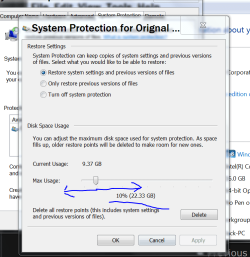
I want to create a restore point before I attempt display manipulation with Powerstrip in case I mess something up but I am not able to because Windows 7 is not giving me the option to.
When I go to the start menu, accessories, system tools, system restore; there is no option for me to create a restore point! The only option it gives me is to restore to an earlier time. There is no option to create a restore point.
There used to be option bubbles with "Restore your system to an earlier date' or 'Create a restore point' but Window 7 is automatically jumping to the restore earlier date option.
How do I fix this so I can create a restore point?
When I go to the start menu, accessories, system tools, system restore; there is no option for me to create a restore point! The only option it gives me is to restore to an earlier time. There is no option to create a restore point.
There used to be option bubbles with "Restore your system to an earlier date' or 'Create a restore point' but Window 7 is automatically jumping to the restore earlier date option.
How do I fix this so I can create a restore point?
My Computer
At a glance
Windows 7 Ultimate 64-bit SP1Intel Core 2 Duo E8400 @ 3.00GHz8.00GB Single-Channel DDR3 @ 531MHz (7-7-7-20)Intel Q45/Q43 Express Chipset (Dell)
- Computer type
- PC/Desktop
- Computer Manufacturer/Model Number
- Dell Optiplex 780
- OS
- Windows 7 Ultimate 64-bit SP1
- CPU
- Intel Core 2 Duo E8400 @ 3.00GHz
- Motherboard
- Dell Inc. 03NVJ6 (CPU)
- Memory
- 8.00GB Single-Channel DDR3 @ 531MHz (7-7-7-20)
- Graphics Card(s)
- Intel Q45/Q43 Express Chipset (Dell)
- Sound Card
- SoundMAX Integrated Digital High Definition Audio
- Monitor(s) Displays
- Viore
- Screen Resolution
- 1920x1080
- Hard Drives
- 149GB Seagate ST3160318AS (SATA)
- Keyboard
- Dell
- Mouse
- Dell
- Internet Speed
- up to 7 Mbps (average 3.2 Mbps)
- Antivirus
- AVG IS
- Browser
- Firefox, Chrome