Solved Cannot create restore points

dkline007

New member
Local time
6:56 PM
Messages
13
Hi all,

I am attempting to help a friend who has an HP TouchSmart PC running Windows 7 Home Premium 64-bit. He recently purchased an iPad and after connecting it, was prompted to update his iTunes, but could not. The update hangs. After investigating a bit, I've been able to determine that it is hanging when it attempts to create a restore point. In fact, I can't do Windows updates because they hang at the point where it is attempting to create a restore point. The system isn't locked up, I can close things out just fine, but it will not create a restore point.

If I attempt to turn system restore off, following the instructions in Help and Support, I see the following screen:
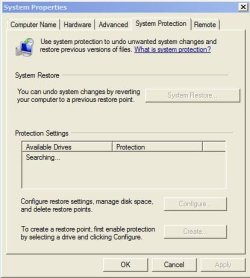
Sys_Prop.JPG
It never finds any drives, it just sits there "Searching..."

In the Application Event Log there are some VSS errors. Event ID 11 followed by Event ID 12292.
In the System Event Log I also see some Distributed COM errors, Event ID 10016.

I've searched on these events, but so far my searches have not lead me to anything that has worked. I found a thread here that spoke about turning System Restore off and then back on again, but when I couldn't do that, I thought I'd give this a shot and see if anyone here might have an idea.

The Volume Shadow Copy service is started.

Any help you can provide would be greatly appreciated! Thanks for taking the time to read the post!

Damon
 

My Computer

OS
Windows 7 Ultimate x64
Run your anti virus and make a full scan
Download and make a full scan with malwarebytes. What you describe may be a trick of a virus writer to protect his work, since you can help remove a virus with system restore.
 

My Computer

Computer type
PC/Desktop
Computer Manufacturer/Model Number
Dell XPS 420
OS
Windows 10, Home Clean Install
CPU
Intel Core2 processsor Q8200(2.33Ghz 1333FSB) Quad Core Tech
Motherboard
Dell
Memory
6 gb
Graphics Card(s)
ATI Radeon 256MB HD3650
Sound Card
Intergrated 7.1 Channel Audio
Monitor(s) Displays
Dell SP2009W 20"
Hard Drives
640 GB Serial ATA Hard drive
Cooling
Fan
Keyboard
Dell USB Keyboard
Mouse
Dell Premium Optical USB
Internet Speed
DSL 2.85
Just a quick check: a similar situation might occur if the PC has limited local admin rights, ie like a business pc given out to company users with a central or outsourced servicemanagement.

Is this friends PC a private buy?
 

My Computer

Computer Manufacturer/Model Number
custom build
OS
Windows 7 64b Ultimate
CPU
I7-2600 3.40GHz - testing various OC levels..
Motherboard
ASUS Sabretooth
Memory
2x 4Gb DDR3/1333
Graphics Card(s)
GTX570 - testing OC levels
Sound Card
motherboard 7.1 DIG.
Monitor(s) Displays
2x Ilyama 24" E2409HDS-B1 2ms/DVI
Screen Resolution
1920 x 1080
Hard Drives
120 GB Intel Elmcrest SSD
1 TB SATAII 7200RPM/32MB
External 2TB USB3
PSU
Corsair Pro HX850W
Cooling
Coolermaster Hyper V8
Keyboard
Logitech G110
Mouse
Logitech G700
Internet Speed
25Mb
Other Info
CPU: 7,7 RAM: 7,7 GTX: 7,9 GTX 3D : 7,9 SSD 7,6
Overall 7,6 ...... now to speed up the SSD... ;)

Also use a Dell XPS M1710 on Vista 32b
Asus LT on Vista 32
3 older machines still doing fine on Linux/ubuntu but not used much anymore...
Thanks to both of you for your replies. This is a friend's PC that he purchased from a store brand new.

It came with a copy of McAfee Plus which he purchased and it is up to date. I did a quick scan with Malware Bytes and it found no infections, but I will attempt to run a full scan.

I forgot to post in my original posting that I experience this same behavior when I boot into safe mode.

Thanks!
 

My Computer

OS
Windows 7 Ultimate x64
If we trust the AV and Malware check then this is what we can check next...

Did you enable the UAC on your system?
Please temporarily disable the UAC to check if it works.

If that doesn't work, try your Event Viewer and upload its logs.
 

My Computer

Computer Manufacturer/Model Number
custom build
OS
Windows 7 64b Ultimate
CPU
I7-2600 3.40GHz - testing various OC levels..
Motherboard
ASUS Sabretooth
Memory
2x 4Gb DDR3/1333
Graphics Card(s)
GTX570 - testing OC levels
Sound Card
motherboard 7.1 DIG.
Monitor(s) Displays
2x Ilyama 24" E2409HDS-B1 2ms/DVI
Screen Resolution
1920 x 1080
Hard Drives
120 GB Intel Elmcrest SSD
1 TB SATAII 7200RPM/32MB
External 2TB USB3
PSU
Corsair Pro HX850W
Cooling
Coolermaster Hyper V8
Keyboard
Logitech G110
Mouse
Logitech G700
Internet Speed
25Mb
Other Info
CPU: 7,7 RAM: 7,7 GTX: 7,9 GTX 3D : 7,9 SSD 7,6
Overall 7,6 ...... now to speed up the SSD... ;)

Also use a Dell XPS M1710 on Vista 32b
Asus LT on Vista 32
3 older machines still doing fine on Linux/ubuntu but not used much anymore...
I'm at work at the moment, so I'll have to check this evening. I believe the UAC is enabled, so I can disable that tonight. I can also do a full scan with Malware Byites as opposed to a quick scan to see if it yields different results.

I can also upload the event logs. Is there an instructional post out here that explains the best way to upload event logs?
 

My Computer

OS
Windows 7 Ultimate x64
I'm at work at the moment, so I'll have to check this evening. I believe the UAC is enabled, so I can disable that tonight. I can also do a full scan with Malware Byites as opposed to a quick scan to see if it yields different results.

I can also upload the event logs. Is there an instructional post out here that explains the best way to upload event logs?

best use: http://www.sevenforums.com/crashes-debugging/96879-blue-screen-death-bsod-posting-instructions.html

It's more than we might need but then you're really complete...
 

My Computer

Computer Manufacturer/Model Number
custom build
OS
Windows 7 64b Ultimate
CPU
I7-2600 3.40GHz - testing various OC levels..
Motherboard
ASUS Sabretooth
Memory
2x 4Gb DDR3/1333
Graphics Card(s)
GTX570 - testing OC levels
Sound Card
motherboard 7.1 DIG.
Monitor(s) Displays
2x Ilyama 24" E2409HDS-B1 2ms/DVI
Screen Resolution
1920 x 1080
Hard Drives
120 GB Intel Elmcrest SSD
1 TB SATAII 7200RPM/32MB
External 2TB USB3
PSU
Corsair Pro HX850W
Cooling
Coolermaster Hyper V8
Keyboard
Logitech G110
Mouse
Logitech G700
Internet Speed
25Mb
Other Info
CPU: 7,7 RAM: 7,7 GTX: 7,9 GTX 3D : 7,9 SSD 7,6
Overall 7,6 ...... now to speed up the SSD... ;)

Also use a Dell XPS M1710 on Vista 32b
Asus LT on Vista 32
3 older machines still doing fine on Linux/ubuntu but not used much anymore...
Sounds like a plan. Thanks for the help! I'll get that uploaded this evening.
 

My Computer

OS
Windows 7 Ultimate x64
Okay, I tried disabling the UAC and rebooted, but I still had the same result.

So, I followed the steps in the linked post for the BSOD upload. I'll attach that to this post.

One thing I noted in the performance summary is that it does not detect an antivirus program, but I can see that McAfee AntiVirus Plus is installed and working.

I'll now start a full scan of the system using Malware Bytes. (I had done a quick scan, but it did not detect anything.)

Thanks for the help!
View attachment BSOD_perfmon.zip
 

My Computer

OS
Windows 7 Ultimate x64
Okay, I tried disabling the UAC and rebooted, but I still had the same result.

So, I followed the steps in the linked post for the BSOD upload. I'll attach that to this post.

One thing I noted in the performance summary is that it does not detect an antivirus program, but I can see that McAfee AntiVirus Plus is installed and working.

I'll now start a full scan of the system using Malware Bytes. (I had done a quick scan, but it did not detect anything.)

Thanks for the help!
View attachment 162387


Something is very wrong here, most of the data we need is not in the files. Not even msinfo :confused:

Please turn UAC back on. Then reboot in Safe Mode and run SFC Scannow multiple times, if needed. Then use any way that you know of to show us the hard disk and volume setup and post a BSOD upload again please. Tutorial for SFC:
http://www.sevenforums.com/tutorials/1538-sfc-scannow-command-system-file-checker.html
 

My Computer

Computer Manufacturer/Model Number
custom build
OS
Windows 7 64b Ultimate
CPU
I7-2600 3.40GHz - testing various OC levels..
Motherboard
ASUS Sabretooth
Memory
2x 4Gb DDR3/1333
Graphics Card(s)
GTX570 - testing OC levels
Sound Card
motherboard 7.1 DIG.
Monitor(s) Displays
2x Ilyama 24" E2409HDS-B1 2ms/DVI
Screen Resolution
1920 x 1080
Hard Drives
120 GB Intel Elmcrest SSD
1 TB SATAII 7200RPM/32MB
External 2TB USB3
PSU
Corsair Pro HX850W
Cooling
Coolermaster Hyper V8
Keyboard
Logitech G110
Mouse
Logitech G700
Internet Speed
25Mb
Other Info
CPU: 7,7 RAM: 7,7 GTX: 7,9 GTX 3D : 7,9 SSD 7,6
Overall 7,6 ...... now to speed up the SSD... ;)

Also use a Dell XPS M1710 on Vista 32b
Asus LT on Vista 32
3 older machines still doing fine on Linux/ubuntu but not used much anymore...
Hmmm...I'll give this a shot tonight. I saw this post this morning, so I turned UAC back on and started an SFC scan, but I had to leave for work. I'll check the status when I get home this evening and report back.

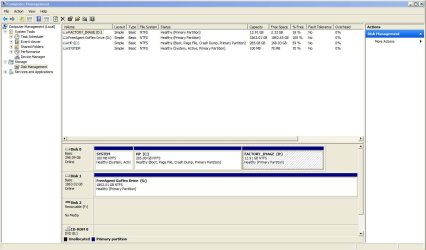
Will a screenshot of the Disk Management screen be enough to show the hard disk and volume setup?
 

My Computer

OS
Windows 7 Ultimate x64
To use Restore Points again, you need to turn it off. Reboot and then turn it on again. This will get rid of the old corrupted restore points and start from fresh.
To turn Restore Points off, open ADvanced System Settings, click on System Protection tab and configure C: drive and select 'Turn off system protection'.
 

My Computer

Computer Manufacturer/Model Number
CCL Online OEM
OS
Windows 7 Home Premium 32bit
CPU
Intel Core 2 2.4GHz
Motherboard
Foxconn 946GZ7MA
Memory
4GB
Graphics Card(s)
ATI Radeon 4850
Sound Card
Realtek HD Audio
Monitor(s) Displays
Prolite E2407HDS
Screen Resolution
1920x1080
Hard Drives
2 x WDC 500 GB
Cooling
Fan
Keyboard
Microsoft Digital Media
Mouse
Optical Wheel Mouse
Internet Speed
14Mb/sec
Other Info
Internet ISP: Plusnet
Thanks for the reply pj, but when I attempt to turn off system restore, I am unable to do so. When I click on System Protection, it just sits there "Searching...".

If you look at my original post, you'll see the screen I get when I click on System Protection.
 

My Computer

OS
Windows 7 Ultimate x64
Okay, first of all, thanks for all of the help so far!

I booted into safe mode and ran the SFC /runnow command from an elevated command prompt. It ran successfully but did not detect any inconsistencies.

So, I ran another BSOD from safe mode, then booted back into the OS and ran the perfmon. I zipped both of those up and will attach them. I also took a snip of the disk manager:
DiskManager.JPG

Here's the BSOD zip:
View attachment Windows_NT6_BSOD_jcgriff2.zip

Again, thanks for the help!
 

My Computer

OS
Windows 7 Ultimate x64
Okay, first of all, thanks for all of the help so far!

I booted into safe mode and ran the SFC /runnow command from an elevated command prompt. It ran successfully but did not detect any inconsistencies.

So, I ran another BSOD from safe mode, then booted back into the OS and ran the perfmon. I zipped both of those up and will attach them. I also took a snip of the disk manager:
View attachment 162568

Here's the BSOD zip:
View attachment 162567

Again, thanks for the help!


Most of this is still empty and there is no dumpfile to analyse.

However, on your disk I do see a seemingly correct pre-install partition. Have you tried that yet?
 

My Computer

Computer Manufacturer/Model Number
custom build
OS
Windows 7 64b Ultimate
CPU
I7-2600 3.40GHz - testing various OC levels..
Motherboard
ASUS Sabretooth
Memory
2x 4Gb DDR3/1333
Graphics Card(s)
GTX570 - testing OC levels
Sound Card
motherboard 7.1 DIG.
Monitor(s) Displays
2x Ilyama 24" E2409HDS-B1 2ms/DVI
Screen Resolution
1920 x 1080
Hard Drives
120 GB Intel Elmcrest SSD
1 TB SATAII 7200RPM/32MB
External 2TB USB3
PSU
Corsair Pro HX850W
Cooling
Coolermaster Hyper V8
Keyboard
Logitech G110
Mouse
Logitech G700
Internet Speed
25Mb
Other Info
CPU: 7,7 RAM: 7,7 GTX: 7,9 GTX 3D : 7,9 SSD 7,6
Overall 7,6 ...... now to speed up the SSD... ;)

Also use a Dell XPS M1710 on Vista 32b
Asus LT on Vista 32
3 older machines still doing fine on Linux/ubuntu but not used much anymore...
I'm confused as to why this is empty. Hopefully I'm following the instructions correctly. I downloaded the file, right-clicked the EXE and chose to "Run as administrator". It does it's thing and creates a folder, which I zip up along with the perfmon report. Is that right?

For the pre-install partition, are you referring to the factory image partition? Will that just revert the system back to the factory default? If so, I can do that, but I'm trying to avoid having to reload all of the software that he's purchased after he bought the PC. Also, in a somewhat selfish way, I really want to know what the heck the problem is. If we can't figure this out soon, I'll just use the factory image and start over again, but if we can determine what the problem is, not only would I feel better knowing that we could solve it, but it might help someone else down the road from having to go through this as well.

Thanks for help...again. :)
 

My Computer

OS
Windows 7 Ultimate x64
I'm confused as to why this is empty. Hopefully I'm following the instructions correctly. I downloaded the file, right-clicked the EXE and chose to "Run as administrator". It does it's thing and creates a folder, which I zip up along with the perfmon report. Is that right?

For the pre-install partition, are you referring to the factory image partition? Will that just revert the system back to the factory default? If so, I can do that, but I'm trying to avoid having to reload all of the software that he's purchased after he bought the PC. Also, in a somewhat selfish way, I really want to know what the heck the problem is. If we can't figure this out soon, I'll just use the factory image and start over again, but if we can determine what the problem is, not only would I feel better knowing that we could solve it, but it might help someone else down the road from having to go through this as well.

Thanks for help...again. :)

-permon etc... yeah, that seems allright:confused: Strange. I'll have to look at the log it made...

-I understand that... we'll have to think some more.. I'll get back to you soon.
 

My Computer

Computer Manufacturer/Model Number
custom build
OS
Windows 7 64b Ultimate
CPU
I7-2600 3.40GHz - testing various OC levels..
Motherboard
ASUS Sabretooth
Memory
2x 4Gb DDR3/1333
Graphics Card(s)
GTX570 - testing OC levels
Sound Card
motherboard 7.1 DIG.
Monitor(s) Displays
2x Ilyama 24" E2409HDS-B1 2ms/DVI
Screen Resolution
1920 x 1080
Hard Drives
120 GB Intel Elmcrest SSD
1 TB SATAII 7200RPM/32MB
External 2TB USB3
PSU
Corsair Pro HX850W
Cooling
Coolermaster Hyper V8
Keyboard
Logitech G110
Mouse
Logitech G700
Internet Speed
25Mb
Other Info
CPU: 7,7 RAM: 7,7 GTX: 7,9 GTX 3D : 7,9 SSD 7,6
Overall 7,6 ...... now to speed up the SSD... ;)

Also use a Dell XPS M1710 on Vista 32b
Asus LT on Vista 32
3 older machines still doing fine on Linux/ubuntu but not used much anymore...
If we trust the AV and Malware check then this is what we can check next...

Did you enable the UAC on your system?
Please temporarily disable the UAC to check if it works.

If that doesn't work, try your Event Viewer and upload its logs.
Disabling UAC deletes any restore points that are saved
 

My Computer

Computer Manufacturer/Model Number
Hewlett packard/p6512uk
OS
Microsoft Windows 7 Home Premium 64-bit 7600
CPU
IIx4 amd athelon 635 processor
Motherboard
FOXCONN 2AA9
Memory
2x2gb
Graphics Card(s)
ati radeon HD 5450
Sound Card
(1) Realtek High Definition Audio (2) AMD High Definition
Monitor(s) Displays
samsung lcd tv 32"
Screen Resolution
1360x 768
Hard Drives
(1) WDC WD10 01FAES-60Z2A0 SATA Disk Device (2) Maxtor OneTouch USB Device (3) ST310003 33AS USB Device (4) WD My Book 1111 USB Device
PSU
?
Cooling
air!
Keyboard
wireless hp
Mouse
wireless Hp,optical
Internet Speed
1.10mb/s
Antivirus
MSE
Browser
Firefox
If we trust the AV and Malware check then this is what we can check next...

Did you enable the UAC on your system?
Please temporarily disable the UAC to check if it works.

If that doesn't work, try your Event Viewer and upload its logs.
Disabling UAC deletes any restore points that are saved

I know, it was enabled, therefore disabling and re-enabling it sometimes helps. It's a common procedure from MS engineers:
HTML:
Thank you for posting your question to the Microsoft Answers Forum.

Let's try the simple troubleshooting step: disable System Restore and then enable it. This will remove all existing restore points.

How to disable System Restore in Windows Vista:
http://bertk.mvps.org/html/disablesrv.html

Do not set System Restore to monitor any drives other than the one Windows is installed on.

Have you tried to add your account to the permissions list for the system restore directory etc. If that doesn't work, then try to disable User Account control and see if that is the issue. 
To turn off UAC
Click Start, and then click Control Panel.In Control Panel, click User Accounts.
In the User Accounts window, click User Accounts.
In the User Accounts tasks window, click Turn User Account Control on or off.
If UAC is currently configured in Admin Approval Mode, the User Account Control message appears. Click Continue.
Clear the Use User Account Control (UAC) to help protect your computer check box, and then click OK.
Click Restart Now to apply the change right away, or click Restart Later and close the User Accounts tasks window.
If turning off UAC doesn't help with creating a System Restore point, try the following:

1) Set up a clean boot and see if a 3rd party program or software may be interferring with the System Restore point.
Follow the KB article below for steps on setting up the msconfig (clean boot) configuration.
KB 929135 - How to troubleshoot a problem by performing a clean boot in Windows Vista
http://support.microsoft.com/kb/929135

2) Disable Anti-Virus and try to create a system restore point. I would also try to uninstall it too.

Something else is going on here, we just haven't figured out what yet...
 

My Computer

Computer Manufacturer/Model Number
custom build
OS
Windows 7 64b Ultimate
CPU
I7-2600 3.40GHz - testing various OC levels..
Motherboard
ASUS Sabretooth
Memory
2x 4Gb DDR3/1333
Graphics Card(s)
GTX570 - testing OC levels
Sound Card
motherboard 7.1 DIG.
Monitor(s) Displays
2x Ilyama 24" E2409HDS-B1 2ms/DVI
Screen Resolution
1920 x 1080
Hard Drives
120 GB Intel Elmcrest SSD
1 TB SATAII 7200RPM/32MB
External 2TB USB3
PSU
Corsair Pro HX850W
Cooling
Coolermaster Hyper V8
Keyboard
Logitech G110
Mouse
Logitech G700
Internet Speed
25Mb
Other Info
CPU: 7,7 RAM: 7,7 GTX: 7,9 GTX 3D : 7,9 SSD 7,6
Overall 7,6 ...... now to speed up the SSD... ;)

Also use a Dell XPS M1710 on Vista 32b
Asus LT on Vista 32
3 older machines still doing fine on Linux/ubuntu but not used much anymore...
Sorry, I had gone away for a few days, but I'm back and at it again. Any other suggestions? I'll delve back into it this evening and see if anything else strikes an idea.
 

My Computer

OS
Windows 7 Ultimate x64
Back
Top