Cannot delete partition

Nonothing

New member
Local time
5:28 PM
Messages
4
Hi Guys,
I have a problem in that I can't delete one of my partitions.
I have 3 hard drives, 1x1tb sata with my main os, win 7 ultimate 64bit and 3 other partitions. 1x500gb sata with win xp 32bit and other partitions. 1x250gb ide with 5 partitions.
I kept the xp as a dual boot with win 7 ages ago, but now I have decided to wipe it off to use the space. I used miniTool patition wizard to delete the xp partition (as easeus pm won't do that),let it do its stuff, and there was a nice big blank partition, waiting to be filled. Rebooted and nothing happened! I thought there must have been important loading files on the xp partition which were hosed with the deletion, so popped in my win 7 disk and fixed the MBR. When I rebooted, windows auto ran check disk and started to repair things, which seemed to be ok. So I left it to sort itself out and went to bed. 4 hours later it was still churning about, so, I went back to sleep. Come the morning and win 7 was sat there good as gold. Anyway, tonight after booting up and checking my drives, it turns out that there is my xp partition, still full of.........well, xp and stuff, sitting there as if nothing has happened!
Does anyone know what DID happen,and why? And, how can I actually delete/format the partition properly, preferably without having to fix the mbr again?
Thanks
Dave
 

My Computer My Computer

At a glance

Windows 7 Ultimate x64Intel E8400Kingston 4gbATI HD4850
Computer Manufacturer/Model Number
Self built
OS
Windows 7 Ultimate x64
CPU
Intel E8400
Motherboard
Foxconn Mars
Memory
Kingston 4gb
Graphics Card(s)
ATI HD4850
Sound Card
Asus Xonar DX
Monitor(s) Displays
17" TFT
Hard Drives
1x 1tb sata
1x 500gb sata
1x 250gb ide
PSU
800watt generic
Case
atx
Cooling
2x 80mmcase fans + std cpu/gpu fans
What happened... don't know

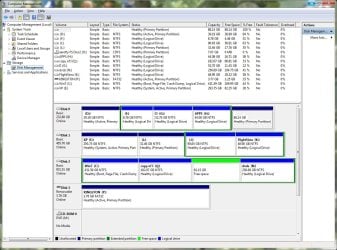
please post screenshot of diskmangement when within win7
 

My Computer My Computer

At a glance

Microsoft Windows 7 Home Premium 64-bits 7601...Intel(R) Core(TM) i3 CPU M 370 @ 2.40GHz4,00 GBATI Mobility Radeon HD 5400 Series
Computer type
Laptop
Computer Manufacturer/Model Number
ACER ASPIRE 5742G
OS
Microsoft Windows 7 Home Premium 64-bits 7601 Multiprocessor Free Service Pack 1
CPU
Intel(R) Core(TM) i3 CPU M 370 @ 2.40GHz
Motherboard
Acer Aspire 5742G
Memory
4,00 GB
Graphics Card(s)
ATI Mobility Radeon HD 5400 Series
Sound Card
(1) AMD High Definition Audio Device (2) Realtek High Defi
Screen Resolution
1366 x 768 x 32 bits (4294967296 colors) @ 60 Hz
Hard Drives
WDC WD5000BEVT-22ZAT0
Why can`t you just delete it from 7 ?

If you are using the PW disc, make sure you are deleting the proper partition. The disc never fails. You may have to mark the XP partition inactive b4 it will let you delete it.
 

My Computer My Computer

At a glance

Windows 10 Pro x64Intel Core i7 6700KGSkill TridentZ RGB 16GB 3600 16-16-16-36EVGA GTX 980 Ti SC x2
Computer type
PC/Desktop
Computer Manufacturer/Model Number
Skylake Special #666
OS
Windows 10 Pro x64
CPU
Intel Core i7 6700K
Motherboard
Asus Sabertooth Z170 Mark 1
Memory
GSkill TridentZ RGB 16GB 3600 16-16-16-36
Graphics Card(s)
EVGA GTX 980 Ti SC x2
Sound Card
Realtek High Definition
Monitor(s) Displays
AOC G2460PG
Screen Resolution
1920 x 1080 144Hz
Hard Drives
Samsung 860 Pro 256GB, Seagate Barracuda 4TB x2
PSU
EVGA 1000 P2, EVGA White Custom Braided Cables
Case
Corsair Vengeance C70 Gunmetal Black
Cooling
Corsair H100i v2, Corsair ML120 x2, Thermal Grizzly Kryonaut
Keyboard
Logitech G910 Orion Spectrum
Mouse
Logitech G700s
Internet Speed
Verizon Fios Quantum Gateway 75/75
Antivirus
Windows Defender, Malwarebytes Free 3.8.3
Browser
Chrome
Other Info
Corsair SP120 x4, LG Blu-ray Drive, Durabrand HT-395 100 Watt Dolby Digital Amp, Corsair H2100 Wireless 7.1 Headset
Why can`t you just delete it from 7 ?

If you are using the PW disc, make sure you are deleting the proper partition. The disc never fails. You may have to mark the XP partition inactive b4 it will let you delete it.

After I had deleted the partition, it showed up as empty in minitool pm and easeus, so it was the right one. I'm not using a disc, just the downloaded software.
Win 7 wont format it. Gives me the message "windows was unable to complete the format" as soon as I click on "format".
 

My Computer My Computer

At a glance

Windows 7 Ultimate x64Intel E8400Kingston 4gbATI HD4850
Computer Manufacturer/Model Number
Self built
OS
Windows 7 Ultimate x64
CPU
Intel E8400
Motherboard
Foxconn Mars
Memory
Kingston 4gb
Graphics Card(s)
ATI HD4850
Sound Card
Asus Xonar DX
Monitor(s) Displays
17" TFT
Hard Drives
1x 1tb sata
1x 500gb sata
1x 250gb ide
PSU
800watt generic
Case
atx
Cooling
2x 80mmcase fans + std cpu/gpu fans
Have you tried using diskpart from command prompt?
 

My Computer My Computer

At a glance

Windows 7 Pro 64-Biti716GBNvidia
Computer Manufacturer/Model Number
Custom
OS
Windows 7 Pro 64-Bit
CPU
i7
Motherboard
Gigabyte
Memory
16GB
Graphics Card(s)
Nvidia
Sound Card
Onboard
Monitor(s) Displays
Asus
Hard Drives
Seagate
PSU
Antec
Case
Fractial Design
Cooling
Stock
disc man2.jpg

Here's a screenshot of my messy drives....:p
 

My Computer My Computer

At a glance

Windows 7 Ultimate x64Intel E8400Kingston 4gbATI HD4850
Computer Manufacturer/Model Number
Self built
OS
Windows 7 Ultimate x64
CPU
Intel E8400
Motherboard
Foxconn Mars
Memory
Kingston 4gb
Graphics Card(s)
ATI HD4850
Sound Card
Asus Xonar DX
Monitor(s) Displays
17" TFT
Hard Drives
1x 1tb sata
1x 500gb sata
1x 250gb ide
PSU
800watt generic
Case
atx
Cooling
2x 80mmcase fans + std cpu/gpu fans
One of the worst Disk Mgmt messes I've ever seen. Did you just do things randomly without asking or caring?

Unplug all of the HD's except the Win7 HD, boot into free Partition Wizard CD to rightclick Win7 partition to Modify>Set to Primary, click OK. Then rightclick Win7 partition again to Modify>Set to Active, click OK, then Apply both steps.

Now boot into Win7 installer System Recovery Options to run Startup Repair - Run 3 Separate Times until Win7 holds the System Active boot flags which it can only do as a Primary Partition. Make sure it's set as HD first to boot in BIOS setup so it starts.

If there is an OS on D since it is marked Active then repeat the same PW steps with only it's HD plugged in that you did for Win7 on C, and boot it separately via the BIOS Boot Menu key. If it is not an OS partition then mark it Inactive using Partition Wizard CD.

You can then plug back in the other HD's, boot XP if it's still there independently using the one-time BIOS Boot Menu key.
 
After seeing that screenshot I am not supprised you are having issues. Follow gregrockers advise... and slowly rebuild your hard drive setup as that is messy.
 

My Computer My Computer

At a glance

Windows 7 Pro 64-Biti716GBNvidia
Computer Manufacturer/Model Number
Custom
OS
Windows 7 Pro 64-Bit
CPU
i7
Motherboard
Gigabyte
Memory
16GB
Graphics Card(s)
Nvidia
Sound Card
Onboard
Monitor(s) Displays
Asus
Hard Drives
Seagate
PSU
Antec
Case
Fractial Design
Cooling
Stock
Thanks for the advice gregrocker. I noticed you edited your original post, if that was to tone it down a bit you needn't have bothered, you're quite right, it is a damn mess.
I take what you say in the right spirit, as I'm sure that's how it was meant. I do tend to charge about rather haphazardly in many areas of life, and my pc is just one of them.
I will follow your instructions and I'm sure I'll achieve my initial goal of deleting my xp partition. As for 'rebuilding my hard drive setup' as mentioned by ThermoDust.....what exactly am I aiming at?........fewer partitons....more equally sized partitions?........I'm at a bit of a loss as to what a hard drive setup 'should' look like.
Any advice greatfully received.......as was everything up to now, thanks for that.
Dave
 

My Computer My Computer

At a glance

Windows 7 Ultimate x64Intel E8400Kingston 4gbATI HD4850
Computer Manufacturer/Model Number
Self built
OS
Windows 7 Ultimate x64
CPU
Intel E8400
Motherboard
Foxconn Mars
Memory
Kingston 4gb
Graphics Card(s)
ATI HD4850
Sound Card
Asus Xonar DX
Monitor(s) Displays
17" TFT
Hard Drives
1x 1tb sata
1x 500gb sata
1x 250gb ide
PSU
800watt generic
Case
atx
Cooling
2x 80mmcase fans + std cpu/gpu fans
For fastest reads/writes, you want OS in first partition on HD, installed with other HD"s unplugged.

Preferred HD booted via BIOS boot order priority, other OS HD's booted by one-time BIOS BOot menu.

Any installs/repairs are done with all other HD's unplugged to avoid derailng the boot files to a preceding Active partition.

Logicals are only used for Data, and mainly only needed when you already have 3 Primary partitions on the HD since you can make as many adjacent Logicals as you want.
 
Back
Top