Cannot disable proxy permanently

coyote455

New member
Local time
11:41 AM
Messages
37
Location
Hungary
Hi all!

I've just joined this forum so that I can gather information about my current problem.

As the title says, I cannot disable proxy permanently.
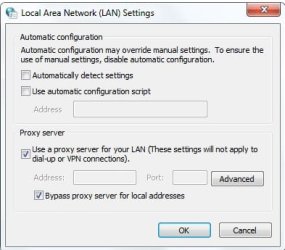
I go to Control Panel > Network and Internet > Internet options > Connections > LAN and I see what the image displays here. Nothing special so far.

I untick Use a proxy server for your LAN. Click Ok, and I quit Control Panel.
If I visit the same panel 2 minutes later, this option is enabled again.

And because of this, I cannot disable proxy on Google Chrome, either.

I've tried many things to solve this problem.
For example, I went to Advanced, and deleted everything there. I clicked OK, then an error message popped up saying: Do you want to turn off proxy connection? I click yes- I go back 30 sec later and it's enabled again.
I even tried some tricks in registry. Still nothing.

I want to disable it permanenty, as it's my private computer, using proxy isn't useful for me.

Any ideas? Why does it always come back?
By the way, I use WiFi connection.
 

Attachments
  • Untitled.jpg
    Untitled.jpg
    46.6 KB · Views: 25

My Computer

Computer type
Laptop
Computer Manufacturer/Model Number
HP
OS
Windows 7 Professional 64 bit
CPU
IB Intel Core i3-3110M
Memory
6GB 1333 Mhz
Graphics Card(s)
-
Screen Resolution
1366*768
Hard Drives
Samsung 840 EVO 120 GB
Internet Speed
20/1
Browser
Chrome
Hello and welcome to SevenForums,

Type in the Search Bar of your browser "about:config",

search for this option "network.proxy.type",

change the value to 0
 

My Computer

Computer type
PC/Desktop
Computer Manufacturer/Model Number
Custom Build
OS
Windows 7 Ultimate 64-bit
CPU
Intel G3420 3.2GHZ Dual Core
Motherboard
Gigabyte H87-HD3
Memory
Kingson 8GB 1600mhz
Graphics Card(s)
MSI R7970 TF 3GD5/OC BE
Monitor(s) Displays
21" LG & "19 Vertical Samsung
Hard Drives
120GB SSD - Boot
1TB WD
350GB External
2TB External (Wireless)
PSU
Corsair CX 500 modular
Case
Zalman Z11 Plus (modified)
Cooling
Corsair H55, 2x 120mm SP Corsair, 1x 140 Coolermaster
Keyboard
Corsair K50
Mouse
CSL Gaming
Internet Speed
164Mbps
Antivirus
Avast, Malwarebytes
Browser
Google Chrome, IE, Firefox
I tried, but Chrome does not have this about:config page anymore.

I checked in Firefox, it's 0 on default. If only that was the browser I use daily..
 

My Computer

Computer type
Laptop
Computer Manufacturer/Model Number
HP
OS
Windows 7 Professional 64 bit
CPU
IB Intel Core i3-3110M
Memory
6GB 1333 Mhz
Graphics Card(s)
-
Screen Resolution
1366*768
Hard Drives
Samsung 840 EVO 120 GB
Internet Speed
20/1
Browser
Chrome
No ideas? :shock:
 

My Computer

Computer type
Laptop
Computer Manufacturer/Model Number
HP
OS
Windows 7 Professional 64 bit
CPU
IB Intel Core i3-3110M
Memory
6GB 1333 Mhz
Graphics Card(s)
-
Screen Resolution
1366*768
Hard Drives
Samsung 840 EVO 120 GB
Internet Speed
20/1
Browser
Chrome
Uncheck the box that says Use Proxy server .
 

My Computer

Computer type
PC/Desktop
Computer Manufacturer/Model Number
Dell optiplex 740
OS
Win 7 Home Premium SP1 32 bit
CPU
AMD Athlon 64 X2 5000B
Motherboard
Dell Inc. 0YP696 (Socket M2 )
Memory
4.00 GB Dual-Channel DDR2 @ 370MHz (6-6-6-18)
Graphics Card(s)
Acer E181H (1366x768@60Hz) 64MB GeForce 6150 LE (Dell)
Sound Card
SigmaTel High Definition Audio CODEC
Monitor(s) Displays
Acer E181H (1366x768@60Hz) 64MB GeForce 6150 LE (Dell)
Hard Drives
699GB Seagate ST375064 0NS SCSI Disk Device (ATA)
Case
Mini tower
Internet Speed
Ping 36 ms, Download 57.71 mbps , Upload 11.79mbps
Antivirus
Free Avast. Pro paid Mbam , Free Sas
Browser
Palemoon .
As I said, I've tried that many times, but once I close the window and go back, the tick is there again.
 

My Computer

Computer type
Laptop
Computer Manufacturer/Model Number
HP
OS
Windows 7 Professional 64 bit
CPU
IB Intel Core i3-3110M
Memory
6GB 1333 Mhz
Graphics Card(s)
-
Screen Resolution
1366*768
Hard Drives
Samsung 840 EVO 120 GB
Internet Speed
20/1
Browser
Chrome
Quite odd.. Maybe an expert can offer advice.. this is a new one for me..
 

My Computer

Computer type
PC/Desktop
Computer Manufacturer/Model Number
Dell optiplex 740
OS
Win 7 Home Premium SP1 32 bit
CPU
AMD Athlon 64 X2 5000B
Motherboard
Dell Inc. 0YP696 (Socket M2 )
Memory
4.00 GB Dual-Channel DDR2 @ 370MHz (6-6-6-18)
Graphics Card(s)
Acer E181H (1366x768@60Hz) 64MB GeForce 6150 LE (Dell)
Sound Card
SigmaTel High Definition Audio CODEC
Monitor(s) Displays
Acer E181H (1366x768@60Hz) 64MB GeForce 6150 LE (Dell)
Hard Drives
699GB Seagate ST375064 0NS SCSI Disk Device (ATA)
Case
Mini tower
Internet Speed
Ping 36 ms, Download 57.71 mbps , Upload 11.79mbps
Antivirus
Free Avast. Pro paid Mbam , Free Sas
Browser
Palemoon .
This can be caused by malware, or security programs, etc. You'll want to do some scans to make sure.

D/L AdwCleaner and run it

AdwCleaner Download (Choose the Download now @BleepingComputer link)

Follow Jacees instructions to run AdwCleaner (ignore the title of the thread)

http://www.sevenforums.com/system-s...roke-mouseclick-causes-chaos.html#post2834259

D/L and run Malwarebytes Free (Decline the trial offer when installing)

Malwarebytes | Free Anti-Malware Detection & Removal Software

See what these programs find, we may need a security expert if there are issues.

A Guy
 

My Computer

Computer type
PC/Desktop
OS
Windows 10 Home x64
CPU
INTEL Core i5-750 Quad-Core 3.37GHz
Motherboard
ASUS P7P55D
Memory
HyperX Fury Black Series 8GB (2 x 4GB) 1866Mhz
Graphics Card(s)
EVGA GeForce GTX 750 Superclocked 1GB 128-Bit GDDR5
Monitor(s) Displays
LG 32MA68HY 32" IPS
Screen Resolution
1920 x 1080
Hard Drives
Samsung 840 Evo 120GB, SEAGATE 500GB Barracuda® 7200.12, SATA 3 Gb/s, 7200 RPM, 16MB cache
PSU
ANTEC TruePower New TP-550, 80 PLUS, 550W
Case
ANTEC Three Hundred Illusion
Cooling
COOLER MASTER Hyper 212 Plus, 4 x 120mm 1 x 140mm Noctua's
Internet Speed
85 + Mbps
Antivirus
Avast
Browser
Vivaldi
  • Like
Reactions: Arc
I absolutely agree with A Guy this can be a infection or another programs.

Do you use Advanced System Care or any other programs by IObit?

Have you installed any new programs?

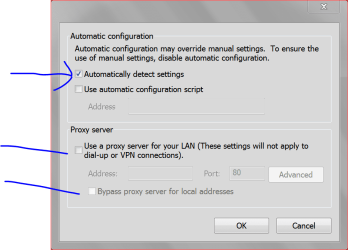
This is how mine is set.

Capture.PNGTODAY ONLY.PNG
 

My Computer

Computer type
PC/Desktop
Computer Manufacturer/Model Number
Home made Desktop
OS
Windows 10 Pro. 64/ version 1709 Windows 7 Pro/64
CPU
Intel i7-6800K @ 4.3
Motherboard
ASUS X-99 Deluxe II
Memory
Corsair Platinum 16 gig @2400
Graphics Card(s)
EVGA GTX 1070 OC
Monitor(s) Displays
Asus 27" LED LCD/VE278Q
Screen Resolution
1920-1080 or 1280-720 HDMI
Hard Drives
INTEL SSD 730-240 Gb Sata 3.0/
PSU
EVGA Platium 1200W
Case
Phanteks Luxe Tempered Glass 8 fans/ one radiator
Cooling
XSPC/ Water Cooled CPU
Keyboard
Das 4 Professional
Mouse
Logitech M705/MX Anywhere 2-S
Internet Speed
100 mbits
Antivirus
Microsoft Security Essentials/ Malwarebytes Premium 3.0/ SAS
Browser
I.E. 11 default/Firefox/ ISP Time Warner Cable/Spectrum
Other Info
LG BluRay Burner/
Sound system-KLipsch-THX/
Icy Dock ssd Hot Swap bays.
This can be caused by malware, or security programs, etc. You'll want to do some scans to make sure.

D/L AdwCleaner and run it

AdwCleaner Download (Choose the Download now @BleepingComputer link)

Follow Jacees instructions to run AdwCleaner (ignore the title of the thread)

http://www.sevenforums.com/system-s...roke-mouseclick-causes-chaos.html#post2834259

D/L and run Malwarebytes Free (Decline the trial offer when installing)

Malwarebytes | Free Anti-Malware Detection & Removal Software

See what these programs find, we may need a security expert if there are issues.

A Guy

Thanks for the answer!

Malwarebytes is already installed, and it's muuch better than Microsoft Security Essentials.
It doesn't find anything now, though.
I am going to install the programs you listed and see what happens.
 

My Computer

Computer type
Laptop
Computer Manufacturer/Model Number
HP
OS
Windows 7 Professional 64 bit
CPU
IB Intel Core i3-3110M
Memory
6GB 1333 Mhz
Graphics Card(s)
-
Screen Resolution
1366*768
Hard Drives
Samsung 840 EVO 120 GB
Internet Speed
20/1
Browser
Chrome
I absolutely agree with A Guy this can be a infection or another programs.

Do you use Advanced System Care or any other programs by IObit?

Have you installed any new programs?

This is how mine is set.

View attachment 326299

I don't use any IObit programs.
I tried disabling proxy and enabling Automatically detect settings, but the same thing happens: I close the window, go back 30 sec later and it's enabled again.
 

My Computer

Computer type
Laptop
Computer Manufacturer/Model Number
HP
OS
Windows 7 Professional 64 bit
CPU
IB Intel Core i3-3110M
Memory
6GB 1333 Mhz
Graphics Card(s)
-
Screen Resolution
1366*768
Hard Drives
Samsung 840 EVO 120 GB
Internet Speed
20/1
Browser
Chrome
So. I have downloaded AdwCleaner, ran it, it found some infections, removed it, but the problem still exists.:huh:

I think reinstalling W7 is my only option now.
 

My Computer

Computer type
Laptop
Computer Manufacturer/Model Number
HP
OS
Windows 7 Professional 64 bit
CPU
IB Intel Core i3-3110M
Memory
6GB 1333 Mhz
Graphics Card(s)
-
Screen Resolution
1366*768
Hard Drives
Samsung 840 EVO 120 GB
Internet Speed
20/1
Browser
Chrome
Back
Top