Cannot Format D-Drive (2nd hard drive)

bladesgore

New member
Local time
12:12 PM
Messages
10
I have a second hard drive, which I recovered a deleted file into. I went into the find the recovered file, but it wasn't there, even though it used up a few gigabytes of space. I'm now frustrated, and I want to format the drive. It kept saying "being used by another process" or something like that, anyways, I went into the hard drive and deleted everything myself. The hard drive is now empty, but it still has about 16gigs of space being used, even though the drive is completely empty.

The software I used to recover my file was "Recuva". I uninstalled it, so it shouldn't be interfering with the formatting. Is there anyway to force format the hard drive???

Please help!

Thank you.
 

My Computer

Computer Manufacturer/Model Number
HP
OS
Windows 7 Home 64bit
CPU
Core I7
Memory
8gb DDR3
Graphics Card(s)
ATI Radeon HD5850
Hard Drives
2 512gb hard drives
Use your Windows install disc. When it gets to the point where it ask you where you want to install Win 7 indicate that drive. Then format the disc. Now exit the installation. If you cannot get that one to work then attempt it with a XP installation disc.

Another way is to go to your Control Panel and choice Administration Tools then go to Computer Management. From there go to Disk management. Once there right click on the Drive then click on Delete Volume. Once that is done, reformat. Hope this helps.
 

My Computer

Computer Manufacturer/Model Number
HP Pavilion a4302f
OS
Win 7 Pro x64, VM Win XP, Win7 Pro Sandbox, Kubuntu 11
CPU
AMD Athlon(tm) II X4 640 @ 3.0 Gbz
Memory
12GB 1066MHz DDR3 SDRAM - 2x4GB, 2x2GB
Graphics Card(s)
ATI Radeon HD 4350 HD Graphics/Audio with 512MB
Sound Card
Realtek High Definition Audio
Monitor(s) Displays
1. Dell 23" SP2307, 2. Mitsublishi 40" HDTV, Hannspree 25"
Screen Resolution
1. 2048x1152, 2. 1920-1080, 3. 1920x1200
Hard Drives
Int: 1 120 Gig SSD i
1 - 2.5" 500 USB External HDD
1 -1 Tb USB External HDD
Case
Mid Tower
Cooling
Standard Fans - 5 fans (very quiet)
Keyboard
Microsoft Wireless 2000
Mouse
Microsoft Wireless Mouse 5000
Internet Speed
10 Mbit (realistically 500 Kbit - 1.2 Mbit)
Other Info
Speakers - Bose Desktop (Excellent Sound)
1 external CD|DVD\Blue-ray Recorders/Players (Sony)
It won't let me delete volume, the option is faded out. Also, I have an HP envy 17 laptop, it didn't come with any CDs.
 

My Computer

Computer Manufacturer/Model Number
HP
OS
Windows 7 Home 64bit
CPU
Core I7
Memory
8gb DDR3
Graphics Card(s)
ATI Radeon HD5850
Hard Drives
2 512gb hard drives
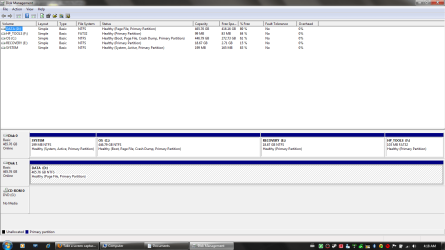
I tried diskpart. It didn't let me delete the volume, it said it was in use. I then tried to delete it through override, but that wasn't allowed for it, because it is a "Pagefile".
 

My Computer

Computer Manufacturer/Model Number
HP
OS
Windows 7 Home 64bit
CPU
Core I7
Memory
8gb DDR3
Graphics Card(s)
ATI Radeon HD5850
Hard Drives
2 512gb hard drives
Can you provide a snipshot of the disk management window?
 

My Computer

Computer Manufacturer/Model Number
Too many to describe...
OS
Windows 7 x64 pro/ Windows 7 x86 Pro/ XP SP3 x86
moz-screenshot.png
moz-screenshot-1.png
Here you go:
 

Attachments

  • Disk Management.png
    Disk Management.png
    127.8 KB · Views: 753

My Computer

Computer Manufacturer/Model Number
HP
OS
Windows 7 Home 64bit
CPU
Core I7
Memory
8gb DDR3
Graphics Card(s)
ATI Radeon HD5850
Hard Drives
2 512gb hard drives
It is the D- Drive which I can't format.
 

My Computer

Computer Manufacturer/Model Number
HP
OS
Windows 7 Home 64bit
CPU
Core I7
Memory
8gb DDR3
Graphics Card(s)
ATI Radeon HD5850
Hard Drives
2 512gb hard drives

My Computer

Computer Manufacturer/Model Number
Too many to describe...
OS
Windows 7 x64 pro/ Windows 7 x86 Pro/ XP SP3 x86
I went into the my computer advanced virtual memory properties, and clicked on the "No paging file" option, and set it. I was able to format the drive having done that.

My question is, will setting this drive, which is my extra hard drive, create any future problems?
 

My Computer

Computer Manufacturer/Model Number
HP
OS
Windows 7 Home 64bit
CPU
Core I7
Memory
8gb DDR3
Graphics Card(s)
ATI Radeon HD5850
Hard Drives
2 512gb hard drives
Since D: was a data drive, there was no reason for the pagefile to be there in the first place, unless you moved it there. I see that there's already a pagefile on the windows partition and since you also have 8 gb of ram, there should be no issue whatsoever.

Page file is a temporary area on the hard disk which windows will utilize as memory when its short of actual RAM, such as when you have a large no. of programs open that demand a lot of memory.
 

My Computer

Computer Manufacturer/Model Number
Too many to describe...
OS
Windows 7 x64 pro/ Windows 7 x86 Pro/ XP SP3 x86
I see. Thank you very much for your help, and the others too. I appreciate it very much guys! :)
 

My Computer

Computer Manufacturer/Model Number
HP
OS
Windows 7 Home 64bit
CPU
Core I7
Memory
8gb DDR3
Graphics Card(s)
ATI Radeon HD5850
Hard Drives
2 512gb hard drives
Back
Top