
Solved Cannot format USB flash drive after using Windows 7 USB download tool

skyu1

New member
Local time
11:52 PM
Messages
9
Dear all

Because of an issue with my laptop, I decided to reinstall Windows 7 home premium 64-bit. To that end, I borrowed a Kingston datatraveler 4GB usb flash drive from a friend to try and make a bootable flash drive.

After downloading the prerequisite ISO image and installing the windows 7 usb/dvd download tool, I proceeded to run the program. However, at around 6% the copying fails. As a result of this there is around 256 mb of files left on my usb. I then tried to use the diskpart utility in the CMD to clean the drive. However for some reason the usb drive is now write protected, and every subsequent attempt to format it to its original state has failed. I also cannot move files into the usb. Attached below is a screenshot of the files in the usb drive
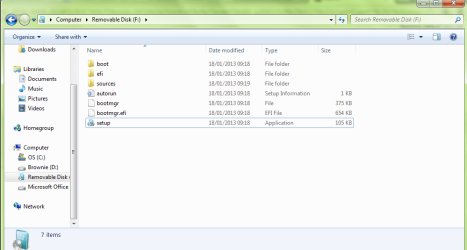
crop.png

So my question is, what has the windows 7 usb download tool done to the usb flash drive to make it read only? And how can I undo what it has done so I can format it and return it back to my friend?
 

My Computer My Computer

At a glance

windows 7 home premium 64 bit
OS
windows 7 home premium 64 bit

My Computer My Computer

At a glance

Windows 10 Pro x64Intel Core i7 6700KGSkill TridentZ RGB 16GB 3600 16-16-16-36EVGA GTX 980 Ti SC x2
Computer type
PC/Desktop
Computer Manufacturer/Model Number
Skylake Special #666
OS
Windows 10 Pro x64
CPU
Intel Core i7 6700K
Motherboard
Asus Sabertooth Z170 Mark 1
Memory
GSkill TridentZ RGB 16GB 3600 16-16-16-36
Graphics Card(s)
EVGA GTX 980 Ti SC x2
Sound Card
Realtek High Definition
Monitor(s) Displays
AOC G2460PG
Screen Resolution
1920 x 1080 144Hz
Hard Drives
Samsung 860 Pro 256GB, Seagate Barracuda 4TB x2
PSU
EVGA 1000 P2, EVGA White Custom Braided Cables
Case
Corsair Vengeance C70 Gunmetal Black
Cooling
Corsair H100i v2, Corsair ML120 x2, Thermal Grizzly Kryonaut
Keyboard
Logitech G910 Orion Spectrum
Mouse
Logitech G700s
Internet Speed
Verizon Fios Quantum Gateway 75/75
Antivirus
Windows Defender, Malwarebytes Free 3.8.3
Browser
Chrome
Other Info
Corsair SP120 x4, LG Blu-ray Drive, Durabrand HT-395 100 Watt Dolby Digital Amp, Corsair H2100 Wireless 7.1 Headset
Nope! You'll have to excuse me as I am not very familiar with computing in general.

What I am assuming from your suggestion though is that the USB download tool has created a partition on my usb flash drive that is read only to store these files, thus making my usb drive read only in the process. However I don't know what I should do once the tool has been installed. It would be great if you could tell me what to do with the partition wizard! Thank you
 

My Computer My Computer

At a glance

windows 7 home premium 64 bit
OS
windows 7 home premium 64 bit
Use the tool I gave you in the post just above. It will handle everything and is not fussy like MS tool.
 

My Computer My Computer

At a glance

windows 7 home premium 64 bit
OS
windows 7 home premium 64 bit

My Computer My Computer

At a glance

Win7 Enterprise, Win7 x86 (Ult 7600), Win7 x6...AMD fx8350 4ghz, AMD-32 2400mhz, AMD-64 3200m...2gb, 4gb on the Ult 7600, 4gb on Technet RTM,...Draw my own Graphics, several nVidia cards
Computer type
PC/Desktop
Computer Manufacturer/Model Number
Built them myself, Science Experiments !
OS
Win7 Enterprise, Win7 x86 (Ult 7600), Win7 x64 Ult 7600, TechNet RTM on AMD x64 (2.8Ghz)
CPU
AMD fx8350 4ghz, AMD-32 2400mhz, AMD-64 3200mhz, AMDx64 2.8G
Motherboard
SIS 755, ECS-K8M890M-M (Ult 7600), GigaByte & others
Memory
2gb, 4gb on the Ult 7600, 4gb on Technet RTM, 32gb on FX8350
Graphics Card(s)
Draw my own Graphics, several nVidia cards
Sound Card
on motherboard
Monitor(s) Displays
19" flat scr, 28" I-Inc widescr,22" Emprex Widescr, 23" Acer
Screen Resolution
1280 x 1024, 1440 x 900, 1920 x 1080
Hard Drives
6 pata Ide HD's & 2 Sata HD's
added 80gb external on Ult 7600 computer,
numerous extra 1tb, 2TB, 3Tb SATA HD's
A collection of ext HD Docks w/ HDs
PSU
430w, 550w, 600w, 700, 800, etc
Case
All Generic Full Towers
Cooling
Open Air & a few fans, some w/ colored LEDs
Keyboard
Compaq & Dell recycled from GoodWill
Mouse
Made in China Optical Wired Mouse
Internet Speed
Fast Cable InterNet
Antivirus
AVG Free on 24 different Desktops, NO Problems!
Browser
IE 8 is preferred, but use FireFox sometimes
Other Info
Linksys Routers, switches, & Hubs
Too Many USB Flash Drives to count, Biggest is 64GB !
Eight computers in my home network.
Sixteen computers at my business network.
Linked via TeamViewer !
Lots of old used spare computer parts everywhere!
When the others fail the one which always works for me is UltraISO Software To Create Bootable USB Flash Drive.

Be sure to format first with Format button, then Write button.

I will try out your suggestion greg. At this point I am just looking to format the usb drive to its original state so I can return it to my friend. Thank you for taking the time out to help me!

There's no worry about that. After you install your licensed version just rightclick on the USB stick in explorer and Format and it will be ready to return to your friend.

But you really should have the installer for repairs and reinstall, or you can burn a System Repair CD - Create
 
Hey greg! Sorry to bother you again but I am running into a problem: the usb drive won't format when I use ultraISO. Following the steps outlined in your link I am able to reach step 5, however when I click the format button a message pops up telling me that the disk is write protected. How should I proceed?
 

My Computer My Computer

At a glance

windows 7 home premium 64 bit
OS
windows 7 home premium 64 bit
Did you try Rufus ? Is it still not letting you ?
 

My Computer My Computer

At a glance

Windows 10 Pro x64Intel Core i7 6700KGSkill TridentZ RGB 16GB 3600 16-16-16-36EVGA GTX 980 Ti SC x2
Computer type
PC/Desktop
Computer Manufacturer/Model Number
Skylake Special #666
OS
Windows 10 Pro x64
CPU
Intel Core i7 6700K
Motherboard
Asus Sabertooth Z170 Mark 1
Memory
GSkill TridentZ RGB 16GB 3600 16-16-16-36
Graphics Card(s)
EVGA GTX 980 Ti SC x2
Sound Card
Realtek High Definition
Monitor(s) Displays
AOC G2460PG
Screen Resolution
1920 x 1080 144Hz
Hard Drives
Samsung 860 Pro 256GB, Seagate Barracuda 4TB x2
PSU
EVGA 1000 P2, EVGA White Custom Braided Cables
Case
Corsair Vengeance C70 Gunmetal Black
Cooling
Corsair H100i v2, Corsair ML120 x2, Thermal Grizzly Kryonaut
Keyboard
Logitech G910 Orion Spectrum
Mouse
Logitech G700s
Internet Speed
Verizon Fios Quantum Gateway 75/75
Antivirus
Windows Defender, Malwarebytes Free 3.8.3
Browser
Chrome
Other Info
Corsair SP120 x4, LG Blu-ray Drive, Durabrand HT-395 100 Watt Dolby Digital Amp, Corsair H2100 Wireless 7.1 Headset
Did you try Rufus ? Is it still not letting you ?

That is correct. When I run rufus I also get a write error. Checking the log reveals the problem:

Clearing MBR...
write_sectors: Write error - [0x00000013] The media is write protected.
Wrote: 0, Expected: 65536
StartSector:0, nSectors:0, SectorSize:1
unable to zero MBR
 

My Computer My Computer

At a glance

windows 7 home premium 64 bit
OS
windows 7 home premium 64 bit

My Computer My Computer

At a glance

Windows 10 Pro x64Intel Core i7 6700KGSkill TridentZ RGB 16GB 3600 16-16-16-36EVGA GTX 980 Ti SC x2
Computer type
PC/Desktop
Computer Manufacturer/Model Number
Skylake Special #666
OS
Windows 10 Pro x64
CPU
Intel Core i7 6700K
Motherboard
Asus Sabertooth Z170 Mark 1
Memory
GSkill TridentZ RGB 16GB 3600 16-16-16-36
Graphics Card(s)
EVGA GTX 980 Ti SC x2
Sound Card
Realtek High Definition
Monitor(s) Displays
AOC G2460PG
Screen Resolution
1920 x 1080 144Hz
Hard Drives
Samsung 860 Pro 256GB, Seagate Barracuda 4TB x2
PSU
EVGA 1000 P2, EVGA White Custom Braided Cables
Case
Corsair Vengeance C70 Gunmetal Black
Cooling
Corsair H100i v2, Corsair ML120 x2, Thermal Grizzly Kryonaut
Keyboard
Logitech G910 Orion Spectrum
Mouse
Logitech G700s
Internet Speed
Verizon Fios Quantum Gateway 75/75
Antivirus
Windows Defender, Malwarebytes Free 3.8.3
Browser
Chrome
Other Info
Corsair SP120 x4, LG Blu-ray Drive, Durabrand HT-395 100 Watt Dolby Digital Amp, Corsair H2100 Wireless 7.1 Headset
Found this:

Can't format USB mass storage drive [Solved] | Kioskea


I guess it won`t let you delete the partition either ?

That's right. None of the solutions in the link worked either. The repair tool suggested in the first post does not detect my flash drive, and the second solution does not work either, the option to delete partition (it actually says delete volume when I right click it) is greyed out.

I'm sorry to bother you some more, but do you have any ideas as to why the usb drive could be doing this?
 

My Computer My Computer

At a glance

windows 7 home premium 64 bit
OS
windows 7 home premium 64 bit
No clue. If you go into computer and right click on the usb drive properties is there anything in there saying read only or write protected or anything like that.

And it`s no bother, we`re here to tryin help you.:)

This is such a dumb thing, I don`t understand it either. You should be able to do whatever you want with a flashdrive. What make and model is it ?
 

My Computer My Computer

At a glance

Windows 10 Pro x64Intel Core i7 6700KGSkill TridentZ RGB 16GB 3600 16-16-16-36EVGA GTX 980 Ti SC x2
Computer type
PC/Desktop
Computer Manufacturer/Model Number
Skylake Special #666
OS
Windows 10 Pro x64
CPU
Intel Core i7 6700K
Motherboard
Asus Sabertooth Z170 Mark 1
Memory
GSkill TridentZ RGB 16GB 3600 16-16-16-36
Graphics Card(s)
EVGA GTX 980 Ti SC x2
Sound Card
Realtek High Definition
Monitor(s) Displays
AOC G2460PG
Screen Resolution
1920 x 1080 144Hz
Hard Drives
Samsung 860 Pro 256GB, Seagate Barracuda 4TB x2
PSU
EVGA 1000 P2, EVGA White Custom Braided Cables
Case
Corsair Vengeance C70 Gunmetal Black
Cooling
Corsair H100i v2, Corsair ML120 x2, Thermal Grizzly Kryonaut
Keyboard
Logitech G910 Orion Spectrum
Mouse
Logitech G700s
Internet Speed
Verizon Fios Quantum Gateway 75/75
Antivirus
Windows Defender, Malwarebytes Free 3.8.3
Browser
Chrome
Other Info
Corsair SP120 x4, LG Blu-ray Drive, Durabrand HT-395 100 Watt Dolby Digital Amp, Corsair H2100 Wireless 7.1 Headset
Heh thats nice! Thank you for being so helpful :)

The properties do not say anything about the flash drive being read only. However I have noticed a few things:

1.) If you look at the picture posted on the first page, the icon next to removable disk is not a 'normal' icon. It is an icon that would be displayed if it was a Windows 7 installation disk, I think. Does that mean the usb is not being recognized as a normal flash drive and instead as an installer?

2.) The folders boot, efi and sources are all read only, and any attempt to change that results in a write protection error. However the other files are not read only.

3.) The diskpart utility tells me that the current read only state is yes, however the read only state is no. I have found solutions to this problem on these forums and on google, however they have failed to solve my problem.

edit: believe it or not its a kingston datatraveler :(
 

My Computer My Computer

At a glance

windows 7 home premium 64 bit
OS
windows 7 home premium 64 bit
Last edited:

My Computer My Computer

At a glance

Win7 Enterprise, Win7 x86 (Ult 7600), Win7 x6...AMD fx8350 4ghz, AMD-32 2400mhz, AMD-64 3200m...2gb, 4gb on the Ult 7600, 4gb on Technet RTM,...Draw my own Graphics, several nVidia cards
Computer type
PC/Desktop
Computer Manufacturer/Model Number
Built them myself, Science Experiments !
OS
Win7 Enterprise, Win7 x86 (Ult 7600), Win7 x64 Ult 7600, TechNet RTM on AMD x64 (2.8Ghz)
CPU
AMD fx8350 4ghz, AMD-32 2400mhz, AMD-64 3200mhz, AMDx64 2.8G
Motherboard
SIS 755, ECS-K8M890M-M (Ult 7600), GigaByte & others
Memory
2gb, 4gb on the Ult 7600, 4gb on Technet RTM, 32gb on FX8350
Graphics Card(s)
Draw my own Graphics, several nVidia cards
Sound Card
on motherboard
Monitor(s) Displays
19" flat scr, 28" I-Inc widescr,22" Emprex Widescr, 23" Acer
Screen Resolution
1280 x 1024, 1440 x 900, 1920 x 1080
Hard Drives
6 pata Ide HD's & 2 Sata HD's
added 80gb external on Ult 7600 computer,
numerous extra 1tb, 2TB, 3Tb SATA HD's
A collection of ext HD Docks w/ HDs
PSU
430w, 550w, 600w, 700, 800, etc
Case
All Generic Full Towers
Cooling
Open Air & a few fans, some w/ colored LEDs
Keyboard
Compaq & Dell recycled from GoodWill
Mouse
Made in China Optical Wired Mouse
Internet Speed
Fast Cable InterNet
Antivirus
AVG Free on 24 different Desktops, NO Problems!
Browser
IE 8 is preferred, but use FireFox sometimes
Other Info
Linksys Routers, switches, & Hubs
Too Many USB Flash Drives to count, Biggest is 64GB !
Eight computers in my home network.
Sixteen computers at my business network.
Linked via TeamViewer !
Lots of old used spare computer parts everywhere!
That`s the normal icon you get after you turn a usb into an installer.

Have you tried formatting on another pc ? Try that.
 

My Computer My Computer

At a glance

Windows 10 Pro x64Intel Core i7 6700KGSkill TridentZ RGB 16GB 3600 16-16-16-36EVGA GTX 980 Ti SC x2
Computer type
PC/Desktop
Computer Manufacturer/Model Number
Skylake Special #666
OS
Windows 10 Pro x64
CPU
Intel Core i7 6700K
Motherboard
Asus Sabertooth Z170 Mark 1
Memory
GSkill TridentZ RGB 16GB 3600 16-16-16-36
Graphics Card(s)
EVGA GTX 980 Ti SC x2
Sound Card
Realtek High Definition
Monitor(s) Displays
AOC G2460PG
Screen Resolution
1920 x 1080 144Hz
Hard Drives
Samsung 860 Pro 256GB, Seagate Barracuda 4TB x2
PSU
EVGA 1000 P2, EVGA White Custom Braided Cables
Case
Corsair Vengeance C70 Gunmetal Black
Cooling
Corsair H100i v2, Corsair ML120 x2, Thermal Grizzly Kryonaut
Keyboard
Logitech G910 Orion Spectrum
Mouse
Logitech G700s
Internet Speed
Verizon Fios Quantum Gateway 75/75
Antivirus
Windows Defender, Malwarebytes Free 3.8.3
Browser
Chrome
Other Info
Corsair SP120 x4, LG Blu-ray Drive, Durabrand HT-395 100 Watt Dolby Digital Amp, Corsair H2100 Wireless 7.1 Headset
Hey greg! Sorry to bother you again but I am running into a problem: the usb drive won't format when I use ultraISO. Following the steps outlined in your link I am able to reach step 5, however when I click the format button a message pops up telling me that the disk is write protected. How should I proceed?

No prob, run Diskpart Clean Command on the stick to clear all formatting code, then try again.
 
Hey AddRam, I havent tried your suggestion yet.

DocBrown and Greg, I've tried the suggested solution but the response is the same: the media is write protected, so the operation cannot be completed.
 

My Computer My Computer

At a glance

windows 7 home premium 64 bit
OS
windows 7 home premium 64 bit
Back
Top