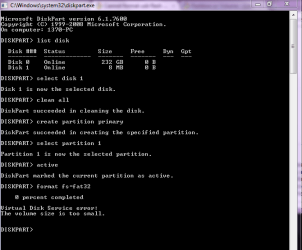
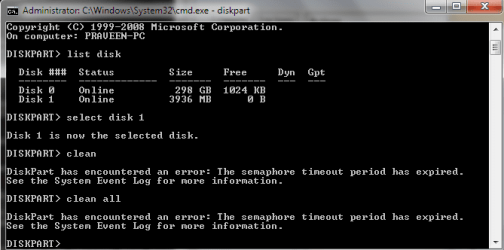
hii..
Cimage...
i have the same problem with my pendrive...
--my problem was started because i try to make my pendrive bootable using cmd..
and i do this..
1. Plug in your USB Flash Drive
2. Open a command prompt as administrator (Right click on Start > All Programs > Accessories > Command Prompt and select “Run as administrator”
3. Find the drive number of your USB Drive by typing the following into the Command Prompt window:
diskpart
list disk
The number of your USB drive will listed. You’ll need this for the next step. I’ll assume that the USB flash drive is disk 1.
4. Format the drive by typing the next instructions into the same window. Replace the number “1” with the number of your disk below.
select disk 1
clean
...
i don't complete process.. that affect my pendrive..
then i go to google and search about this problem..
then i check in forum i got this page where you post, about tour problem..
then i got this link..
http://www.sevenforums.com/tutorials/52129-disk-clean-clean-all-diskpart-command.html
then i go to this link..
then open this pic..
here in this usb is shown blue.. that is healthy..
but mine was unallocated space.. and black coloured..
then i right click on that.. and there i found FORMAT drive..
i do this.. and i entered in wizard.. of making new volume.. wizard give it name O means is O drive..
then i go to next next.. and wizadr make a new volume of all space..
now my pendrive is healthy...
that's how i concour this problem...
i wish this experience may help some other people...
thanks...