Solved Cannot get into BIOS after mini tool partition resize

Mexman

New member
Member
Local time
7:17 AM
Messages
37
Location
Vancouver, Canada
Resized a non-boot partition on my HDD which completed outside of windows and now the BIOS screen hangs right after detecting THAT HDD. If I disconnect the IDE cable, the BIOS comes up ok. I connected the same HDD to another PC and it boots up into win7 no problem and all the files are there. I ran a chkdsk on it and it found some index erros which it repaired but still hangs up the BIOS in the 1st PC.

Any ideas?
 

My Computer

Computer type
PC/Desktop
Computer Manufacturer/Model Number
Several custom builds
OS
Windows 7 Ultimate x64, Win 8.1, Win 10 preview, ubuntu14
CPU
AMD 710 X3, E8400, E5500, Athlon 64 2800, Q6600
Graphics Card(s)
IGP
Monitor(s) Displays
3 x S2309 23" 1920x1080
Can you post a screenshot from DISKMGMT.MSC on the other machine where this disk doesn't prevent that BIOS from booting to Windows? We need to see what the disk currently looks like. Full-screen from DISKMGMT please, and spread the columns so that all the text in the cells is visible in the screenshot and we can read it.

You say all you did was resize a partition, and it wasn't even the Windows C-partition. So it's odd that you say the resize operation was completed outside of windows (i.e. a reboot was requested in order to complete). This would not be the way the program works when working with a non-C partition where you can perform any operation fully without needing to be outside of Windows. Only if the boot partitions are affected would a non-Windows environment be needed.

In other words, I have a hunch you actually did something which DID affect the Windows partition (or "system reserved" where Boot Manager would normally be living), and thus somehow might have affected the use of the drive to actually boot from on its primary "home" machine.

The screenshot or this drive from DISKMGMT.MSC (or Partition Wizard, actually) on the other machine to show us all its partitions, which one is "active", and whether it's MBR or GPT, is critical to providing further guidance.
 

My Computer

Computer type
PC/Desktop
Computer Manufacturer/Model Number
Home-built, two systems (1) and (2)
OS
Windows 7 Pro x64 (1), Win7 Pro X64 (2)
CPU
i5-3350p 3.1Ghz/6MB-cache (1); E8400 3.0Ghz/6MB-cache (2)
Motherboard
ASUS P8Z77-V Pro (1); ASUS P5Q3 (2)
Memory
8GB PC3-12800 DDR3 (1); 4GB PC3-10600 DDR3 (2)
Graphics Card(s)
ATI HD7750 (1), (see TV cards); ATI R7 250 (2)
Sound Card
Realtek ALC892 HD Audio (1); Realtek ALC1200 HD Audio (2)
Monitor(s) Displays
Eizo HD2441W LCD, Eizo S2433W (1); Eizo 24" S2433W (2)
Screen Resolution
1920x1200, 1920x1200 (1); 1920x1200 (2)
Hard Drives
(1) 1TB SATA-II (7200RPM), 2x2TB SATA-III (7200RPM), 250GB SATA-III (10000RPM) for OS; 2x2TB external USB 3.0

(2) 320GB SATA-II (7200RPM), 750GB SATA-II (7200RPM), 150GB SATA-II (10000RPM) for OS; 2TB external USB 3.0
PSU
Nesteq ECS-6001 600W (1); Nesteq ECS-5001 500W (2)
Case
Acousti-Case 360 (1) and (2)
Cooling
Noctua NH-U12P SE2 for CPU, 2x120mm case fans (1) and (2)
Keyboard
IBM PS/2 (1) and (2)
Mouse
Logitech MX Revolution wireless (1); Microsoft wired (2)
Internet Speed
100mbps down / 10mbps up
Antivirus
Microsoft Security Essentials; Malwarebyte Anti-Malware Pro
Browser
Firefox
Other Info
Ceton InfiniTV 4-tuner cablecard-enabled TV card as well as Hauppauge HVR-2250 OTA/ATSC 2-tuner TV card in (1), running under Win7 WMC
And even if you did mess up when re sizing, it should have not affected the bios at all.

How did you re size the partition, which partition, what program did you use ?

Post the shot of DM, as suggested.
 

My Computer

Computer type
PC/Desktop
Computer Manufacturer/Model Number
Skylake Special #666
OS
Windows 10 Pro x64
CPU
Intel Core i7 6700K
Motherboard
Asus Sabertooth Z170 Mark 1
Memory
GSkill TridentZ RGB 16GB 3600 16-16-16-36
Graphics Card(s)
EVGA GTX 980 Ti SC x2
Sound Card
Realtek High Definition
Monitor(s) Displays
AOC G2460PG
Screen Resolution
1920 x 1080 144Hz
Hard Drives
Samsung 860 Pro 256GB, Seagate Barracuda 4TB x2
PSU
EVGA 1000 P2, EVGA White Custom Braided Cables
Case
Corsair Vengeance C70 Gunmetal Black
Cooling
Corsair H100i v2, Corsair ML120 x2, Thermal Grizzly Kryonaut
Keyboard
Logitech G910 Orion Spectrum
Mouse
Logitech G700s
Internet Speed
Verizon Fios Quantum Gateway 75/75
Antivirus
Windows Defender, Malwarebytes Free 3.8.3
Browser
Chrome
Other Info
Corsair SP120 x4, LG Blu-ray Drive, Durabrand HT-395 100 Watt Dolby Digital Amp, Corsair H2100 Wireless 7.1 Headset
And even if you did mess up when re sizing, it should have not affected the bios at all.

There is nothing wrong with the BIOS. The BIOS boots fine, just confused wording.
It just can't hand off to an OS so it stops there.

I suspect a missing ACTIVE flag, as do you all. We could see that right away with a screenshot.
 

My Computer

Computer type
PC/Desktop
Computer Manufacturer/Model Number
Home Built - Jan 2013
OS
Windows 7 64 Bit Home Premium SP1
CPU
i7-3820
Motherboard
Asus P9X79-PRO - Bios 4608
Memory
GSkill F3-14900CL9Q - 16GB
Graphics Card(s)
EVGA GeForce GTX660 - Driver 352.86
Sound Card
On board Realtek ALC898
Monitor(s) Displays
Acer S271HL
Screen Resolution
1920 x 1080
Hard Drives
#1- Samsung 840 Pro Series
#2- Western Digital WD1002FAEX Sata3 Black
#3- Western Digital WD1002FAEX Sata3 Black
PSU
Corsair CMPSU-850TX-V2 - 850 watt (by Seasonic)
Case
Corsair Obsidian 550D
Cooling
Standard 3 120mm case fans, Cooler Master Hyper 212 EVO
Keyboard
MS KC-0405
Mouse
Intellimouse 5-button
Internet Speed
56 Mbits/Sec (on a good day)
Antivirus
Avast & Malwarebytes
Browser
Firefox
Other Info
Asus DVD - DRW-24B1ST 24X
Mexman, we can`t help you if you don`t reply.
 

My Computer

Computer type
PC/Desktop
Computer Manufacturer/Model Number
Skylake Special #666
OS
Windows 10 Pro x64
CPU
Intel Core i7 6700K
Motherboard
Asus Sabertooth Z170 Mark 1
Memory
GSkill TridentZ RGB 16GB 3600 16-16-16-36
Graphics Card(s)
EVGA GTX 980 Ti SC x2
Sound Card
Realtek High Definition
Monitor(s) Displays
AOC G2460PG
Screen Resolution
1920 x 1080 144Hz
Hard Drives
Samsung 860 Pro 256GB, Seagate Barracuda 4TB x2
PSU
EVGA 1000 P2, EVGA White Custom Braided Cables
Case
Corsair Vengeance C70 Gunmetal Black
Cooling
Corsair H100i v2, Corsair ML120 x2, Thermal Grizzly Kryonaut
Keyboard
Logitech G910 Orion Spectrum
Mouse
Logitech G700s
Internet Speed
Verizon Fios Quantum Gateway 75/75
Antivirus
Windows Defender, Malwarebytes Free 3.8.3
Browser
Chrome
Other Info
Corsair SP120 x4, LG Blu-ray Drive, Durabrand HT-395 100 Watt Dolby Digital Amp, Corsair H2100 Wireless 7.1 Headset
Hey,I just woke up! :)

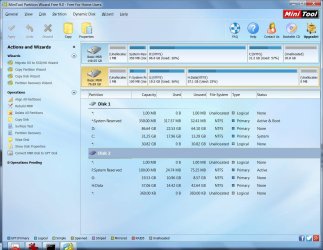
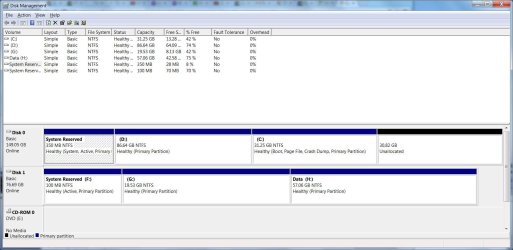
Here's the print screen (both diskmgmt and minitool):

I agree, it was strange that mini tool requested a reboot to resize that partition. After 10-20 secs it said the drive was 'in use', but I could not find any process using it, so I opted the resize after a reboot. It was a resize of the non-root partition to use the remaining space on the HDD.
 

Attachments

  • badhdd2.jpg
    badhdd2.jpg
    136.3 KB · Views: 4
  • badhdd1.jpg
    badhdd1.jpg
    112.2 KB · Views: 5
Last edited:

My Computer

Computer type
PC/Desktop
Computer Manufacturer/Model Number
Several custom builds
OS
Windows 7 Ultimate x64, Win 8.1, Win 10 preview, ubuntu14
CPU
AMD 710 X3, E8400, E5500, Athlon 64 2800, Q6600
Graphics Card(s)
IGP
Monitor(s) Displays
3 x S2309 23" 1920x1080
This is the problem hard drive installed on another computer - correct?

And that other computer has it's own operating system on it's own hard drive - correct?

If so, the problem hard drive is DISK 1 in Disk Management, and Disk 2 in Partition Wizard?
 

My Computer

Computer type
PC/Desktop
Computer Manufacturer/Model Number
Home Built - Jan 2013
OS
Windows 7 64 Bit Home Premium SP1
CPU
i7-3820
Motherboard
Asus P9X79-PRO - Bios 4608
Memory
GSkill F3-14900CL9Q - 16GB
Graphics Card(s)
EVGA GeForce GTX660 - Driver 352.86
Sound Card
On board Realtek ALC898
Monitor(s) Displays
Acer S271HL
Screen Resolution
1920 x 1080
Hard Drives
#1- Samsung 840 Pro Series
#2- Western Digital WD1002FAEX Sata3 Black
#3- Western Digital WD1002FAEX Sata3 Black
PSU
Corsair CMPSU-850TX-V2 - 850 watt (by Seasonic)
Case
Corsair Obsidian 550D
Cooling
Standard 3 120mm case fans, Cooler Master Hyper 212 EVO
Keyboard
MS KC-0405
Mouse
Intellimouse 5-button
Internet Speed
56 Mbits/Sec (on a good day)
Antivirus
Avast & Malwarebytes
Browser
Firefox
Other Info
Asus DVD - DRW-24B1ST 24X
This is the problem hard drive installed on another computer - correct? YES


And that other computer has it's own operating system on it's own hard drive - correct? YES

If so, the problem hard drive is DISK 1 in Disk Management, and Disk 2 in Partition Wizard?
YES


I also setup the problem HDD as the boot drive in the OTHER PC and it boots ok.

Also ran WD's Data lifegaurd quick test with no errors.
 

My Computer

Computer type
PC/Desktop
Computer Manufacturer/Model Number
Several custom builds
OS
Windows 7 Ultimate x64, Win 8.1, Win 10 preview, ubuntu14
CPU
AMD 710 X3, E8400, E5500, Athlon 64 2800, Q6600
Graphics Card(s)
IGP
Monitor(s) Displays
3 x S2309 23" 1920x1080
Disk 1 in the screenshot shows:

  • A System Reserved partition (100MB), marked System and Active
  • Dive G: - (19.53GB), data
  • Drive H: - (57.06GB), data
I don't see a C: drive or and operating system on that disk.

I think your other computers are just starting their own windows installations.
 

My Computer

Computer type
PC/Desktop
Computer Manufacturer/Model Number
Home Built - Jan 2013
OS
Windows 7 64 Bit Home Premium SP1
CPU
i7-3820
Motherboard
Asus P9X79-PRO - Bios 4608
Memory
GSkill F3-14900CL9Q - 16GB
Graphics Card(s)
EVGA GeForce GTX660 - Driver 352.86
Sound Card
On board Realtek ALC898
Monitor(s) Displays
Acer S271HL
Screen Resolution
1920 x 1080
Hard Drives
#1- Samsung 840 Pro Series
#2- Western Digital WD1002FAEX Sata3 Black
#3- Western Digital WD1002FAEX Sata3 Black
PSU
Corsair CMPSU-850TX-V2 - 850 watt (by Seasonic)
Case
Corsair Obsidian 550D
Cooling
Standard 3 120mm case fans, Cooler Master Hyper 212 EVO
Keyboard
MS KC-0405
Mouse
Intellimouse 5-button
Internet Speed
56 Mbits/Sec (on a good day)
Antivirus
Avast & Malwarebytes
Browser
Firefox
Other Info
Asus DVD - DRW-24B1ST 24X
Disk 1 in the screenshot shows:

  • A System Reserved partition (100MB), marked System and Active
  • Dive G: - (19.53GB), data
  • Drive H: - (57.06GB), data
I don't see a C: drive or and operating system on that disk.

I think your other computers are just starting their own windows installations.
When the problem drive is a second drive in the other machine its partitions would not show up with the same letters as you might expect if it were the primary drive in the original machine.

Obviously the C in this other machine setup is on its own primary drive (DISK0 in DISKMGMT). The partitions on what is now seen as the second disk simply get assigned next available letters on the other machine. That's even why "system reserved" is given a letter in this 2nd-drive setup, when in a true setup it would not get any letter.

==> No problem that I see. Everything looks perfectly fine. MBR, "active" partition is "system reserved", and nothing strange is apparent.

Also, configuring the BIOS in the other machine to boot from this "problem drive" and having no problem whatsoever simply adds to the confusion. If Windows on the drive can be booted to successfully in this other machine, why it is a problem to the original machine... well, quite the mystery I agree.

NOTE to Mexman: you didn't spread the columns in the upper part of the DISKMGMT screenshot, so the important text was not visible. Fortunately it is visible in the PW screenshot, so no harm.

I will say that if G (as shown) is the Windows partition on what is currently the second drive on this other machine, it's really very very small for a Windows 7. Only a 20GB partition, with only 10GB used? That's unbelievably tiny. But I guess if it "works" as the system partition when booting to it on this other machine, then it must work. But it really does look very very tiny for "used". Never saw a Win7 with only 10GB used.
 

My Computer

Computer type
PC/Desktop
Computer Manufacturer/Model Number
Home-built, two systems (1) and (2)
OS
Windows 7 Pro x64 (1), Win7 Pro X64 (2)
CPU
i5-3350p 3.1Ghz/6MB-cache (1); E8400 3.0Ghz/6MB-cache (2)
Motherboard
ASUS P8Z77-V Pro (1); ASUS P5Q3 (2)
Memory
8GB PC3-12800 DDR3 (1); 4GB PC3-10600 DDR3 (2)
Graphics Card(s)
ATI HD7750 (1), (see TV cards); ATI R7 250 (2)
Sound Card
Realtek ALC892 HD Audio (1); Realtek ALC1200 HD Audio (2)
Monitor(s) Displays
Eizo HD2441W LCD, Eizo S2433W (1); Eizo 24" S2433W (2)
Screen Resolution
1920x1200, 1920x1200 (1); 1920x1200 (2)
Hard Drives
(1) 1TB SATA-II (7200RPM), 2x2TB SATA-III (7200RPM), 250GB SATA-III (10000RPM) for OS; 2x2TB external USB 3.0

(2) 320GB SATA-II (7200RPM), 750GB SATA-II (7200RPM), 150GB SATA-II (10000RPM) for OS; 2TB external USB 3.0
PSU
Nesteq ECS-6001 600W (1); Nesteq ECS-5001 500W (2)
Case
Acousti-Case 360 (1) and (2)
Cooling
Noctua NH-U12P SE2 for CPU, 2x120mm case fans (1) and (2)
Keyboard
IBM PS/2 (1) and (2)
Mouse
Logitech MX Revolution wireless (1); Microsoft wired (2)
Internet Speed
100mbps down / 10mbps up
Antivirus
Microsoft Security Essentials; Malwarebyte Anti-Malware Pro
Browser
Firefox
Other Info
Ceton InfiniTV 4-tuner cablecard-enabled TV card as well as Hauppauge HVR-2250 OTA/ATSC 2-tuner TV card in (1), running under Win7 WMC
Shouldn't there be a partition, regardless of the drive letter, that is listed in Disk Management as "Boot, Page File, Crash Dump" also?
 

My Computer

Computer type
PC/Desktop
Computer Manufacturer/Model Number
Home Built - Jan 2013
OS
Windows 7 64 Bit Home Premium SP1
CPU
i7-3820
Motherboard
Asus P9X79-PRO - Bios 4608
Memory
GSkill F3-14900CL9Q - 16GB
Graphics Card(s)
EVGA GeForce GTX660 - Driver 352.86
Sound Card
On board Realtek ALC898
Monitor(s) Displays
Acer S271HL
Screen Resolution
1920 x 1080
Hard Drives
#1- Samsung 840 Pro Series
#2- Western Digital WD1002FAEX Sata3 Black
#3- Western Digital WD1002FAEX Sata3 Black
PSU
Corsair CMPSU-850TX-V2 - 850 watt (by Seasonic)
Case
Corsair Obsidian 550D
Cooling
Standard 3 120mm case fans, Cooler Master Hyper 212 EVO
Keyboard
MS KC-0405
Mouse
Intellimouse 5-button
Internet Speed
56 Mbits/Sec (on a good day)
Antivirus
Avast & Malwarebytes
Browser
Firefox
Other Info
Asus DVD - DRW-24B1ST 24X
You can't fit a Windows operating system on a 100MB partition!
 

My Computer

Computer type
PC/Desktop
Computer Manufacturer/Model Number
Home Built - Jan 2013
OS
Windows 7 64 Bit Home Premium SP1
CPU
i7-3820
Motherboard
Asus P9X79-PRO - Bios 4608
Memory
GSkill F3-14900CL9Q - 16GB
Graphics Card(s)
EVGA GeForce GTX660 - Driver 352.86
Sound Card
On board Realtek ALC898
Monitor(s) Displays
Acer S271HL
Screen Resolution
1920 x 1080
Hard Drives
#1- Samsung 840 Pro Series
#2- Western Digital WD1002FAEX Sata3 Black
#3- Western Digital WD1002FAEX Sata3 Black
PSU
Corsair CMPSU-850TX-V2 - 850 watt (by Seasonic)
Case
Corsair Obsidian 550D
Cooling
Standard 3 120mm case fans, Cooler Master Hyper 212 EVO
Keyboard
MS KC-0405
Mouse
Intellimouse 5-button
Internet Speed
56 Mbits/Sec (on a good day)
Antivirus
Avast & Malwarebytes
Browser
Firefox
Other Info
Asus DVD - DRW-24B1ST 24X
I will say that if G (as shown) is the Windows partition on what is currently the second drive on this other machine, it's really very very small for a Windows 7. Only a 20GB partition, with only 10GB used? That's unbelievably tiny. But I guess if it "works" as the system partition when booting to it on this other machine, then it must work. But it really does look very very tiny for "used". Never saw a Win7 with only 10GB used.

Yes, it is a little tight, I usually make them 30GB for simple installs. I try to keep the C partition for Windows only, and all other data on other partitions. With hibernation disabled and the pagefile on a diff partition , you can keep the root drive quite small. Biggest issue is the Winsxs folder keeps growing.
 

My Computer

Computer type
PC/Desktop
Computer Manufacturer/Model Number
Several custom builds
OS
Windows 7 Ultimate x64, Win 8.1, Win 10 preview, ubuntu14
CPU
AMD 710 X3, E8400, E5500, Athlon 64 2800, Q6600
Graphics Card(s)
IGP
Monitor(s) Displays
3 x S2309 23" 1920x1080
You can't fit a Windows operating system on a 100MB partition!
That's not a Windows system partition!! That's simply "system reserved" for Boot Manager. Standard 100MB size for that.

Windows on that drive is located (apparently) on what shows as G in the current screenshots. That's 20GB.

The third partition on that drive (H) is apparently a "data" partition.

OP didn't spread the columns for DISKMGMT, so we can't see the text in the crucial cells. But C (on DISK0) is where the true Windows lives in this other special setup where the problem drive has simply been temporarily connected as DISK1. Hence why its partitions appear to be "normal" partitions on a second drive, although we really know what they really are when the drive is used as a true primary boot drive.
 

My Computer

Computer type
PC/Desktop
Computer Manufacturer/Model Number
Home-built, two systems (1) and (2)
OS
Windows 7 Pro x64 (1), Win7 Pro X64 (2)
CPU
i5-3350p 3.1Ghz/6MB-cache (1); E8400 3.0Ghz/6MB-cache (2)
Motherboard
ASUS P8Z77-V Pro (1); ASUS P5Q3 (2)
Memory
8GB PC3-12800 DDR3 (1); 4GB PC3-10600 DDR3 (2)
Graphics Card(s)
ATI HD7750 (1), (see TV cards); ATI R7 250 (2)
Sound Card
Realtek ALC892 HD Audio (1); Realtek ALC1200 HD Audio (2)
Monitor(s) Displays
Eizo HD2441W LCD, Eizo S2433W (1); Eizo 24" S2433W (2)
Screen Resolution
1920x1200, 1920x1200 (1); 1920x1200 (2)
Hard Drives
(1) 1TB SATA-II (7200RPM), 2x2TB SATA-III (7200RPM), 250GB SATA-III (10000RPM) for OS; 2x2TB external USB 3.0

(2) 320GB SATA-II (7200RPM), 750GB SATA-II (7200RPM), 150GB SATA-II (10000RPM) for OS; 2TB external USB 3.0
PSU
Nesteq ECS-6001 600W (1); Nesteq ECS-5001 500W (2)
Case
Acousti-Case 360 (1) and (2)
Cooling
Noctua NH-U12P SE2 for CPU, 2x120mm case fans (1) and (2)
Keyboard
IBM PS/2 (1) and (2)
Mouse
Logitech MX Revolution wireless (1); Microsoft wired (2)
Internet Speed
100mbps down / 10mbps up
Antivirus
Microsoft Security Essentials; Malwarebyte Anti-Malware Pro
Browser
Firefox
Other Info
Ceton InfiniTV 4-tuner cablecard-enabled TV card as well as Hauppauge HVR-2250 OTA/ATSC 2-tuner TV card in (1), running under Win7 WMC
Mexman,

Your specs show an SSD in the primary machine, along with two WD black spinners. Is this correct?

You also say this problem drive (80GB?) is connected with IDE cable?? Not SATA? Which drive would this be in your specs story?

Have you tried using PW's "align all partitions" operation on DISK1 (with the current setup where the problem drive is connected as a second drive in the other machine)?

It's certainly unheard of in my own experience for the BIOS to be in any way impacted by a disk drive format, so that it doesn't "post" and complete. Sure, it might not actually be able to boot (if say the boot sequence is wrong, or if there is no "active" partition found, etc.), but the BIOS itself should certainly complete and shouldn't hang in the middle.
 

My Computer

Computer type
PC/Desktop
Computer Manufacturer/Model Number
Home-built, two systems (1) and (2)
OS
Windows 7 Pro x64 (1), Win7 Pro X64 (2)
CPU
i5-3350p 3.1Ghz/6MB-cache (1); E8400 3.0Ghz/6MB-cache (2)
Motherboard
ASUS P8Z77-V Pro (1); ASUS P5Q3 (2)
Memory
8GB PC3-12800 DDR3 (1); 4GB PC3-10600 DDR3 (2)
Graphics Card(s)
ATI HD7750 (1), (see TV cards); ATI R7 250 (2)
Sound Card
Realtek ALC892 HD Audio (1); Realtek ALC1200 HD Audio (2)
Monitor(s) Displays
Eizo HD2441W LCD, Eizo S2433W (1); Eizo 24" S2433W (2)
Screen Resolution
1920x1200, 1920x1200 (1); 1920x1200 (2)
Hard Drives
(1) 1TB SATA-II (7200RPM), 2x2TB SATA-III (7200RPM), 250GB SATA-III (10000RPM) for OS; 2x2TB external USB 3.0

(2) 320GB SATA-II (7200RPM), 750GB SATA-II (7200RPM), 150GB SATA-II (10000RPM) for OS; 2TB external USB 3.0
PSU
Nesteq ECS-6001 600W (1); Nesteq ECS-5001 500W (2)
Case
Acousti-Case 360 (1) and (2)
Cooling
Noctua NH-U12P SE2 for CPU, 2x120mm case fans (1) and (2)
Keyboard
IBM PS/2 (1) and (2)
Mouse
Logitech MX Revolution wireless (1); Microsoft wired (2)
Internet Speed
100mbps down / 10mbps up
Antivirus
Microsoft Security Essentials; Malwarebyte Anti-Malware Pro
Browser
Firefox
Other Info
Ceton InfiniTV 4-tuner cablecard-enabled TV card as well as Hauppauge HVR-2250 OTA/ATSC 2-tuner TV card in (1), running under Win7 WMC
Well, I gots to be stubborn.
I have never seen a screenshot of Disk Management that had a partition that contained Windows on it that simply said "Healthy, Primary Partition".
 

My Computer

Computer type
PC/Desktop
Computer Manufacturer/Model Number
Home Built - Jan 2013
OS
Windows 7 64 Bit Home Premium SP1
CPU
i7-3820
Motherboard
Asus P9X79-PRO - Bios 4608
Memory
GSkill F3-14900CL9Q - 16GB
Graphics Card(s)
EVGA GeForce GTX660 - Driver 352.86
Sound Card
On board Realtek ALC898
Monitor(s) Displays
Acer S271HL
Screen Resolution
1920 x 1080
Hard Drives
#1- Samsung 840 Pro Series
#2- Western Digital WD1002FAEX Sata3 Black
#3- Western Digital WD1002FAEX Sata3 Black
PSU
Corsair CMPSU-850TX-V2 - 850 watt (by Seasonic)
Case
Corsair Obsidian 550D
Cooling
Standard 3 120mm case fans, Cooler Master Hyper 212 EVO
Keyboard
MS KC-0405
Mouse
Intellimouse 5-button
Internet Speed
56 Mbits/Sec (on a good day)
Antivirus
Avast & Malwarebytes
Browser
Firefox
Other Info
Asus DVD - DRW-24B1ST 24X
Mexman,

Your specs show an SSD in the primary machine, along with two WD black spinners. Is this correct?

"My specs"? I just connected the 80gb probem drive to another PC to get the screenshot. It has a 1200GB boot drive, no SSD

You also say this problem drive (80GB?) is connected with IDE cable?? Not SATA? Which drive would this be in your specs story?

Yes, IDE cable and I have tried another cable. The 80GB problem drive is a Deskstar

Have you tried using PW's "align all partitions" operation on DISK1 (with the current setup where the problem drive is connected as a second drive in the other machine)? No, not sure why that would make any difference to the BIOS, but may be worth a try.

It's certainly unheard of in my own experience for the BIOS to be in any way impacted by a disk drive format, so that it doesn't "post" and complete. Sure, it might not actually be able to boot (if say the boot sequence is wrong, or if there is no "active" partition found, etc.), but the BIOS itself should certainly complete and shouldn't hang in the middle.

I agree, the K8S-mx bios must be looking a little deeper and getting confused.
....
 

My Computer

Computer type
PC/Desktop
Computer Manufacturer/Model Number
Several custom builds
OS
Windows 7 Ultimate x64, Win 8.1, Win 10 preview, ubuntu14
CPU
AMD 710 X3, E8400, E5500, Athlon 64 2800, Q6600
Graphics Card(s)
IGP
Monitor(s) Displays
3 x S2309 23" 1920x1080

My Computer

Computer type
PC/Desktop
Computer Manufacturer/Model Number
Home made Desktop
OS
Windows 10 Pro. 64/ version 1709 Windows 7 Pro/64
CPU
Intel i7-6800K @ 4.3
Motherboard
ASUS X-99 Deluxe II
Memory
Corsair Platinum 16 gig @2400
Graphics Card(s)
EVGA GTX 1070 OC
Monitor(s) Displays
Asus 27" LED LCD/VE278Q
Screen Resolution
1920-1080 or 1280-720 HDMI
Hard Drives
INTEL SSD 730-240 Gb Sata 3.0/
PSU
EVGA Platium 1200W
Case
Phanteks Luxe Tempered Glass 8 fans/ one radiator
Cooling
XSPC/ Water Cooled CPU
Keyboard
Das 4 Professional
Mouse
Logitech M705/MX Anywhere 2-S
Internet Speed
100 mbits
Antivirus
Microsoft Security Essentials/ Malwarebytes Premium 3.0/ SAS
Browser
I.E. 11 default/Firefox/ ISP Time Warner Cable/Spectrum
Other Info
LG BluRay Burner/
Sound system-KLipsch-THX/
Icy Dock ssd Hot Swap bays.
Well, I gots to be stubborn.
I have never seen a screenshot of Disk Management that had a partition that contained Windows on it that simply said "Healthy, Primary Partition".
On the boot drive, sure.

But on a second drive that contains a "residual" partition that actually is what once was a Windows partition? Why wouldn't it just be a "healthy" partition that is non-empty? It's just "residual" data on it, which happens to have been a usable Windows system partition at one time.

At this very moment it's not even in the Boot Manager menu on the current machine primary drive, so it's not even seen in any way as an available second bootable OS (which might be what possibly makes it show up as a second "system" partition in your comment, in addition to the currently booted Windows C partition which for sure shows as "system").
 

My Computer

Computer type
PC/Desktop
Computer Manufacturer/Model Number
Home-built, two systems (1) and (2)
OS
Windows 7 Pro x64 (1), Win7 Pro X64 (2)
CPU
i5-3350p 3.1Ghz/6MB-cache (1); E8400 3.0Ghz/6MB-cache (2)
Motherboard
ASUS P8Z77-V Pro (1); ASUS P5Q3 (2)
Memory
8GB PC3-12800 DDR3 (1); 4GB PC3-10600 DDR3 (2)
Graphics Card(s)
ATI HD7750 (1), (see TV cards); ATI R7 250 (2)
Sound Card
Realtek ALC892 HD Audio (1); Realtek ALC1200 HD Audio (2)
Monitor(s) Displays
Eizo HD2441W LCD, Eizo S2433W (1); Eizo 24" S2433W (2)
Screen Resolution
1920x1200, 1920x1200 (1); 1920x1200 (2)
Hard Drives
(1) 1TB SATA-II (7200RPM), 2x2TB SATA-III (7200RPM), 250GB SATA-III (10000RPM) for OS; 2x2TB external USB 3.0

(2) 320GB SATA-II (7200RPM), 750GB SATA-II (7200RPM), 150GB SATA-II (10000RPM) for OS; 2TB external USB 3.0
PSU
Nesteq ECS-6001 600W (1); Nesteq ECS-5001 500W (2)
Case
Acousti-Case 360 (1) and (2)
Cooling
Noctua NH-U12P SE2 for CPU, 2x120mm case fans (1) and (2)
Keyboard
IBM PS/2 (1) and (2)
Mouse
Logitech MX Revolution wireless (1); Microsoft wired (2)
Internet Speed
100mbps down / 10mbps up
Antivirus
Microsoft Security Essentials; Malwarebyte Anti-Malware Pro
Browser
Firefox
Other Info
Ceton InfiniTV 4-tuner cablecard-enabled TV card as well as Hauppauge HVR-2250 OTA/ATSC 2-tuner TV card in (1), running under Win7 WMC
"My specs"? I just connected the 80gb probem drive to another PC to get the screenshot. It has a 1200GB boot drive, no SSD
Now I'm a bit more confused. Is this a THIRD machine you're now talking about?

Your screenshot as posted shows two drives, one of which could be a 160GB drive as DISK0, with the problem 80GB drive as DISK1. I see no 1200GB boot drive?? Did you mean 120GB instead? And I still don't see that either.

Anyway, your forum "specs" show some machine with Kingston 64GB SSD and two WD Black spinners. Is that true or not? Is it either of the machines we're currently discussing, or yet some other machine?
 

My Computer

Computer type
PC/Desktop
Computer Manufacturer/Model Number
Home-built, two systems (1) and (2)
OS
Windows 7 Pro x64 (1), Win7 Pro X64 (2)
CPU
i5-3350p 3.1Ghz/6MB-cache (1); E8400 3.0Ghz/6MB-cache (2)
Motherboard
ASUS P8Z77-V Pro (1); ASUS P5Q3 (2)
Memory
8GB PC3-12800 DDR3 (1); 4GB PC3-10600 DDR3 (2)
Graphics Card(s)
ATI HD7750 (1), (see TV cards); ATI R7 250 (2)
Sound Card
Realtek ALC892 HD Audio (1); Realtek ALC1200 HD Audio (2)
Monitor(s) Displays
Eizo HD2441W LCD, Eizo S2433W (1); Eizo 24" S2433W (2)
Screen Resolution
1920x1200, 1920x1200 (1); 1920x1200 (2)
Hard Drives
(1) 1TB SATA-II (7200RPM), 2x2TB SATA-III (7200RPM), 250GB SATA-III (10000RPM) for OS; 2x2TB external USB 3.0

(2) 320GB SATA-II (7200RPM), 750GB SATA-II (7200RPM), 150GB SATA-II (10000RPM) for OS; 2TB external USB 3.0
PSU
Nesteq ECS-6001 600W (1); Nesteq ECS-5001 500W (2)
Case
Acousti-Case 360 (1) and (2)
Cooling
Noctua NH-U12P SE2 for CPU, 2x120mm case fans (1) and (2)
Keyboard
IBM PS/2 (1) and (2)
Mouse
Logitech MX Revolution wireless (1); Microsoft wired (2)
Internet Speed
100mbps down / 10mbps up
Antivirus
Microsoft Security Essentials; Malwarebyte Anti-Malware Pro
Browser
Firefox
Other Info
Ceton InfiniTV 4-tuner cablecard-enabled TV card as well as Hauppauge HVR-2250 OTA/ATSC 2-tuner TV card in (1), running under Win7 WMC
Back
Top