Solved How to Consistently Get Into BIOS?

BuddhaNature

New member
Local time
12:39 PM
Messages
24
OS: Windows 7 Pro. SP1 x64

I do know the keys I need to know to boot into the BIOS at system startup. My problem is that I can not do it consistently, sometimes I manage to get into the BIOS, mostly I fail. So my question is does anyone know of a way to consistently manage to boot into the BIOS every time the user wants to?

I'm thinking in particular that someone might know of a way of setting up a bootable USB flash drive such that the flash drive gets loaded at bootup and allows the user to select to boot into either the BIOS or Windows.

Help with this would be great as the problem drives me nuts.

P.S. I have tried, from within Windows Start Menu, using Shift+Restart but it doesn't work for me.
 

My Computer My Computer

At a glance

Windows 7 Pro. x64 SP1
Computer type
PC/Desktop
OS
Windows 7 Pro. x64 SP1
On my laptop (might be different for your system) the machine cannot boot off a USB stick unless the boot menu is enabled in BIOS... and if BIOS gets reset to its default for any reason, the boot menu is disabled. IOW, trying to boot from a USB stick at all might not work if BIOS has that feature disabled, even if you find a bootable USB that does what you want (i.e. providing a boot menu to offer a choice to boot directly from the stick to BIOS). Of course you'd enable that feature in the first place to use the stick, but I'm saying in an emergency when you want to get into the BIOS the stick method might not work if that menu got reset meantime. So might not be the best solution.

I'm guessing you know this, but the tricky thing about entering the BIOS key at boot is timing. There is usually a very short window of one sec or so, which means the way to do it is to start tapping that key right after you press the power button, or the second anything at all comes up on the screen ... if you wait to start tapping you will likely miss the window, which might be why you can't get in most times. Even with tapping, if it so happens I'm between taps in that short window, it will sometimes boot into Windows and have to restart and do it again. But the vast majority of the time tapping works in my experience.
 

My Computer My Computer

At a glance

Win 7 Ultimate 64-bit
OS
Win 7 Ultimate 64-bit
Thanks for the response, remm.

My BIOS already has enabled the setting to boot from USB stick. It's one of the first settings I make when I get a new computer.

With respect to the key tapping and timing. Yes, I know about this and do 'tap' and am aware that timing is an issue. On the other hand sometimes I just press down the relevant key the instant that the computer starts to boot and keep it pressed down (no tapping -- I do this in the hope that keyboard 'repeat' key press actually works during bootup). Both methods sometimes work. However, most often, they just fail and I get whacked into Windows. It really is infuriating not being able to get into the BIOS when you need to.
 

My Computer My Computer

At a glance

Windows 7 Pro. x64 SP1
Computer type
PC/Desktop
OS
Windows 7 Pro. x64 SP1
Is there a bios setting that allows you to display the splash screen a bit longer? That should give you time to press the f2 key or whatever it is.
 

My Computers My Computers

  • At a glance

    7 X64i5 84002x8gb 3200mhz
    Computer type
    PC/Desktop
    OS
    7 X64
    CPU
    i5 8400
    Motherboard
    gigabyte b365m ds3h
    Memory
    2x8gb 3200mhz
    Hard Drives
    various
    PSU
    pure power 11 400w cm
    Case
    Coolermaster
    Cooling
    cryorig m9i
  • At a glance

    7x64g54008gb ddr4 2400
    Computer type
    PC/Desktop
    OS
    7x64
    CPU
    g5400
    Motherboard
    ga b365m ds3h
    Memory
    8gb ddr4 2400
    PSU
    xfx pro 450w
If I start tapping on the key to get into the BIOS right after I power on the computer I will get into the BIOS. The only time that failed me is when I waited too long to start. Sometimes there is a different key to press after power on to show the boot menu. This menu is used when I want to boot to a different device like a CD/DVD or flash drive.
 

My Computers My Computers

  • At a glance

    Windows 7 Home Premium 64-bitsAMD FX-8350GSKILL Ripjaw-X PC3 12800 8GB (2x4GB)ASUS ROG STRIX GTX 1060 6GB
    Computer type
    PC/Desktop
    Computer Manufacturer/Model Number
    Custom build
    OS
    Windows 7 Home Premium 64-bits
    CPU
    AMD FX-8350
    Motherboard
    Gigabyte GA-990FXA-UD3 (AM3+)
    Memory
    GSKILL Ripjaw-X PC3 12800 8GB (2x4GB)
    Graphics Card(s)
    ASUS ROG STRIX GTX 1060 6GB
    Sound Card
    Integrated
    Monitor(s) Displays
    Asus VE228H (21.5-in)
    Screen Resolution
    1920x1080 60Hz
    Hard Drives
    SAMSUNG 870 EVO 2.5 Inch SATA SSD (1TB)
    SAMSUNG 870 EVO 2.5 Inch SATA SSD (1TB)
    SAMSUNG 870 EVO 2.5 Inch SATA SSD (1TB)
    PSU
    Corsair RM750x (750 watts)
    Case
    Corsair Carbide Series 200R
    Cooling
    Corsair Hydro Series H60 (CWCH60)
    Keyboard
    Logitech Elite
    Mouse
    Logitech M510 Wireless Mouse
    Internet Speed
    Comcast Gigabit Extra (1200Mbps down / 35Mbps up)
    Antivirus
    Malwarebytes
    Browser
    Firefox, Edge, Chrome
    Other Info
    ASUS DRW-24B1ST DVD-RW (24X) optical drive
    Seagate Expansion Desk (5TB) external SATA/USB HDD
    Comcast XB8 Internet Gateway
  • At a glance

    Windows 7 Pro (64-bit)AMD Phenom II 960T X4Corsair XMS2 DDR2-800 8GB (4x2GB)ASUS ENGTX560 DCII OC/2DI/1GD5 1GB
    Computer type
    PC/Desktop
    System Manufacturer/Model Number
    Custom
    OS
    Windows 7 Pro (64-bit)
    CPU
    AMD Phenom II 960T X4
    Motherboard
    ASUS M4N82 Deluxe
    Memory
    Corsair XMS2 DDR2-800 8GB (4x2GB)
    Graphics Card(s)
    ASUS ENGTX560 DCII OC/2DI/1GD5 1GB
    Monitor(s) Displays
    Samsung 930B 19-inch LCD
    Screen Resolution
    1280x1024
    Hard Drives
    Samsung SSD 870 EVO 1000 GB (Windows 10)
    Seagate ST1000DM003 1000 GB (Windows 7)
    PSU
    Antec TruePower (new) TP-650
    Case
    Antec Three Hundred
    Cooling
    AMD stock cooler from FX8350
    Mouse
    Logitech M100
    Internet Speed
    Xfinity Gigabit Extra 1200/35 Mbps
Yippee! I solved the problem! However, first things first:

Is there a bios setting that allows you to display the splash screen a bit longer? That should give you time to press the f2 key or whatever it is.
To answer the question, there is no setting in the BIOS to display the splash screen for a longer period. The key I need to press to get into the BIOS is the Delete key. To get into the option that allows to "select a boot device" I need to press the F12 key.

BIOS Version/Date: American Megatrends Inc. F3g UM, 05/05/2014
Keyboard: Unicomp Ultra Classic (23 July 2013) - This might be important information.

How did I solve the problem?

It occurred to me that maybe the problem lay with the keyboard I was using. The Unicomp keyboard is a fantastic keyboard to type with, excellent tactile and auditory feedback when pressing the keys (forget about Cherry switches keyboards, they are duds compared to Unicomp). So to test that I dug-out a (rubbish) 'freebie' keyboard I got when I bought my current computer and replaced the Unicomp keyboard with that one.

So I tried booting with the freebie keyboard and pressing the Delete key to get into the BIOS. The result was that I got into the BIOS just fine, every time I tried, likewise if I pressed F12 to select a boot device. Right, so from that I concluded that there was some kind of problem with BIOS POST test not 'initialising/finding' the Unicomp keyboard quick enough to use the Unicomp to reliably get into the BIOS. Also SIW2's question (above) was sticking in my mind and I thought that maybe this slowing down the BIOS boot procedure was something that I should research and see if I could do that in some way that didn't require altering a setting in the BIOS (there is no such setting in my BIOS).

Cutting a long story short I found this article in a BIOS forum: want to slow down the boot up screen. In that article there was a suggestion to try using the keyboard Pause/Break key to interrupt the BIOS boot process. Okay, I'm stuck, anything is worth a try. So I tried the following while just using the Unicomp keyboard:


  1. Press the computer power on button.
  2. Wait until the BIOS options flash up.
  3. As soon as the BIOS options show up, hit the Pause/Break key once. This does stop things (at least in as much as I can view the boot options for as long as I like).
  4. Wait a second or two, then press either the Delete or the F12 key, depending on what I want to do.
  5. Result: I get into the BIOS or the "Select boot device" options every time using this procedure.

Fantastic! I've been sitting with this issue with getting into the BIOS for years and now I finally have the solution.

For what it is worth I just think that the BIOS POST thingy was slow in initialising/detecting the Unicomp keyboard (whatever it is doing, not an area of expertise for me). However, sometimes it would work fine and I would get into the BIOS but more often than not I got a fail. Now I know how to get in every time.

Thing that puzzles me with this is what exactly does pressing Pause/Break actually do? If it completely stops POST routine then I would expect that the POST routine wouldn't still be searching for a keyboard. So how does it then allow me into the BIOS on pressing the Delete key after pressing the Pause/Break key? And why at all does it always respond to a press of the Pause/Break key, but won't do likewise if I press the Delete or F12 key? Mmm... I suspect there is something wrong with my thinking on this.

In any case, solution found (at least in my case) even if I don't exactly understand how it works.

Thanks ever so much for the responses to this thread. Greatly appreciated.

EDIT: I'll mark this thread as solved but if anyone can explain what the Pause/Break actually does or has any clue as to why pressing the Pause/Break key works every time, but not pressing the Delete key (at least, it seems, initially) then I would love to hear the explanations.
 
Last edited:

My Computer My Computer

At a glance

Windows 7 Pro. x64 SP1
Computer type
PC/Desktop
OS
Windows 7 Pro. x64 SP1
Mine also states del to enter bios, but I use f2 instead which goes straight into the advanced menu.
 

My Computers My Computers

  • At a glance

    7 X64i5 84002x8gb 3200mhz
    Computer type
    PC/Desktop
    OS
    7 X64
    CPU
    i5 8400
    Motherboard
    gigabyte b365m ds3h
    Memory
    2x8gb 3200mhz
    Hard Drives
    various
    PSU
    pure power 11 400w cm
    Case
    Coolermaster
    Cooling
    cryorig m9i
  • At a glance

    7x64g54008gb ddr4 2400
    Computer type
    PC/Desktop
    OS
    7x64
    CPU
    g5400
    Motherboard
    ga b365m ds3h
    Memory
    8gb ddr4 2400
    PSU
    xfx pro 450w
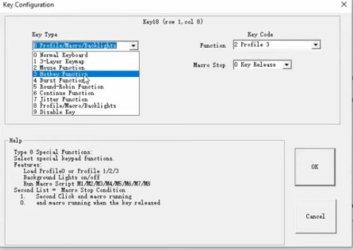
A hack method to entering BIOS/UEFI or Safe Mode might be via an on-board programmable keyboard like the Reddragon. I haven't found any documentationon a macro that can be programed as a repeat key press, like continuously pressing the DELETE key ten times or what ever. That'll insure BIOS/UEFI entry in no time. Of course, the repeats need to be at timed intervals as well, so I'm thinking this may be a crapshoot. You can't use a keyboard that doesn't record the macro/key presses on-board in the keyboard its self though.

Or there's the selection of Koolertron macro keyboards. Looking at a YouTube video, the keyboard supports a "burst function" as well as other functions.

rthrr.jpg


This is just another reason why I like to keep a PS/2 mouse and keyboard around. Because you never know if you need to bypass faulty USB and what have you. I've had that happen to me once where the chipset driver went kaput and had no way of OS interaction without a PS/2 mouse. From there I was able to redownload and install the chipset driver all without a keyboard. And if you need a keyboard, just go into the start orb | accessories| Ease of Access folder and pull out the virtual keyboard. I keep that shortcut on my desktop.

Here's a little Info. on BIOS and safe mode key presses.


When you first boot the computer the motherboard is listening for a key press to go into its various menus. Be it the BIOS/UEFI configuration, boot device selection, or flashing mode, etc. Getting into one of these modes is relatively easy by continuously taping on the key needed for that menu. Don't press and hold the key. I don't think all motherboards on boot up support repeat key presses in that way and thus may not pick up on a key presses. Plus, you could cause an error during the BIOS/UEFI boot sequence. I've seen this happen on older computers.

Getting into Safe Mode could be trickier since it's invoked further down the boot chain. After BIOS boots and pretty much tells Windows to fire off and start (that's what the master boot record is for), during the Windows starting phase it too is listening for keystrokes. The correct time to initiate Safe Mode is after BIOS/UEFI loads, and right before the OS fully loads. It's at that very first part of the OS loading that it's listening for the F8 key for safe mode execution. So knowing this you don't have to keep tapping the F8 key like a made demon well before BIOS/UEFI even loads. You do it right after, but quick like a jack rabbit.

Off topic, but speaking of keyboard commands. Back in my XP days I used to create fake Windows user accounts and my real user account was hidden via a registry tweak. When you booted the computer the login screen would appear showing various user accounts. To get into mine (and if I can remember now) you'd press the keys CTL + ALT and the DEL key twice. Then a login password box would appear and I'd type in my hidden username and password. LOL!

I used that tricked when I hacked my Bro's computer. I first ran a boot CD that deleted his user account password. Once I got in I created my own "backdoor" hidden user account via the registry trick described above. When he discovered that his account no longer needed a password, I simply told him sometimes Windows "can be like that." He shrugged it off, created a new password and all was good. LOL Then when he went off to his night job I'd login to his computer with my hidden account.

Now this was before I had a nice computer myself that could play the games of the day. So having access to his computer meant that I could play those games.


If I knew what I know now, I could of cracked the password its self so that I didn't have to delete it. I'd know the password.


Even waaay back then when a family friend lived with us, he had a computer running Windows 95. Well, I got past the BIOS password on that thing. LOL I was in Jr High at the time. It was then that my school had Macintosh computers with the At Ease desktop where I manged to get into the Admin. account because I keep a running list of all the username and password combinations I was given. Eventually one lead up to the Admin. account because the science teacher was a fool. LOL I also messed around With Cain and Able back then resetting screensaver passwords and what not. Back then in 1999, Cain and Able was on a 2.5" floppy. I carried a 2.5" floppy in my top shirt pocket along with my mini tape recorder. HAHAH Good times.

 

My Computer My Computer

At a glance

Windows 7 Ultimate x64
Computer type
PC/Desktop
OS
Windows 7 Ultimate x64
Back
Top