Cannot get new Win 7 to see existing networked XP PCs

tcurt

New member
Local time
4:58 PM
Messages
8
I'm trying to read alot of posts here and while many of the problems are familiar, I'm not seeing my answer so far.
I have a new Win 7 PC. I have an existing two XP PC home network. The existing network successfully shares files and a printer. Integrating the new Win 7 PC into my network, I have been half successful. I have internet access through the existing router on all three PCs and I have printer access on all three PCs since moving the printer to the Win 7 machine. Both XPs can see the Win 7 machine on the network.
This is where things go off the rails for me though. The Win 7 machine cannot see anything in its network except itself and the router. Keep in mind that certain apps can see back and forth. Windows Easy Transfer was able to see my XP machine from the Win 7 machine and move all my files over just fine. Norton NIS 2009 can see all 3 PCs from all 3 PCs and interact with each perfectly fine.
Likewise, the XP PCs aren't quite there yet either. They alternate between having 100% access to the Win 7 public USERS share and having no access at all - with no changes being made to the setting. Currently it is not accessible and I might not have permission to use this network resource. Interestingly with the XP to Win 7 connection fails, it fails on both XP computers at the same time. Either both work just fine or neither works at all.
All three PCs are in the same workgroup. All three have the same user account names and passwords. In Win 7, Network discovery is on along with all the other Advance Network Sharing features. I am currently sharing the Win 7 shares with Everyone. I have tried shutting the firewall off and leaving it on. All three are set at Full Trust for NIS 2009.
Help, I'm pooped.
 

My Computer My Computer

At a glance

Win 7 & Win XP
Computer Manufacturer/Model Number
Dell Studio XPS 8000
OS
Win 7 & Win XP
From experience, sometimes the "Computer Browser" function just does not work

Have you tried on the W7 machine creating a shortcut on the dekstop using the text \\Name-of-XP-machine

Also have you tried opening a command box on the W7 machine and typing ping Name-of-XP-machine

Jonathan
 

My Computer My Computer

At a glance

7, vista, xp, linux
OS
7, vista, xp, linux
I'm trying to read alot of posts here and while many of the problems are familiar, I'm not seeing my answer so far.
I have a new Win 7 PC. I have an existing two XP PC home network. The existing network successfully shares files and a printer. Integrating the new Win 7 PC into my network, I have been half successful. I have internet access through the existing router on all three PCs and I have printer access on all three PCs since moving the printer to the Win 7 machine. Both XPs can see the Win 7 machine on the network.
This is where things go off the rails for me though. The Win 7 machine cannot see anything in its network except itself and the router. Keep in mind that certain apps can see back and forth. Windows Easy Transfer was able to see my XP machine from the Win 7 machine and move all my files over just fine. Norton NIS 2009 can see all 3 PCs from all 3 PCs and interact with each perfectly fine.
Likewise, the XP PCs aren't quite there yet either. They alternate between having 100% access to the Win 7 public USERS share and having no access at all - with no changes being made to the setting. Currently it is not accessible and I might not have permission to use this network resource. Interestingly with the XP to Win 7 connection fails, it fails on both XP computers at the same time. Either both work just fine or neither works at all.
All three PCs are in the same workgroup. All three have the same user account names and passwords. In Win 7, Network discovery is on along with all the other Advance Network Sharing features. I am currently sharing the Win 7 shares with Everyone. I have tried shutting the firewall off and leaving it on. All three are set at Full Trust for NIS 2009.
Help, I'm pooped.

Quote: All three have the same user account names and passwords.

And there lies the problem. You absolutely need to use a different machine name on all machines. They won't show up consistantly otherwise. So you just need to change the machine names on the XP machines so they do not match each other and don't match the name used on the Windows 7 machine. :)

They should all be sharing the same "workgroup" name but not the same machine name.
 
Last edited:

My Computer My Computer

At a glance

Windows 7 Ult, Windows 8.1 Pro,Q9650-4.275GHz, E8600 4.5GHz, E6750-3.8GHzG.Skill PC2 9600 1200Mhz 5 5 5 15 2TGTX480
Computer type
PC/Desktop
Computer Manufacturer/Model Number
Home built
OS
Windows 7 Ult, Windows 8.1 Pro,
CPU
Q9650-4.275GHz, E8600 4.5GHz, E6750-3.8GHz
Motherboard
Evga 780i FTW
Memory
G.Skill PC2 9600 1200Mhz 5 5 5 15 2T
Graphics Card(s)
GTX480
Sound Card
Asus Xonar D2
Monitor(s) Displays
HannsG
Screen Resolution
1680X1050
Hard Drives
GSkill Phoenix Pro 120GB SSD
PSU
ThermalTake Toughpower 1000Watt modular
Case
ThermalTake XaserV
Cooling
Xigmatek S1283
Keyboard
Logitech G15
Mouse
Logitech G9
Internet Speed
T1
First, I rebooted everything at some point and so far my WinXP PCs have full access to the Win7 PC. All that remains is that the Win7 PC refuses to see either WinXP PC on the network.

I attempted to create a shortcut to a WinXP. New > Shortcut > "\\XP-machine" > Next, only to be told "\\XP-machine cannot be found." Perhaps I'm not creating the shortcut correctly.

This is what I get when I Ping from Win7 to WinXP, I also get a sucessful Ping from the WinXP to the Win7.

C:\Users\Trine Curtis>ping XP-machine
Pinging XP-machine [192.168.1.2] with 32 bytes of data:
Reply from 192.168.1.2: bytes=32 time<1ms TTL=128
Ping statistics for 192.168.1.2:
Packets: Sent = 4, Received = 4, Lost = 0 (0% loss),
Approximate round trip times in milli-seconds:
Minimum = 0ms, Maximum = 0ms, Average = 0ms

I also found this Microsoft article Networking home computers running different versions of Windows which has just about everything I've seen mentioned before and tried except for a long list of ports in my firewall I might need to open to be successful. Overkill?

Thanks!
 

My Computer My Computer

At a glance

Win 7 & Win XP
Computer Manufacturer/Model Number
Dell Studio XPS 8000
OS
Win 7 & Win XP
First, I rebooted everything at some point and so far my WinXP PCs have full access to the Win7 PC. All that remains is that the Win7 PC refuses to see either WinXP PC on the network.

I attempted to create a shortcut to a WinXP. New > Shortcut > "\\XP-machine" > Next, only to be told "\\XP-machine cannot be found." Perhaps I'm not creating the shortcut correctly.

This is what I get when I Ping from Win7 to WinXP, I also get a sucessful Ping from the WinXP to the Win7.

C:\Users\Trine Curtis>ping XP-machine
Pinging XP-machine [192.168.1.2] with 32 bytes of data:
Reply from 192.168.1.2: bytes=32 time<1ms TTL=128
Ping statistics for 192.168.1.2:
Packets: Sent = 4, Received = 4, Lost = 0 (0% loss),
Approximate round trip times in milli-seconds:
Minimum = 0ms, Maximum = 0ms, Average = 0ms

I also found this Microsoft article Networking home computers running different versions of Windows which has just about everything I've seen mentioned before and tried except for a long list of ports in my firewall I might need to open to be successful. Overkill?

Thanks!
Yes, you need to use workgroup or public file sharing when sharing between different Op systems.
But, this fact has nothing to do with your problem.

Please change the names on the XP machines. Please follow advice "already given" if you want the problem solved.
 
Last edited:

My Computer My Computer

At a glance

Windows 7 Ult, Windows 8.1 Pro,Q9650-4.275GHz, E8600 4.5GHz, E6750-3.8GHzG.Skill PC2 9600 1200Mhz 5 5 5 15 2TGTX480
Computer type
PC/Desktop
Computer Manufacturer/Model Number
Home built
OS
Windows 7 Ult, Windows 8.1 Pro,
CPU
Q9650-4.275GHz, E8600 4.5GHz, E6750-3.8GHz
Motherboard
Evga 780i FTW
Memory
G.Skill PC2 9600 1200Mhz 5 5 5 15 2T
Graphics Card(s)
GTX480
Sound Card
Asus Xonar D2
Monitor(s) Displays
HannsG
Screen Resolution
1680X1050
Hard Drives
GSkill Phoenix Pro 120GB SSD
PSU
ThermalTake Toughpower 1000Watt modular
Case
ThermalTake XaserV
Cooling
Xigmatek S1283
Keyboard
Logitech G15
Mouse
Logitech G9
Internet Speed
T1
Quote: All three have the same user account names and passwords.

And there lies the problem. You absolutely need to use a different user name on all machines. They won't show up consistantly otherwise. So you just need to change the names on the XP machines so they do not match each other and don't match the name used on the Windows 7 machine. :)

They should all be sharing the same "workgroup" name but not the same user name.

Hmm. Ok, I can change all the user account names on my old XP desktop to Name-XP easy enough. However, I'm a little fuzzy why the affects my Win7 from registering the existence of the WinXPs altogether. I definitely see how this might affect folder sharing (and confusion in general). All of my shared folders on the XP systems had unique names and do not also appear in my Win7 system.

I'll give it a whirl.
 

My Computer My Computer

At a glance

Win 7 & Win XP
Computer Manufacturer/Model Number
Dell Studio XPS 8000
OS
Win 7 & Win XP
Quote: All three have the same user account names and passwords.

And there lies the problem. You absolutely need to use a different user name on all machines. They won't show up consistantly otherwise. So you just need to change the names on the XP machines so they do not match each other and don't match the name used on the Windows 7 machine. :)

They should all be sharing the same "workgroup" name but not the same user name.

Hmm. Ok, I can change all the user account names on my old XP desktop to Name-XP easy enough. However, I'm a little fuzzy why the affects my Win7 from registering the existence of the WinXPs altogether. I definitely see how this might affect folder sharing (and confusion in general). All of my shared folders on the XP systems had unique names and do not also appear in my Win7 system.

I'll give it a whirl.

If all the user names are the same then Windows cannot identify them on the network. I've already tested this out on XP and Vista machines. There is no way networking will worked correctly unless each machine has a different user name. But it helps if they are all using the same name for the "workgroup".

Using the same user name made the XP or Vista machine not show up every single time for me.
 

My Computer My Computer

At a glance

Windows 7 Ult, Windows 8.1 Pro,Q9650-4.275GHz, E8600 4.5GHz, E6750-3.8GHzG.Skill PC2 9600 1200Mhz 5 5 5 15 2TGTX480
Computer type
PC/Desktop
Computer Manufacturer/Model Number
Home built
OS
Windows 7 Ult, Windows 8.1 Pro,
CPU
Q9650-4.275GHz, E8600 4.5GHz, E6750-3.8GHz
Motherboard
Evga 780i FTW
Memory
G.Skill PC2 9600 1200Mhz 5 5 5 15 2T
Graphics Card(s)
GTX480
Sound Card
Asus Xonar D2
Monitor(s) Displays
HannsG
Screen Resolution
1680X1050
Hard Drives
GSkill Phoenix Pro 120GB SSD
PSU
ThermalTake Toughpower 1000Watt modular
Case
ThermalTake XaserV
Cooling
Xigmatek S1283
Keyboard
Logitech G15
Mouse
Logitech G9
Internet Speed
T1
Yes, you need to use workgroup or public file sharing when sharing between different Op systems.
But, this fact has nothing to do with your problem.

Please change the names on the XP machines. Please follow advice "already given" if you want the problem solved.

This is your problem!!!!!>>>>>>Quote: All three have the same user account names and passwords.

Take a breath. I was posting that previous response when you responded. The "already given" advice hadn't even been read yet.

Ok. I have now changed the duplicate user names to three different ones. Name (on Win7), Name-XP (on desktop XP), and Name-lap (on laptop XP). The three different PCs already had unique names.

Under Network on Win7 I still only show the Win7 PC and the router. What am I not getting about this?
 

My Computer My Computer

At a glance

Win 7 & Win XP
Computer Manufacturer/Model Number
Dell Studio XPS 8000
OS
Win 7 & Win XP
Sorry about the confusion but I assumed you were responding to me with something that made no sense.

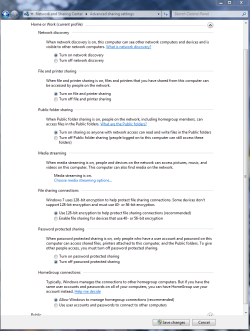
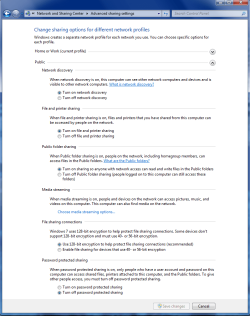
You also need to enable network discovery and file sharing on the XP machines. Make sure all of the steps are checked in the pictures below. You can use either workgroup or public file sharing but not homegroup because that only works with Windows 7 machines.
 

Attachments

  • Home or work homegroup enable.PNG
    Home or work homegroup enable.PNG
    45 KB · Views: 104
  • public sharing enabled all.PNG
    public sharing enabled all.PNG
    39.7 KB · Views: 78

My Computer My Computer

At a glance

Windows 7 Ult, Windows 8.1 Pro,Q9650-4.275GHz, E8600 4.5GHz, E6750-3.8GHzG.Skill PC2 9600 1200Mhz 5 5 5 15 2TGTX480
Computer type
PC/Desktop
Computer Manufacturer/Model Number
Home built
OS
Windows 7 Ult, Windows 8.1 Pro,
CPU
Q9650-4.275GHz, E8600 4.5GHz, E6750-3.8GHz
Motherboard
Evga 780i FTW
Memory
G.Skill PC2 9600 1200Mhz 5 5 5 15 2T
Graphics Card(s)
GTX480
Sound Card
Asus Xonar D2
Monitor(s) Displays
HannsG
Screen Resolution
1680X1050
Hard Drives
GSkill Phoenix Pro 120GB SSD
PSU
ThermalTake Toughpower 1000Watt modular
Case
ThermalTake XaserV
Cooling
Xigmatek S1283
Keyboard
Logitech G15
Mouse
Logitech G9
Internet Speed
T1
Sorry about the confusion but I assumed you were responding to me with something that made no sense.

You also need to enable network discovery and file sharing on the XP machines. Make sure all of the steps are checked in the pictures below. You can use either workgroup or public file sharing but not homegroup because that only works with Windows 7 machines.

The Win7 is completely enabled under the "Change advanced sharing settings" and is set up as a Workgroup with the same name as the two XP machines.
 

My Computer My Computer

At a glance

Win 7 & Win XP
Computer Manufacturer/Model Number
Dell Studio XPS 8000
OS
Win 7 & Win XP
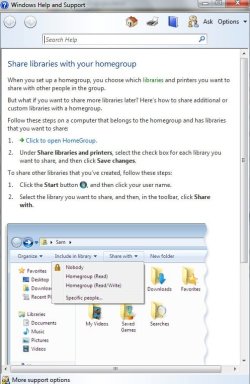
In this example of 'sharing' in help .... click on [specific people] and type (your name)\\XP-machine


Norton's firewall may also be hindering Windows 7, so you could add the IP#'s of both XP machines to the firewall on your Windows 7 or vice-versa.
 

Attachments

  • sharing with other computers.jpg
    sharing with other computers.jpg
    58.9 KB · Views: 29

My Computer My Computer

At a glance

Windows 7 Ultimate 32bit SP1Intel(R) Core(TM)2 Quad CPU @ 2.40GHz, 2400 MHz4 GBATI Radeon HD 2600 Pro
Computer type
PC/Desktop
Computer Manufacturer/Model Number
Bruce ... somewhere in his 40's
OS
Windows 7 Ultimate 32bit SP1
CPU
Intel(R) Core(TM)2 Quad CPU @ 2.40GHz, 2400 MHz
Motherboard
INTEL/D975XBX2
Memory
4 GB
Graphics Card(s)
ATI Radeon HD 2600 Pro
Monitor(s) Displays
Samsung SyncMaster 914v
Screen Resolution
1280 x 1024
Hard Drives
2/500GB each ... ST3500630AS ATA Device.
One is not connected
PSU
Rocketfish 700 W
Case
G.Skill Gigabyte Chassis
Keyboard
Standard PS/2 Keyboard
Mouse
Microsoft PS/2 Mouse
Internet Speed
DSL
Antivirus
Avira Internet Security
Browser
IE 11
Other Info
ATI HDMI Audio
In this example of 'sharing' in help .... click on [specific people] and type (your name)\\XP-machine


Norton's firewall may also be hindering Windows 7, so you could add the IP#'s of both XP machines to the firewall on your Windows 7 or vice-versa.

I'am not sure why you posted a homegroup connection page when XP can't connect using "Homegroups" nor can XP share library's. Only Win 7 machines can use homegroup as a network sharing connection.

You would think that disabling the Norton firewall or allowing the XP machines through the Norton file wall would be the first thing to do but maybe he didn't think of that.

In either event, there is zero chance it would work if all the machines were using the same user name.
 

My Computer My Computer

At a glance

Windows 7 Ult, Windows 8.1 Pro,Q9650-4.275GHz, E8600 4.5GHz, E6750-3.8GHzG.Skill PC2 9600 1200Mhz 5 5 5 15 2TGTX480
Computer type
PC/Desktop
Computer Manufacturer/Model Number
Home built
OS
Windows 7 Ult, Windows 8.1 Pro,
CPU
Q9650-4.275GHz, E8600 4.5GHz, E6750-3.8GHz
Motherboard
Evga 780i FTW
Memory
G.Skill PC2 9600 1200Mhz 5 5 5 15 2T
Graphics Card(s)
GTX480
Sound Card
Asus Xonar D2
Monitor(s) Displays
HannsG
Screen Resolution
1680X1050
Hard Drives
GSkill Phoenix Pro 120GB SSD
PSU
ThermalTake Toughpower 1000Watt modular
Case
ThermalTake XaserV
Cooling
Xigmatek S1283
Keyboard
Logitech G15
Mouse
Logitech G9
Internet Speed
T1
You would think that disabling the Norton firewall or allowing the XP machines through the Norton file wall would be the first thing to do but maybe he didn't think of that.

In either event, there is zero chance it would work if all the machines were using the same user name.

Ok. I believe I have exceptions in both the XP desktop Norton firewall and the Win7 Norton firewall. But for arguement's sake, I've shut off both firewalls for one hour just to see if it makes a difference. I've done this already before, but I cannot be sure of every step, so I am doing it again to make it official.

Lastly, because this is your major concern, I need to make absolutely certain of one detail. When you say "all machines have the same user name" do you mean all the PCs have the same Full Computer Name or are you talking about individual user account names (like my account, my wife's account on each PC). In my network, the Full Computer Names have never been the same, and I have now changed the individual user names on all three PCs.

thanks.
 

My Computer My Computer

At a glance

Win 7 & Win XP
Computer Manufacturer/Model Number
Dell Studio XPS 8000
OS
Win 7 & Win XP
Hey
I have roughly the same problem, a win-7 PC that's connected by hub to a win-XP laptop.. and neither one sees the other!!!
I've done all the mentioned settings.. all in vain
I suspect the so-named HomeGroup is causing issues! have anyone checked this?
 

My Computer My Computer

At a glance

Win7 Ultimate 32bit3Ghz /2MB L22GB1GB nVidia 5800 GT
Computer Manufacturer/Model Number
Gigabyte
OS
Win7 Ultimate 32bit
CPU
3Ghz /2MB L2
Motherboard
Gigabyte 945 S3P
Memory
2GB
Graphics Card(s)
1GB nVidia 5800 GT
Sound Card
built in
Monitor(s) Displays
Acer 17"
Hard Drives
320 GB
160 GB
PSU
400 W
Case
Discovery
Cooling
n/a
This is why I ask. Your advice to use different user accounts and passwords with each machine contradicts much of what I've read elsewhere so I need to make sure we are saying the same thing. From another conversation elsewhere comes this:

"As of Windows Vista, you must have a password associated with an account. Having an account sans password will generate the problems you are experiencing.

On both computers, the XP and Windows 7 system, create a username and password that is consistent between both computers. Using that account and password combination will then allow you to access both computer shares—providing you granted the passworded account proper access and permissions."

Now for me this doesn't solve alot, because I still cannot see the XPs from Win7 at all. Therefore I never get to the User Account level when I try and connect with the Win7 PC.
 

My Computer My Computer

At a glance

Win 7 & Win XP
Computer Manufacturer/Model Number
Dell Studio XPS 8000
OS
Win 7 & Win XP
Hey
I have roughly the same problem, a win-7 PC that's connected by hub to a win-XP laptop.. and neither one sees the other!!!
I've done all the mentioned settings.. all in vain
I suspect the so-named HomeGroup is causing issues! have anyone checked this?

Well, this much I've gleaned for sure. The Homegroup is meaningless to everything except Win7 to Win7 connections. Connect ANYTHING else (XP, Vista, etc) and you have to use a Workgroup (which has to have identical names on all Windows machines in your network).
 

My Computer My Computer

At a glance

Win 7 & Win XP
Computer Manufacturer/Model Number
Dell Studio XPS 8000
OS
Win 7 & Win XP
This is why I ask. Your advice to use different user accounts and passwords with each machine contradicts much of what I've read elsewhere so I need to make sure we are saying the same thing. From another conversation elsewhere comes this:

"As of Windows Vista, you must have a password associated with an account. Having an account sans password will generate the problems you are experiencing.

On both computers, the XP and Windows 7 system, create a username and password that is consistent between both computers. Using that account and password combination will then allow you to access both computer shares—providing you granted the passworded account proper access and permissions."

Now for me this doesn't solve alot, because I still cannot see the XPs from Win7 at all. Therefore I never get to the User Account level when I try and connect with the Win7 PC.

You heard wrong. That was an old fable that was floating around and it is completely and utterly incorrect. You also do not need to set up a password on any of the machines in the network if you don't want too. More false information I see. In any event you can also turn off password protected sharing if you need too.

I tested this on my own machines over 10 months ago when I first started using Windows 7, and also on the new 7600 build just to make sure. There is absolutly no way another machine will show up if it has the same name as the Windows 7 machine or any other machine on your network.

They need to be part of the same "workgroup" but cannot use the same name. Each machine needs it's own machine name,... Tom's-PC and so on. They can't and won't show up unless they have different names. Where you have to option to use a different machine name and user name on the same machine, both of those should be the same also.

I'am not sure why Msoft does that but it makes it way more complicated than it needs to be.

It is important to be sure and enable all file sharing and network discovery on the XP machine. This is an easy mistake to make, trust me on this.
 

My Computer My Computer

At a glance

Windows 7 Ult, Windows 8.1 Pro,Q9650-4.275GHz, E8600 4.5GHz, E6750-3.8GHzG.Skill PC2 9600 1200Mhz 5 5 5 15 2TGTX480
Computer type
PC/Desktop
Computer Manufacturer/Model Number
Home built
OS
Windows 7 Ult, Windows 8.1 Pro,
CPU
Q9650-4.275GHz, E8600 4.5GHz, E6750-3.8GHz
Motherboard
Evga 780i FTW
Memory
G.Skill PC2 9600 1200Mhz 5 5 5 15 2T
Graphics Card(s)
GTX480
Sound Card
Asus Xonar D2
Monitor(s) Displays
HannsG
Screen Resolution
1680X1050
Hard Drives
GSkill Phoenix Pro 120GB SSD
PSU
ThermalTake Toughpower 1000Watt modular
Case
ThermalTake XaserV
Cooling
Xigmatek S1283
Keyboard
Logitech G15
Mouse
Logitech G9
Internet Speed
T1
Hey
I have roughly the same problem, a win-7 PC that's connected by hub to a win-XP laptop.. and neither one sees the other!!!
I've done all the mentioned settings.. all in vain
I suspect the so-named HomeGroup is causing issues! have anyone checked this?

If you are having a problem please start another thread for it.

Homegroup does NOT work with any OP system besides Windows 7. It will not work with XP or Vista machines.

You will need to use work or public file sharing for what you are doing.
 

My Computer My Computer

At a glance

Windows 7 Ult, Windows 8.1 Pro,Q9650-4.275GHz, E8600 4.5GHz, E6750-3.8GHzG.Skill PC2 9600 1200Mhz 5 5 5 15 2TGTX480
Computer type
PC/Desktop
Computer Manufacturer/Model Number
Home built
OS
Windows 7 Ult, Windows 8.1 Pro,
CPU
Q9650-4.275GHz, E8600 4.5GHz, E6750-3.8GHz
Motherboard
Evga 780i FTW
Memory
G.Skill PC2 9600 1200Mhz 5 5 5 15 2T
Graphics Card(s)
GTX480
Sound Card
Asus Xonar D2
Monitor(s) Displays
HannsG
Screen Resolution
1680X1050
Hard Drives
GSkill Phoenix Pro 120GB SSD
PSU
ThermalTake Toughpower 1000Watt modular
Case
ThermalTake XaserV
Cooling
Xigmatek S1283
Keyboard
Logitech G15
Mouse
Logitech G9
Internet Speed
T1
Hey
I have roughly the same problem, a win-7 PC that's connected by hub to a win-XP laptop.. and neither one sees the other!!!
I've done all the mentioned settings.. all in vain
I suspect the so-named HomeGroup is causing issues! have anyone checked this?

Well, this much I've gleaned for sure. The Homegroup is meaningless to everything except Win7 to Win7 connections. Connect ANYTHING else (XP, Vista, etc) and you have to use a Workgroup (which has to have identical names on all Windows machines in your network).

Public file sharing also works with different Op systems. In fact, if you are having problems with the work file share, just go into the public file sharing window, enable everything and try using it. It works better for some.
 

My Computer My Computer

At a glance

Windows 7 Ult, Windows 8.1 Pro,Q9650-4.275GHz, E8600 4.5GHz, E6750-3.8GHzG.Skill PC2 9600 1200Mhz 5 5 5 15 2TGTX480
Computer type
PC/Desktop
Computer Manufacturer/Model Number
Home built
OS
Windows 7 Ult, Windows 8.1 Pro,
CPU
Q9650-4.275GHz, E8600 4.5GHz, E6750-3.8GHz
Motherboard
Evga 780i FTW
Memory
G.Skill PC2 9600 1200Mhz 5 5 5 15 2T
Graphics Card(s)
GTX480
Sound Card
Asus Xonar D2
Monitor(s) Displays
HannsG
Screen Resolution
1680X1050
Hard Drives
GSkill Phoenix Pro 120GB SSD
PSU
ThermalTake Toughpower 1000Watt modular
Case
ThermalTake XaserV
Cooling
Xigmatek S1283
Keyboard
Logitech G15
Mouse
Logitech G9
Internet Speed
T1
This is why I ask. Your advice to use different user accounts and passwords with each machine contradicts much of what I've read elsewhere so I need to make sure we are saying the same thing. From another conversation elsewhere comes this:

"As of Windows Vista, you must have a password associated with an account. Having an account sans password will generate the problems you are experiencing.

On both computers, the XP and Windows 7 system, create a username and password that is consistent between both computers. Using that account and password combination will then allow you to access both computer shares—providing you granted the passworded account proper access and permissions."

Now for me this doesn't solve alot, because I still cannot see the XPs from Win7 at all. Therefore I never get to the User Account level when I try and connect with the Win7 PC.

You heard wrong. That was an old fable that was floating around and it is completely and utterly incorrect. You also do not need to set up a password on any of the machines in the network if you don't want too. More false information I see. In any event you can also turn off password protected sharing if you need too.

I tested this on my own machines over 10 months ago when I first started using Windows 7, and also on the new 7600 build just to make sure. There is absolutly no way another machine will show up if it has the same name as the Windows 7 machine or any other machine on your network.

They need to be part of the same "workgroup" but cannot use the same name. Each machine needs it's own machine name,... Tom's-PC and so on. They can't and won't show up unless they have different names. Where you have to option to use a different machine name and user name on the same machine, both of those should be the same also.

It is important to be sure and enable all file sharing and network discovery on the XP machine. This is an easy mistake to make, trust me on this.

You've confused "machine name" with "user name". The poster explained that he had identical users on each computer, not identical computer names.

There is a reason why it's recommended to create the same users on all computers. When you create files and folders on a machine, you can set permissions based on a particular user. Then, when a person is logged into one computer and accesses files on another computer, the permissions are already set. I can safely share files with my oldest son, and not have to worry about my youngest son accidentally deleting/accessing/etc those same files. A granular permissions system is very powerful and very useful for family situations (as well as in business/network situations). It also means that, since the user is part of the authenticated users group, you do not need to use the guest account (which, in all professional networking circles, is always disabled and renamed).
 

My Computer My Computer

At a glance

Windows 7 Ultimate x64 SP1Core i7-2670QM8GB DDR3 PC3-10600Intel HD Graphics 3000 + GeForce GT 540M
Computer Manufacturer/Model Number
Dell XPS 15 L502x
OS
Windows 7 Ultimate x64 SP1
CPU
Core i7-2670QM
Memory
8GB DDR3 PC3-10600
Graphics Card(s)
Intel HD Graphics 3000 + GeForce GT 540M
Screen Resolution
1920x1080
Hard Drives
1TB 5400RPM Seagate
Back
Top