Cannot get rid of drive letter in My Computer

drtanz

New member
Member
Local time
5:14 PM
Messages
28
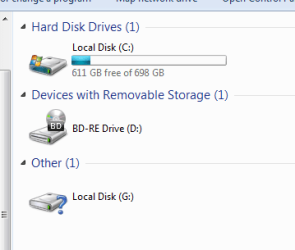
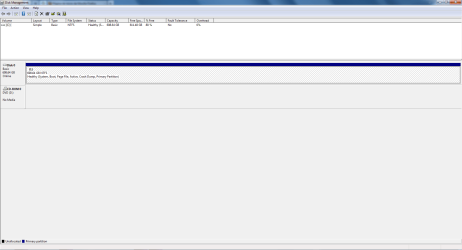
Hi I did some re partitioning, deleted a partition and merged that space with the C: drive so I only have one drive now. However in My Computer the G: drive keeps showing, and I cannot assign that letter to any other drive. In Disk management there is no such G: partition. How can I get rid of it once and for all?

Thanks
 

Attachments

  • 11-12-2011 13-08-36.png
    11-12-2011 13-08-36.png
    6.7 KB · Views: 2

My Computer My Computer

At a glance

Windows 7
OS
Windows 7
I did get an encouraging responce from that program but I still see the G drive as before.

DriveCleanup V0.8.1 (x64)
Uninstalls non present USB hubs, USB storage devices and their storage volumes, Disks, CDROMs, Floppies, WPD devices
and deletes their registry items
Freeware by Uwe Sieber - Uwe Sieber's Homepage

Regkey delete HKCU\Software\Microsoft\Windows\CurrentVersion\Explorer\MountPoints2\G
OK

Removed 0 USB devices
Removed 0 USB hubs
Removed 0 Disk devices
Removed 0 CDROM devices
Removed 0 Floppy devices
Removed 0 Storage volumes
Removed 0 WPD devices
Removed 1 Keys from registry

Press any key to close
 

My Computer My Computer

At a glance

Windows 7
OS
Windows 7
OK, may be only for USB devices. Hold on till someone comes up with a fix. I have nothing up my sleeve.:)
 

My Computer My Computer

At a glance

Windows 7 Home Premium 32 bit
OS
Windows 7 Home Premium 32 bit
If you could post a pic of disk mgmt, and explain how you deleted the partition would really help.
 

My Computer My Computer

At a glance

Windows 7 Home Premium 64 bitIntel Core 2 quad Extreme Q9770 @ 3.2 GHz4x2 GB Muskin 1600 MHz ramNVidia GTX 250
Computer Manufacturer/Model Number
Dell XPS 730
OS
Windows 7 Home Premium 64 bit
CPU
Intel Core 2 quad Extreme Q9770 @ 3.2 GHz
Memory
4x2 GB Muskin 1600 MHz ram
Graphics Card(s)
NVidia GTX 250
Sound Card
Soundblaster X-Fi Fatality Champion
Monitor(s) Displays
2 Dell 2007WFP Ultrascans
Screen Resolution
3360 x 1050
Hard Drives
WD Black 1TB sata, 2-WD Black 500 sata, 2-Seagate 500 Go external
PSU
1000 Watt
Cooling
air
Keyboard
MS Natrual Keyboard Pro
Mouse
Logitech Wireless Trackball
Internet Speed
DSL Elite
I used Easeus Partition Manager to delete the partition. I've now merged the empty space with drive C, using Easeus, however I still have the G drive showing as in the previous screenshot.
 

Attachments

  • 12-12-2011 00-28-36.png
    12-12-2011 00-28-36.png
    21.2 KB · Views: 20

My Computer My Computer

At a glance

Windows 7
OS
Windows 7
1. Are you saying that the letter G is taken and cannot be reused?

2. There are plenty of letters to assign, what is special about G.

3. Since you used easeus, the system does not know what was done. If you had used DM, that would not have happened.

4. Suggest you recreate a small partition with G using easeus and then delete it with DM
 

My Computer My Computer

At a glance

Vista, Windows7, Mint Mate, Zorin, Windows 8from 1.6GHz Duo to i7
Computer Manufacturer/Model Number
HP, Dell, Gateway, Toshiba - 4 laptops and 2 desktops
OS
Vista, Windows7, Mint Mate, Zorin, Windows 8
CPU
from 1.6GHz Duo to i7
Monitor(s) Displays
2x HP w2207
Hard Drives
5x HDD, 7x SSD, 12x Externals
Keyboard
with trackball - no mices
Mouse
Trackball mice
Internet Speed
DSL 6000
Any partitoning software that deletes a partition and then merges it to another partition should rewrite the new partition table. I wonder why EaseUS had failed and left an orphaned drive letter.( I have not used EaseUs and so not sure what happened)

I can suggest to the OP to try Testdisk which may be able to rewrite the correct partition table and in the process eliminate the orphaned drive letter hopefully. Just my thoughts. But this trial should only be done as a last resort.

If there are simple ways to do it, he should try them first.

The above suggestion by whs seems to be just right and inline with it..
 

My Computer My Computer

At a glance

Windows 7 Home Premium 32 bit
OS
Windows 7 Home Premium 32 bit
found the problem, i had a program called ext2fs or something like that, deleted it and all fine now, G disappeared. thanks all
 

My Computer My Computer

At a glance

Windows 7
OS
Windows 7
Good to know that. Next time someone comes with a similiar problem we wiil ask " have you extended Windows OS to read ext2 file system?" :)

Thanks for sharing this info and you may mark this thread as solved.
 

My Computer My Computer

At a glance

Windows 7 Home Premium 32 bit
OS
Windows 7 Home Premium 32 bit
Back
Top