USB Hard drive, beeps and clicks, doesn't show in my computer

freya306

New member
Local time
3:51 AM
Messages
3
Location
united Kingdom
Hi I have a 1TB external USB hard drive, it is not showing up in 'my computer' the light on the hard drive is constantly flashing and randomly beeps and clicks, I have never heard this until today..
I have tried it on two laptops, windows 7 and windows 10 and in a macbook, does not show up.
I have tried a different cable from another USB device, still no luck.
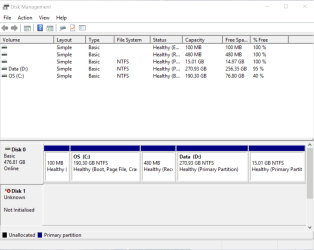
It appears in device manager which says it is running normally, I have tried un-installing and re-installing, no luck! In disk manager it says the disk is unknown and not initialised, see screenshot.
Please help me recover my device, it has a lot of data on it that I don't want to lose! I hope it is still there!
 

Attachments
  • disk manager.PNG
    disk manager.PNG
    65.7 KB · Views: 3

My Computer My Computer

At a glance

Windows 10 Home, 64-bit
Computer type
Laptop
Computer Manufacturer/Model Number
Asus
OS
Windows 10 Home, 64-bit

My Computer My Computer

At a glance

Windows 7 Professional SP1 x64 (OEM)Intel® Core™ i5 2430M/2410M ProcessorDDR3 1333 SODIMM (8GB)NVIDIA® GeForce® GT 555M (2GB)
Computer type
Laptop
Computer Manufacturer/Model Number
ASUS N45SF
OS
Windows 7 Professional SP1 x64 (OEM)
CPU
Intel® Core™ i5 2430M/2410M Processor
Motherboard
Intel® HM65 Express Chipset
Memory
DDR3 1333 SODIMM (8GB)
Graphics Card(s)
NVIDIA® GeForce® GT 555M (2GB)
Sound Card
Realtek High Definition Audio
Monitor(s) Displays
14.0" LED Backlight
Screen Resolution
16:9 HD (1366x768)
Hard Drives
640GB Seagate (internal), 1TB Toshiba Canvio Portable, 2TB x 2 WD My Book Essential (external)
Antivirus
Malwarebytes Anti-Malware Home (Premium)
Browser
Waterfox
Other Info
Optical Drive: Slimtype DVD A DS8A5SH (Super-Multi DVD);
Audio: Bang & Olufsen ICEpower®, SonicMaster
It only seems to beep and click a few times when it is first plugged in, been plugged in for an half an hour now and hasn't made a noise for quite some time! Click of death doesnt sound good!
 

My Computer My Computer

At a glance

Windows 10 Home, 64-bit
Computer type
Laptop
Computer Manufacturer/Model Number
Asus
OS
Windows 10 Home, 64-bit
Click of Death is usually a mechanical/hardware failure. PC still not being able to read contents?
 

My Computer My Computer

At a glance

Windows 7 Professional SP1 x64 (OEM)Intel® Core™ i5 2430M/2410M ProcessorDDR3 1333 SODIMM (8GB)NVIDIA® GeForce® GT 555M (2GB)
Computer type
Laptop
Computer Manufacturer/Model Number
ASUS N45SF
OS
Windows 7 Professional SP1 x64 (OEM)
CPU
Intel® Core™ i5 2430M/2410M Processor
Motherboard
Intel® HM65 Express Chipset
Memory
DDR3 1333 SODIMM (8GB)
Graphics Card(s)
NVIDIA® GeForce® GT 555M (2GB)
Sound Card
Realtek High Definition Audio
Monitor(s) Displays
14.0" LED Backlight
Screen Resolution
16:9 HD (1366x768)
Hard Drives
640GB Seagate (internal), 1TB Toshiba Canvio Portable, 2TB x 2 WD My Book Essential (external)
Antivirus
Malwarebytes Anti-Malware Home (Premium)
Browser
Waterfox
Other Info
Optical Drive: Slimtype DVD A DS8A5SH (Super-Multi DVD);
Audio: Bang & Olufsen ICEpower®, SonicMaster
no, still not showing up..
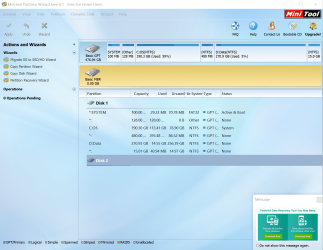
Ive seen jumanji has posted on other theads to try minitool partition, it is coming up like this on there, 0GB doesnt look promising!
 

Attachments

  • minotool.PNG
    minotool.PNG
    514 KB · Views: 5

My Computer My Computer

At a glance

Windows 10 Home, 64-bit
Computer type
Laptop
Computer Manufacturer/Model Number
Asus
OS
Windows 10 Home, 64-bit
I was supposed to recommend a file recovery software but I'm not sure if it can do much in this scenario.

Let's hope a hardware expert comes by to your assistance. You did post in the right forums. :)
 

My Computer My Computer

At a glance

Windows 7 Professional SP1 x64 (OEM)Intel® Core™ i5 2430M/2410M ProcessorDDR3 1333 SODIMM (8GB)NVIDIA® GeForce® GT 555M (2GB)
Computer type
Laptop
Computer Manufacturer/Model Number
ASUS N45SF
OS
Windows 7 Professional SP1 x64 (OEM)
CPU
Intel® Core™ i5 2430M/2410M Processor
Motherboard
Intel® HM65 Express Chipset
Memory
DDR3 1333 SODIMM (8GB)
Graphics Card(s)
NVIDIA® GeForce® GT 555M (2GB)
Sound Card
Realtek High Definition Audio
Monitor(s) Displays
14.0" LED Backlight
Screen Resolution
16:9 HD (1366x768)
Hard Drives
640GB Seagate (internal), 1TB Toshiba Canvio Portable, 2TB x 2 WD My Book Essential (external)
Antivirus
Malwarebytes Anti-Malware Home (Premium)
Browser
Waterfox
Other Info
Optical Drive: Slimtype DVD A DS8A5SH (Super-Multi DVD);
Audio: Bang & Olufsen ICEpower®, SonicMaster
Run the HDD manufacturer's diagnostic/repair utility and check the status of your external drive.( You should always give full details of your faulty hardware. Manufacturer/model Number etc.,Just saying 1TB external drive doesn't help.)
 

My Computer My Computer

At a glance

Windows 7 Home Premium 32 bit
OS
Windows 7 Home Premium 32 bit
It`s dead :(

It will make a nice paperweight :)
 

My Computer My Computer

At a glance

Windows 10 Pro x64Intel Core i7 6700KGSkill TridentZ RGB 16GB 3600 16-16-16-36EVGA GTX 980 Ti SC x2
Computer type
PC/Desktop
Computer Manufacturer/Model Number
Skylake Special #666
OS
Windows 10 Pro x64
CPU
Intel Core i7 6700K
Motherboard
Asus Sabertooth Z170 Mark 1
Memory
GSkill TridentZ RGB 16GB 3600 16-16-16-36
Graphics Card(s)
EVGA GTX 980 Ti SC x2
Sound Card
Realtek High Definition
Monitor(s) Displays
AOC G2460PG
Screen Resolution
1920 x 1080 144Hz
Hard Drives
Samsung 860 Pro 256GB, Seagate Barracuda 4TB x2
PSU
EVGA 1000 P2, EVGA White Custom Braided Cables
Case
Corsair Vengeance C70 Gunmetal Black
Cooling
Corsair H100i v2, Corsair ML120 x2, Thermal Grizzly Kryonaut
Keyboard
Logitech G910 Orion Spectrum
Mouse
Logitech G700s
Internet Speed
Verizon Fios Quantum Gateway 75/75
Antivirus
Windows Defender, Malwarebytes Free 3.8.3
Browser
Chrome
Other Info
Corsair SP120 x4, LG Blu-ray Drive, Durabrand HT-395 100 Watt Dolby Digital Amp, Corsair H2100 Wireless 7.1 Headset
Back
Top