cannot get the real 5.1 sound

ludipera

New member
Local time
7:28 PM
Messages
4
Hi everybody, I have a question. I'm using Altec Lansing 5.1 speakers on Realtek ALC888 (on board sound GA-M56S S3 is the motherboard) and I have read and tried I suppose everything found here, still I cannot get the real 5.1 sound. I've installed the latest 6.0.1.6257 Realtek drivers still the only option for me is remapping the connectors so that I use rear speakers as front and then I get the same sound on all of them, but is there a way of making them work really as rear speakers so that I have the real 5.1 sound like I used to have on Win XP Sp2 that I used till recently? Thanks in advance!
 

My Computer My Computer

OS
Windows 7 Ultimate 32bit
Motherboard
Gigabyte M56S-S3
Memory
Kingston
Sound Card
On board Realtek
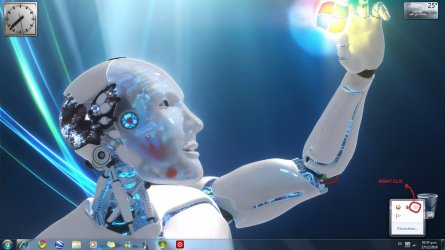
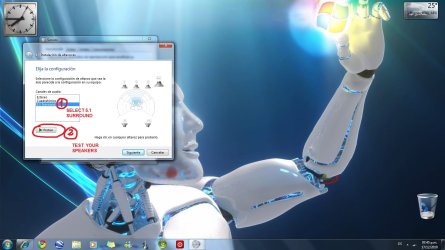
Hi ludipera. Follow this steps and maybe you find a solution. Clic on the pics to enlarge. (My Windows is in Spanish, but you won't have problem to understand).
1)
postt1.jpg
2)
postt2.jpg
3)
postt3.jpg
4)
postt4.jpg


Any doubt just post back. Good luck.
 

My Computer My Computer

Computer Manufacturer/Model Number
HP Pavilon Slimline
OS
Windows 7 Ultimate 64 bits
CPU
Dual Core Intel Core 2 Duo E7500
Motherboard
MSI MS-7525 (Boston)
Memory
2x[2048 MB DDR2-SDRAM (PC2-6400 / 800 MHz), 2 Gb]; Total:4Gb
Graphics Card(s)
Intel(R) G33/G31 Express Chipset Family (256 MB)
Sound Card
Realtek ALC662 @ Intel 82801GB ICH7 - HD Audio Controller
Monitor(s) Displays
HP 2009m 20'' LCD
Screen Resolution
1600x900
Hard Drives
SAMSUNG HD642JJ (596 GB)
Hey man thanks for the quick answer. I have it set up just like in your picture, still I get the same problem. I wrote an e-mail to Realtek and I keep my fingers crossed for the answer, but it seems to me that they don't have the solution either...:/ I will have to buy some cheap 5.1 card so if you know which one works on Win 7 without problems please tell me..muchos gracias..:)
 

My Computer My Computer

OS
Windows 7 Ultimate 32bit
Motherboard
Gigabyte M56S-S3
Memory
Kingston
Sound Card
On board Realtek
What real 5.1? Unless the source was encoded in 5.1/surround all you're going to get is stereo. If the source isn't encoded in 5.1 then you need to look for the "speaker fill" option and enable it.
 

My Computer My Computer

Computer type
PC/Desktop
Computer Manufacturer/Model Number
Me
OS
Win 7 Ultimate x64
CPU
FX-8350 @ 4.6 GHz so far
Motherboard
Asus M5A97 EVO
Memory
ADATA XPG V1 Series Black 8GB DDR3 1600
Graphics Card(s)
Sapphire R9 270x Dual-X
Sound Card
Xonar DGX w/ Corsair Vengence 1300
Monitor(s) Displays
Acer S232HL Abid
Screen Resolution
1920x1080
Hard Drives
120 GB OCZ Vertex 3
500 GB Seagate 7200.12
PSU
Antec Earthwatts 650W Green
Case
Antec Three Hundred
Cooling
Cooler Master 212 EVO
Keyboard
Logitech G510
Mouse
Logitech G500s
Internet Speed
35000/3000
The source was encoded in 5.1 still I'm forced to use speaker fill. So now I replaced back speakers as front and front as back, turned on the speaker fill, turned up the volume on the central speaker so that it covers the lack of sound coming from front speakers (that are receiving that emulated software rubbish sound from speaker fill function) and I guess I will have to live with it or someone else has the other idea? Thanks all for helping, I really appreciate it!
 

My Computer My Computer

OS
Windows 7 Ultimate 32bit
Motherboard
Gigabyte M56S-S3
Memory
Kingston
Sound Card
On board Realtek
Back
Top