Solved Cannot get wireless network to work on laptop (not even button)

Orhtex

New member
Local time
1:36 AM
Messages
13
Hello all!

I am requesting help! My knowledge is run out, I can't think of any other solution for my problem. I hope someone can help me.


My problem is that I installed windows 7 ultimate 32x to a old vista laptop. Windows 7 runs really nice and smooth on it. But the wireless function on the laptop and the icon in the right corner is not working. Ethernet is working perfect.

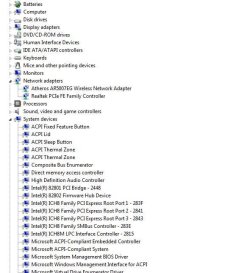
I read somewhere on this site with a case similar, where I look up the name of the driver via device manager and then download it. But it did not work (see picture).

Any ideas? I have Sp1 installed and tried to update everything via windows update. I can't find the motherboards name to update it.


Any help? I am really grateful! :)
Thanks
 

Attachments

  • Device manager.JPG
    Device manager.JPG
    55.6 KB · Views: 12

My Computer My Computer

Computer type
PC/Desktop
OS
Windows 7 Ultimate 32 bit
Have you checked on the NoteBook OEM manufacturer's web site for Windows 7 drivers?
 

My Computer My Computer

OS
ME/XP/Vista/Win7
Have you checked on the NoteBook OEM manufacturer's web site for Windows 7 drivers?

I have not. Doesn't Windows 7 do it automatically?
 

My Computer My Computer

Computer type
PC/Desktop
OS
Windows 7 Ultimate 32 bit

My Computer My Computer

Computer type
PC/Desktop
Computer Manufacturer/Model Number
Self Built
OS
Windows 7 Ultimate 64bit
CPU
AMD Phenom Quad core 9950 black edition
Motherboard
Gigabyte
Memory
16Gb
Graphics Card(s)
2x XFX Radeon 5850
Sound Card
PCI Express X-Fi Titanium / Logitech G35
Monitor(s) Displays
2x HP 2410i
Screen Resolution
1920x1080
Hard Drives
2x 500Gb Seagate
1x 300Gb Seagate
1x 1Tb Seagate
2x 1Tb Hitatchi
PSU
Jean Tech Storm 700W
Case
Cooler Master COSMOS S
Cooling
Akasa Evo Blue Pro
Keyboard
Logitech G15
Mouse
Mad Catz M.M.O. 7
Internet Speed
12mb
Hi all!

I am sorry for not writing back sooner, but I operated my tonsils and have been a bit tired afterwards.

It is a Fujitsu Siemens laptop, I read about updating the BIOS, but it sounds like it can go terrible wrong? The laptop was bought ready with a vista on it.


Go to Troubleshooting, select View All under Step 4 to run the Network troubleshooter.

I checked the troubleshooter, and it said that I have to turn Wireless capability. But as I mentioned earlier, it wont work.
 

My Computer My Computer

Computer type
PC/Desktop
OS
Windows 7 Ultimate 32 bit
Have you checked on the NoteBook OEM manufacturer's web site for Windows 7 drivers?

I have not. Doesn't Windows 7 do it automatically?

Yes, but you need to get online with wireless or wire to run all rounds of Important and Optional Windows Updates, after enabling http://www.sevenforums.com/tutorials/2803-device-installation-settings.html Option 3.

What did the Troubleshooter say?

I did enable automatic updates. Any more ideas?

Thank you very much for your help so far! :)
 

My Computer My Computer

Computer type
PC/Desktop
OS
Windows 7 Ultimate 32 bit
Your ethernet (wired) and wireless drivers are installed and show that they are working in the Device Manager.

If the Troubleshooter says to turn on Wireless then find the switch with the LED light to turn it on.

Otherwise plug in by wire and run all Important and Optional Windows Updates to completion to see if a patch or driver remedies the wireless problem. Run the Troubleshooter again.

Did you install a bunch of drivers up front on the PC as this is not how they are handled in Win7. You should be following the steps in Clean Reinstall - Factory OEM Windows 7
for what works best, letting Win7 provide your drivers when you get online (by wire if necessary) to run all rounds of Important and Optional Updates with reboots.

Again since you apparently didn't get it: I did not say enable Automatic Updates although you should, but very specifically to enable Automatically deliver drivers via Windows Update (Step 3)
 
Your ethernet (wired) and wireless drivers are installed and show that they are working in the Device Manager.

If the Troubleshooter says to turn on Wireless then find the switch with the LED light to turn it on.

Otherwise plug in by wire and run all Important and Optional Windows Updates to completion to see if a patch or driver remedies the wireless problem. Run the Troubleshooter again.

Did you install a bunch of drivers up front on the PC as this is not how they are handled in Win7. You should be following the steps in Clean Reinstall - Factory OEM Windows 7
for what works best, letting Win7 provide your drivers when you get online (by wire if necessary) to run all rounds of Important and Optional Updates with reboots.

Again since you apparently didn't get it: I did not say enable Automatic Updates although you should, but very specifically to enable Automatically deliver drivers via Windows Update (Step 3)


Hey,

I did more updates, and did run the truobleshooter. Same problem consists. Nothing happends when I press function F1 :(
 

My Computer My Computer

Computer type
PC/Desktop
OS
Windows 7 Ultimate 32 bit
Are you able to interact with us on ALL of the steps we give you to try, instead of just picking one to answer and ignoring all the rest? This requires us to repeat them or else help someone else who is thorough.

Did you make sure the Wireless switch on your laptop is turned on, yes or no? The switch should be by the power button or on the side. It often has an LED light to let you know it is turned on.

If you can't find the wireless switch then read the Manual for your model PC on it's Support Downloads webpage.
 
Hey,

I have tried to respond to all post with quotes, making it easier to see that I answered the questions. Sorry if I have missed any.

This laptop has only a light signaling if WIFI i active (which it doesn't). The only way to run the WIFI earlier was by pressing FUNCTION and F1 (that had a WIFI symbol on the side of the F1). This would open up a menu which you could control WIFI on/off. There is no switch anywhere.

I am very sure of this, my other laptop ha a button controlled WIFI.

Thank you,

Andreas
 

My Computer My Computer

Computer type
PC/Desktop
OS
Windows 7 Ultimate 32 bit
I do hope I'm not butting in or anything but the outside switch on any laptop will override any software related setting. Flicking the hardware switch to turn the WiFi on or off is like physically plugging/removing the card.

What is the exact make/model of the laptop? I can see if I can find any information on how to turn the WiFi on.

Even if drivers are installed or not the WiFi power light should still be lit up if it is active.

Josh :)
 

My Computer My Computer

Computer type
PC/Desktop
Computer Manufacturer/Model Number
Custom Built
OS
Windows 7 Professional x64 SP1 ; Windows Server 2012 R2 Standard
CPU
Intel Core i5 2400 @ 3.10GHz
Motherboard
Foxconn H67MP-S/-V/H67MP
Memory
8.0GB DDR3 @ 665MHz (2GBx4)
Graphics Card(s)
AMD Radeon HD 6870
Sound Card
Realtek High Definition Audio
Monitor(s) Displays
AOC 2243W & SMB1930NW
Screen Resolution
1440x900 & 1920x1080
Hard Drives
977GB Seagate ST31000524AS ATA Drive (SATA)
250GB WD iSCSI attached Drive
PSU
750W Gaming PSU
Case
Novatech Night
Cooling
Fan
Keyboard
Dell Standard PS/2 Keyboard
Mouse
R.A.T 07 Gaming Mouse
Internet Speed
Download: 10 Mbps Ping: 30ms Upload: 0.81 Mbps
Browser
Google Chrome
Other Info
Optiarc DVD RW AD-5260S ATA Device
I do hope I'm not butting in or anything but the outside switch on any laptop will override any software related setting. Flicking the hardware switch to turn the WiFi on or off is like physically plugging/removing the card.

What is the exact make/model of the laptop? I can see if I can find any information on how to turn the WiFi on.

Even if drivers are installed or not the WiFi power light should still be lit up if it is active.

Josh :)

Hey Josh,

Thanks for butting in :P

I double checked that it is not a keyboard dilemma, the FUNCTION button works fine with volume control and brightness.

The laptop:
Fujitsu Siemens
Intel pentium dual CPU t2400 2,00 GHZ
4gb ram

Model MS2228,
AMILO Li 2735

Thanks :)
 

My Computer My Computer

Computer type
PC/Desktop
OS
Windows 7 Ultimate 32 bit
A quick google and I can see you are not the only one. The keyboard shortcut is apparently tied with some OEM software that was installed with Vista. When you installed Windows 7 you erased the software that used the hot key to toggle the WiFi. Definitely one of the most odd setups I've seen :)

The only possible way I can think of is to go to Start > Control Panel

In the search bar search for 'Network and Sharing Center'

Then click on 'Change Adapter Settings' :

adapter.png


Upon opening you should see a couple of NICs, Right click on your Wireless NIC and click on 'Enable'

If it says 'Disable' then I'm afraid I cannot find any other way of enabling it :(

enable.png

EDIT: If it doesn't work then possibly try what gregrocker has provided above

Hope This Helps,
Josh :)
 

My Computer My Computer

Computer type
PC/Desktop
Computer Manufacturer/Model Number
Custom Built
OS
Windows 7 Professional x64 SP1 ; Windows Server 2012 R2 Standard
CPU
Intel Core i5 2400 @ 3.10GHz
Motherboard
Foxconn H67MP-S/-V/H67MP
Memory
8.0GB DDR3 @ 665MHz (2GBx4)
Graphics Card(s)
AMD Radeon HD 6870
Sound Card
Realtek High Definition Audio
Monitor(s) Displays
AOC 2243W & SMB1930NW
Screen Resolution
1440x900 & 1920x1080
Hard Drives
977GB Seagate ST31000524AS ATA Drive (SATA)
250GB WD iSCSI attached Drive
PSU
750W Gaming PSU
Case
Novatech Night
Cooling
Fan
Keyboard
Dell Standard PS/2 Keyboard
Mouse
R.A.T 07 Gaming Mouse
Internet Speed
Download: 10 Mbps Ping: 30ms Upload: 0.81 Mbps
Browser
Google Chrome
Other Info
Optiarc DVD RW AD-5260S ATA Device
Hey to both of you,

I have tried both, with no luck.

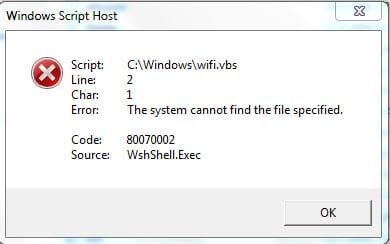
Gregrocker, that is for vista, (I'm guessing that is the reason why it won't work, see attachment)
I have tired finding a similar solution for window 7, but no luck.

Josh,
That one i have already tired. The WIFI icon is enabled. :(

Thank you so far.
 

Attachments

  • Script.JPG
    Script.JPG
    17.8 KB · Views: 4

My Computer My Computer

Computer type
PC/Desktop
OS
Windows 7 Ultimate 32 bit
The .vbs is referencing to the OEM application that was used to turn the WiFi on.

I managed to find some sort of support page for your machine from fujitsu but it turns out your machine is not in anyway shape or form fully supports Windows 7.

I did manage to find the Launch Manager which the script is referencing to however it says it only supports vista so I cannot guarantee that it will install.

File located - Technical Support pages from Fujitsu

If it fails try to run the application in compatibility mode with Windows Vista

Hope This Helps,
Josh :)
 

Attachments

My Computer My Computer

Computer type
PC/Desktop
Computer Manufacturer/Model Number
Custom Built
OS
Windows 7 Professional x64 SP1 ; Windows Server 2012 R2 Standard
CPU
Intel Core i5 2400 @ 3.10GHz
Motherboard
Foxconn H67MP-S/-V/H67MP
Memory
8.0GB DDR3 @ 665MHz (2GBx4)
Graphics Card(s)
AMD Radeon HD 6870
Sound Card
Realtek High Definition Audio
Monitor(s) Displays
AOC 2243W & SMB1930NW
Screen Resolution
1440x900 & 1920x1080
Hard Drives
977GB Seagate ST31000524AS ATA Drive (SATA)
250GB WD iSCSI attached Drive
PSU
750W Gaming PSU
Case
Novatech Night
Cooling
Fan
Keyboard
Dell Standard PS/2 Keyboard
Mouse
R.A.T 07 Gaming Mouse
Internet Speed
Download: 10 Mbps Ping: 30ms Upload: 0.81 Mbps
Browser
Google Chrome
Other Info
Optiarc DVD RW AD-5260S ATA Device
I tried it and it said that everything is uptodate. So whats bugging..

I will still try the launch manager for windows 7....
 

My Computer My Computer

Computer type
PC/Desktop
OS
Windows 7 Ultimate 32 bit
Back
Top