Cannot install Office 2007 update

Anderson2

New member
Power User
Local time
12:04 PM
Messages
188
I purchased and have Office 2007 ultimate installed on my new windows 7 laptop and it runs fine.

Windows updates tells me there is an important "2007 Microsoft Office Suite Pack 2 (SP2)" to download. But 8 attempts to download and install fail with Error Code 8020000E.

How do I get around this?

Thanks. Jeff
 

My Computer

OS
Windows 7
I misspoke. I have Office 2010 Ultimate installed biut office update tells me that I need to install "2007 Microsoft Office Suite Pack 2 (SP2)". Not sure why other than I have some data files created by Office XP.
 

My Computer

OS
Windows 7
My error again. Let me start again.
What I purchased and installed is indeed *Office 2007 ultimate* (not 2010 which does not exist!) I was confused because I purchased it online on Jan 16 2010 and the registration email I received started with something about 2010, but actually referred to my purchase of Office 2007 ultimate. I feel really stupid.

I installed it fine and it accepted the registration text I entered and it works fine. This is Windows 7 Home Premium 64 bit on a new laptop.

But: Windows Update tells me there is an important important update it calls:
"The 2007 Microsoft Office Suite Service Pack 2 (SP2)" and other W 7 updates. All updates install fine except for the 2007 Office Suite. It fails with an Error Code 8020000E.

UrbanBounca asked if I had installed any other updates. I checked my update history and see that I had previously installed many other Office 7 updates including "2007 MS Office Suite Pack 1 (SP1). All were successful except for this one that keeps failing and I do not know why or what to do about it.

Is there a phone number at Microsoft I can call ask why this is happening?

Thanks.
 

My Computer

OS
Windows 7
Have you tried restarting since install Office 2007 SP1? Also, you aren't wrong Office 2010 does exist. Its still in the beta stages though. I'm trying it out myself.
 

My Computer

OS
Windows 7 64-bit
CPU
AMD Athlon II X4 620 Propus @ 2.6ghz
Motherboard
GIGABYTE GA-MA785GM-US2H
Memory
OCZ Platinum 4GB (2 x 2GB) 240-Pin DDR2 SDRAM DDR2 1066 (PC2
Graphics Card(s)
ATI Radeon HD 4200 [on board]
Sound Card
Realtek ALC889A [on board]
Case
APEVIA X-QPACK-NW-BK/420 Black Aluminum
You might want to try un-installing Office 2007 run CCleaner clean out your reg and then do a fresh install and apply the updates after.


Steve
 

My Computer

Computer Manufacturer/Model Number
Over Clockers Ultima Viper 2.80Ghz
OS
Windows 7 Ultimate 64 - OEM Service Pack 1
CPU
Intel Core i7 930 2.80Ghz Bloomfield Socket LGA 1366
Motherboard
Gigabyte GA-X58A-UD3R Intel X58 Socket 1366 DDR3
Memory
Patriot Viper 6GB 3x2GB DDR3 PC3-1200C9 1600Mhz Tri Channel
Graphics Card(s)
Asus ATI Radeon HD 5770 CuCore 1024MB GDDR5 PCI Express
Sound Card
Realtek ALC889 @ Intel 82801JB ICH10 - High Definition Audio
Monitor(s) Displays
Samsung SyncMaster 920N 19"
Screen Resolution
1280*1024
Hard Drives
1 x OCZ Vertex2 Series 120GB 2.5" SATA-II SSD
1 x Seagate Barracuda 7200.12 1TB SATA-II 32MB Cache
1 x Western Digital Caviar Green 2TB SATA-II 64 MB Cache
PSU
Corsair TX 650W ATX SLi
Case
Antec 902 Ultimate Gaming Case Black
Cooling
Prolimatech Megahalems Rev B CPU Cooler Socket 775/1156/1366
Keyboard
Microsoft Comfort Curve Keyboard
Mouse
Microsoft Optical USB
Internet Speed
ADSL24 FTTC 34.2 Mbps Down 7.1Mbps Up
Other Info
OcUK 22x DVDSATA ReWriter Black
Akasa AK-FN058 Apache Black Super Silent 120mm Fan
Printer Epson Stylus Photo R300
Scanner Canon Canoscan 8000F
Yes, I have rebooted many times since then.

I finally found the Microsoft support site and sent them an email explaining the problem. It's apparently free and they say they will respond within 1 day. I'll wait for them to reply before trying uninstalling and re-installing the Office suite.

Jeff
 

My Computer

OS
Windows 7
Hallo Anderson2; If your update download is corrupted this workaround will create a new (clean) download folder in Distibution Software and download the update from scratch again.

Note; this will clear your update history and windows update will search your computer for missing updates but it will not affect your already installed updates

You will still be able to still see installed updates by selecting Installed Updates in the bottom LH corner of windows upate control panel

update error 8020000E

Hope this is of some help
 

My Computer

Computer Manufacturer/Model Number
Hewlett Packard Compaq Presario CQ60-305au
OS
Windows Seven Home Premium 32bit SP1
CPU
AMD Athlon QI46 2.1Ghz
Motherboard
Wistron 303c
Memory
2048 Mb DDR2 SD RAM
Graphics Card(s)
NVidea GE GoForce 8200M G/256mb dedicated graphics memory
Sound Card
MCP78S NVidea high definition
Monitor(s) Displays
15.6" High definition Brightview Widescreen
Screen Resolution
1336x768
Hard Drives
Toshiba MK2555GSX ATA
Yes, I have rebooted many times since then.

I finally found the Microsoft support site and sent them an email explaining the problem. It's apparently free and they say they will respond within 1 day. I'll wait for them to reply before trying uninstalling and re-installing the Office suite.

Jeff

This error will occur if your volume name or guide is changed. have you recently changed volume label?..

renaming the software distribution folder will solve the issue.

Click Start, Choose Run.
In the Run box, type services.msc.
Click OK.
Right-click the Automatic Updates service.
Click Stop.

Rename the "SoftwareDistribution" folder: a. Click Start, click Run, type
%systemroot%, and then click OK.
b. Right-click the SoftwareDistribution folder, and then click Rename.
c. Type SoftwareDistribution.old, and then press ENTER to rename this folder.

Click Start. Choose Run.
In the Run box, type services.msc.
Click OK.
Right-click the Automatic Updates service.
Click Start.

Let us know the result :)

Delphin
 

My Computer

Computer Manufacturer/Model Number
wipro
OS
windows 7
CPU
wipro
Motherboard
intel
Memory
8 gb
Hard Drives
580 gb
(Below is what Microsoft support advised. I did Steps 1-4 with no results).

I appreciate your advice Delphin. I did not rename any volumes that I recall.

I ran services.msc but found no service named Automatic Updates service. This is W7. Could it have another name in W 7 64 bit?

I did find the SoftwareDistribution folder but did not do anything with it till I hear back from you. In case it makes an y difference, Windows updates has successfully installed many other updates as recently as earlier today. It is just the Office SP2 update that refuses to install even though many other earlier Office 2007 updates installed fine.

Thanks.


Step 1: Remove Multiple Versions of Office Suites
1.Click on Start > Control Panel.
2.Click on Classic view on the left Pane.
3.Double click on Programs and Features (in case of Vista), Add/Remove programs (in case of Windows XP).
4.Check for multiple/trial versions of Office & uninstall them. (If you see "2007 Microsoft Office Systems" , uninstall it).
5.Restart the computer and check for the issue.

If the issue persists or an error is encountered when performing above steps, let's move on:
Step 2: Turn User Account Control OFF
==================================
1.Start Menu -> Control Panel -> User Accounts and Family Safety -> User Account
2.Click on User Account Control settings link.
3.Move the Slider to Never Notify
4.Click OK to make the change effective
5.Restart the computer and then check for the issue

If the issue persists or an error is encountered when performing above steps, let's move on:

Step 3: Run the Detect and Repair tool from Programs and Features
1.Click Start, and then click Control Panel.
2.Double-click Programs and Features.
3.Click Microsoft Office Edition 2007, and then click Change.
Note In this option, Edition represents the Microsoft Office edition that is installed on the computer.
4.Click Repair, and then click Continue.
5.Now check for the issue.

If the issue persists or an error is encountered when performing above steps, let's move on:
Step 4: Perform Windows clean boot
1.Click Start and then click Run or Start Search.
2.Type "msconfig" in the box (without quotation marks) and then click OK.
3.Switch to "Services" tab.
4.Check "Hide All Microsoft Services" and click Disable All button.
5.Switch to Startup tab, click Disable All, click "OK" to reboot your computer.
6.When you see the message, choose "Don't show this message or launch the System Configuration Utility when Windows starts" and click OK.
7.Now check for the issue.

Note: You can go back to normal boot by checking back those options.
To restart the system in Normal mode
1.Click Start, type msconfig.exe in the RUN box, and then press ENTER to start the System Configuration Utility.
2.On the General tab, click Normal Startup.
3.Click OK, and then click Restart.

If the issue persists or an error is encountered when performing above steps, let's move on:

Step 5: Enable Office Source Engine service
Determine the status of the Office Source Engine service. To do this, follow these steps:

1.Click "Start", type "services.msc" (without the quotation marks) in Run or in Start Search box, and then click "Enter".
2.In the list of services, double-click "Office Source Engine".
3.View the option that appears in the "Startup type" list.
4.If the start type is set to "DISABLED", modify the startup type to a setting of "Manual". To do this, right-click "DISABLED" list, click Properties, General tab. And then select "Manual" in the "Startup type" list, Click on "Apply" and Then Click on "Start" and "OK".
Repeat 4& 5 for Windows Installer also (in services.msc ) , there is an option called windows installer
5.Try to install the Office Update locally again.

If the issue persists or an error is encountered when performing above steps, let's move on:

Step 6: Remove Office 2007 keys from Registry [Please make sure your have Office 2007 setup disk]

Note: Before you Run the Fix IT tool please ensure "User Account Control" is OFF

Turn User Account Control OFF
==================================
1.Start Menu -> Control Panel -> User Accounts and Family Safety -> User Account
2.Click on User Account Control settings link.
3.Move the Slider to Never Notify
4.Click OK to make the change effective
5.Restart the computer and then check for the issue

Uninstall and reinstall

1.Click on the link http://support.microsoft.com/kb/971179 look for and click on the same and run the tool.

2.Restart the computer after it is uninstalled.
3.Now try to reinstall Office 2007 and then check for the issue.
 

My Computer

OS
Windows 7
Mine also windows seven 32 bit.

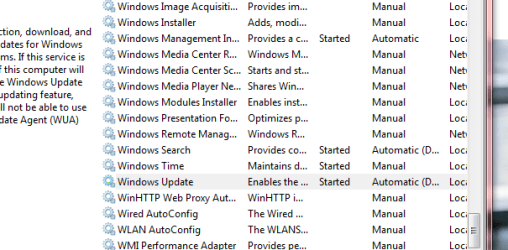
go to services.msc and find windows update


Capture.PNG


Follow my above procedure..
 

My Computer

Computer Manufacturer/Model Number
wipro
OS
windows 7
CPU
wipro
Motherboard
intel
Memory
8 gb
Hard Drives
580 gb
Hi there
I think you need to install SP1 first -- then install SP2.

I'd download the whole update first from MS's servers and install "stand alone" - not using the update. Run the .exe file after downloading.

After installing SP2 then you'll find Office Updates will work fine.


Download details: The 2007 Microsoft Office Suite Service Pack 2 (SP2)

There's also a link to the download of SP1 if you need it -- bottom of the list in the above link.

I'm not sure if you need to install SP1 first -- possibly not.


Cheers
jimbo
 

My Computer

Computer type
PC/Desktop
Computer Manufacturer/Model Number
Custom built, several laptops HP/ASUS
OS
Linux CENTOS 7 / various Windows OS'es and servers
CPU
Intel i7 Intel i5
Memory
8GB, 16GB
Graphics Card(s)
On Motherboard
Sound Card
Realtek HD audio
Monitor(s) Displays
Apple Cinema display, Samsung LCD
Screen Resolution
1920 X 1080
Hard Drives
4 X 1TB SATA
Mouse
Toshiba wireless laser
Internet Speed
> 20MB up
Hi there
I think you need to install SP1 first -- then install SP2.

I'd download the whole update first from MS's servers and install "stand alone" - not using the update. Run the .exe file after downloading.

After installing SP2 then you'll find Office Updates will work fine.
Download details: The 2007 Microsoft Office Suite Service Pack 2 (SP2)

There's also a link to the download of SP1 if you need it -- bottom of the list in the above link.

I'm not sure if you need to install SP1 first -- possibly not.


Cheers
jimbo
SP1 is already installed. It is one of the earlier Office updates that installed fine. It is this SP2 that will not install. I will try what you say and keep my fingers crossed.

It's downloading now. Hope it finished before we lose electricity. We are in a blizzasrd right now in DC and due to lose electricity any moment ......
 

My Computer

OS
Windows 7
Downloaded fine. Will hold off doing much else until things are safer power wise.
 

My Computer

OS
Windows 7
Jimbo, you're the hero.

Because electric power was still on I could not resist (this ia a new laptop with a good battery anyway) and installed the downloaded SP2. Worked like a charm with no problems. Asked to reboot to complete the install and I let it and all is fine.

I did not implement Delphin's suggestions which may also have worked because I fortunately did not need it.

Thank you *all* for helping. It is greatly appreciated. :D
 

My Computer

OS
Windows 7
Just ran Windows update to check and it no longer tells me 2007 Office Suite needs to be installed. So I guess things are back to "normal" and the local update installed correctly.
 

My Computer

OS
Windows 7
Glad its all sorted out! ;)
 

My Computer

Computer type
PC/Desktop
Computer Manufacturer/Model Number
LENOVO K450 @3.0GHZ
OS
64-bit Windows 8.1 Pro
CPU
Core(TM) i5 CPU 4330 Haswell @ 3.20GHz
Motherboard
LENOVO
Memory
12.00 GB
Graphics Card(s)
Intel(R) HD Graphics
Sound Card
Intel HD integtrated
Monitor(s) Displays
HP 25' ISP Monitor
Screen Resolution
1900/1020
Hard Drives
(1) ST1000DM003-1CH162 (2) Generic STORAGE DEVICE USB Device (3) Generic STORAGE DEVICE USB Device
Internet Speed
100mb down/10mb up
:):):):):)
 

My Computer

Computer Manufacturer/Model Number
wipro
OS
windows 7
CPU
wipro
Motherboard
intel
Memory
8 gb
Hard Drives
580 gb
Back
Top