Cannot launch programs from right-click popup menu

jsampson45

New member
Local time
5:30 AM
Messages
34
I recently had some kind of corruption so that I had to restore an image backup using Macrium Reflect. This has been mostly successful but when I right-click on a text file in Windows Explorer and then select a program from the popup menu to edit it nothing happens. I reinstalled the editor I was using but this did not help. I do not have hours to spend on this - should I try an alternative explorer or is there any possibility of a quick fix?
 

My Computer

Computer type
PC/Desktop
Computer Manufacturer/Model Number
HP EliteDesk 705 G4 SFF
OS
Windows 10 Pro 64 bit
CPU
AMD Ryzen 7 PRO 2700 Eight-Core Processor 320 GHz
Motherboard
HP 8462 PHPQP0AMVB62YG KBC Version 07.D1.00
Memory
8.00 GB
Antivirus
Windows Defender
Hi and welcome to SevenForums,
Which programs/ editors have you installed ?
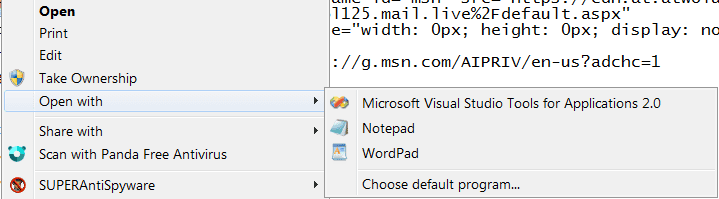
Possibly post a screen shot of the open with context list
As far as I know this is the default
txt default open with.png
 

My Computer

Computer type
PC/Desktop
Computer Manufacturer/Model Number
Custom assembled by me :}
OS
Win-7-Pro64bit 7-H-Prem-64bit
CPU
i7-5930K 2nd i9-9940x both water blocked VRM's too
Motherboard
ASUS SABERTOOTH X99 2nd ASUS x299 Apex
Memory
Trident-z 3200C14 2nd Trident-z 3600C16
Graphics Card(s)
EVGA 1080ti ftw3 2nd Titan Xp both water blocked
Sound Card
Built-in Realtek
Monitor(s) Displays
1-AOC G2460PG 24"G-Sync 144Hz/ 2nd 1-ASUS VG248QE 24" 144Hz
Screen Resolution
1920 x 1080 144Hz
Hard Drives
2-Samsung M.2 Evo & Evo Plus
2-Samsung 850 EVO 500GB SSD's/ 3-2.5 W.D. Black 1tb-&3-1tb/3-3.5 WD Black 1tb hdd's
PSU
EVGA SuperNOVA 1000-P2 2nd 1200-P2
Case
2-Corsair Obsidian Series 450D Black ATX Mid Tower
Cooling
Custom water loops
Keyboard
Logitech G710+/ 2nd Logitech G910
Mouse
2-RedDragon M901 Perdition 16400 dpi Gaming mouse = wired
Internet Speed
Comcast Ping 19ms 89.31mbps download speed 6.12mbps upload
Antivirus
Malwarebytes Pro/ Superantispyware Pro
Browser
FireFox & Pale moon
Other Info
2nd ASUS X299 Apex/Intel i9-9940x with Custom water loop/7H-Prem-x64/Corsair 450D case/Ram Trident-z 3600C16 4x8gb / Samsung970Evo plus 500gb SSD/Dual ssd EZ swap evo/PSU EVGA SuperNova 1200w-P2 80+Platinum/GPU Titan Xp /8-ML-140 on push-pull on 2-280GTX rads
Thank you - I do not know how to get a screen shot without the popup menu popping down. There is nothing unusual to see so I don't think it would help. The program I was trying to run was gvim 7.4, to edit a text file. "Edit with Vim" is one of the options in the popup menu but clicking on this does nothing.
I was wondering if there was an obscure Windows setting I do not know about that had been switched off and could be switched on again. I do not have time to launch an investigation - I would rather put up with the problem.
 

My Computer

Computer type
PC/Desktop
Computer Manufacturer/Model Number
HP EliteDesk 705 G4 SFF
OS
Windows 10 Pro 64 bit
CPU
AMD Ryzen 7 PRO 2700 Eight-Core Processor 320 GHz
Motherboard
HP 8462 PHPQP0AMVB62YG KBC Version 07.D1.00
Memory
8.00 GB
Antivirus
Windows Defender
Hi:

Context menu entries are controlled by the Windows OS.
If, as you mentioned, you recently experienced OS corruption necessitating restoration of a system image, that may underlie your issue - perhaps some of that corruption may have carried over.

I am unfamiliar with gvim 7.4. but a couple of ideas/suggestions come to mind:

  • Is there a setting/option in gvim to create a context menu entry? If so, perhaps that was somehow disabled inadvertently and needs to be re-enabled?
  • Have you tried uninstalling gvim, rebooting the computer, manually removing its program data and program files folders (if necessary) and then cleanly reinstalling it and rebooting the computer again?


Just a thought,
MM
 

My Computer

Computer type
PC/Desktop
Computer Manufacturer/Model Number
Dell Studio XPS 8500
OS
OEM Windows 7 Ult (x64) SP1
CPU
Intel Core-i7 3770 @ 3.4 GHz
Motherboard
"Dell" branded
Memory
16 GB DDR3 SDRAM @ 1333 MHz
Graphics Card(s)
NVidia GeForce GT620 1 GB
Sound Card
THX TruStudio PC
Monitor(s) Displays
Dell U2410 Full HD
Hard Drives
2.0 TB SATA2 @ 7200 RPM
PSU
350W
Keyboard
MS 4000 Ergon - Wired
Mouse
Logitech Anywhere MX
Internet Speed
Cable HSI w/Turbo (router)
Antivirus
KIS-MBAM Premium-MBAE Premium
Browser
Fx (current version); IE
Other Info
And a Win7/64 Pro laptop; And a Win10/64 Pro desktop.
Hi,
Not sure about controlled by windows
A Open with entry only points to the programs .exe file it lists or you manually search for by using Choose default program.

I simply use the PrtScrn key while the context menu is open
Then open Paint and use Paste.
 

My Computer

Computer type
PC/Desktop
Computer Manufacturer/Model Number
Custom assembled by me :}
OS
Win-7-Pro64bit 7-H-Prem-64bit
CPU
i7-5930K 2nd i9-9940x both water blocked VRM's too
Motherboard
ASUS SABERTOOTH X99 2nd ASUS x299 Apex
Memory
Trident-z 3200C14 2nd Trident-z 3600C16
Graphics Card(s)
EVGA 1080ti ftw3 2nd Titan Xp both water blocked
Sound Card
Built-in Realtek
Monitor(s) Displays
1-AOC G2460PG 24"G-Sync 144Hz/ 2nd 1-ASUS VG248QE 24" 144Hz
Screen Resolution
1920 x 1080 144Hz
Hard Drives
2-Samsung M.2 Evo & Evo Plus
2-Samsung 850 EVO 500GB SSD's/ 3-2.5 W.D. Black 1tb-&3-1tb/3-3.5 WD Black 1tb hdd's
PSU
EVGA SuperNOVA 1000-P2 2nd 1200-P2
Case
2-Corsair Obsidian Series 450D Black ATX Mid Tower
Cooling
Custom water loops
Keyboard
Logitech G710+/ 2nd Logitech G910
Mouse
2-RedDragon M901 Perdition 16400 dpi Gaming mouse = wired
Internet Speed
Comcast Ping 19ms 89.31mbps download speed 6.12mbps upload
Antivirus
Malwarebytes Pro/ Superantispyware Pro
Browser
FireFox & Pale moon
Other Info
2nd ASUS X299 Apex/Intel i9-9940x with Custom water loop/7H-Prem-x64/Corsair 450D case/Ram Trident-z 3600C16 4x8gb / Samsung970Evo plus 500gb SSD/Dual ssd EZ swap evo/PSU EVGA SuperNova 1200w-P2 80+Platinum/GPU Titan Xp /8-ML-140 on push-pull on 2-280GTX rads
  • Is there a setting/option in gvim to create a context menu entry? If so, perhaps that was somehow disabled inadvertently and needs to be re-enabled?
  • Have you tried uninstalling gvim, rebooting the computer, manually removing its program data and program files folders (if necessary) and then cleanly reinstalling it and rebooting the computer again?

MM

OP states that the program has been removed and reinstalled.

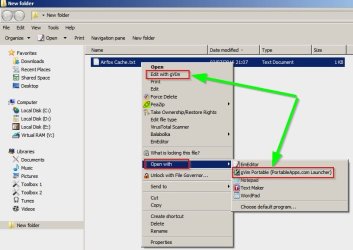
I tried the portable version of gvim and there's no option in the GUI to create a context menu entry. Context menu entries needed to be created manually.

gVim1.jpg

@ jsampson45

Which context menu entries to you need (Edit with or Open with) and what do you actually see?

gVim2.jpg

Also state if you used the installed version or the portable version.

If you use the installed version I'd suggest that if you uninstalled it via Control Panel > Add remove programs there's a good chance that your context menu entry is an old leftover from the original install.

Try uninstalling using GeekUninstaller. Then reboot and reinstall gvim.
 

My Computer

Computer type
Laptop
Computer Manufacturer/Model Number
ASUS
OS
Microsoft Windows 7 Home Premium 64-bit 7601 Multiprocessor Free Service Pack 1
CPU
AMD C-60 APU with Radeon(tm) HD Graphics
Motherboard
ASUSTeK COMPUTER INC. X501U
Memory
4.00 GB
Graphics Card(s)
AMD Radeon HD 6290 Graphics
Sound Card
(1) AMD High Definition Audio Device (2) Realtek High Defi
Screen Resolution
1366 x 768 x 32 bits (4294967296 colors) @ 60 Hz
Hard Drives
Hitachi HTS545050A7E380 SATA Disk Device
Antivirus
Comodo CIS & FW, SecureAplus App Whitelisting, Threatfire
Browser
Cyberfox 64bit, Opera 64bit, Airfox
Other Info
Spy-The-Spy, HitmanPro.Alert, Norton Connect Safe, MJRegWatcher, BitDefender TrafficLight, Voodoo Shield, Zemana AntiMalware
Thanks for the additional suggestions @Callender.
For the record, I did understand that the OP had attempted to uninstall the program.
That's why I specifically mentioned manually removing the Program Data and Program Files folders as an added step.
But a 3rd-party uninstaller tool would likely accomplish the same tasks.
(And I likewise specifically stated that I did not use the program in question, as I do not have a test box or a VM in which to try it. So, I offered the best suggestion I could about looking for a possible context menu entry in the GUI. Thank you for clarifying that.)

I shall bow out and defer to the others for additional assistance.

Cheers,
MM
 

My Computer

Computer type
PC/Desktop
Computer Manufacturer/Model Number
Dell Studio XPS 8500
OS
OEM Windows 7 Ult (x64) SP1
CPU
Intel Core-i7 3770 @ 3.4 GHz
Motherboard
"Dell" branded
Memory
16 GB DDR3 SDRAM @ 1333 MHz
Graphics Card(s)
NVidia GeForce GT620 1 GB
Sound Card
THX TruStudio PC
Monitor(s) Displays
Dell U2410 Full HD
Hard Drives
2.0 TB SATA2 @ 7200 RPM
PSU
350W
Keyboard
MS 4000 Ergon - Wired
Mouse
Logitech Anywhere MX
Internet Speed
Cable HSI w/Turbo (router)
Antivirus
KIS-MBAM Premium-MBAE Premium
Browser
Fx (current version); IE
Other Info
And a Win7/64 Pro laptop; And a Win10/64 Pro desktop.
For the record, I did understand that the OP had attempted to uninstall the program.
That's why I specifically mentioned manually removing the Program Data and Program Files folders as an added step.
But a 3rd-party uninstaller tool would likely accomplish the same tasks.
(And I likewise specifically stated that I did not use the program in question, as I do not have a test box or a VM in which to try it. So, I offered the best suggestion I could about looking for a possible context menu entry in the GUI.

I should learn to read a little more carefully. :o

@ jsampson45:

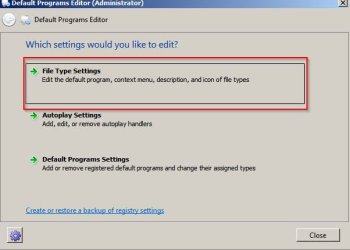
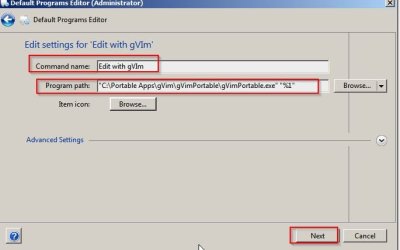
Grab a copy of Default Programs Editor

It's portable so runs without install.

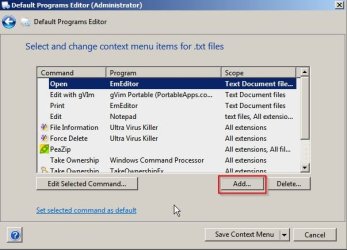
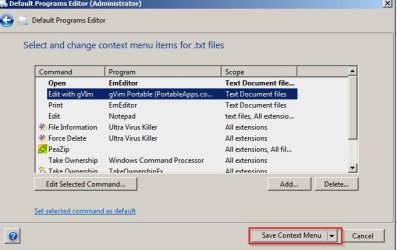
Follow these steps:

Default Programs Editor (Administrator) 1.jpg

Default Programs Editor (Administrator) 2.jpg

Default Programs Editor (Administrator) 3.jpg

Default Programs Editor (Administrator) 4.jpg

Type a descrition and also Replace the command shown with the full path to the executable (depends on which version is installed) and add a space then "%1" at the end of the command line.


Default Programs Editor (Administrator) 5.jpg

Default Programs Editor (Administrator) 6.jpg
 

My Computer

Computer type
Laptop
Computer Manufacturer/Model Number
ASUS
OS
Microsoft Windows 7 Home Premium 64-bit 7601 Multiprocessor Free Service Pack 1
CPU
AMD C-60 APU with Radeon(tm) HD Graphics
Motherboard
ASUSTeK COMPUTER INC. X501U
Memory
4.00 GB
Graphics Card(s)
AMD Radeon HD 6290 Graphics
Sound Card
(1) AMD High Definition Audio Device (2) Realtek High Defi
Screen Resolution
1366 x 768 x 32 bits (4294967296 colors) @ 60 Hz
Hard Drives
Hitachi HTS545050A7E380 SATA Disk Device
Antivirus
Comodo CIS & FW, SecureAplus App Whitelisting, Threatfire
Browser
Cyberfox 64bit, Opera 64bit, Airfox
Other Info
Spy-The-Spy, HitmanPro.Alert, Norton Connect Safe, MJRegWatcher, BitDefender TrafficLight, Voodoo Shield, Zemana AntiMalware
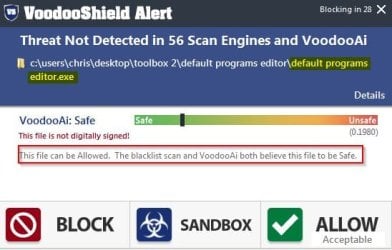
File safety check for Default Programs Editor:

Default Programs Editor (Administrator) 7.jpg
 

My Computer

Computer type
Laptop
Computer Manufacturer/Model Number
ASUS
OS
Microsoft Windows 7 Home Premium 64-bit 7601 Multiprocessor Free Service Pack 1
CPU
AMD C-60 APU with Radeon(tm) HD Graphics
Motherboard
ASUSTeK COMPUTER INC. X501U
Memory
4.00 GB
Graphics Card(s)
AMD Radeon HD 6290 Graphics
Sound Card
(1) AMD High Definition Audio Device (2) Realtek High Defi
Screen Resolution
1366 x 768 x 32 bits (4294967296 colors) @ 60 Hz
Hard Drives
Hitachi HTS545050A7E380 SATA Disk Device
Antivirus
Comodo CIS & FW, SecureAplus App Whitelisting, Threatfire
Browser
Cyberfox 64bit, Opera 64bit, Airfox
Other Info
Spy-The-Spy, HitmanPro.Alert, Norton Connect Safe, MJRegWatcher, BitDefender TrafficLight, Voodoo Shield, Zemana AntiMalware
I have tried the procedure with Default Programs Editor. Although I saved the context menu it made no difference. The new option in the context menu that I had specified did not appear. I should make it clear that all the options in the menu are affected, not just "Edit with Vim". This suggests that the context menu no longer functions, although it pops up on right-clicking a file shown in Windows Explorer. Many thanks, anyway.
 

My Computer

Computer type
PC/Desktop
Computer Manufacturer/Model Number
HP EliteDesk 705 G4 SFF
OS
Windows 10 Pro 64 bit
CPU
AMD Ryzen 7 PRO 2700 Eight-Core Processor 320 GHz
Motherboard
HP 8462 PHPQP0AMVB62YG KBC Version 07.D1.00
Memory
8.00 GB
Antivirus
Windows Defender
I have tried the procedure with Default Programs Editor. Although I saved the context menu it made no difference. The new option in the context menu that I had specified did not appear.

Are you sure you typed the correct path to the executable? It might be different on your machine.

I should make it clear that all the options in the menu are affected, not just "Edit with Vim". This suggests that the context menu no longer functions, although it pops up on right-clicking a file shown in Windows Explorer. Many thanks, anyway.

Well originally you just sais text files were affected. If all context m enu items are affected then it points to:

A buggy shell extension that was installed by other software.
A program updated and it contained a buggy shell extension.
A program needs updating.

Anyway you say you don't want to spend time on this so I won't go into a lenghty step by step answer.

In brief:

Find all shell extensions and find which programs installed them. Check for any updates for those programs.

Also try disabling shell extensions (needs a reboot each time)

List all installed programs and sort by installed on date.

If you know when the problem started think about any software changes on that day or the day before.

A workaround if you don't want to fix it might be to use Explorer++ to navigate to files then check right click context menu (using Explorer++) to see if it works. It's not 100% guaranteed to work. You need to right click Explorer++ executable and run as administrator or use command line to run as administrator.

RUNAS "Full Path To\explorer++_1.3.4_x64\Explorer++.exe"

Replace "Full Path To" with the actual path.

Current list of problem software causing right click issues that I personally know of:

Spybot Search & Destroy
MyWinLocker
Old versions of Google Drive
Some zip (archive) software

There's various softwares that you would need to install to list/ disable context menu entries.

 
Last edited:

My Computer

Computer type
Laptop
Computer Manufacturer/Model Number
ASUS
OS
Microsoft Windows 7 Home Premium 64-bit 7601 Multiprocessor Free Service Pack 1
CPU
AMD C-60 APU with Radeon(tm) HD Graphics
Motherboard
ASUSTeK COMPUTER INC. X501U
Memory
4.00 GB
Graphics Card(s)
AMD Radeon HD 6290 Graphics
Sound Card
(1) AMD High Definition Audio Device (2) Realtek High Defi
Screen Resolution
1366 x 768 x 32 bits (4294967296 colors) @ 60 Hz
Hard Drives
Hitachi HTS545050A7E380 SATA Disk Device
Antivirus
Comodo CIS & FW, SecureAplus App Whitelisting, Threatfire
Browser
Cyberfox 64bit, Opera 64bit, Airfox
Other Info
Spy-The-Spy, HitmanPro.Alert, Norton Connect Safe, MJRegWatcher, BitDefender TrafficLight, Voodoo Shield, Zemana AntiMalware
Many thanks. Not having the context menu facility is not a showstopper so I will do without it. Regards John Sampson
 

My Computer

Computer type
PC/Desktop
Computer Manufacturer/Model Number
HP EliteDesk 705 G4 SFF
OS
Windows 10 Pro 64 bit
CPU
AMD Ryzen 7 PRO 2700 Eight-Core Processor 320 GHz
Motherboard
HP 8462 PHPQP0AMVB62YG KBC Version 07.D1.00
Memory
8.00 GB
Antivirus
Windows Defender
Back
Top