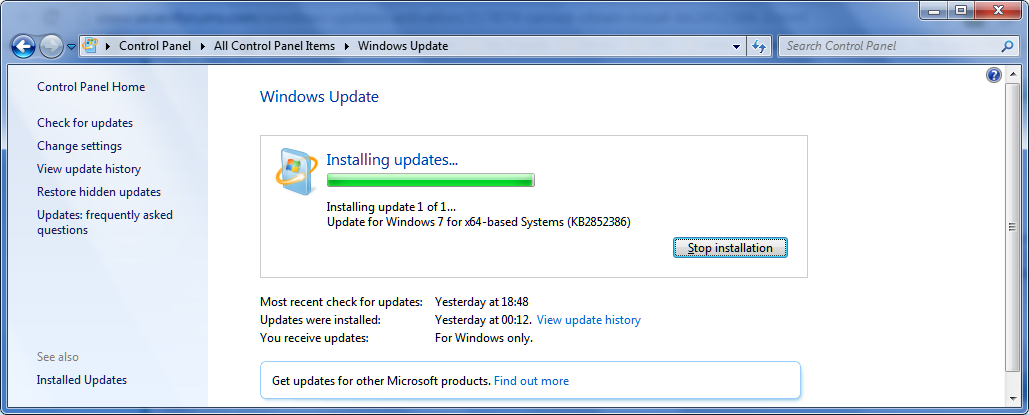
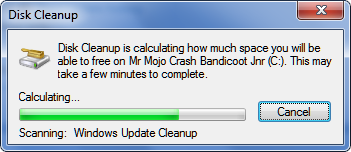
Cannot Obtain/Install KB2852386

I'm not certain, there is not language pack requirement stated in the kb article.

It was an educated guess based on the information I had when I posted that, that's all
 

My Computer

Computer type
Laptop
Computer Manufacturer/Model Number
HP Pavilion dv6-6c10us
OS
x64 (6.3.9600) Win8.1 Pro & soon dual boot x64 (6.1.7601) Win7_SP1 HomePrem
CPU
AMD A6-3420M APU with Radeon(tm) HD Graphics
Motherboard
Hewlett-Packard 1805
Memory
6.00 GB
Graphics Card(s)
AMD Radeon(TM) HD 6520G
Sound Card
(1) AMD High Definition Audio Device (2) IDT High Definiti
Monitor(s) Displays
HP W2072a 20" LCD (1600 x 900) @ 60 Hz
Screen Resolution
1366 x 768 x 32 bits (4294967296 colors) @ 60 Hz
Hard Drives
ST640LM0 00 HM641JI SATA Disk Device
Keyboard
Logitech k520 wireless KB
Mouse
Logitech m320 wireless mouse (bundled with KB)
Internet Speed
15/5 | 54 MB Wireless 'n'
Antivirus
Realtime: Defender or Avast | On-demand: Malwarebytes, ESET
Browser
IE 11 on Win8, IE 10 on win 7
Other Info
Media: [Gimp, Audacity, VLC] || Comm: [WEmail 2012, Skype] || Productivity: [OpenOffice,| Textpad] || Utils: [Sysinternals, cCleaner, Speccy, Defraggler]
As has been stated several times the update is only applicable if you have service pack 1 (SP1) installed already. Your dxdiag screen shot shows that you do not have SP1 installed. It says your version is (6.1, Build 7600). If it had SP1 installed then it would say (6.1, Build 7601). If you want to have access to the new feature, you need to install SP1.

Also, a report of 6 GB "size" for c:\windows\winsxs does not mean that winsxs is taking anywhere near 6 GB on disk. Most of that 6 GB is shared with the rest of windows via hard-links (meaning there is really only 1 file, but it appears to be in 2 places. For example, calc.exe can be found hard-linked to both c:\windows\system32\calc.exe, and c:\windows\winsxs\<some-directory>\calc.exe.) Out of that 6 GB, maybe 2 GB is actually taking space in winsxs. That ~2 GB space is comprised of: backups of critical files, disabled features, important meta-data, and backups of superseded files. Of that ~2GB, the "windows update cleanup" tool targets the "backups of superseded files" only. A fully up-to-date and cleaned (using the update cleanup functionality) 32 bit Win7 OS would probably be reported by explorer as somewhere in the 5 GB range.
 

My Computer

Computer type
PC/Desktop
OS
Windows 8.1 Professional
Addendum: I have confirmed that "Windows Update Cleanup" will not appear in disk clean up options unless and until there has been updates installed. I checked this last Monday and again Tuesday after the updates were installed.
 

My Computer

Computer type
PC/Desktop
Computer Manufacturer/Model Number
Home Built Desktop By DataTech
OS
Windows 7 Ultimate X64 SP1
CPU
Intel i5-2550K, Differing ~4.4-4.8GHz No built in GPU
Motherboard
ASUS P8Z68-V PRO/GEN3
Memory
16GB G.Skill Sniper 1866MHz @ 2133MHz 2x8GB
Graphics Card(s)
ASUS GTX650TIB-DC2OC-2GD5, (650TI Boost)
Sound Card
Onboard Realtek 5-1
Monitor(s) Displays
Samsung P2570HD
Screen Resolution
1920x1080
Hard Drives
Samsung 840 Pro 256GB SSD for OS, 500GB Seagate Constellation (Enterprise drive) for Data
PSU
Corsair HX650W
Case
Inwin Dragon Rider
Cooling
Hyper 212 EVO w/two Noctua fans, push-pull, @1300 RPM
Keyboard
E-Z Eyes, bright yellow keys with large characters
Mouse
steelseries SENSEI Laser Pro Gaming
Internet Speed
48-51Mbs Mbs down, 11 Mbs up Xfinity Cable
Antivirus
Norton Internet Security 2013
Browser
IE 10, Opera, Pale Moon if needed
Other Info
4 case fans, LG BluRay-RE, ASUS DVD-RW, Mr. Fusion power supply, 1.21 gigawatts.
Troy6 provided the solution.

Update to SP1

As has been stated several times the update is only applicable if you have service pack 1 (SP1) installed already. Your dxdiag screen shot shows that you do not have SP1 installed. It says your version is (6.1, Build 7600). If it had SP1 installed then it would say (6.1, Build 7601). If you want to have access to the new feature, you need to install SP1........
 

My Computer

Computer type
Laptop
Computer Manufacturer/Model Number
HP Pavilion dv6-6c10us
OS
x64 (6.3.9600) Win8.1 Pro & soon dual boot x64 (6.1.7601) Win7_SP1 HomePrem
CPU
AMD A6-3420M APU with Radeon(tm) HD Graphics
Motherboard
Hewlett-Packard 1805
Memory
6.00 GB
Graphics Card(s)
AMD Radeon(TM) HD 6520G
Sound Card
(1) AMD High Definition Audio Device (2) IDT High Definiti
Monitor(s) Displays
HP W2072a 20" LCD (1600 x 900) @ 60 Hz
Screen Resolution
1366 x 768 x 32 bits (4294967296 colors) @ 60 Hz
Hard Drives
ST640LM0 00 HM641JI SATA Disk Device
Keyboard
Logitech k520 wireless KB
Mouse
Logitech m320 wireless mouse (bundled with KB)
Internet Speed
15/5 | 54 MB Wireless 'n'
Antivirus
Realtime: Defender or Avast | On-demand: Malwarebytes, ESET
Browser
IE 11 on Win8, IE 10 on win 7
Other Info
Media: [Gimp, Audacity, VLC] || Comm: [WEmail 2012, Skype] || Productivity: [OpenOffice,| Textpad] || Utils: [Sysinternals, cCleaner, Speccy, Defraggler]
Simplistic solution - but if it works....
:-D
 

My Computer

Computer type
Laptop
Computer Manufacturer/Model Number
Asus K52F or Lenovo B51-80
OS
Win 7 x64 Home Premium (and x86 VirtualBox VM)/Win10
CPU
i3 370M/i7 6500U
Motherboard
Asus/Lenovo
Memory
8GB - finally :)/8GB
Graphics Card(s)
it's an i3, dude!/dual Intel&nVidia
Sound Card
onboard
Monitor(s) Displays
15.6" built-in
Screen Resolution
1366x768/1920x1080
Hard Drives
750GB Seagate internal
Sundry external drives attached to other computers on the local network
1TB SSD on the Lenovo
PSU
n/a
Internet Speed
as much as I can get - usually on a dongle/phone, so <1MB/s
Antivirus
MSE/Defender
Browser
IE11/12/Edge/Chrome/FF(if I must)
It should be as simple as going to Control Panel\All Control Panel Items\Windows Update and on the Update window, clicking on Check for Updates in the left Panel.


  • Let Updates search for any updates and if you see Service Pack for Microsoft Windows (KB976932) click on the box to the left to tell Windows to install it click on OK at the bottom.
  • When it changes to the Main windows Update page you should see it listed, click on Install Update(s) and let Updates do its thing.
  • When done Updates may ask you to restart your machine, I would, even if it doesn't ask.

If Updates doesn't find KB976932 see:
Show all

Before you begin

Installing SP1 using Windows Update (recommended)


If your computer is set to automatically install updates, you'll be prompted by Windows Update to install SP1. Follow the instructions on the screen. If you aren't prompted to install SP1, follow these steps:

  1. Make sure your computer is connected to the Internet.
  2. Click the Start button
    4f6cbd09-148c-4dd8-b1f2-48f232a2fd33_818.jpg
    , click All Programs, and then click Windows Update.
  3. In the left pane, click Check for updates.
  4. If any important updates are found, click the link to view available updates. In the list of updates, select Service Pack for Microsoft Windows (KB976932), and then click OK.
  5. Click Install updates.
    18abb370-ac1e-4b6b-b663-e028a75bf05b_48.jpg
    If you're prompted for an administrator password or confirmation, type the password or provide confirmation.
  6. Follow the instructions on your screen.
  7. After the installation is complete, log on to your computer at the Windows logon prompt. You might see a notification indicating whether the update was successful.
  8. If you disabled your antivirus software, enable it again.
   Note
Note


  • If SP1 isn't listed, you might need to install some other updates before installing SP1. Install any important updates, return to the Windows Update page, and then click Check for updates again.


Downloading and installing SP1 from the Microsoft Download Center

Installing SP1 using an installation DVD

Uninstalling SP1

Help stay safe and keep your computer up to date


Notes


  • For general information about service packs, go to the Service Pack Center webpage on the Windows website.
  • For technical information about SP1, such as release notes and the SP1 deployment guide, go to the Windows 7 Service Pack 1 resources webpage on the Microsoft TechNet website.
Source near bottom of page: Learn how to install Windows 7 Service Pack 1 (SP1)

Take note of the Blue Note Box and underlined text, if you haven't been running a type of Update notification that didn't alert you to offered updates you may need to run more required updates before the Service Pack can be installed.
 

My Computer

Computer type
PC/Desktop
Computer Manufacturer/Model Number
Gateway DX4831-01e (Mid-Tower Desktop)
OS
Originally Win 7 Hm Prem x64 Ver 6.1.7600 Build 7601-SP1 | Upgraded to Windows 10 December 14, 2019
CPU
Intel i3 530 2.93GHz, 2933MHz 2 Cores 4 Logical Processors
Motherboard
Gateway H57M01 133 megahertz
Memory
6GB of 1,333MHz DDR3 SDRAM
Graphics Card(s)
32MB Intel Graphics Media Accelerator HD IGChip
Sound Card
Realtek High Definition Audio
Monitor(s) Displays
Gateway HX2000 20inch TFT active matrix TN
Screen Resolution
1600 x 900 x 59 hertz
Hard Drives
WDC WD10EADS-00M2B0 [HDD] (1000.20 GB) -- drive 0,
HL-DT-ST DVDRAM GH41N [CD-ROM dr]
Four card readers, and Four USB 2.0
PSU
300watts.
Case
Mid-Tower Desktop
Cooling
Stock from Gateway
Keyboard
Natural Ergonomic Keyboard 4000, see Other Info
Mouse
Orig. Gateway wore out now using Insignia USB wired optical
Internet Speed
Vz FIOS 10ms png 57.64Mbps down 65.53Mbps up Speedtest.org
Antivirus
Zamana Anti-logger with Anti-malware, MSE, Windows Firewall,
Browser
IE11.0.9600.19399-Upd ver11.0.135, Firefox 68.0.1 x64
Other Info
System Specs by Belarc.

BIOS: American Megatrends Inc. P01-A0 11/17/2009

Replaced the MS 'Natural' Standard PS/2 Enhanced 101-102 Keyboard with a new Natural Ergonomic Keyboard 4000 on August 1st 2014.

Canon Pixma MG3222 Printer.

Updated to IE11 on 12102015 | Fios Quantum Router g1100

Additional AV: SpywareBlaster, manual Mbam, SAS
Some great info in here.

So I have windows 7 service pack 1 (x64).

Trying to install the "clean up updates" update 2852386. get the "not applicable to your computer" message.

Anyone that assumes this message means the feature is installed is just guessing. I monitored the cleanup scan, and it does not reference the "updates cleanup" in it's status bar.

Every day, Microsoft disappoints. At a loss
 

My Computer

Computer type
Laptop
Computer Manufacturer/Model Number
Dell
OS
Windows 7 Ultimate 64bit
CPU
2.2
Memory
8Gb
Graphics Card(s)
NVIDIA
Screen Resolution
1280/762
Mouse
built in pad || iphone || MS wireless
Internet Speed
100MB
Antivirus
Avast
Browser
Chrome, Chrome portable
Please start a new thread of your own, then follow the Windows Update Posting Instructions and post the requested data
If the file is too large (8MB compressed), remove the older CBSPersist cab files until the final file is below the limit - you can always post them separately after zipping them. (the forum doesn't allow the upload of bare CAB files, for a number of reasons)

Please also post the C:\Windows\windowsupdate.log file.
 

My Computer

Computer type
Laptop
Computer Manufacturer/Model Number
Asus K52F or Lenovo B51-80
OS
Win 7 x64 Home Premium (and x86 VirtualBox VM)/Win10
CPU
i3 370M/i7 6500U
Motherboard
Asus/Lenovo
Memory
8GB - finally :)/8GB
Graphics Card(s)
it's an i3, dude!/dual Intel&nVidia
Sound Card
onboard
Monitor(s) Displays
15.6" built-in
Screen Resolution
1366x768/1920x1080
Hard Drives
750GB Seagate internal
Sundry external drives attached to other computers on the local network
1TB SSD on the Lenovo
PSU
n/a
Internet Speed
as much as I can get - usually on a dongle/phone, so <1MB/s
Antivirus
MSE/Defender
Browser
IE11/12/Edge/Chrome/FF(if I must)
OK some useful info
ea4I2WW.png


It seems that the update can only be installed via windows update. you can download the installer from ms, but it won't run (GENIUS MS).

My solution was to grab a comb, open optional windows updates... and sift.

Et voile

iY9Jck0.png
 

My Computer

Computer type
Laptop
Computer Manufacturer/Model Number
Dell
OS
Windows 7 Ultimate 64bit
CPU
2.2
Memory
8Gb
Graphics Card(s)
NVIDIA
Screen Resolution
1280/762
Mouse
built in pad || iphone || MS wireless
Internet Speed
100MB
Antivirus
Avast
Browser
Chrome, Chrome portable
Troy6 provided the solution.

Update to SP1

As has been stated several times the update is only applicable if you have service pack 1 (SP1) installed already. Your dxdiag screen shot shows that you do not have SP1 installed. It says your version is (6.1, Build 7600). If it had SP1 installed then it would say (6.1, Build 7601). If you want to have access to the new feature, you need to install SP1........

I'd also like to re-state my experience. The update cannot be obtained and installed manually, and has to be obtained VIA the windows update mechanism (check "optional")
 

My Computer

Computer type
Laptop
Computer Manufacturer/Model Number
Dell
OS
Windows 7 Ultimate 64bit
CPU
2.2
Memory
8Gb
Graphics Card(s)
NVIDIA
Screen Resolution
1280/762
Mouse
built in pad || iphone || MS wireless
Internet Speed
100MB
Antivirus
Avast
Browser
Chrome, Chrome portable
Back
Top