Solved Cannot overwrite deleted emails on free space

sabruffian

New member
Local time
4:47 PM
Messages
18
I am trying to overwrite a file in the free space on drive C, but it keeps telling me that it is unable to overwrite the special file type. The file name is "Thunderbird emails.zip".

When I first found it I recovered it then went back later to overwrite the emails so it would not be in my ssd drive free space. Does anyone know why this cannot be overwritten? I tried using CCleaner to erase them but wouldn't do it. I even filled up the free space with videos trying to overwrite it but no luck there either! I am trying to overwrite this without doing a secure erase on the whole drive.
Thanks for any help someone may have with this.
 

My Computer

Computer type
PC/Desktop
Computer Manufacturer/Model Number
custom build
OS
Windows 7 Home Premium 64
CPU
i5-4570
Motherboard
ASUS Z87-A
Memory
CORSAIR 4gb
Hard Drives
SAMSUNG 120 SSD
Antivirus
KASPERSKY IS
Browser
FIREFOX
Welcome to Seven Forums sabruffian. Do you use/have you used Recuva? It likely created that. Suggest you d/l and install Lockhunter

LockHunter is a free 64/32 bit tool to delete files blocked by any processes

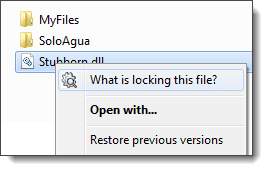
Right click the file and click on the What's locking this file entry.

contextMenu.png

See what's actually locking the file, you can also choose the Unlock it, then Delete it buttons. See if that works.

A Guy
 

My Computer

Computer type
PC/Desktop
OS
Windows 10 Home x64
CPU
INTEL Core i5-750 Quad-Core 3.37GHz
Motherboard
ASUS P7P55D
Memory
HyperX Fury Black Series 8GB (2 x 4GB) 1866Mhz
Graphics Card(s)
EVGA GeForce GTX 750 Superclocked 1GB 128-Bit GDDR5
Monitor(s) Displays
LG 32MA68HY 32" IPS
Screen Resolution
1920 x 1080
Hard Drives
Samsung 840 Evo 120GB, SEAGATE 500GB Barracuda® 7200.12, SATA 3 Gb/s, 7200 RPM, 16MB cache
PSU
ANTEC TruePower New TP-550, 80 PLUS, 550W
Case
ANTEC Three Hundred Illusion
Cooling
COOLER MASTER Hyper 212 Plus, 4 x 120mm 1 x 140mm Noctua's
Internet Speed
85 + Mbps
Antivirus
Avast
Browser
Vivaldi
Hey Guy. Thanks for your suggestion about trying Lockhunter. I installed and tried it, but I had no luck with it, because I cannot get it to see the the problem I have, because the problem is with emails that I have deleted and they are on my c/free space and so I know of no way to get L
 

My Computer

Computer type
PC/Desktop
Computer Manufacturer/Model Number
custom build
OS
Windows 7 Home Premium 64
CPU
i5-4570
Motherboard
ASUS Z87-A
Memory
CORSAIR 4gb
Hard Drives
SAMSUNG 120 SSD
Antivirus
KASPERSKY IS
Browser
FIREFOX
Hey Guy. Thanks for your suggestion about trying Lockhunter. I installed and tried it, but I had no luck with it, because I cannot get it to see the the problem I have, because the problem is with emails that I have deleted and they are on my c/free space and so I know of no way to get Lockhunter to see it. Yes, Recuva is the program that has done this, and they have been no help.

Again...the file /folder is in the free space that I deleted and am trying to get rid of it securely for good. Thanks.
 

My Computer

Computer type
PC/Desktop
Computer Manufacturer/Model Number
custom build
OS
Windows 7 Home Premium 64
CPU
i5-4570
Motherboard
ASUS Z87-A
Memory
CORSAIR 4gb
Hard Drives
SAMSUNG 120 SSD
Antivirus
KASPERSKY IS
Browser
FIREFOX
Free Space - viewing

Just what are you using to view "free space" on your HD?

Maybe I'm missing something but if a file trace exists in "free space" then it's already been deleted.
 

My Computer

Computer type
Laptop
Computer Manufacturer/Model Number
ASUS
OS
Microsoft Windows 7 Home Premium 64-bit 7601 Multiprocessor Free Service Pack 1
CPU
AMD C-60 APU with Radeon(tm) HD Graphics
Motherboard
ASUSTeK COMPUTER INC. X501U
Memory
4.00 GB
Graphics Card(s)
AMD Radeon HD 6290 Graphics
Sound Card
(1) AMD High Definition Audio Device (2) Realtek High Defi
Screen Resolution
1366 x 768 x 32 bits (4294967296 colors) @ 60 Hz
Hard Drives
Hitachi HTS545050A7E380 SATA Disk Device
Antivirus
Comodo CIS & FW, SecureAplus App Whitelisting, Threatfire
Browser
Cyberfox 64bit, Opera 64bit, Airfox
Other Info
Spy-The-Spy, HitmanPro.Alert, Norton Connect Safe, MJRegWatcher, BitDefender TrafficLight, Voodoo Shield, Zemana AntiMalware
Wipe Free Space

Okay I see what you mean. You're viewing previously deleted files using Recuva.

Just wipe the free space using any third party software that can do the job.

My personal preference is to use sdelete - you can get it here:

SDelete

Copy the sdelete.exe file into your system32 directory.

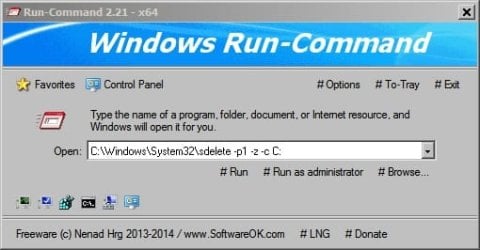
It's a command line tool so to wipe free space on a drive (one pass is enough) either use software like RunCommand and use the following command line:

C:\Windows\System32\sdelete -p -1 -z -c C:

Run-Command.jpg

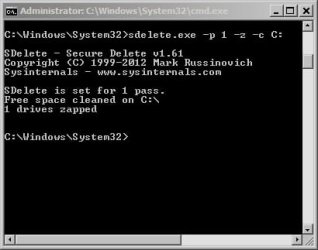
Or else open an Elevated Command Prompt and type C:\Windows\System32\sdelete -p -1 -z -c C:

The switches are explained in the screenshot.

sdelete -p 1 -z -c C_.jpg

Or just use "Wipe Free Space" in Ccleaner if you have it installed but it's not as thorough as Sdelete and takes much longer to complete.
 

My Computer

Computer type
Laptop
Computer Manufacturer/Model Number
ASUS
OS
Microsoft Windows 7 Home Premium 64-bit 7601 Multiprocessor Free Service Pack 1
CPU
AMD C-60 APU with Radeon(tm) HD Graphics
Motherboard
ASUSTeK COMPUTER INC. X501U
Memory
4.00 GB
Graphics Card(s)
AMD Radeon HD 6290 Graphics
Sound Card
(1) AMD High Definition Audio Device (2) Realtek High Defi
Screen Resolution
1366 x 768 x 32 bits (4294967296 colors) @ 60 Hz
Hard Drives
Hitachi HTS545050A7E380 SATA Disk Device
Antivirus
Comodo CIS & FW, SecureAplus App Whitelisting, Threatfire
Browser
Cyberfox 64bit, Opera 64bit, Airfox
Other Info
Spy-The-Spy, HitmanPro.Alert, Norton Connect Safe, MJRegWatcher, BitDefender TrafficLight, Voodoo Shield, Zemana AntiMalware
OK Callender, thanks for your reply. I have tried CCleaner, it will not wipe Thunderbird emails.zip. I have tried windows cypher, it will not erase it either. I tried Erase, it will not erase that file! I even completely filled up my free space with video files thinking that would cause an overwrite....but NO, that did not overwrite it either! I will try sdelete. I would have already tried it but I thought it was for wiping a complete drive instead of just free space. Thanks.
 

My Computer

Computer type
PC/Desktop
Computer Manufacturer/Model Number
custom build
OS
Windows 7 Home Premium 64
CPU
i5-4570
Motherboard
ASUS Z87-A
Memory
CORSAIR 4gb
Hard Drives
SAMSUNG 120 SSD
Antivirus
KASPERSKY IS
Browser
FIREFOX
Thunderbird deleted emails

After some digging I found this thread:

Problem with Recuva 1.29 and Thunderbird emails.zip - Recuva Discussion - Piriform Community Forums

Now I'm busy trying to work out why I don't find the Thunderbird Emails.zip file anywhere on my machine.

Possibly it's because I've never used Recuva to recover deleted emails - only files!

Piriform - Recovering deleted emails

Also see: How Thunderbird handles deleted messages

I tend to compact Thunderbird folders on a weekly basis. Right click a folder - say Inbox and compact it. Do the same for all other folders.

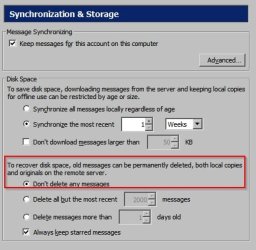
My settings aslo show the following for email deletion:

TB-Account Settings.jpg

In other words in order to delete old messages I log into my email account and delete them from there rather than via Thunderbird.

You might solve your problem by fully removing Thunderbird, rebooting, then wiping free space but that's just a guess. You can reinstall Thunderbird any time.
 

My Computer

Computer type
Laptop
Computer Manufacturer/Model Number
ASUS
OS
Microsoft Windows 7 Home Premium 64-bit 7601 Multiprocessor Free Service Pack 1
CPU
AMD C-60 APU with Radeon(tm) HD Graphics
Motherboard
ASUSTeK COMPUTER INC. X501U
Memory
4.00 GB
Graphics Card(s)
AMD Radeon HD 6290 Graphics
Sound Card
(1) AMD High Definition Audio Device (2) Realtek High Defi
Screen Resolution
1366 x 768 x 32 bits (4294967296 colors) @ 60 Hz
Hard Drives
Hitachi HTS545050A7E380 SATA Disk Device
Antivirus
Comodo CIS & FW, SecureAplus App Whitelisting, Threatfire
Browser
Cyberfox 64bit, Opera 64bit, Airfox
Other Info
Spy-The-Spy, HitmanPro.Alert, Norton Connect Safe, MJRegWatcher, BitDefender TrafficLight, Voodoo Shield, Zemana AntiMalware
Callender, I tried sdelete just now using 1 pass of 0's. However....Thunderbird emails are still there according to Recuva. Recuva still says after trying to overwrite the file with their overwrite feature.....not overwritten.....unable to overwrite special file type. sdele kinda acts like there is nothing there to overwrite. As soon as i paste in C:\Windows\System32\sdelete -p -1 -z -c C: in the command prompt, it shows 0%. Don't know what to think of that. Any other suggestions??
 

My Computer

Computer type
PC/Desktop
Computer Manufacturer/Model Number
custom build
OS
Windows 7 Home Premium 64
CPU
i5-4570
Motherboard
ASUS Z87-A
Memory
CORSAIR 4gb
Hard Drives
SAMSUNG 120 SSD
Antivirus
KASPERSKY IS
Browser
FIREFOX
Suggestions

It will show 0% for a while depending on how much data is going to be overwritten. Try leaving it running for a few minutes to see if it will move to 1%.

You did use an Elevated Command Prompt?

Is your windows partition on Drive C? If it isn't use the correct drive letter in the command line.

http://www.sevenforums.com/tutorials/783-elevated-command-prompt.html

Other suggestions are:

Empty the trashcan, and then compact the folder. Then overwrite free space.

EDIT: Also maybe consider uninstalling Recuva - as it's the program that created the file. After removal try rebooting then wiping free space. It's not guaranteed to work - just something to try.
 
Last edited:

My Computer

Computer type
Laptop
Computer Manufacturer/Model Number
ASUS
OS
Microsoft Windows 7 Home Premium 64-bit 7601 Multiprocessor Free Service Pack 1
CPU
AMD C-60 APU with Radeon(tm) HD Graphics
Motherboard
ASUSTeK COMPUTER INC. X501U
Memory
4.00 GB
Graphics Card(s)
AMD Radeon HD 6290 Graphics
Sound Card
(1) AMD High Definition Audio Device (2) Realtek High Defi
Screen Resolution
1366 x 768 x 32 bits (4294967296 colors) @ 60 Hz
Hard Drives
Hitachi HTS545050A7E380 SATA Disk Device
Antivirus
Comodo CIS & FW, SecureAplus App Whitelisting, Threatfire
Browser
Cyberfox 64bit, Opera 64bit, Airfox
Other Info
Spy-The-Spy, HitmanPro.Alert, Norton Connect Safe, MJRegWatcher, BitDefender TrafficLight, Voodoo Shield, Zemana AntiMalware
see below
 
Last edited:

My Computer

Computer type
PC/Desktop
Computer Manufacturer/Model Number
custom build
OS
Windows 7 Home Premium 64
CPU
i5-4570
Motherboard
ASUS Z87-A
Memory
CORSAIR 4gb
Hard Drives
SAMSUNG 120 SSD
Antivirus
KASPERSKY IS
Browser
FIREFOX
Yes, it is on drive C. I let it set there for 15 minutes or more and still says 0%. Yes I am using command prompt...Home drive Homepath. Here is what I get:
C:\Users\Tommy>C:\Windows\System32\sdelete -p -1 -z -c C:

SDelete - Secure Delete v1.61
Copyright (C) 1999-2012 Mark Russinovich
Sysinternals - Windows Sysinternals: Documentation, downloads and additional resources

SDelete is set for -1 passes.
Zeroing free space on C:\: 0%
 

My Computer

Computer type
PC/Desktop
Computer Manufacturer/Model Number
custom build
OS
Windows 7 Home Premium 64
CPU
i5-4570
Motherboard
ASUS Z87-A
Memory
CORSAIR 4gb
Hard Drives
SAMSUNG 120 SSD
Antivirus
KASPERSKY IS
Browser
FIREFOX
Will test and post if success

Mayve wiping free space in safe mode is possible and it should release any lock on the file.

I'll try it to see if it's even possible and post the results.
 

My Computer

Computer type
Laptop
Computer Manufacturer/Model Number
ASUS
OS
Microsoft Windows 7 Home Premium 64-bit 7601 Multiprocessor Free Service Pack 1
CPU
AMD C-60 APU with Radeon(tm) HD Graphics
Motherboard
ASUSTeK COMPUTER INC. X501U
Memory
4.00 GB
Graphics Card(s)
AMD Radeon HD 6290 Graphics
Sound Card
(1) AMD High Definition Audio Device (2) Realtek High Defi
Screen Resolution
1366 x 768 x 32 bits (4294967296 colors) @ 60 Hz
Hard Drives
Hitachi HTS545050A7E380 SATA Disk Device
Antivirus
Comodo CIS & FW, SecureAplus App Whitelisting, Threatfire
Browser
Cyberfox 64bit, Opera 64bit, Airfox
Other Info
Spy-The-Spy, HitmanPro.Alert, Norton Connect Safe, MJRegWatcher, BitDefender TrafficLight, Voodoo Shield, Zemana AntiMalware
Yep Callender, Piriform/recuva said:
Note: You cannot securely delete the ZIP file in Step 2 before you recover it. Recuva only creates the ZIP file when you choose to recover the emails.

Ha, that makes no sense what-so-ever to me! When I first found the file using recuva, I recovered it. Then yes, when I went back and tried to overwrite it was when it told me it could not overwrite that special file. Can't figure out why it is a special file??

Yes, I used command prompt. Just sits there on 0% even after 15 minutes. The file is still showing on free space when using recuva to look at it.

Microsoft Windows [Version 6.1.7601]
Copyright (c) 2009 Microsoft Corporation. All rights reserved.

C:\Users\Sabrina>C:\Windows\System32\sdelete -p -1 -z -c C:

SDelete - Secure Delete v1.61
Copyright (C) 1999-2012 Mark Russinovich
Sysinternals - Windows Sysinternals: Documentation, downloads and additional resources

SDelete is set for -1 passes.
Zeroing free space on C:\: 0%
 

My Computer

Computer type
PC/Desktop
Computer Manufacturer/Model Number
custom build
OS
Windows 7 Home Premium 64
CPU
i5-4570
Motherboard
ASUS Z87-A
Memory
CORSAIR 4gb
Hard Drives
SAMSUNG 120 SSD
Antivirus
KASPERSKY IS
Browser
FIREFOX
File paths

Well you're showing two different users for some reason:

C:\Users\Tommy>C:\Windows\System32\sdelete -p -1 -z -c C:

C:\Users\Sabrina>C:\Windows\System32\sdelete -p -1 -z -c C:

Those paths look wrong anyway!

In any case what you should be doing is using the account for the Thunderbird user and going to

C:\Windows\System32\cmd.exe then right click cmd.exe and choose run as administrator.

Then in the window that appears it should automatically open at:

C:\Windows\System32

just add sdelete -p -1 -z -c C: then press enter.

Safe mode tested, free space on drive C wiped - no problem.

Admin_System32_cmd.jpg

The documentation from Recuva and Piriform isn't well put together.

My understanding of it is that the file is created by Recuva. It does not get created on my machine - I've tested using Recuva using the recover deleted emails option. That's because there are no deleted emails stored in Thunderbird databases to be recovered. Your setup is different.

I have used software "Comodo Time Machine" in the past that wrote it's files in a special way into free space. Uninstalling the software deleted the files. Recuva seems to be using a simiilar technique to store that deleted emails.zip file.

Try the safe mode wipe.
 

My Computer

Computer type
Laptop
Computer Manufacturer/Model Number
ASUS
OS
Microsoft Windows 7 Home Premium 64-bit 7601 Multiprocessor Free Service Pack 1
CPU
AMD C-60 APU with Radeon(tm) HD Graphics
Motherboard
ASUSTeK COMPUTER INC. X501U
Memory
4.00 GB
Graphics Card(s)
AMD Radeon HD 6290 Graphics
Sound Card
(1) AMD High Definition Audio Device (2) Realtek High Defi
Screen Resolution
1366 x 768 x 32 bits (4294967296 colors) @ 60 Hz
Hard Drives
Hitachi HTS545050A7E380 SATA Disk Device
Antivirus
Comodo CIS & FW, SecureAplus App Whitelisting, Threatfire
Browser
Cyberfox 64bit, Opera 64bit, Airfox
Other Info
Spy-The-Spy, HitmanPro.Alert, Norton Connect Safe, MJRegWatcher, BitDefender TrafficLight, Voodoo Shield, Zemana AntiMalware
Still showing....
SDelete is set for -1 passes.
Zeroing free space on C:\: 0%

Will try safe mode and see if that will work.
 

My Computer

Computer type
PC/Desktop
Computer Manufacturer/Model Number
custom build
OS
Windows 7 Home Premium 64
CPU
i5-4570
Motherboard
ASUS Z87-A
Memory
CORSAIR 4gb
Hard Drives
SAMSUNG 120 SSD
Antivirus
KASPERSKY IS
Browser
FIREFOX
More questions

Are you 100% sure that Recuva reports that the file's status is deleted?

How about trying this as a test:

Navigate to C:\Users\USERNAME\AppData\Roaming\Thunderbird

Replace USERNAME with the account name.

Create another backup folder on your desktop and Copy Profiles and profiles.ini into it.

Then try deleting both "Profiles and profiles.ini" from C:\Users\USERNAME\AppData\Roaming\Thunderbird and if they delete successfuly go into the backup folder that you just made then try going into the Profiles folder then into your profile and try deleting the zip file from there.

If it works restore the files back to their original location:

C:\Users\USERNAME\AppData\Roaming\Thunderbird

Then run Thunderbird and adjust the following:

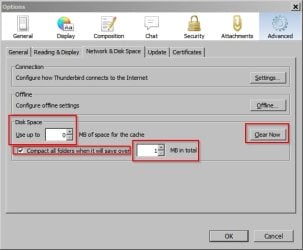
Compact all folders.

Tools> Options> Advanced> Network & Disk Space:

TB-Account Settings 2.jpg

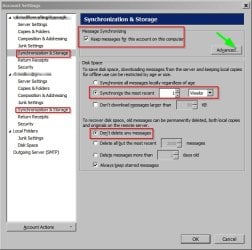
Tools> Account Settings> Synchronization & Storage:

TB-Account Settings 3.jpg

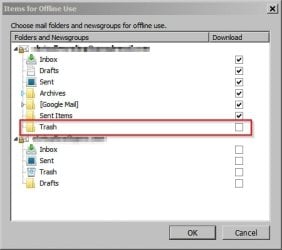
Click the advanced tab and ensure that trash remains unchecked.

TB-Account Settings 4.jpg

That should hopefully prevent the same problem happening in future.
 

My Computer

Computer type
Laptop
Computer Manufacturer/Model Number
ASUS
OS
Microsoft Windows 7 Home Premium 64-bit 7601 Multiprocessor Free Service Pack 1
CPU
AMD C-60 APU with Radeon(tm) HD Graphics
Motherboard
ASUSTeK COMPUTER INC. X501U
Memory
4.00 GB
Graphics Card(s)
AMD Radeon HD 6290 Graphics
Sound Card
(1) AMD High Definition Audio Device (2) Realtek High Defi
Screen Resolution
1366 x 768 x 32 bits (4294967296 colors) @ 60 Hz
Hard Drives
Hitachi HTS545050A7E380 SATA Disk Device
Antivirus
Comodo CIS & FW, SecureAplus App Whitelisting, Threatfire
Browser
Cyberfox 64bit, Opera 64bit, Airfox
Other Info
Spy-The-Spy, HitmanPro.Alert, Norton Connect Safe, MJRegWatcher, BitDefender TrafficLight, Voodoo Shield, Zemana AntiMalware
Command Line issue

You have twice stated that Sdelete remains on 0% and reports:

Zeroing free space on C:\: 0%

What it should read is:

Zeroing free space on C:\ 0%

You seem to have typed an extra : in the command line?
 

My Computer

Computer type
Laptop
Computer Manufacturer/Model Number
ASUS
OS
Microsoft Windows 7 Home Premium 64-bit 7601 Multiprocessor Free Service Pack 1
CPU
AMD C-60 APU with Radeon(tm) HD Graphics
Motherboard
ASUSTeK COMPUTER INC. X501U
Memory
4.00 GB
Graphics Card(s)
AMD Radeon HD 6290 Graphics
Sound Card
(1) AMD High Definition Audio Device (2) Realtek High Defi
Screen Resolution
1366 x 768 x 32 bits (4294967296 colors) @ 60 Hz
Hard Drives
Hitachi HTS545050A7E380 SATA Disk Device
Antivirus
Comodo CIS & FW, SecureAplus App Whitelisting, Threatfire
Browser
Cyberfox 64bit, Opera 64bit, Airfox
Other Info
Spy-The-Spy, HitmanPro.Alert, Norton Connect Safe, MJRegWatcher, BitDefender TrafficLight, Voodoo Shield, Zemana AntiMalware
Callender: You have twice stated that Sdelete remains on 0% and reports:

Zeroing free space on C:\: 0%

What it should read is:

Zeroing free space on C:\ 0%

It will not read without the : you are talking about. I put it into the command prompt exactly as you posted to do as below, and it still has the : before and after \.
SDelete is set for -1 passes.
Zeroing free space on C:\: 0%

Tried it in safe mode also, but Thunderbird emails.zip is still in the free space. And yes, Recuva reports that those emails have been deleted. It just took all the emails that I had deleted and put them all in that zip file. The emails all have an .eml extension.

I will try your last suggestion with Thunderbird.
 

My Computer

Computer type
PC/Desktop
Computer Manufacturer/Model Number
custom build
OS
Windows 7 Home Premium 64
CPU
i5-4570
Motherboard
ASUS Z87-A
Memory
CORSAIR 4gb
Hard Drives
SAMSUNG 120 SSD
Antivirus
KASPERSKY IS
Browser
FIREFOX
Run Recuva again

Just a thought but perhaps try running Recuva with the recover deleted emails option one more time once you've cleaned up Thunderbird just to see if it creates a new zip file!

The last option that I can think of is that if that file was created recently try rolling back your system using system restore to a point before you recovered those emails then scan again.

Other than that I'm out of ideas. Maybe another member will have other suggestions!
 

My Computer

Computer type
Laptop
Computer Manufacturer/Model Number
ASUS
OS
Microsoft Windows 7 Home Premium 64-bit 7601 Multiprocessor Free Service Pack 1
CPU
AMD C-60 APU with Radeon(tm) HD Graphics
Motherboard
ASUSTeK COMPUTER INC. X501U
Memory
4.00 GB
Graphics Card(s)
AMD Radeon HD 6290 Graphics
Sound Card
(1) AMD High Definition Audio Device (2) Realtek High Defi
Screen Resolution
1366 x 768 x 32 bits (4294967296 colors) @ 60 Hz
Hard Drives
Hitachi HTS545050A7E380 SATA Disk Device
Antivirus
Comodo CIS & FW, SecureAplus App Whitelisting, Threatfire
Browser
Cyberfox 64bit, Opera 64bit, Airfox
Other Info
Spy-The-Spy, HitmanPro.Alert, Norton Connect Safe, MJRegWatcher, BitDefender TrafficLight, Voodoo Shield, Zemana AntiMalware
Back
Top