Cannot save anything on Desktop

bindoksala

New member
Local time
3:24 AM
Messages
11
Location
Pune
Hello team,

I cannot save anything on the desktop, when I create new folder, new text document, new office file on the desktop by right clicking, its not saving on the desktop but automatically gets saved to the folder C:/User/.../Desktop.

Or whenever I paste any item on the desktop it gets saved to the above directory.
Also my user directory is showing a locked symbol but I can access it.

How can I make these items visible on the Desktop?

Regards
BS
 

My Computer

Computer type
Laptop
Computer Manufacturer/Model Number
HP
OS
Microsoft Windows 7 Professional 32-bit 7601 Multiprocessor Free Service Pack 1
CPU
Intel(R) Core(TM)2 Duo CPU T6400 @ 2.00GHz
Motherboard
Hewlett-Packard 30F8
Memory
3.00 GB
Graphics Card(s)
NVIDIA GeForce 9200M GS
Sound Card
(1) NVIDIA High Definition Audio (2) High Definition Audio
Screen Resolution
1280 x 800 x 32 bits (4294967296 colors) @ 59 Hz
Hard Drives
(1) TOSHIBA MK3252GSX ATA Device (2) USBModem Disk USB Device
Antivirus
ESET NOD 4
Browser
Chrome
The desktop is a folder.
Mine is located here:
C:\Users\username\Desktop

...or maybe I'm not understanding your issue...
 

My Computer

Computer type
Laptop
Computer Manufacturer/Model Number
Employer provided Dell Latitude
OS
W7 Pro SP1 64bit
CPU
i7
Memory
8GB
Graphics Card(s)
Intel HD Graphics
Hard Drives
crappy SSD
Antivirus
Employer mandated Symantec Endpoint Protection
Browser
Pale Moon 64bit, IE11 64bit & Chrome 64bit
Correct the desktop is a folder and is located at C:\Users\username\Desktop but its showing lock symbol but I can access it
 

My Computer

Computer type
Laptop
Computer Manufacturer/Model Number
HP
OS
Microsoft Windows 7 Professional 32-bit 7601 Multiprocessor Free Service Pack 1
CPU
Intel(R) Core(TM)2 Duo CPU T6400 @ 2.00GHz
Motherboard
Hewlett-Packard 30F8
Memory
3.00 GB
Graphics Card(s)
NVIDIA GeForce 9200M GS
Sound Card
(1) NVIDIA High Definition Audio (2) High Definition Audio
Screen Resolution
1280 x 800 x 32 bits (4294967296 colors) @ 59 Hz
Hard Drives
(1) TOSHIBA MK3252GSX ATA Device (2) USBModem Disk USB Device
Antivirus
ESET NOD 4
Browser
Chrome
The lock symbol is normal for that folder.

I still don't understand the issue that you are having with saving files to the desktop.
 

My Computer

Computer type
Laptop
Computer Manufacturer/Model Number
Employer provided Dell Latitude
OS
W7 Pro SP1 64bit
CPU
i7
Memory
8GB
Graphics Card(s)
Intel HD Graphics
Hard Drives
crappy SSD
Antivirus
Employer mandated Symantec Endpoint Protection
Browser
Pale Moon 64bit, IE11 64bit & Chrome 64bit
Correct the desktop is a folder and is located at C:\Users\username\Desktop but its showing lock symbol but I can access it
lock symbol is quite normal.

Your real desktop (what you see on your desktop) is C:\Users\username\Desktop ?
Please copy something in that folder and see if it appears on desktop
 

My Computer

Computer type
Laptop
Computer Manufacturer/Model Number
ACER ASPIRE 5742G
OS
Microsoft Windows 7 Home Premium 64-bits 7601 Multiprocessor Free Service Pack 1
CPU
Intel(R) Core(TM) i3 CPU M 370 @ 2.40GHz
Motherboard
Acer Aspire 5742G
Memory
4,00 GB
Graphics Card(s)
ATI Mobility Radeon HD 5400 Series
Sound Card
(1) AMD High Definition Audio Device (2) Realtek High Defi
Screen Resolution
1366 x 768 x 32 bits (4294967296 colors) @ 60 Hz
Hard Drives
WDC WD5000BEVT-22ZAT0

My Computer

Computer type
Laptop
Computer Manufacturer/Model Number
Employer provided Dell Latitude
OS
W7 Pro SP1 64bit
CPU
i7
Memory
8GB
Graphics Card(s)
Intel HD Graphics
Hard Drives
crappy SSD
Antivirus
Employer mandated Symantec Endpoint Protection
Browser
Pale Moon 64bit, IE11 64bit & Chrome 64bit
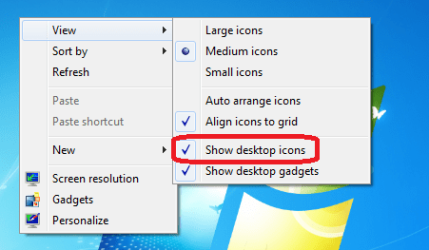
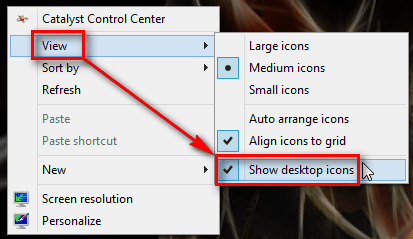
Can you see Trashcan on Desktop? If not, the desktop icons might be turned off. If this is the case, right click an empty spot on desktop to open context menu and select View > Show Desktop Icons:

2012-12-11_100928.png

Kari

EDIT: UsernameIssues above was faster :)
 

My Computer

Computer type
Laptop
Computer Manufacturer/Model Number
HP ENVY 17-1150eg
OS
Windows 10 Pro x64 EN-GB
CPU
1.6 GHz Intel Core i7-720QM Processor
Memory
6 GB
Graphics Card(s)
ATI Mobility Radeon HD 5850 Graphics
Sound Card
Beats sound system with integrated subwoofer
Monitor(s) Displays
17" laptop display, 22" LED and 32" Full HD TV through HDMI
Screen Resolution
1600*900 (1), 1920*1080 (2&3)
Hard Drives
Internal: 2 x 500 GB SATA Hard Disk Drive 7200 rpm
External: 2TB for backups, 3TB USB3 network drive for media
Cooling
As Envy runs a bit warm, I have it on a Cooler Master pad
Keyboard
Logitech diNovo Media Desktop Laser (bluetooth)
Mouse
Logitech Performance Mouse MX
Internet Speed
50/10 Mbps VDSL
Antivirus
Windows Defender 4.3.9431.0
Browser
Maxthon 3.5.2., IE11

My Computer

Computer type
Laptop
Computer Manufacturer/Model Number
Employer provided Dell Latitude
OS
W7 Pro SP1 64bit
CPU
i7
Memory
8GB
Graphics Card(s)
Intel HD Graphics
Hard Drives
crappy SSD
Antivirus
Employer mandated Symantec Endpoint Protection
Browser
Pale Moon 64bit, IE11 64bit & Chrome 64bit

My Computer

Computer type
Laptop
Computer Manufacturer/Model Number
Employer provided Dell Latitude
OS
W7 Pro SP1 64bit
CPU
i7
Memory
8GB
Graphics Card(s)
Intel HD Graphics
Hard Drives
crappy SSD
Antivirus
Employer mandated Symantec Endpoint Protection
Browser
Pale Moon 64bit, IE11 64bit & Chrome 64bit
Back
Top