Cannot see any wifi networks

bertie11

New member
Member
VIP
Local time
1:51 AM
Messages
254
I've been using my HP Pavilion DV6-2113SA for a long time, connecting with a LAN cable. I now need to use wireless but the HP doesn't see any wifi networks at all, let alone the one from my Brightbox router. I have wifi turned on and rebooted but Brightbox is only shown when cabled. there is nothing shown except my T-Mobile dongle (disconnected).

I went into the router and SSID is enabled. The problem must be that NO networks are being shown at all. I know there about a dozen in this area as I can see them on my Asus Transformer and my wife also sees them in her netbook. I have tried updating drivers for wifi but it seems I already have the latest.

Any help would be great please!

Qualcomm Atheros AR928S 802.11b/g/n. Tried uninstalling and letting Win 7 reconfigure. Still cannot see any wifi networds, yest on 3 other systems in the house about 10 networks are visible, so I guess the router is OK?
 
Last edited:

My Computer My Computer

Computer type
Laptop
Computer Manufacturer/Model Number
HP Envy 15
OS
Windows 8.1.1
CPU
AMD A10-5750M APU with Radeon(tm) HD Graphics
Memory
8gb
Hard Drives
1TB Serial ATA 16mb buffer
Is the wifi adapter enabled?

There is often a physical switch for this, if not find it in the device manager, view its properties and and ensure "Use this device" is selected.

Failing that, remove the HP wireless software and in services.msc make sure wireless Zero Config is enabled and started (automatic) then let windows manage your wireless connection, sometimes if you have multiple wifi managers they conflict and you cant get anywhere with either of them.
 

My Computer My Computer

Computer type
PC/Desktop
Computer Manufacturer/Model Number
Self Build
OS
Windows 7 Ultimate x64
CPU
Intel Core2 Quad Q8300 2.5Ghz
Motherboard
Asus P5QD Turbo
Memory
Kingston HyperX 4x1GB DDR2 1066Mhz
Graphics Card(s)
Asus/Nvidia 9500GT 1GB
Sound Card
On-Board HD
Monitor(s) Displays
22" Widescreen TFT
Screen Resolution
1920x1080
Hard Drives
2x 320Gb Seagate SATAII RAID 0
2x 80Gb Seagate SATAII RAID 0
1x 1tb hybrid (8gb ssd)
PSU
650w
Case
ATX
Cooling
140mm front, 120mm Rear, 80mm Chipset + stock CPU and GPU
Keyboard
Plastic one
Mouse
Plastic one
Internet Speed
4Mbps
Other Info
Laptop: HP Elitebook 2560p
i5 @2.7Ghz 4GB DDR3
Hi there,

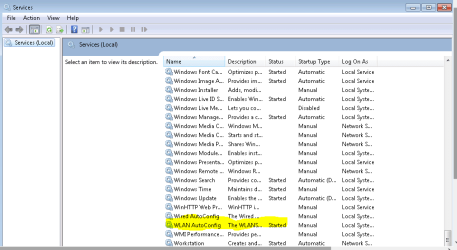
Right click on the Start button/orb, on the top select Services, locate WLAN Auto Config service and make sure it's 'Started'.

An update will be nice.

Edit: I was 5 min. late in this post, see previous post with similar suggestion.
 

Attachments

  • WLAN Auto config.PNG
    WLAN Auto config.PNG
    14.8 KB · Views: 6

My Computer My Computer

Computer Manufacturer/Model Number
Lenovo Desktop/Samsung Laptop
OS
Win7 & Win8 64bit
CPU
Intel i5
Internet Speed
Charter-20 Mbps
Antivirus
Avast
Browser
FF, IE9 and Chrome
Looks like I beat you to it!

I also have an old Acer 4810 and following a gut feeling that one or more services were incorrectly configured I got the two laptops side by side and went through all the Services, paying particular attention to anything wifi related. I found four items which were different and set the faulty machine to be the same, then rebooted and then got the list of available wifi networks which had previously disappeared. Yippee! I then just had to login with the password and I had wireless connection back.

2xg

I did notice that WLAN autoconfig was one the the services I needed to change, so you were right on the money!

My thanks to you both.

Just curious, what was the download fix about? Was it going to correct these services?
 

My Computer My Computer

Computer type
Laptop
Computer Manufacturer/Model Number
HP Envy 15
OS
Windows 8.1.1
CPU
AMD A10-5750M APU with Radeon(tm) HD Graphics
Memory
8gb
Hard Drives
1TB Serial ATA 16mb buffer
Back
Top