Cannot Seem to Install IE11

boweasel

New member
Power User
Local time
11:05 PM
Messages
678
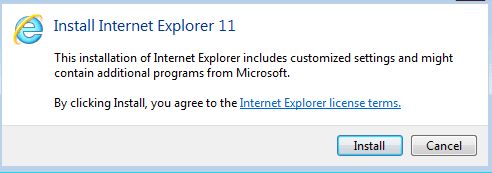
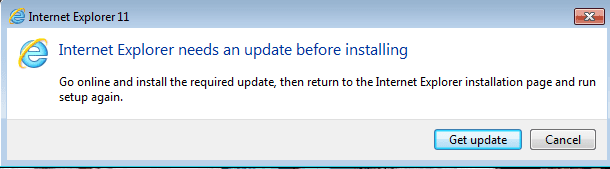
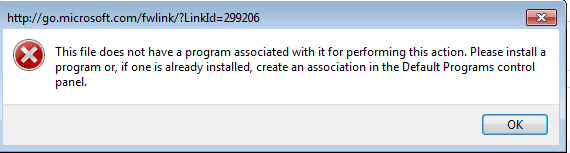
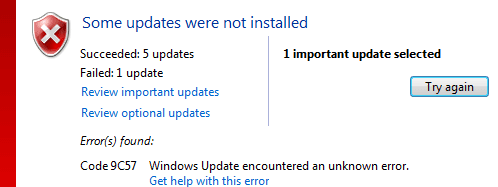
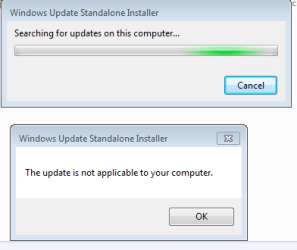
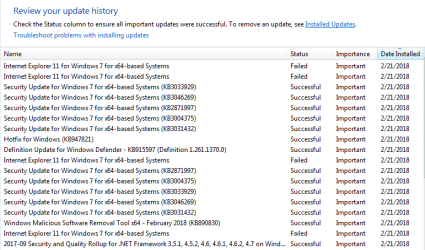
Updates seem to work for everything bit IE11
I've downloaded and run the SURT without effect.
I've run the system file checker - no integrity violations.
I've tried to download and install the prerequisites for IE11
 

Attachments
  • Ie11-8.PNG
    Ie11-8.PNG
    12.4 KB · Views: 0
  • Ie11-1.PNG
    Ie11-1.PNG
    4.3 KB · Views: 14
  • Ie11-2.PNG
    Ie11-2.PNG
    5.4 KB · Views: 14
  • Ie11-3.PNG
    Ie11-3.PNG
    4.6 KB · Views: 14
  • Ie11-6.PNG
    Ie11-6.PNG
    5.9 KB · Views: 14
  • Ie11-7.PNG
    Ie11-7.PNG
    5 KB · Views: 14

My Computer

Computer type
Laptop
OS
Windows 7 home premium 64 bit
CPU
AMD K10
Motherboard
Hewlett-Packard 1444 (Socket S1G4)
Memory
3.00GB Dual-Channel DDR3 @ 532MHz
Graphics Card(s)
ATI AMD M880G with ATI Mobility Radeon HD 4250 (HP)
Sound Card
Realtek
Screen Resolution
1366 x 768
Hard Drives
465GB Western Digital
Antivirus
MSE
There are a lot of update problems with Microsoft right now. It seems that they aren't sufficiently tested before they are released.

When did this problem start? If you can determine when, then you might uninstall all Windows updates which have been installed from that date forward, including all updates related to IE. Then try the IE 11 install after doing that. Once you have successfully installed and tested IE 11, then reinstall all Windows updates.

Be sure to do a full backup of your computer before starting this process.
 

My Computer

Computer type
PC/Desktop
Computer Manufacturer/Model Number
Dell
OS
Linux Mint 18.2 xfce 64-bit (VMWare host) / Windows 8.1 Pro 32-bit (VMWare guest)
CPU
Haswell
Memory
4 GB
Monitor(s) Displays
Acer 23"
Screen Resolution
1920 x 1080
Hard Drives
Two hard drives, 1TB each: One for Linux, one for my data.
Keyboard
IBM Model M
Antivirus
Sophos (Linux), Trend Micro (Windows)
Browser
Firefox, Opera
Other Info
I use Samba to share my data drive with the other computers at my house and with my guest session in VMWare Workstation Player.
There are a lot of update problems with Microsoft right now. It seems that they aren't sufficiently tested before they are released.

When did this problem start? If you can determine when, then you might uninstall all Windows updates which have been installed from that date forward, including all updates related to IE. Then try the IE 11 install after doing that. Once you have successfully installed and tested IE 11, then reinstall all Windows updates.

Be sure to do a full backup of your computer before starting this process.
I had a 3-4 day thread I started last week in the Drivers sub-forum about a Dell BIOS update frying the MOBO. Yesterday I took the new HDD out of the Dell Inspiron put in in a Lenovo ThinhCentre, wiped the drive and installed W7 Pro. That disk must have been newer than the W7 Home disk I'd used on the Inspiron because it need few updates.

All the updates seemed to install except for IE11.
 

My Computer

Computer type
Laptop
OS
Windows 7 home premium 64 bit
CPU
AMD K10
Motherboard
Hewlett-Packard 1444 (Socket S1G4)
Memory
3.00GB Dual-Channel DDR3 @ 532MHz
Graphics Card(s)
ATI AMD M880G with ATI Mobility Radeon HD 4250 (HP)
Sound Card
Realtek
Screen Resolution
1366 x 768
Hard Drives
465GB Western Digital
Antivirus
MSE
Have you installed Windows 7 service pack 1? I don't see it in the above list of updates that have successfully installed.

That is a requirement in order to be able to install IE 11.
 

My Computer

Computer type
PC/Desktop
Computer Manufacturer/Model Number
Dell
OS
Linux Mint 18.2 xfce 64-bit (VMWare host) / Windows 8.1 Pro 32-bit (VMWare guest)
CPU
Haswell
Memory
4 GB
Monitor(s) Displays
Acer 23"
Screen Resolution
1920 x 1080
Hard Drives
Two hard drives, 1TB each: One for Linux, one for my data.
Keyboard
IBM Model M
Antivirus
Sophos (Linux), Trend Micro (Windows)
Browser
Firefox, Opera
Other Info
I use Samba to share my data drive with the other computers at my house and with my guest session in VMWare Workstation Player.
Have you installed Windows 7 service pack 1? That is a requirement in order to be able to install IE 11.
Of course. The disk actually had IE11 on it.
 

My Computer

Computer type
Laptop
OS
Windows 7 home premium 64 bit
CPU
AMD K10
Motherboard
Hewlett-Packard 1444 (Socket S1G4)
Memory
3.00GB Dual-Channel DDR3 @ 532MHz
Graphics Card(s)
ATI AMD M880G with ATI Mobility Radeon HD 4250 (HP)
Sound Card
Realtek
Screen Resolution
1366 x 768
Hard Drives
465GB Western Digital
Antivirus
MSE
Is this an install from another computer? You can't put a hard drive from one computer into another unless they are exactly the same model. Windows needs to be reinstalled to avoid driver and registry conflicts. On top of that if your license came with another computer than it can only be used on the computer that it came with otherwise you have violation of the terms of service. Only a retail or volume license can be transferred to another computer. Help! Dell Inspiron 'Dead' After BIOS Update - Windows 7 Help Forums
 

My Computers

System One System Two

The last paragraph of #3 addresses the issue of the Dell Inspiron and it's almost brand new hard drive. Since it was a different OS - the Lenovo runs W7 Pro, while the Inspiron ran W7 Home - I entered the 25 character Product Code from the Lenovo after installing the OS. And yes it is activated.
 

My Computer

Computer type
Laptop
OS
Windows 7 home premium 64 bit
CPU
AMD K10
Motherboard
Hewlett-Packard 1444 (Socket S1G4)
Memory
3.00GB Dual-Channel DDR3 @ 532MHz
Graphics Card(s)
ATI AMD M880G with ATI Mobility Radeon HD 4250 (HP)
Sound Card
Realtek
Screen Resolution
1366 x 768
Hard Drives
465GB Western Digital
Antivirus
MSE
Back
Top