Cannot send mail from web links... IE goes totally crazy

labecs

New member
Local time
8:59 AM
Messages
51
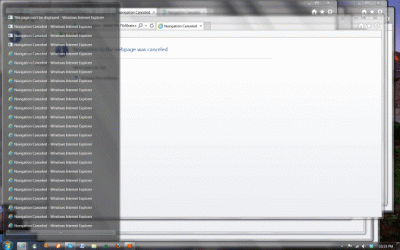
Whenever I try to send an email through a web link, I get an error message saying my mail program is not correctly installed. My email program does have all it's defaults. And on top of that, IE then goes crazy and starts opening pages non stop, I have counted 50 pages before I had to press the off button, cause not even task manager will work. I have IE 10 (hate it!) :mad:
Can you help me with this, please?
 

My Computer My Computer

Computer Manufacturer/Model Number
HP Pavillion
OS
Windows 7
CPU
Intel Core 2 Quad q6600 @2.40GHz
Memory
6.00 GB
Graphics Card(s)
Intel G33/G31 Express Chipset Family (???)
Sound Card
Realtek High Definition Audio
Monitor(s) Displays
HP w2207 Wide LCD Monitor
Screen Resolution
1680 x 1050
Keyboard
Logitech DiNovo Edge
Mouse
Logitech MX Revolution or Optical Trackman
Other Info
I'm not a gamer, I just run programs like Photoshop, SwishMax, Dreamweaver and Word 2007. I have the latest Kaspersky Internet Security (2010)
labecs run DDS

Click here DDS

:ar: Click on Download Now button

:ar: When the download is complete . Drag the DDS program from the Downloads folder to your Desktop

:ar: Right-click the DDS icon on the Desktop choose Run as administrator to run the tool.

:ar: Place a check next to attact.txt and click Start . When done, DDS will open two logs
DDS.txt
Attach.txt

:ar: Save two logs onto your desktop and upload them with your reply
 

My Computer My Computer

Computer Manufacturer/Model Number
Custom Built
OS
Windows 7 Ultimate 32-Bit & Windows 7 Ultimate 64-Bit
CPU
Intel Core i7 CPU 950 @ 3.07GHz
Motherboard
ASUS P6T DELUXE V2
Memory
OCZ 6GB (3 x 2GB) 240-Pin DDR3 SDRAM DDR3 1600 OCZ3X1600R2
Graphics Card(s)
ATI Radeon HD 5700 Series
Sound Card
OnBoard
Hard Drives
WD6400AACS-00M3B0 (640GB SATA )
PSU
CORSAIR 850w
Case
NZXT LEXA
Cooling
Intel Stock Heatsink Fan
Keyboard
Microsoft Wireless Laser Keyboard 7000
Mouse
Microsoft Wireless Laser Mouse 7000
Thank you!
 

Attachments

My Computer My Computer

Computer Manufacturer/Model Number
HP Pavillion
OS
Windows 7
CPU
Intel Core 2 Quad q6600 @2.40GHz
Memory
6.00 GB
Graphics Card(s)
Intel G33/G31 Express Chipset Family (???)
Sound Card
Realtek High Definition Audio
Monitor(s) Displays
HP w2207 Wide LCD Monitor
Screen Resolution
1680 x 1050
Keyboard
Logitech DiNovo Edge
Mouse
Logitech MX Revolution or Optical Trackman
Other Info
I'm not a gamer, I just run programs like Photoshop, SwishMax, Dreamweaver and Word 2007. I have the latest Kaspersky Internet Security (2010)
Run AdwCleaner


Click here AdwCleaner

:ar: Click on Download Now button

:ar: Save to the Desktop

:ar: Close all open programs.

:ar: Right-click on AdwCleaner.exe and choose Run as administrator

:ar: Click on Delete and confirm the prompt.

:ar: After it finishes, the computer is restarted.

Upload the log saved at C:\AdwCleaner[S1].txt

Once you're back on the Desktop download RevoUninstaller

Download Link RevoUninstaller :ar: RevoUninstaller Free

Uninstall Spybot

Instructions :

Double click Revo Uninstaller to run it.
From the list of programs double click on Spybot Search and Destroy to remove
When prompted if you want to uninstall click Yes.
Be sure the Advanced option is selected then click Next.
The program will run, If prompted again click Yes
when the built-in uninstaller is finished click on Next.
Once the program has searched for leftovers click Next.
Check/tick the bolded items only on the list then click Delete
when prompted click on Yes and then on next.
put a check on any folders that are found and select delete
when prompted select yes then on next
Once done click Finish.
 

My Computer My Computer

Computer Manufacturer/Model Number
Custom Built
OS
Windows 7 Ultimate 32-Bit & Windows 7 Ultimate 64-Bit
CPU
Intel Core i7 CPU 950 @ 3.07GHz
Motherboard
ASUS P6T DELUXE V2
Memory
OCZ 6GB (3 x 2GB) 240-Pin DDR3 SDRAM DDR3 1600 OCZ3X1600R2
Graphics Card(s)
ATI Radeon HD 5700 Series
Sound Card
OnBoard
Hard Drives
WD6400AACS-00M3B0 (640GB SATA )
PSU
CORSAIR 850w
Case
NZXT LEXA
Cooling
Intel Stock Heatsink Fan
Keyboard
Microsoft Wireless Laser Keyboard 7000
Mouse
Microsoft Wireless Laser Mouse 7000
Here's the log. However, it deleted all my Babylon software which I use for work!
 

Attachments

My Computer My Computer

Computer Manufacturer/Model Number
HP Pavillion
OS
Windows 7
CPU
Intel Core 2 Quad q6600 @2.40GHz
Memory
6.00 GB
Graphics Card(s)
Intel G33/G31 Express Chipset Family (???)
Sound Card
Realtek High Definition Audio
Monitor(s) Displays
HP w2207 Wide LCD Monitor
Screen Resolution
1680 x 1050
Keyboard
Logitech DiNovo Edge
Mouse
Logitech MX Revolution or Optical Trackman
Other Info
I'm not a gamer, I just run programs like Photoshop, SwishMax, Dreamweaver and Word 2007. I have the latest Kaspersky Internet Security (2010)
labecs ,

Babylon is a browser hijack . Also known as adware .
 

My Computer My Computer

Computer Manufacturer/Model Number
Custom Built
OS
Windows 7 Ultimate 32-Bit & Windows 7 Ultimate 64-Bit
CPU
Intel Core i7 CPU 950 @ 3.07GHz
Motherboard
ASUS P6T DELUXE V2
Memory
OCZ 6GB (3 x 2GB) 240-Pin DDR3 SDRAM DDR3 1600 OCZ3X1600R2
Graphics Card(s)
ATI Radeon HD 5700 Series
Sound Card
OnBoard
Hard Drives
WD6400AACS-00M3B0 (640GB SATA )
PSU
CORSAIR 850w
Case
NZXT LEXA
Cooling
Intel Stock Heatsink Fan
Keyboard
Microsoft Wireless Laser Keyboard 7000
Mouse
Microsoft Wireless Laser Mouse 7000
I know, but I have purchased the program dictionary, and that is gone too.
 

My Computer My Computer

Computer Manufacturer/Model Number
HP Pavillion
OS
Windows 7
CPU
Intel Core 2 Quad q6600 @2.40GHz
Memory
6.00 GB
Graphics Card(s)
Intel G33/G31 Express Chipset Family (???)
Sound Card
Realtek High Definition Audio
Monitor(s) Displays
HP w2207 Wide LCD Monitor
Screen Resolution
1680 x 1050
Keyboard
Logitech DiNovo Edge
Mouse
Logitech MX Revolution or Optical Trackman
Other Info
I'm not a gamer, I just run programs like Photoshop, SwishMax, Dreamweaver and Word 2007. I have the latest Kaspersky Internet Security (2010)
You could reinstall it . Just make sure it doesn't install the toolbars .
 

My Computer My Computer

Computer Manufacturer/Model Number
Custom Built
OS
Windows 7 Ultimate 32-Bit & Windows 7 Ultimate 64-Bit
CPU
Intel Core i7 CPU 950 @ 3.07GHz
Motherboard
ASUS P6T DELUXE V2
Memory
OCZ 6GB (3 x 2GB) 240-Pin DDR3 SDRAM DDR3 1600 OCZ3X1600R2
Graphics Card(s)
ATI Radeon HD 5700 Series
Sound Card
OnBoard
Hard Drives
WD6400AACS-00M3B0 (640GB SATA )
PSU
CORSAIR 850w
Case
NZXT LEXA
Cooling
Intel Stock Heatsink Fan
Keyboard
Microsoft Wireless Laser Keyboard 7000
Mouse
Microsoft Wireless Laser Mouse 7000
I am still struggling with this. I tried sending an email by clicking on an address on another one of my emails, and the same thing happened. IE starts going crazy opening windows and I have to shut down the computer. So, it's not an online thing... :(
 

My Computer My Computer

Computer Manufacturer/Model Number
HP Pavillion
OS
Windows 7
CPU
Intel Core 2 Quad q6600 @2.40GHz
Memory
6.00 GB
Graphics Card(s)
Intel G33/G31 Express Chipset Family (???)
Sound Card
Realtek High Definition Audio
Monitor(s) Displays
HP w2207 Wide LCD Monitor
Screen Resolution
1680 x 1050
Keyboard
Logitech DiNovo Edge
Mouse
Logitech MX Revolution or Optical Trackman
Other Info
I'm not a gamer, I just run programs like Photoshop, SwishMax, Dreamweaver and Word 2007. I have the latest Kaspersky Internet Security (2010)
   Warning
You will need a USB FLASH DRIVE


   Tip
Download the Tool from a non infected PC


Download Farbar Recovery Scan Tool

Choose one that goes with your OS bit version . Save the file to a USB Flash drive

32-bit Version OS :ar: Farbar Recovery Scan Tool

64-Bit Version OS :ar: Farbar Recovery Scan Tool x64


   Note
Click the :orb: button and right-click Computer .Select Properties . Look for System Type: which will say 32-bit Operating System or 64-bit Operating System


Plug the flash drive into the infected PC.

Enter System Recovery Options.

:ar: To enter System Recovery Options from the Advanced Boot Options:
Restart the computer.
As soon as the BIOS is loaded begin tapping the F8 key until Advanced Boot Options appears.
Use the arrow keys to select Repair Your Computer menu item.
Select US as the keyboard language settings, and then click Next.
Select the operating system you want to repair, and then click Next.
Select your user account an click Next.

:ar: To enter System Recovery Options by using Windows installation disc:
Insert the installation disc.
Restart your computer.
If prompted, press any key to start Windows from the installation disc. If your computer is not configured to start from a CD or DVD, check your BIOS settings.
Click Repair your computer.
Select US as the keyboard language settings, and then click Next.
Select the operating system you want to repair, and then click Next.
Select your user account and click Next.

:ar: On the System Recovery Options menu you will get the following options:

  • Startup Repair

  • System Restore

  • Windows Complete PC Restore

  • Windows Memory Diagnostic Tool

  • Command Prompt

Select Command Prompt

In the command window type X:\FRST.exe (for x64 bit version type X:\FRST64.exe) and press Enter
   Note
Replace letter X with the drive letter of your flash drive.

   Tip
Type the commands below to see what your letter is for the USB drive and press ENTER after each command

Code:
Diskpart
List volume
The tool will start to run.
When the tool opens click Yes to disclaimer.
Press Scan button.
FRST will let you know when the scan is complete and has written the FRST.txt to file
Please copy and paste both logs in your reply.(FRST.txt and Addition.txt)

 

My Computer My Computer

Computer Manufacturer/Model Number
Custom Built
OS
Windows 7 Ultimate 32-Bit & Windows 7 Ultimate 64-Bit
CPU
Intel Core i7 CPU 950 @ 3.07GHz
Motherboard
ASUS P6T DELUXE V2
Memory
OCZ 6GB (3 x 2GB) 240-Pin DDR3 SDRAM DDR3 1600 OCZ3X1600R2
Graphics Card(s)
ATI Radeon HD 5700 Series
Sound Card
OnBoard
Hard Drives
WD6400AACS-00M3B0 (640GB SATA )
PSU
CORSAIR 850w
Case
NZXT LEXA
Cooling
Intel Stock Heatsink Fan
Keyboard
Microsoft Wireless Laser Keyboard 7000
Mouse
Microsoft Wireless Laser Mouse 7000
It doesn't work. It doesn't recognize the location of the flash drive...
 

My Computer My Computer

Computer Manufacturer/Model Number
HP Pavillion
OS
Windows 7
CPU
Intel Core 2 Quad q6600 @2.40GHz
Memory
6.00 GB
Graphics Card(s)
Intel G33/G31 Express Chipset Family (???)
Sound Card
Realtek High Definition Audio
Monitor(s) Displays
HP w2207 Wide LCD Monitor
Screen Resolution
1680 x 1050
Keyboard
Logitech DiNovo Edge
Mouse
Logitech MX Revolution or Optical Trackman
Other Info
I'm not a gamer, I just run programs like Photoshop, SwishMax, Dreamweaver and Word 2007. I have the latest Kaspersky Internet Security (2010)
When you have the USB Flash drive plugged into the problematic PC .

Type in the commands below and press [ENTER] after each command

diskpart


list volume


Does it see the drive there? it should also provide you a Letter for the drive .
 

My Computer My Computer

Computer Manufacturer/Model Number
Custom Built
OS
Windows 7 Ultimate 32-Bit & Windows 7 Ultimate 64-Bit
CPU
Intel Core i7 CPU 950 @ 3.07GHz
Motherboard
ASUS P6T DELUXE V2
Memory
OCZ 6GB (3 x 2GB) 240-Pin DDR3 SDRAM DDR3 1600 OCZ3X1600R2
Graphics Card(s)
ATI Radeon HD 5700 Series
Sound Card
OnBoard
Hard Drives
WD6400AACS-00M3B0 (640GB SATA )
PSU
CORSAIR 850w
Case
NZXT LEXA
Cooling
Intel Stock Heatsink Fan
Keyboard
Microsoft Wireless Laser Keyboard 7000
Mouse
Microsoft Wireless Laser Mouse 7000
This is the only file that was there... forgive me for being such a newb :(
 

Attachments

My Computer My Computer

Computer Manufacturer/Model Number
HP Pavillion
OS
Windows 7
CPU
Intel Core 2 Quad q6600 @2.40GHz
Memory
6.00 GB
Graphics Card(s)
Intel G33/G31 Express Chipset Family (???)
Sound Card
Realtek High Definition Audio
Monitor(s) Displays
HP w2207 Wide LCD Monitor
Screen Resolution
1680 x 1050
Keyboard
Logitech DiNovo Edge
Mouse
Logitech MX Revolution or Optical Trackman
Other Info
I'm not a gamer, I just run programs like Photoshop, SwishMax, Dreamweaver and Word 2007. I have the latest Kaspersky Internet Security (2010)
Try to run malwarebytes

Download Link :ar: MalwareBytes

When the installation is done uncheck Enable free trial of Malwarebytes (see image below )

2013-03-09_224312_zps62dc7c23.jpg


Update the definitions and do a full scan

The email software you use is it Incredimail ?
 

My Computer My Computer

Computer Manufacturer/Model Number
Custom Built
OS
Windows 7 Ultimate 32-Bit & Windows 7 Ultimate 64-Bit
CPU
Intel Core i7 CPU 950 @ 3.07GHz
Motherboard
ASUS P6T DELUXE V2
Memory
OCZ 6GB (3 x 2GB) 240-Pin DDR3 SDRAM DDR3 1600 OCZ3X1600R2
Graphics Card(s)
ATI Radeon HD 5700 Series
Sound Card
OnBoard
Hard Drives
WD6400AACS-00M3B0 (640GB SATA )
PSU
CORSAIR 850w
Case
NZXT LEXA
Cooling
Intel Stock Heatsink Fan
Keyboard
Microsoft Wireless Laser Keyboard 7000
Mouse
Microsoft Wireless Laser Mouse 7000
I already ran Malwarebytes and couldn't find a thing. Yes, I use Incredimal. I am starting to think it might be a problem with that....
 

My Computer My Computer

Computer Manufacturer/Model Number
HP Pavillion
OS
Windows 7
CPU
Intel Core 2 Quad q6600 @2.40GHz
Memory
6.00 GB
Graphics Card(s)
Intel G33/G31 Express Chipset Family (???)
Sound Card
Realtek High Definition Audio
Monitor(s) Displays
HP w2207 Wide LCD Monitor
Screen Resolution
1680 x 1050
Keyboard
Logitech DiNovo Edge
Mouse
Logitech MX Revolution or Optical Trackman
Other Info
I'm not a gamer, I just run programs like Photoshop, SwishMax, Dreamweaver and Word 2007. I have the latest Kaspersky Internet Security (2010)
labecs

Take a look at the settings of the program .
 

My Computer My Computer

Computer Manufacturer/Model Number
Custom Built
OS
Windows 7 Ultimate 32-Bit & Windows 7 Ultimate 64-Bit
CPU
Intel Core i7 CPU 950 @ 3.07GHz
Motherboard
ASUS P6T DELUXE V2
Memory
OCZ 6GB (3 x 2GB) 240-Pin DDR3 SDRAM DDR3 1600 OCZ3X1600R2
Graphics Card(s)
ATI Radeon HD 5700 Series
Sound Card
OnBoard
Hard Drives
WD6400AACS-00M3B0 (640GB SATA )
PSU
CORSAIR 850w
Case
NZXT LEXA
Cooling
Intel Stock Heatsink Fan
Keyboard
Microsoft Wireless Laser Keyboard 7000
Mouse
Microsoft Wireless Laser Mouse 7000
It all looks good. It is set as the default email program. I will uninstall and install again, and see what happens... :rolleyes:
 

My Computer My Computer

Computer Manufacturer/Model Number
HP Pavillion
OS
Windows 7
CPU
Intel Core 2 Quad q6600 @2.40GHz
Memory
6.00 GB
Graphics Card(s)
Intel G33/G31 Express Chipset Family (???)
Sound Card
Realtek High Definition Audio
Monitor(s) Displays
HP w2207 Wide LCD Monitor
Screen Resolution
1680 x 1050
Keyboard
Logitech DiNovo Edge
Mouse
Logitech MX Revolution or Optical Trackman
Other Info
I'm not a gamer, I just run programs like Photoshop, SwishMax, Dreamweaver and Word 2007. I have the latest Kaspersky Internet Security (2010)
I uninstalled Incredimail completely, and reinstalled fresh... same problem.:confused:
 

My Computer My Computer

Computer Manufacturer/Model Number
HP Pavillion
OS
Windows 7
CPU
Intel Core 2 Quad q6600 @2.40GHz
Memory
6.00 GB
Graphics Card(s)
Intel G33/G31 Express Chipset Family (???)
Sound Card
Realtek High Definition Audio
Monitor(s) Displays
HP w2207 Wide LCD Monitor
Screen Resolution
1680 x 1050
Keyboard
Logitech DiNovo Edge
Mouse
Logitech MX Revolution or Optical Trackman
Other Info
I'm not a gamer, I just run programs like Photoshop, SwishMax, Dreamweaver and Word 2007. I have the latest Kaspersky Internet Security (2010)
I'm going nuts with this... still happening. Can I totally uninstall IE and install again? I'm sure that's the problem, otherwise, why would it start opening windows like crazy and there's no way to stop it, except turning the computer off, since it won't let me click on anything else while it's opening those windows...
 

Attachments

  • Image1.gif
    Image1.gif
    92.4 KB · Views: 4
Last edited:

My Computer My Computer

Computer Manufacturer/Model Number
HP Pavillion
OS
Windows 7
CPU
Intel Core 2 Quad q6600 @2.40GHz
Memory
6.00 GB
Graphics Card(s)
Intel G33/G31 Express Chipset Family (???)
Sound Card
Realtek High Definition Audio
Monitor(s) Displays
HP w2207 Wide LCD Monitor
Screen Resolution
1680 x 1050
Keyboard
Logitech DiNovo Edge
Mouse
Logitech MX Revolution or Optical Trackman
Other Info
I'm not a gamer, I just run programs like Photoshop, SwishMax, Dreamweaver and Word 2007. I have the latest Kaspersky Internet Security (2010)
Lets try this

Close all Windows .

Copy and paste the code below into Notepad. To open Notepad, click on :orb: . Inside
2nqbqes.png
type notepad and then press <ENTER> button .

Code:
@Echo off
pushd\windows\system32\drivers\etc
attrib -h -s -r hosts
echo 127.0.0.1 localhost>HOSTS
attrib +r +h +s hosts
popd
ipconfig /release
ipconfig /renew
ipconfig /flushdns
netsh winsock reset all
netsh int ip reset all
cls
echo Script finished.
pause
del %0

In Notepad, click File and then Save. Type reset.bat inside file name section . Change Save as Type to All Files, and then save the file to your desktop. After the file is saved, right click on the RESET.bat choose
mawket.jpg
. Once it's finished running, restart your computer. Check to see if your Internet connection is restored.
 

My Computer My Computer

Computer Manufacturer/Model Number
Custom Built
OS
Windows 7 Ultimate 32-Bit & Windows 7 Ultimate 64-Bit
CPU
Intel Core i7 CPU 950 @ 3.07GHz
Motherboard
ASUS P6T DELUXE V2
Memory
OCZ 6GB (3 x 2GB) 240-Pin DDR3 SDRAM DDR3 1600 OCZ3X1600R2
Graphics Card(s)
ATI Radeon HD 5700 Series
Sound Card
OnBoard
Hard Drives
WD6400AACS-00M3B0 (640GB SATA )
PSU
CORSAIR 850w
Case
NZXT LEXA
Cooling
Intel Stock Heatsink Fan
Keyboard
Microsoft Wireless Laser Keyboard 7000
Mouse
Microsoft Wireless Laser Mouse 7000
Back
Top