Solved How Do I Delete AOL As Default Email Client?

poolmon

New member
Power User
VIP
Local time
10:01 PM
Messages
172
I use AOL mail in 9.7 AOL Desktop & I tried to set AOL as my default email client in the Win 7 Default Programs>Set Program Access And Computer Defaults>Associations/Protocols. There was only 1 "Protocol" showing for AOL Software namely "Mail To" so I checked it.

I did this because more websites are showing live links to email addresses (rather than the address) and whenever I clicked on the link to get the address it would only give a message "no email client" and I could not get the actual address.

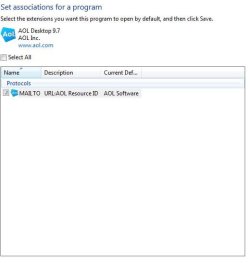
Now whenever I click on an email link on a web page my browser starts opening an infinite number of new windows/tabs. I tried to go back into the Default Programs an uncheck AOL as the Protocol but it's greyed out (in the Custom drop down which is the only place I can even see it) and does not let me undo it. How can I undo this and delete AOL as the "Mail To" [URL: AOL Resource ID AOL Software" Protocol; (which is the only protocol that shows). I prefer to have no email client to what's happening now.

When I go to Associations & Protocols I do not see AOL Software listed for any File Type Extension nor do I see the "Mail To" Protocol listed under the list of Protocols at the end of the File Association & Protocols so I cant click on anything to make a change. HELP !!
 
Last edited:

My Computer

OS
win 7

My Computer

Computer type
PC/Desktop
Computer Manufacturer/Model Number
Custom assembled by me :}
OS
Win-7-Pro64bit 7-H-Prem-64bit
CPU
i7-5930K 2nd i9-9940x both water blocked VRM's too
Motherboard
ASUS SABERTOOTH X99 2nd ASUS x299 Apex
Memory
Trident-z 3200C14 2nd Trident-z 3600C16
Graphics Card(s)
EVGA 1080ti ftw3 2nd Titan Xp both water blocked
Sound Card
Built-in Realtek
Monitor(s) Displays
1-AOC G2460PG 24"G-Sync 144Hz/ 2nd 1-ASUS VG248QE 24" 144Hz
Screen Resolution
1920 x 1080 144Hz
Hard Drives
2-Samsung M.2 Evo & Evo Plus
2-Samsung 850 EVO 500GB SSD's/ 3-2.5 W.D. Black 1tb-&3-1tb/3-3.5 WD Black 1tb hdd's
PSU
EVGA SuperNOVA 1000-P2 2nd 1200-P2
Case
2-Corsair Obsidian Series 450D Black ATX Mid Tower
Cooling
Custom water loops
Keyboard
Logitech G710+/ 2nd Logitech G910
Mouse
2-RedDragon M901 Perdition 16400 dpi Gaming mouse = wired
Internet Speed
Comcast Ping 19ms 89.31mbps download speed 6.12mbps upload
Antivirus
Malwarebytes Pro/ Superantispyware Pro
Browser
FireFox & Pale moon
Other Info
2nd ASUS X299 Apex/Intel i9-9940x with Custom water loop/7H-Prem-x64/Corsair 450D case/Ram Trident-z 3600C16 4x8gb / Samsung970Evo plus 500gb SSD/Dual ssd EZ swap evo/PSU EVGA SuperNova 1200w-P2 80+Platinum/GPU Titan Xp /8-ML-140 on push-pull on 2-280GTX rads

My Computer

OS
win 7
Hi sorry the file extensions link on the tutorial is here I would use the batch reset for all windows 7 file type associations and see if it had any positive effects,

Also if you go to set your default programs instead of Associate a file type or protocol with a program is aol listed as a installed program ?

The default would be either Office Outlook or live mail depending on which you have installed,
Double check it if you wouldn't mind,
Start/ Default programs/ Set your default programs.
 

My Computer

Computer type
PC/Desktop
Computer Manufacturer/Model Number
Custom assembled by me :}
OS
Win-7-Pro64bit 7-H-Prem-64bit
CPU
i7-5930K 2nd i9-9940x both water blocked VRM's too
Motherboard
ASUS SABERTOOTH X99 2nd ASUS x299 Apex
Memory
Trident-z 3200C14 2nd Trident-z 3600C16
Graphics Card(s)
EVGA 1080ti ftw3 2nd Titan Xp both water blocked
Sound Card
Built-in Realtek
Monitor(s) Displays
1-AOC G2460PG 24"G-Sync 144Hz/ 2nd 1-ASUS VG248QE 24" 144Hz
Screen Resolution
1920 x 1080 144Hz
Hard Drives
2-Samsung M.2 Evo & Evo Plus
2-Samsung 850 EVO 500GB SSD's/ 3-2.5 W.D. Black 1tb-&3-1tb/3-3.5 WD Black 1tb hdd's
PSU
EVGA SuperNOVA 1000-P2 2nd 1200-P2
Case
2-Corsair Obsidian Series 450D Black ATX Mid Tower
Cooling
Custom water loops
Keyboard
Logitech G710+/ 2nd Logitech G910
Mouse
2-RedDragon M901 Perdition 16400 dpi Gaming mouse = wired
Internet Speed
Comcast Ping 19ms 89.31mbps download speed 6.12mbps upload
Antivirus
Malwarebytes Pro/ Superantispyware Pro
Browser
FireFox & Pale moon
Other Info
2nd ASUS X299 Apex/Intel i9-9940x with Custom water loop/7H-Prem-x64/Corsair 450D case/Ram Trident-z 3600C16 4x8gb / Samsung970Evo plus 500gb SSD/Dual ssd EZ swap evo/PSU EVGA SuperNova 1200w-P2 80+Platinum/GPU Titan Xp /8-ML-140 on push-pull on 2-280GTX rads
Hi sorry the file extensions link on the tutorial is here I would use the batch reset for all windows 7 file type associations and see if it had any positive effects,

Also if you go to set your default programs instead of Associate a file type or protocol with a program is aol listed as a installed program ?

The default would be either Office Outlook or live mail depending on which you have installed,
Double check it if you wouldn't mind,
Start/ Default programs/ Set your default programs.

If I go to "Set your default programs" AOL Desktop 9.7 is in the list under Programs. If I left click on it to select it a dialog box opens asking me to either:
1 Set this program as default to open all file types and protocols it can open by default or
2. Choose defaults for this program. Under this second category there is only one protocol listed that I can assign. That's the "MAIL TO" protocol. That protocol is checked but is greyed out so I cannot uncheck it.

Before I assigned AOL to the MAIL TO protocol which started the problem, AOL was not assigned to any file type nor to any protocols. The list of available protocols for AOL to which I could select from only contained one, namely the MAIL TO protocol, so I checked it and the problem began. Now I can't figure out how to uncheck it as the MAIL TO protocol. I don't use any other mail services nor do I want to add any. I just would like to get back to having no default MAIL TO protocol.
 

My Computer

OS
win 7
Go back to default programs,
This time go to Set program access and computer defaults,
Custom section drop down arrow,
If aol is listed Uncheck the box to Enable access to this program,
This should be selectable if not take a screen shot of the listings,

Outside of system restore to an earlier time before you altered the settings ?
Have you contacted aol ?
Cheers.
 

My Computer

Computer type
PC/Desktop
Computer Manufacturer/Model Number
Custom assembled by me :}
OS
Win-7-Pro64bit 7-H-Prem-64bit
CPU
i7-5930K 2nd i9-9940x both water blocked VRM's too
Motherboard
ASUS SABERTOOTH X99 2nd ASUS x299 Apex
Memory
Trident-z 3200C14 2nd Trident-z 3600C16
Graphics Card(s)
EVGA 1080ti ftw3 2nd Titan Xp both water blocked
Sound Card
Built-in Realtek
Monitor(s) Displays
1-AOC G2460PG 24"G-Sync 144Hz/ 2nd 1-ASUS VG248QE 24" 144Hz
Screen Resolution
1920 x 1080 144Hz
Hard Drives
2-Samsung M.2 Evo & Evo Plus
2-Samsung 850 EVO 500GB SSD's/ 3-2.5 W.D. Black 1tb-&3-1tb/3-3.5 WD Black 1tb hdd's
PSU
EVGA SuperNOVA 1000-P2 2nd 1200-P2
Case
2-Corsair Obsidian Series 450D Black ATX Mid Tower
Cooling
Custom water loops
Keyboard
Logitech G710+/ 2nd Logitech G910
Mouse
2-RedDragon M901 Perdition 16400 dpi Gaming mouse = wired
Internet Speed
Comcast Ping 19ms 89.31mbps download speed 6.12mbps upload
Antivirus
Malwarebytes Pro/ Superantispyware Pro
Browser
FireFox & Pale moon
Other Info
2nd ASUS X299 Apex/Intel i9-9940x with Custom water loop/7H-Prem-x64/Corsair 450D case/Ram Trident-z 3600C16 4x8gb / Samsung970Evo plus 500gb SSD/Dual ssd EZ swap evo/PSU EVGA SuperNova 1200w-P2 80+Platinum/GPU Titan Xp /8-ML-140 on push-pull on 2-280GTX rads
Go back to default programs,
This time go to Set program access and computer defaults,
Custom section drop down arrow,
If aol is listed Uncheck the box to Enable access to this program,
This should be selectable if not take a screen shot of the listings,

Outside of system restore to an earlier time before you altered the settings ?
Have you contacted aol ?
Cheers.

All it shows under "Custom" then under "Choose a default e-mail program" is a single radio button labeled " Use my current e-mail program." AOL does not show up there as a specified program nor are there any other choices under that category.
 

Attachments

  • Screenshot1.JPG
    Screenshot1.JPG
    58.9 KB · Views: 1

My Computer

OS
win 7
Thanks for the screen shot very weird,
I would suggest considering downloading a email program to straighten out the settings,
Windows essentials 2012 is free and you might already have it installed,
Click Start and All Programs,
Near the bottom of the list there might be a Windows Live or Windows essentials folder,
If not please download it from here,
Pick your language and there are some useful programs included in the package use the recommended install,
Or the Custom install and just the ones you want at this point Mail/ Photo gallery and Movie maker are my recommends ;)
Windows Essentials download options - Free Email, Instant Messaging, and Photo Editing Software from Microsoft

http://windows.microsoft.com/en-US/windows-live/mail-add-email-account-faq
 

My Computer

Computer type
PC/Desktop
Computer Manufacturer/Model Number
Custom assembled by me :}
OS
Win-7-Pro64bit 7-H-Prem-64bit
CPU
i7-5930K 2nd i9-9940x both water blocked VRM's too
Motherboard
ASUS SABERTOOTH X99 2nd ASUS x299 Apex
Memory
Trident-z 3200C14 2nd Trident-z 3600C16
Graphics Card(s)
EVGA 1080ti ftw3 2nd Titan Xp both water blocked
Sound Card
Built-in Realtek
Monitor(s) Displays
1-AOC G2460PG 24"G-Sync 144Hz/ 2nd 1-ASUS VG248QE 24" 144Hz
Screen Resolution
1920 x 1080 144Hz
Hard Drives
2-Samsung M.2 Evo & Evo Plus
2-Samsung 850 EVO 500GB SSD's/ 3-2.5 W.D. Black 1tb-&3-1tb/3-3.5 WD Black 1tb hdd's
PSU
EVGA SuperNOVA 1000-P2 2nd 1200-P2
Case
2-Corsair Obsidian Series 450D Black ATX Mid Tower
Cooling
Custom water loops
Keyboard
Logitech G710+/ 2nd Logitech G910
Mouse
2-RedDragon M901 Perdition 16400 dpi Gaming mouse = wired
Internet Speed
Comcast Ping 19ms 89.31mbps download speed 6.12mbps upload
Antivirus
Malwarebytes Pro/ Superantispyware Pro
Browser
FireFox & Pale moon
Other Info
2nd ASUS X299 Apex/Intel i9-9940x with Custom water loop/7H-Prem-x64/Corsair 450D case/Ram Trident-z 3600C16 4x8gb / Samsung970Evo plus 500gb SSD/Dual ssd EZ swap evo/PSU EVGA SuperNova 1200w-P2 80+Platinum/GPU Titan Xp /8-ML-140 on push-pull on 2-280GTX rads
I'm including a screen shot of the "Set associations for programs" window. It shows AOL URL but its greyed out and can't be changed from here.

The second screenshot immediately below it is from the "Associate a file type or protocol with a specific program" window. It displays all protocols at the end of the association listing but this Mail To one isn't even listed, so it cant be changed from here either.

I have not yet downloaded a new email client but will look at doing so. I just wanted to send these additional screens in case you might have some additional thoughts.
 

Attachments

  • Screen Shot 3.JPG
    Screen Shot 3.JPG
    24.1 KB · Views: 7
  • Screen Shot 4.JPG
    Screen Shot 4.JPG
    22.1 KB · Views: 7

My Computer

OS
win 7
Hi,
The only way I know how to remove a listing from protocols or file types for that matter is to Browser for another program to associate it with ?
This is why downloading windows essentials 2012 is needed in my opinion,
Then review how to add a email address to the new program,
Then the help/ support email links on websites might actually work as expected ;)

You can also I believe I already posted this but you can uninstall aol toolbar or the program you associated the protocol with ?
Cheers.
 

My Computer

Computer type
PC/Desktop
Computer Manufacturer/Model Number
Custom assembled by me :}
OS
Win-7-Pro64bit 7-H-Prem-64bit
CPU
i7-5930K 2nd i9-9940x both water blocked VRM's too
Motherboard
ASUS SABERTOOTH X99 2nd ASUS x299 Apex
Memory
Trident-z 3200C14 2nd Trident-z 3600C16
Graphics Card(s)
EVGA 1080ti ftw3 2nd Titan Xp both water blocked
Sound Card
Built-in Realtek
Monitor(s) Displays
1-AOC G2460PG 24"G-Sync 144Hz/ 2nd 1-ASUS VG248QE 24" 144Hz
Screen Resolution
1920 x 1080 144Hz
Hard Drives
2-Samsung M.2 Evo & Evo Plus
2-Samsung 850 EVO 500GB SSD's/ 3-2.5 W.D. Black 1tb-&3-1tb/3-3.5 WD Black 1tb hdd's
PSU
EVGA SuperNOVA 1000-P2 2nd 1200-P2
Case
2-Corsair Obsidian Series 450D Black ATX Mid Tower
Cooling
Custom water loops
Keyboard
Logitech G710+/ 2nd Logitech G910
Mouse
2-RedDragon M901 Perdition 16400 dpi Gaming mouse = wired
Internet Speed
Comcast Ping 19ms 89.31mbps download speed 6.12mbps upload
Antivirus
Malwarebytes Pro/ Superantispyware Pro
Browser
FireFox & Pale moon
Other Info
2nd ASUS X299 Apex/Intel i9-9940x with Custom water loop/7H-Prem-x64/Corsair 450D case/Ram Trident-z 3600C16 4x8gb / Samsung970Evo plus 500gb SSD/Dual ssd EZ swap evo/PSU EVGA SuperNova 1200w-P2 80+Platinum/GPU Titan Xp /8-ML-140 on push-pull on 2-280GTX rads
Hi,
The only way I know how to remove a listing from protocols or file types for that matter is to Browser for another program to associate it with ?
This is why downloading windows essentials 2012 is needed in my opinion,
Then review how to add a email address to the new program,
Then the help/ support email links on websites might actually work as expected ;)

You can also I believe I already posted this but you can uninstall aol toolbar or the program you associated the protocol with ?
Cheers.

I got it fixed by following your previous advice to download & install an alternate mail client. I downloaded & installed "gmaildefaultmaker" and selected gmail as the default. When I clicked on a web page mail link it did the same thing (started opening an infinite number of tabs/pages). But then I then uninstalled gmaildefaultmaker and now both gmail & aol have been removed as mail to defaults and my system is back to normal. I tested this on one of my old XP machines before trying it on my WIN7 main computer just to be sure I would not further cause problems.
THANKS FOR ALL YOUR HELP !!!

I learned that just because WIN 7 allows someone with AOL 9.7 software to check it as a default MAIL TO protocol, doesn't mean WIN 7 will play nice with that default AOL box being checked. On my XP computer I found that using gmaildefaultmaker would allow me to select AOL as the default MAIL TO protocol but that it opened into the web based AOL rather than the 9.7 software.
 
Last edited:

My Computer

OS
win 7
Thanks for the update,
No idea where the issue lies on Microsoft or aol but we'll just say aol's mail client needs a tweak or two by them both ;)
Cheers.
 

My Computer

Computer type
PC/Desktop
Computer Manufacturer/Model Number
Custom assembled by me :}
OS
Win-7-Pro64bit 7-H-Prem-64bit
CPU
i7-5930K 2nd i9-9940x both water blocked VRM's too
Motherboard
ASUS SABERTOOTH X99 2nd ASUS x299 Apex
Memory
Trident-z 3200C14 2nd Trident-z 3600C16
Graphics Card(s)
EVGA 1080ti ftw3 2nd Titan Xp both water blocked
Sound Card
Built-in Realtek
Monitor(s) Displays
1-AOC G2460PG 24"G-Sync 144Hz/ 2nd 1-ASUS VG248QE 24" 144Hz
Screen Resolution
1920 x 1080 144Hz
Hard Drives
2-Samsung M.2 Evo & Evo Plus
2-Samsung 850 EVO 500GB SSD's/ 3-2.5 W.D. Black 1tb-&3-1tb/3-3.5 WD Black 1tb hdd's
PSU
EVGA SuperNOVA 1000-P2 2nd 1200-P2
Case
2-Corsair Obsidian Series 450D Black ATX Mid Tower
Cooling
Custom water loops
Keyboard
Logitech G710+/ 2nd Logitech G910
Mouse
2-RedDragon M901 Perdition 16400 dpi Gaming mouse = wired
Internet Speed
Comcast Ping 19ms 89.31mbps download speed 6.12mbps upload
Antivirus
Malwarebytes Pro/ Superantispyware Pro
Browser
FireFox & Pale moon
Other Info
2nd ASUS X299 Apex/Intel i9-9940x with Custom water loop/7H-Prem-x64/Corsair 450D case/Ram Trident-z 3600C16 4x8gb / Samsung970Evo plus 500gb SSD/Dual ssd EZ swap evo/PSU EVGA SuperNova 1200w-P2 80+Platinum/GPU Titan Xp /8-ML-140 on push-pull on 2-280GTX rads
Back
Top