Cannot Sync Controller to Xbox 360 Wireless Receiver

thecurse0101

New member
Local time
3:36 PM
Messages
1
Hey all, I'm new here so thank you all in advance for any help i may get.

I'm running windows 7 ultimate x64.
I also am very pc fluent. I am a network operations specialist and blah blah blah.

OK so I bought a third party xbox 360 wireless receiver on ebay for 15$ brand new.

Here it is: http://www.amazon.com/Xbox-Wireless-Gaming-Receiver-Windows-Pc/dp/B000HZFCT2

The receiver obviously doesn't install on it's own and I have no problem installing the driver for it. The problem is actually getting the controller to sync to the receiver. When i first tried it after installing it, it wouldn't sync. Then for about 5 minutes it synced my controllers fine, and I was testing the receiver by powering off the controller and powering it back on to make sure it stays in sync. That's the last time it was i got it to sync up. Since then i have not been able to get the controllers to sync to the receiver at all. I've tried different ports on the PC, uninstalling/reinstalling the drivers. I even tried to plug the usb end into an outlet (via a phone charger) to ensure it was getting max power and it still would not sync to the receiver. (the receiver should be able to sync to the controller despite if it's plugged into a pc or not, i believe as long as it has power it should at least sync up)

Has anyone had this issue? is it possible this unit may just be defective?

My machine has 4 hard drives, a dvd rom, 4GB of ram on a 650w power supply.
I was going to try an external powered USB hub but since i plugged it directly into the wall im now not so sure.
 

My Computer

OS
Windows 7 Ultimate x64
Hey all, I'm new here so thank you all in advance for any help i may get.

I'm running windows 7 ultimate x64.
I also am very pc fluent. I am a network operations specialist and blah blah blah.

OK so I bought a third party xbox 360 wireless receiver on ebay for 15$ brand new.

Here it is: Amazon.com: Xbox 360 Wireless Gaming Receiver for Windows: Video Games

The receiver obviously doesn't install on it's own and I have no problem installing the driver for it. The problem is actually getting the controller to sync to the receiver. When i first tried it after installing it, it wouldn't sync. Then for about 5 minutes it synced my controllers fine, and I was testing the receiver by powering off the controller and powering it back on to make sure it stays in sync. That's the last time it was i got it to sync up. Since then i have not been able to get the controllers to sync to the receiver at all. I've tried different ports on the PC, uninstalling/reinstalling the drivers. I even tried to plug the usb end into an outlet (via a phone charger) to ensure it was getting max power and it still would not sync to the receiver. (the receiver should be able to sync to the controller despite if it's plugged into a pc or not, i believe as long as it has power it should at least sync up)

Has anyone had this issue? is it possible this unit may just be defective?

My machine has 4 hard drives, a dvd rom, 4GB of ram on a 650w power supply.
I was going to try an external powered USB hub but since i plugged it directly into the wall im now not so sure.


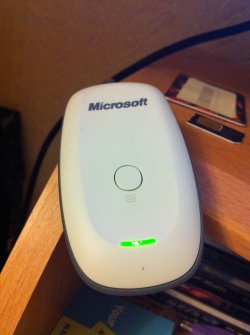
unfortunately you have purchased a knock off to the real thing, the real device looks like this:
IMG_1831.jpg

and as you can see, it says Microsoft instead of Xbox 360, i'd seek a refund immediately.
 

My Computer

Computer type
PC/Desktop
Computer Manufacturer/Model Number
Custom Build
OS
Windows 7 Ultimate x64 SP1
CPU
Intel Q6600 @ 2.6Ghz
Motherboard
Evga NF78-CK-132-A 3-Way SLI
Memory
4Gb DDR2 Corsair Dominator @ 800Mhz 5-5-5-15
Graphics Card(s)
EVGA 560 GTX SC FTW 1GB
Sound Card
Realtek HD 7.1 Audio, Plantronics GameCom780 7.1 Headset
Monitor(s) Displays
Dell S2409W
Screen Resolution
1920 x 1080
Hard Drives
SanDisk SDSSDHII-120G-G25 120GB SSD
Samsung 7200RPM 750Gb SATA
Samsung 850 EVO 120GB SSD
Western Digital Green 1TB 7200RPM
PSU
Xigmatek 750W Quad sli quad core 80% eff
Case
Antec 900 Gaming Case
Cooling
Zalman CNPS9700-NT NVIDIA Tritium
Keyboard
Logitech generic keyboard, MS wireless keyboard
Mouse
Razor Lachesis Banshee V2 Blue, 4000DPI, MS wireless mouse
Internet Speed
152Mb Virgin Media Fibre Optic
Antivirus
Microsoft Security Essentials
Browser
Google Chrome
Other Info
Wireless Gaming Receiver for Windows, Wireless Xbox 360 Pad
Has anyone had this issue? is it possible this unit may just be defective?

I do have the exact same receiver as you, and im also running Windows 7 Ultimate 64bit with a similar system spec. Mine does work but it does often fail sync for the first time but it will sync on the second attempt.

MrNeeds is correct, its a cheap copy and thats the problem with most electronics bought on eBay.

In my opinion when the receiver works it does perform near as good as the official microsoft receiver.

It would not harm to try a different controller, if not get it sent back.

Dan
 

My Computer

Computer Manufacturer/Model Number
Custom Build
OS
Windows 7 Ultimate 64bit SP1
CPU
AMD Athlon2 X4 645 (3.1GHz)
Motherboard
AsRock 770 Extreme3 AM3
Memory
OCZ Platinum 4GB DDR3 2000 MHz
Graphics Card(s)
ATI Radeon HD 5770 1GB DDR5
Sound Card
Onboard Audio / ATI Radeon HDMI Output
Monitor(s) Displays
LG 44" LCD TV
Hard Drives
2x Seagate 1TB Sata3 running RAID0
PSU
OCZ StealthExtreme 700W
Case
Thermaltake WingRS301
Cooling
Akasa UltraSilent Case Fans & AeroCool Touch Controller
Keyboard
Toshiba 2.4GHz Wireless Keyboard & TouchPad
Mouse
Toshiba 2.4GHz Wireless Keyboard & TouchPad
Internet Speed
(SPEEDTEST.NET) DL - 13.98Mbps / UL - 1.97Mbps
I have the same receiver (seems difficult to find the ones with "Microsoft" on them), & had the same problem. This worked for me:

After installing the drivers -

  1. Go to your Control Panel
  2. Click on Hardware and Sound
  3. Click on Device Manager under Devices and Printers
  4. Scroll down the list to Other devices
  5. Double-click the Unknown device
  6. Click on the Hardware tab
  7. Click on Update Driver
  8. Select Browse my computer for driver software
  9. Select Let me pick from a list of device drivers on my computer
  10. Scroll down and select Microsoft Common Controller for Windows Class and click on Next
  11. Select Xbox 360 Wireless Receiver for Windows and click on Next
  12. When the warning message appears, select Yes

Full article: Using the Microsoft Wireless Gaming Receiver in 64-bit Windows 7 or Vista « Steel Frog – A blog on web design and gaming
 

My Computer

OS
Windows 7 Professional x64
I have the same receiver (seems difficult to find the ones with "Microsoft" on them), & had the same problem. This worked for me:

After installing the drivers -

  1. Go to your Control Panel
  2. Click on Hardware and Sound
  3. Click on Device Manager under Devices and Printers
  4. Scroll down the list to Other devices
  5. Double-click the Unknown device
  6. Click on the Hardware tab
  7. Click on Update Driver
  8. Select Browse my computer for driver software
  9. Select Let me pick from a list of device drivers on my computer
  10. Scroll down and select Microsoft Common Controller for Windows Class and click on Next
  11. Select Xbox 360 Wireless Receiver for Windows and click on Next
  12. When the warning message appears, select Yes

Full article: Using the Microsoft Wireless Gaming Receiver in 64-bit Windows 7 or Vista « Steel Frog – A blog on web design and gaming

I also have that same receiver, do what Fortnight suggests.
 

My Computer

Computer Manufacturer/Model Number
Custom Build
OS
Windows 8.1 Pro w/ Media Center 64-Bit
CPU
Intel Core-i7 950
Motherboard
MSI X58-GD45
Memory
12GB Corsair Dominator (3x4GB) DDR3 1600Mhz 9-9-9-24
Graphics Card(s)
EVGA Geforce GTX 980 4GB VRAM
Sound Card
Integrated HD Audio
Monitor(s) Displays
25" I-Inc iH252, 27" ASUS VE278(primary)
Screen Resolution
1920 x 1080 @ 60hz
Hard Drives
240GB OCZ Agility 3 SSD (boot drive)
WD Caviar Black 2TB Sata-III 64MB Cache (data drive)
WD Caviar Black 500GB Sata-II 16MB cache (data drive)
PSU
Raidmax RX-850AE 850 Watt gold plus PS
Case
Cooler master HAF X full tower
Cooling
2x 200mm Fan 1x 230mm/ Red LED Fan
Internet Speed
Cable
Has anyone had this issue? is it possible this unit may just be defective?

I do have the exact same receiver as you, and im also running Windows 7 Ultimate 64bit with a similar system spec. Mine does work but it does often fail sync for the first time but it will sync on the second attempt.

MrNeeds is correct, its a cheap copy and thats the problem with most electronics bought on eBay.

In my opinion when the receiver works it does perform near as good as the official microsoft receiver.

It would not harm to try a different controller, if not get it sent back.

Dan

Mine works better than the original I had straight from Microsoft, the Microsoft version crapped out after two months... this one has been working perfectly for well over a year now.
 

My Computer

Computer Manufacturer/Model Number
Custom Build
OS
Windows 8.1 Pro w/ Media Center 64-Bit
CPU
Intel Core-i7 950
Motherboard
MSI X58-GD45
Memory
12GB Corsair Dominator (3x4GB) DDR3 1600Mhz 9-9-9-24
Graphics Card(s)
EVGA Geforce GTX 980 4GB VRAM
Sound Card
Integrated HD Audio
Monitor(s) Displays
25" I-Inc iH252, 27" ASUS VE278(primary)
Screen Resolution
1920 x 1080 @ 60hz
Hard Drives
240GB OCZ Agility 3 SSD (boot drive)
WD Caviar Black 2TB Sata-III 64MB Cache (data drive)
WD Caviar Black 500GB Sata-II 16MB cache (data drive)
PSU
Raidmax RX-850AE 850 Watt gold plus PS
Case
Cooler master HAF X full tower
Cooling
2x 200mm Fan 1x 230mm/ Red LED Fan
Internet Speed
Cable
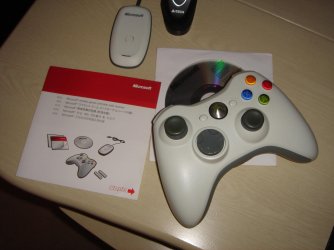
i got the original one that comes in a package with Booklet + Installation Manual + Driver CD and never had any trouble syncing the controller or disconnection during anything and it does say Microsoft just like MrNeeds mentioned above. Here's the pic below and sorry for dull result :p
 

Attachments

  • DSC07459.jpg
    DSC07459.jpg
    184 KB · Views: 129

My Computer

Computer type
PC/Desktop
Computer Manufacturer/Model Number
Self Built
OS
Windows 10 Pro
CPU
Core i5 9600K
Motherboard
ASUS ROG Strix Z390-F Gaming
Memory
Corsair Vengeance Pro 2x 8GB (16GB) 3200MHz DDR4
Graphics Card(s)
MSI GTX 1070 Gaming X 8GB
Sound Card
ASRock A-Style Purity Sound
Monitor(s) Displays
ASUS VX239H IPS
Screen Resolution
1920x1080
Hard Drives
XPG SPECTRIX S40G 2566GB M.2 NVMe | Patriot P210 512GB SSD | Seagate BarraCuda 4TB 5400RPM
PSU
Thermaltake Smart 600w RGB 80Plus
Case
NZXT H500 with 3x Corsair HD120 RGB w/Node Pro
Cooling
Cryorig H7
Keyboard
Corsair K70 RapidFire RGB (Cherry MX Speed)
Mouse
Logitech G402 Hyperion Fury
Internet Speed
20MB Cable Broadband
Browser
Chrome
Other Info
Corsair MM300 Extended Anti-Fray Mouse Pad | Edifier C2 2.1ch Sound System | XBOX One S Controller | XBOX 360 Wireless Controller for Windows | APC SUA1000i Smart-UPS | PS4 Slim 500GB [Region 1 - USA]
Hello, i have red ALL suggestion on EVERY forum i could find about how to fix this connection with the controller. 70% of solving tips were about force install the driver or update driver in Device Manager -> Unknown device. The problem i have is that I do not have any Unknown device in device manager.
I installed and reinstalled and cleaned registry numerous times and not even once the so called *unknown device* appeared in my Device Manager list.
I have Windows 7 Profesional and I installed the driver found on microsoft page. I have a genuine controller that came packed with the receiver in the same box so those are legit. I have done the steps described in quick guide. My device is trying to search for signal but then starts blinking an all four lights.
I managed to connect the device few months ago when i bought the controller. After hours of tries and reinstalls that had no effect, when i almost give up and wanted to return it, i spent 20 min pushing the buttons to sync it and by luck at some point the device synced. I played a few days and I had no problems with it. At some point i removed the receiver from USB and now the torment is back.
My guess is that it is a problem with the receiver because windows do not react every time i insert the receiver in USB port (it does the same an all 6 ports i have). When the controller worked fine, once in a while i heard the windows sound like when you insert an usb device, though i watch a movie or played a game. It's like windows lost signal with the receiver an then connected back
Any suggestions?
 

My Computer

OS
Windows 7 Professional x64
Hello, i have red ALL suggestion on EVERY forum i could find about how to fix this connection with the controller. 70% of solving tips were about force install the driver or update driver in Device Manager -> Unknown device. The problem i have is that I do not have any Unknown device in device manager.
I installed and reinstalled and cleaned registry numerous times and not even once the so called *unknown device* appeared in my Device Manager list.
I have Windows 7 Profesional and I installed the driver found on microsoft page. I have a genuine controller that came packed with the receiver in the same box so those are legit. I have done the steps described in quick guide. My device is trying to search for signal but then starts blinking an all four lights.
I managed to connect the device few months ago when i bought the controller. After hours of tries and reinstalls that had no effect, when i almost give up and wanted to return it, i spent 20 min pushing the buttons to sync it and by luck at some point the device synced. I played a few days and I had no problems with it. At some point i removed the receiver from USB and now the torment is back.
My guess is that it is a problem with the receiver because windows do not react every time i insert the receiver in USB port (it does the same an all 6 ports i have). When the controller worked fine, once in a while i heard the windows sound like when you insert an usb device, though i watch a movie or played a game. It's like windows lost signal with the receiver an then connected back
Any suggestions?
You could be hitting the bandwidth peak, try unplugging any unnecessary devices from other usb ports eg/ webcam, printers, phones etc....
 

My Computer

Computer type
PC/Desktop
Computer Manufacturer/Model Number
Custom Build
OS
Windows 7 Ultimate x64 SP1
CPU
Intel Q6600 @ 2.6Ghz
Motherboard
Evga NF78-CK-132-A 3-Way SLI
Memory
4Gb DDR2 Corsair Dominator @ 800Mhz 5-5-5-15
Graphics Card(s)
EVGA 560 GTX SC FTW 1GB
Sound Card
Realtek HD 7.1 Audio, Plantronics GameCom780 7.1 Headset
Monitor(s) Displays
Dell S2409W
Screen Resolution
1920 x 1080
Hard Drives
SanDisk SDSSDHII-120G-G25 120GB SSD
Samsung 7200RPM 750Gb SATA
Samsung 850 EVO 120GB SSD
Western Digital Green 1TB 7200RPM
PSU
Xigmatek 750W Quad sli quad core 80% eff
Case
Antec 900 Gaming Case
Cooling
Zalman CNPS9700-NT NVIDIA Tritium
Keyboard
Logitech generic keyboard, MS wireless keyboard
Mouse
Razor Lachesis Banshee V2 Blue, 4000DPI, MS wireless mouse
Internet Speed
152Mb Virgin Media Fibre Optic
Antivirus
Microsoft Security Essentials
Browser
Google Chrome
Other Info
Wireless Gaming Receiver for Windows, Wireless Xbox 360 Pad
You could be hitting the bandwidth peak, try unplugging any unnecessary devices from other usb ports eg/ webcam, printers, phones etc....
I have only mouse and keyboard on usb at this moment. Sometimes i have 2 x mouse, one keyboard, external hdd and a wireless receiver for keyboard and mouse all at the same time and works fine.
 

My Computer

OS
Windows 7 Professional x64
You could be hitting the bandwidth peak, try unplugging any unnecessary devices from other usb ports eg/ webcam, printers, phones etc....
I have only mouse and keyboard on usb at this moment. Sometimes i have 2 x mouse, one keyboard, external hdd and a wireless receiver for keyboard and mouse all at the same time and works fine.

I'm having the same problem. It shows up installed just fine but will not connect for nothing. "bandwidth peak"? Not my problem either as I have only a mouse and keyboard connected as well.
 

My Computer

Computer Manufacturer/Model Number
Dell xps
OS
Windows 7 64 bit Home Premium
CPU
i7 3.4
Memory
16 gb ram
Graphics Card(s)
AMD Radeon HD 7870
Monitor(s) Displays
24" Dell
Screen Resolution
1920x1080
Hard Drives
2 tb hd 32 gb ssd enhancement
Keyboard
Apple wired
Mouse
Razer Naga Hex
Fixed it a different way

Hi all!

Just to let you all know that all of the methods weren't working for me since it wasn't displaying for me as being as unrecognized device in the first place. If you are someone like me who already owns a PS3 console, you probably tried to plug the PS3 controller like I did and tried getting it to work with a program like MotionJoy. Know that although I had uninstalled MotionJoy, the driver hadn't uninstalled. So when I plugged in my XBOX wireless controller, it wrongly associated MotionJoy's driver to the controller instead of the Microsoft one. So what I did was go into the Device Manager and looked to see where my controller was. It was labeled as being a MotionJoy controller. So I right-clicked it and asked to Delete Driver. My XBOX controller was of course disconnected (the receiver unplugged, batteries out of the controller) and the program for the controller was already correctly installed (I hadn't uninstalled it). When I reinserted the batteries into the controller, then replugged the receiver, then pushed the button on the receiver and the XBOX button on the controller, the controller finally installed itself correctly without a hitch. Hope this helps anyone out there for whom the previous mentioned fixes aren't working and are not even showing the same.

So in short, here it is for those of you for whom the controller is NOT showing up as an "unrecognised device" but it is still not working:
- Make sure you have removed the batteries on your controller and unplugged the receiver. You can leave the XBOX program alone, don't need to uninstall.
- Go to Device Manager and look under each category until you find one where controller is part of the description listed.
- If it doesn't mention Microsoft and instead some other company or program, right-click and select "Delete Driver"
- Re-insert the batteries into the controller.
- Re-plug the receiver.
- Push the button on the receiver and then turn on the controller by holding the XBOX button until it lights up.
- Your controller will now be detected by your PC and should correctly install itself.
- Done!
 

My Computer

Computer type
PC/Desktop
Computer Manufacturer/Model Number
HP
OS
Windows 7 Home Premium 64 bit
Back
Top