Can't Sync Xbox360 controller to Xbox 360 Wireless Receiver

michael2344

New member
Local time
1:59 AM
Messages
3
Location
New Jersey
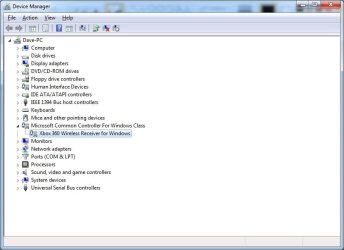
Hi, I recently wiped my computer and now when I tried to sync my Xbox 360 controller to my Xbox 360 Wireless Receiver it would not connect. Someone please help me solve this issue. If it helps I had to force install a driver for the Wireless Receiver because I lost the install disc a long time ago, it is also a Microsoft product. Here is a picture of the exact one I found on the internet.
e4d95a469cba05edd1134c955ff2bc50.jpg
If any of you guys have any clue what to do please reply.

~Michael2344
 

My Computer My Computer

Computer type
PC/Desktop
Computer Manufacturer/Model Number
HP
OS
Windows 7 64 bit
Memory
6 gb
Antivirus
Norton Security Suite
Browser
Chrome
Um read the next reply....
 
Last edited:

My Computer My Computer

Computer type
PC/Desktop
Computer Manufacturer/Model Number
HP
OS
Windows 7 64 bit
Memory
6 gb
Antivirus
Norton Security Suite
Browser
Chrome
Hi, I recently wiped my computer and now when I tried to sync my Xbox 360 controller to my Xbox 360 Wireless Receiver it would not connect. Someone please help me solve this issue. If it helps I had to force install a driver for the Wireless Receiver because I lost the install disc a long time ago, it is also a Microsoft product. Here is a picture of the exact one I found on the internet.
e4d95a469cba05edd1134c955ff2bc50.jpg
If any of you guys have any clue what to do please reply.

~Michael2344
If it helps i am playing steam.
 

My Computer My Computer

Computer type
PC/Desktop
Computer Manufacturer/Model Number
HP
OS
Windows 7 64 bit
Memory
6 gb
Antivirus
Norton Security Suite
Browser
Chrome
Hi, I recently wiped my computer and now when I tried to sync my Xbox 360 controller to my Xbox 360 Wireless Receiver it would not connect. Someone please help me solve this issue. If it helps I had to force install a driver for the Wireless Receiver because I lost the install disc a long time ago, it is also a Microsoft product. Here is a picture of the exact one I found on the internet.
e4d95a469cba05edd1134c955ff2bc50.jpg
If any of you guys have any clue what to do please reply.

~Michael2344
If it helps i am playing steam.

Hi Michael, welcome to the forums.

It should just be a case of pressing the sync button on the receiver and the controller, if nothing happens with that, it maybe just a stiff button, does the receiver install OK?
XBOX RECIEVER.jpg

if everything is installed correctly then it might just be a case of a stiff button, on the receiver, it's easier to use a fingernail with moderate pressure to get it to flash, on the controller, it should rotate around the x logo, if they are both doing that then I can only assume it's a faulty receiver.
 

My Computer My Computer

Computer type
PC/Desktop
Computer Manufacturer/Model Number
Custom Build
OS
Windows 7 Ultimate x64 SP1
CPU
Intel Q6600 @ 2.6Ghz
Motherboard
Evga NF78-CK-132-A 3-Way SLI
Memory
4Gb DDR2 Corsair Dominator @ 800Mhz 5-5-5-15
Graphics Card(s)
EVGA 560 GTX SC FTW 1GB
Sound Card
Realtek HD 7.1 Audio, Plantronics GameCom780 7.1 Headset
Monitor(s) Displays
Dell S2409W
Screen Resolution
1920 x 1080
Hard Drives
SanDisk SDSSDHII-120G-G25 120GB SSD
Samsung 7200RPM 750Gb SATA
Samsung 850 EVO 120GB SSD
Western Digital Green 1TB 7200RPM
PSU
Xigmatek 750W Quad sli quad core 80% eff
Case
Antec 900 Gaming Case
Cooling
Zalman CNPS9700-NT NVIDIA Tritium
Keyboard
Logitech generic keyboard, MS wireless keyboard
Mouse
Razor Lachesis Banshee V2 Blue, 4000DPI, MS wireless mouse
Internet Speed
152Mb Virgin Media Fibre Optic
Antivirus
Microsoft Security Essentials
Browser
Google Chrome
Other Info
Wireless Gaming Receiver for Windows, Wireless Xbox 360 Pad
Back
Top