
Solved Cannot UNSHARE a folder in Workgroup!

Persons Can Wai

New member
Member
Local time
11:33 AM
Messages
50
HEADDESK. I am so frustrated. I am coming here since I am out of options myself (you know I always try to fix my own problems first). Windows 7 64bit Home Premium.

A long time ago I shared a file on my desktop. It was just a tiny image, nothing important. The network path to it was Network\[me]\Users\[me]\Desktop. I unshared that file and deleted it, but still that path exists. When one attempts to browse my network, they see The Public Folder and my Personal folder, even though it only links to my Desktop, and that folder is empty. There is nothing else shared. I've right clicked my Users folder, it has no sharing enabled... I have right clicked the desktop, not sharing enabled. I've tried changing my Workgroup name, turning on/off public folder sharing, network discovery, file and printer sharing, with a restart between each new combination. NOTHING. I cannot UNSHARE that location. Can anybody help?
 

My Computer

Computer Manufacturer/Model Number
Self built
OS
Windows 7 x64
CPU
AMD Athlon II X2 245 Regor 2.9GHz
Motherboard
Foxconn A78AX-S AM2+/AM2 AMD 770 ATX AMD
Memory
G.SKILL 4GB (2 x 2GB) 240-Pin DDR2 SDRAM DDR2 800 (PC2 6400)
Graphics Card(s)
MSI R4670-2D512/D3 Radeon HD 4670 512MB
Sound Card
Integrated
Hard Drives
Western Digital Caviar Blue WD3200AAJS 320GB 7200 RPM SATA 3.0Gb/s 3.5" Internal

, Random LaCie external
PSU
OCZ ModXStream Pro OCZ500MXSP 500W ATX12V V2.2 / EPS12V

My Computer

Computer type
PC/Desktop
Computer Manufacturer/Model Number
Custom
OS
Dual Boot: Windows 8.1 & Server 2012r2 VMs: Kali Linux, Backbox, Matriux, Windows 8.1
CPU
A10 7700 Kavari SteamRoller
Motherboard
ASUS A88XM-PLUS (FM2+ )
Memory
8GB DDR3 SDRAM PC3-8500
Graphics Card(s)
1024MB ATI AMD Radeon R7 Graphics
Sound Card
Realtek High Definition Audio
Monitor(s) Displays
Samsung
Hard Drives
SSD Crucial 120gb
WD VelociRaptor 1tb
PSU
Rosewill Gaming 650w
Case
Rosewill Galaxy 2
Internet Speed
55/12
Antivirus
Malwarebytes, MSE, SAS
Browser
FireFox, Chrome
I wish that menu was in the control panel or network and sharing section! I never knew that existed.

However, the share I am trying to unshare is NOT there. In fact, right clicking any section doesn't even give me a Stop Sharing option. I was going to stop sharing my Entire C:\Users folder, and see if it makes any difference, but there is no option to stop sharing or delete or anything. Yes, I am an administrator. Should I just try to reshare my entire user folder and then unshare it? I don't know what to do.
 

My Computer

Computer Manufacturer/Model Number
Self built
OS
Windows 7 x64
CPU
AMD Athlon II X2 245 Regor 2.9GHz
Motherboard
Foxconn A78AX-S AM2+/AM2 AMD 770 ATX AMD
Memory
G.SKILL 4GB (2 x 2GB) 240-Pin DDR2 SDRAM DDR2 800 (PC2 6400)
Graphics Card(s)
MSI R4670-2D512/D3 Radeon HD 4670 512MB
Sound Card
Integrated
Hard Drives
Western Digital Caviar Blue WD3200AAJS 320GB 7200 RPM SATA 3.0Gb/s 3.5" Internal

, Random LaCie external
PSU
OCZ ModXStream Pro OCZ500MXSP 500W ATX12V V2.2 / EPS12V

My Computer

Computer type
PC/Desktop
Computer Manufacturer/Model Number
Home built
OS
Windows 7 Ult, Windows 8.1 Pro,
CPU
Q9650-4.275GHz, E8600 4.5GHz, E6750-3.8GHz
Motherboard
Evga 780i FTW
Memory
G.Skill PC2 9600 1200Mhz 5 5 5 15 2T
Graphics Card(s)
GTX480
Sound Card
Asus Xonar D2
Monitor(s) Displays
HannsG
Screen Resolution
1680X1050
Hard Drives
GSkill Phoenix Pro 120GB SSD
PSU
ThermalTake Toughpower 1000Watt modular
Case
ThermalTake XaserV
Cooling
Xigmatek S1283
Keyboard
Logitech G15
Mouse
Logitech G9
Internet Speed
T1
That's how to remove/disable that feature altogether - do I really need to do that? I've never even used that feature, nor do any network drives show up under my computer with their own letter and such.
 

My Computer

Computer Manufacturer/Model Number
Self built
OS
Windows 7 x64
CPU
AMD Athlon II X2 245 Regor 2.9GHz
Motherboard
Foxconn A78AX-S AM2+/AM2 AMD 770 ATX AMD
Memory
G.SKILL 4GB (2 x 2GB) 240-Pin DDR2 SDRAM DDR2 800 (PC2 6400)
Graphics Card(s)
MSI R4670-2D512/D3 Radeon HD 4670 512MB
Sound Card
Integrated
Hard Drives
Western Digital Caviar Blue WD3200AAJS 320GB 7200 RPM SATA 3.0Gb/s 3.5" Internal

, Random LaCie external
PSU
OCZ ModXStream Pro OCZ500MXSP 500W ATX12V V2.2 / EPS12V
I thought I had finally fixed the problem, but no, I hadn't... I only discovered the root of it all - when I enable sharing of the public folders (in the Network and Sharing Center > Advanced sharing settings), it reshares the users\me\Desktop link. Apparently it considers the link to my desktop a public folder, yet none of the files inside it are shared. The weird thing is that the first area (the network sharing wizard) shows the sharing and the network path the sharing wizard is enabled, but the Advanced Sharing section NEVER shows it shared at all! Here's how I found that out though...

One, I turned back on the sharing wizard (Explorer window > Tools > Folder Options > View > Use Sharing Wizard (Recommended). I had that off because I don't use Homegroups (it's really made for homegroups), and 2, I originally turned it off because I believe it was linking things to their exact location (ie if I have a folder on my desktop and I use the wizard to share it, it will appear in Network Drives as [My computer]\Users\[me]\Desktop\[location], rather than just [My computer]\[location]. It follows the same hierarchy to get there, which is not necessary IMO). When I turned it on, the first sharing section was visible (in right click folder > properties > Sharing > section at top above Advanced Sharing) on my folder and my desktop folder AND they showed the Network Path it had (this was not there before) - but weirdly enough, I was only sharing them myself (then how come others could browse them when connected to me?) It wouldn't let me remove myself... I tried resharing it with myself, but that took too long and I cancelled it. Seemed to make no difference. I turned off sharing the public folders, then manually unshared my entire users folder via Advanced Sharing. This finally removed it. I went to turn on my public folders via Windows networking options, and BAM, it's back again. What the hell!? This has a mind of it's own. So I turn off the Public folders, to see if they are linked, and nope, the Public folders disappear, but my desktop link is still there... Turn back on the sharing wizard, and yep, it shows that it really is shared. So having the Network Sharing Wizard on shows you if something is really shared or not.

This is beyond my skill to fix. There's probably something in the registry or who knows what that controls this, but I came up with a workaround though. Disable the public folder sharing, then unshare the users folder via Advanced Sharing. Then I made a new folder (Public 2) and make that my new public folder, sharing it via Advanced Sharing again. It also skips the additional /Users click you need to get to it.

Huge update - apparently it's not just me who are having problems like this. http://answers.microsoft.com/en-us/...s/6f912ddb-139e-445a-89fe-863c6aebb510?page=3 Mine doesn't have any files in it shared by default, but like the people in that forum are posting, when I turn on Public folder sharing, it shares my PERSONAL folder too, and even after turning it off, it is STILL shared. You must manually unshared the users folder, then create your own public folder and share that instead. This is completely ****ed up... My Grandpa's computer however doesn't do this though, so there must be some trigger. Mine didn't do this until the first time I shared a single desktop item. Guess this is another problem with Windows, not my computer specifically.
 

My Computer

Computer Manufacturer/Model Number
Self built
OS
Windows 7 x64
CPU
AMD Athlon II X2 245 Regor 2.9GHz
Motherboard
Foxconn A78AX-S AM2+/AM2 AMD 770 ATX AMD
Memory
G.SKILL 4GB (2 x 2GB) 240-Pin DDR2 SDRAM DDR2 800 (PC2 6400)
Graphics Card(s)
MSI R4670-2D512/D3 Radeon HD 4670 512MB
Sound Card
Integrated
Hard Drives
Western Digital Caviar Blue WD3200AAJS 320GB 7200 RPM SATA 3.0Gb/s 3.5" Internal

, Random LaCie external
PSU
OCZ ModXStream Pro OCZ500MXSP 500W ATX12V V2.2 / EPS12V
Your description of the problem in the first post was a bit confusing. ;)

When you share the C:>Users folder which is the default setting for good reason, it also automatically shares all folders that reside inside the C:>Users folder, this of course includes the C:>Users>Public folder as well.

So if you don't want your personal folders shared out but you do require that the Public folders are shared out, you would need to leave the C:>Users folders shared out "Sharing tab" Not Security tab, then un-share the personal folders by going to C:>Users>UserName, at which point you can selectively stop-sharing as it were, what ever personal folders you want.

The picture below illustrates how to do this. :)
 

Attachments

  • Screenshot (1).png
    Screenshot (1).png
    171.1 KB · Views: 7

My Computer

Computer type
PC/Desktop
Computer Manufacturer/Model Number
Home built
OS
Windows 7 Ult, Windows 8.1 Pro,
CPU
Q9650-4.275GHz, E8600 4.5GHz, E6750-3.8GHz
Motherboard
Evga 780i FTW
Memory
G.Skill PC2 9600 1200Mhz 5 5 5 15 2T
Graphics Card(s)
GTX480
Sound Card
Asus Xonar D2
Monitor(s) Displays
HannsG
Screen Resolution
1680X1050
Hard Drives
GSkill Phoenix Pro 120GB SSD
PSU
ThermalTake Toughpower 1000Watt modular
Case
ThermalTake XaserV
Cooling
Xigmatek S1283
Keyboard
Logitech G15
Mouse
Logitech G9
Internet Speed
T1
I did not manually share my Users folder at any point. It came on by itself after turning on the public folder option. Why should turning on the default public folder share all user accounts at the same time (when does Public = all users?). That is the misleading, not to mention when you turn that same feature off, expecting them to go, they are still shared, and then you need to manually change that via Advanced Sharing. I actually did try that thing you have in your screenshot a while ago at the beginning of this (not sure I mentioned that or not), but it did nothing. I guess I "fixed" my problem anyways, but for the average user, they wouldn't even get this far due to how the system is designed.
 

My Computer

Computer Manufacturer/Model Number
Self built
OS
Windows 7 x64
CPU
AMD Athlon II X2 245 Regor 2.9GHz
Motherboard
Foxconn A78AX-S AM2+/AM2 AMD 770 ATX AMD
Memory
G.SKILL 4GB (2 x 2GB) 240-Pin DDR2 SDRAM DDR2 800 (PC2 6400)
Graphics Card(s)
MSI R4670-2D512/D3 Radeon HD 4670 512MB
Sound Card
Integrated
Hard Drives
Western Digital Caviar Blue WD3200AAJS 320GB 7200 RPM SATA 3.0Gb/s 3.5" Internal

, Random LaCie external
PSU
OCZ ModXStream Pro OCZ500MXSP 500W ATX12V V2.2 / EPS12V
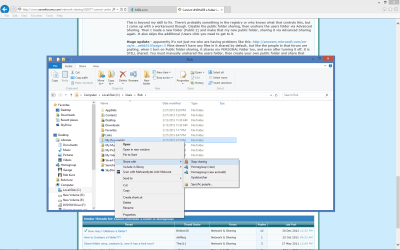
That was the first thing I also tried and it did nothing.

This method works flawlessly I can assure you, unless the NTFS Security permissions "Security Tab" settings were mistakenly adjusted.

Seriously, why would they show these settings if they didn't do anything?
 

My Computer

Computer type
PC/Desktop
Computer Manufacturer/Model Number
Home built
OS
Windows 7 Ult, Windows 8.1 Pro,
CPU
Q9650-4.275GHz, E8600 4.5GHz, E6750-3.8GHz
Motherboard
Evga 780i FTW
Memory
G.Skill PC2 9600 1200Mhz 5 5 5 15 2T
Graphics Card(s)
GTX480
Sound Card
Asus Xonar D2
Monitor(s) Displays
HannsG
Screen Resolution
1680X1050
Hard Drives
GSkill Phoenix Pro 120GB SSD
PSU
ThermalTake Toughpower 1000Watt modular
Case
ThermalTake XaserV
Cooling
Xigmatek S1283
Keyboard
Logitech G15
Mouse
Logitech G9
Internet Speed
T1

My Computer

Computer type
Laptop
Computer Manufacturer/Model Number
ASUS G60-RBBX05
OS
Win7 Home Premium 64x
CPU
Intel Core 2 Duo P7450 / 2.13 GHz (2.29 with Extreme Turbo)
Memory
4 GB PC-6400 Hyundai (2X2) at 800Mhz
Graphics Card(s)
NVIDIA GeForce GTX 260M 1GB DDR3 VRAM
Monitor(s) Displays
16" LED Backlit
Screen Resolution
1366 x 768 on laptop 1600x1050 max res on 22" external mon
Hard Drives
OCZ Agility 3 60GB SSD / 320 GB - Serial ATA-150 - 7200 rpm
PSU
6-cell Lithium ion { lasts 1.5 hours }
Case
ASUS G60 Laptop
Keyboard
Chicklet type back-lit (white light) keyboard
Mouse
Logitech G9 Laser Mouse 3200dpi and 1000 reports per minute
Internet Speed
Comcast 8.60mb/s up - 3.11mb/s down
Antivirus
MSE
Browser
Firefox
Other Info
General mid-budget gaming Comp. Low batterylife - High FrameRates - currently overheating problems :(

2nd Rig: Case: Rosewill BLACKHAWK Gaming ATX Mid Tower Computer Case

Mobo: GIGABYTE GA-990FXA-UD3
CPU: AMD FX-6200 Zambezi 3.8GHz (4.1GHz Turbo)
Heatsink: COOLER MASTER V8 CPU Cooler
RAM: Patriot Viper 3 8GB (2 x 4GB) 240-Pin DDR3 SDRAM 1866 (PC3 15000)
GPU: SAPPHIRE Radeon HD 6850 1GB 2
That was the first thing I also tried and it did nothing.

This method works flawlessly I can assure you, unless the NTFS Security permissions "Security Tab" settings were mistakenly adjusted.

Seriously, why would they show these settings if they didn't do anything?
Just because something says/shows it will do something, doesn't mean it actually does it (computers after all). That's why I said in the beginning I tried digging into every feature Windows had on the surface to fix this myself. I tried that option with no success. When the public folder is on, it shares my folder and desktop, and clicking Nobody from that menu doesn't make a difference. I looked into the NTFS Security permissions, but it doesn't look like anything it out of place. Do you still want to see that though?

Since it was a picture, can you make sure that media sharing is off as well (saw and issue like this recently) : http://www.sevenforums.com/network-sharing/281104-windows-keeps-enabling-file-sharing.html#post2313758
Thanks for the tip. I had that off too though. Never do streaming so didn't see a reason to keep it on.
 

My Computer

Computer Manufacturer/Model Number
Self built
OS
Windows 7 x64
CPU
AMD Athlon II X2 245 Regor 2.9GHz
Motherboard
Foxconn A78AX-S AM2+/AM2 AMD 770 ATX AMD
Memory
G.SKILL 4GB (2 x 2GB) 240-Pin DDR2 SDRAM DDR2 800 (PC2 6400)
Graphics Card(s)
MSI R4670-2D512/D3 Radeon HD 4670 512MB
Sound Card
Integrated
Hard Drives
Western Digital Caviar Blue WD3200AAJS 320GB 7200 RPM SATA 3.0Gb/s 3.5" Internal

, Random LaCie external
PSU
OCZ ModXStream Pro OCZ500MXSP 500W ATX12V V2.2 / EPS12V
Back
Top