Cannot use 6TB HDD on Computer?

Micky2171

New member
Local time
11:48 AM
Messages
4
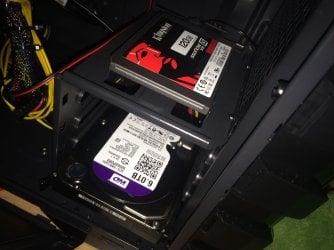
I have just got a new custom built computer for Christmas but cannot use a 6TB HDD with it.
I have used this HDD in another PC before, so I know it works.
But, in this computer it makes a buzzing noise then cuts off (and then repeats)

My Motherboard: MSI H81M-E33
My HDD: WD 6TD Surveillance
 

My Computer My Computer

At a glance

Windows 7 Ultimate x64i7 8-Core16GBGTX 960 4GB
Computer type
PC/Desktop
Computer Manufacturer/Model Number
Custom Build
OS
Windows 7 Ultimate x64
CPU
i7 8-Core
Motherboard
MSI H81M-E33
Memory
16GB
Graphics Card(s)
GTX 960 4GB
Hard Drives
120GB Kingston Solid State
6TB WD Surveillance
Antivirus
ESET NOD32
Browser
Chrome
Hi Micky2171,welcome to the forums.

As I understand you just built the PC, yes? The PC itself works, it's just the HDD that won't boot?
Shut down the PC, plug in the HDD and then start into bios. Check your HDD settings and see if it gets picked up there.
 

My Computer My Computer

At a glance

Windows 7 Ultimate x64AMD Phenom II X6 Black Edition 1090T4 x G Skill Ripjaws F3-10666CL9-4GBRLGigabyte GeForce GTX 970
Computer type
PC/Desktop
Computer Manufacturer/Model Number
Custom Build
OS
Windows 7 Ultimate x64
CPU
AMD Phenom II X6 Black Edition 1090T
Motherboard
Asus Crosshair IV Formula
Memory
4 x G Skill Ripjaws F3-10666CL9-4GBRL
Graphics Card(s)
Gigabyte GeForce GTX 970
Screen Resolution
1920x1080
Hard Drives
Drive #1 - Corsair Force GT (111 GB) (System)

Drive #2 - WDC WD3200AAKS-00B3A0 (298 GB) (Data & Installs)
Drive #3 - WD Ext HDD 1021 (931 GB) (Storage)
Antivirus
Eset Smart Security
Browser
Mozilla Firefox
The BIOS cannot see the HDD at all, but can see another (smaller) HDD / SSD if I try that.
 

Attachments

  • image.jpg
    image.jpg
    408.5 KB · Views: 2

My Computer My Computer

At a glance

Windows 7 Ultimate x64i7 8-Core16GBGTX 960 4GB
Computer type
PC/Desktop
Computer Manufacturer/Model Number
Custom Build
OS
Windows 7 Ultimate x64
CPU
i7 8-Core
Motherboard
MSI H81M-E33
Memory
16GB
Graphics Card(s)
GTX 960 4GB
Hard Drives
120GB Kingston Solid State
6TB WD Surveillance
Antivirus
ESET NOD32
Browser
Chrome
At this point I'd check the connections from HDD to Main and everything between them.
- Both connected via SATA? I, II, III?
- (This is extremely unlikely) Did you use it as your main HDD for your system before? If so check if you added jumpers that only let it be the "main master disk", refer to manual online.
- Check the SATA ports you connected them to on your motherboard. Make sure it supports the SATA-type you used. Remember, they are always backwards compatible but not always vice versa
- In rare cases the Bios needs an update to recognize HDD above a certain size, your MB is fairly fresh on the market so I doubt that. Also: make sure you only install a BIOS update AFTER windows is installed on your SSD.

//EDIT: read through your specs, that is a very nice rig, very balanced, you'll have some major fun with it once your HDD is installed.
 

My Computer My Computer

At a glance

Windows 7 Ultimate x64AMD Phenom II X6 Black Edition 1090T4 x G Skill Ripjaws F3-10666CL9-4GBRLGigabyte GeForce GTX 970
Computer type
PC/Desktop
Computer Manufacturer/Model Number
Custom Build
OS
Windows 7 Ultimate x64
CPU
AMD Phenom II X6 Black Edition 1090T
Motherboard
Asus Crosshair IV Formula
Memory
4 x G Skill Ripjaws F3-10666CL9-4GBRL
Graphics Card(s)
Gigabyte GeForce GTX 970
Screen Resolution
1920x1080
Hard Drives
Drive #1 - Corsair Force GT (111 GB) (System)

Drive #2 - WDC WD3200AAKS-00B3A0 (298 GB) (Data & Installs)
Drive #3 - WD Ext HDD 1021 (931 GB) (Storage)
Antivirus
Eset Smart Security
Browser
Mozilla Firefox
I have checked all of the cables, and have tried the same ones in other HDD and they work.
Could the fact that the HDD making a buzzing noise on boot and making the BIOS stick for a moment have anything to do with it?
 

My Computer My Computer

At a glance

Windows 7 Ultimate x64i7 8-Core16GBGTX 960 4GB
Computer type
PC/Desktop
Computer Manufacturer/Model Number
Custom Build
OS
Windows 7 Ultimate x64
CPU
i7 8-Core
Motherboard
MSI H81M-E33
Memory
16GB
Graphics Card(s)
GTX 960 4GB
Hard Drives
120GB Kingston Solid State
6TB WD Surveillance
Antivirus
ESET NOD32
Browser
Chrome
Does the biosoutput suggest that it is scanning for an HDD when it get's "stuck" for a moment? That would simply mean that it is, in fact, trying to scan that HDD and determine what it is. The bios only knows that something is connected to it via SATA, doesn't know what it is though. Do you have the means to test the HDD on another PC? I don't want to be a pessimist but if the connection is alright then it might be that the HDD was damaged when it was built out and back into a PC.
 

My Computer My Computer

At a glance

Windows 7 Ultimate x64AMD Phenom II X6 Black Edition 1090T4 x G Skill Ripjaws F3-10666CL9-4GBRLGigabyte GeForce GTX 970
Computer type
PC/Desktop
Computer Manufacturer/Model Number
Custom Build
OS
Windows 7 Ultimate x64
CPU
AMD Phenom II X6 Black Edition 1090T
Motherboard
Asus Crosshair IV Formula
Memory
4 x G Skill Ripjaws F3-10666CL9-4GBRL
Graphics Card(s)
Gigabyte GeForce GTX 970
Screen Resolution
1920x1080
Hard Drives
Drive #1 - Corsair Force GT (111 GB) (System)

Drive #2 - WDC WD3200AAKS-00B3A0 (298 GB) (Data & Installs)
Drive #3 - WD Ext HDD 1021 (931 GB) (Storage)
Antivirus
Eset Smart Security
Browser
Mozilla Firefox
I have just tried the HDD in another PC (Dell) and it seems to do the exact same thing?
Is there anything I can do to save this HDD, 6TB costs a lot!
 

My Computer My Computer

At a glance

Windows 7 Ultimate x64i7 8-Core16GBGTX 960 4GB
Computer type
PC/Desktop
Computer Manufacturer/Model Number
Custom Build
OS
Windows 7 Ultimate x64
CPU
i7 8-Core
Motherboard
MSI H81M-E33
Memory
16GB
Graphics Card(s)
GTX 960 4GB
Hard Drives
120GB Kingston Solid State
6TB WD Surveillance
Antivirus
ESET NOD32
Browser
Chrome
There are methods of repairing an HDD. If it does the same thing in two PCs then I'm afraid it seems to have been damaged up to some extend. If you're lucky, the disk read-and-write head is undamaged. Worst case scenario would be that it was "bent" and it damaged/scratched the plate(s).

I don't want to doomsay anything but be prepared for bad news if it's the latter. You'd have to submit it to a repair shop. Ask around town if there are any PC shops that can diagnose and repair a disk locally. Be sure to ask for a cost estimate before you agree to any repairs.

It might still just be something small like one of the contacts going cold or a loose connection internally.
 

My Computer My Computer

At a glance

Windows 7 Ultimate x64AMD Phenom II X6 Black Edition 1090T4 x G Skill Ripjaws F3-10666CL9-4GBRLGigabyte GeForce GTX 970
Computer type
PC/Desktop
Computer Manufacturer/Model Number
Custom Build
OS
Windows 7 Ultimate x64
CPU
AMD Phenom II X6 Black Edition 1090T
Motherboard
Asus Crosshair IV Formula
Memory
4 x G Skill Ripjaws F3-10666CL9-4GBRL
Graphics Card(s)
Gigabyte GeForce GTX 970
Screen Resolution
1920x1080
Hard Drives
Drive #1 - Corsair Force GT (111 GB) (System)

Drive #2 - WDC WD3200AAKS-00B3A0 (298 GB) (Data & Installs)
Drive #3 - WD Ext HDD 1021 (931 GB) (Storage)
Antivirus
Eset Smart Security
Browser
Mozilla Firefox
If the drive won't work in another machine, then it's probably dead.

1. Is the drive still under warranty? If so, just contact WD for a warranty replacement.

2. The surveillance drives are not well suited for general data storage since the have no error correction. The WD Greens, Blues, and Blacks are much better for data storage (even though they cost more, I prefer to use the WD Blacks in my machine).
 

My Computer My Computer

At a glance

Win 7 Ultimate 64 bitIntel i7-3930KKingston HyperX Genesis 32GB Kit (8x4GB Modul...MSI R7850 Twin Frozr 2GD5/OC Radeon HD 7850 2...
Computer type
PC/Desktop
Computer Manufacturer/Model Number
Custom Build
OS
Win 7 Ultimate 64 bit
CPU
Intel i7-3930K
Motherboard
ASUS P9X79 WS
Memory
Kingston HyperX Genesis 32GB Kit (8x4GB Modules) 1600MHz DDR
Graphics Card(s)
MSI R7850 Twin Frozr 2GD5/OC Radeon HD 7850 2GB 256-bit GDDR
Sound Card
Asus Xonar Essence STX
Monitor(s) Displays
3x Asus VG248QE 24", Vizio 32" TV
Screen Resolution
1920 x 1080, ?
Hard Drives
Samsung 128GB 840 Pro SSD (1),
Samsung 4TB 850 EVO SSDs (4)
Samsung 4TB 850 EVO SSDs (16) external backup drives used in 2.5" hot swap bays in the computer.
PSU
Corsair HX750w
Case
Antec Two Hundred v2 (modified)
Cooling
Cooler Master GeminII S524 120mm (fan replaced with a 140mm)
Keyboard
Logitech G510s
Mouse
Logitech M525 (two in use)
Internet Speed
=< 32Mbps down, 8Mbps up
Antivirus
AVAST!, MBAM, SAS, Spybot S&D (all but MBAM free) Glary Util
Browser
IE11
Other Info
LSI 9211-8i HBA card (8 SATA III ports), 2.5" & 3.5" Hot Swap Bays, HooToo HT-CR001 PCI-E to USB 3.0 Internal Hub + 6 Slot Card Reader, and LG Model CH12LS28 BD-ROM Optical Drive. Also, ScanSnap S1500 ADF duplexing scanner, Canon 9000F flat bed scanner, Corsair SP2500 2.1 speakers, Samsung CLP 415nw laser color printer, Cyberpower PP2200SW UPS
Pretty much what Lady Fitzgerarld said. I never used anything but WD Blacks so far. Some times the 10 extra quid are worth it.
 

My Computer My Computer

At a glance

Windows 7 Ultimate x64AMD Phenom II X6 Black Edition 1090T4 x G Skill Ripjaws F3-10666CL9-4GBRLGigabyte GeForce GTX 970
Computer type
PC/Desktop
Computer Manufacturer/Model Number
Custom Build
OS
Windows 7 Ultimate x64
CPU
AMD Phenom II X6 Black Edition 1090T
Motherboard
Asus Crosshair IV Formula
Memory
4 x G Skill Ripjaws F3-10666CL9-4GBRL
Graphics Card(s)
Gigabyte GeForce GTX 970
Screen Resolution
1920x1080
Hard Drives
Drive #1 - Corsair Force GT (111 GB) (System)

Drive #2 - WDC WD3200AAKS-00B3A0 (298 GB) (Data & Installs)
Drive #3 - WD Ext HDD 1021 (931 GB) (Storage)
Antivirus
Eset Smart Security
Browser
Mozilla Firefox
Hello Micky2171!

I see you have an issue with a WD Purple 6TB. :/

First you need to make sure that the HDD works now in another system internally. If it does, then the problem is in the system you want to use it currently in.

Make sure you have tried all ports on the motherboard (from the first 0 to the last one), new cables and that the drive shows up in BIOS. The motherboard itself doesn't have that many ports and it supports older RAM types, so it is also possible that it doesn't support such a new and large drive. :/

This in the case you make sure that the HDD actually works.

It needs to also spin up when the PC is turned on. Does it? If it doesn't try also other power cables.

My advice would also be to contact MSI support and make sure if your motherboard can support a 6TB SATA III HDD.

Additionally, I would like just to mention that the WD Purple drives are specific for surveillance and it's not their design to be used in average PC-s as storage/loading drives.

If you conclude the WD Purple itself is not working, then I would advise you try and RMA it.

WD Warranty check:
Support Answers

WD Warranty policy:
Support Answers

Best of luck and post back! :)

CK_WD
 

My Computer My Computer

At a glance

Windows 7 Home Premium x64
Computer type
PC/Desktop
OS
Windows 7 Home Premium x64
Back
Top