Can't Access External Hard Drive

321

New member
Local time
8:56 PM
Messages
9
Location
Scarborough, ON
Hello!

I've just installed windows 7 today, so it's my first time using it.

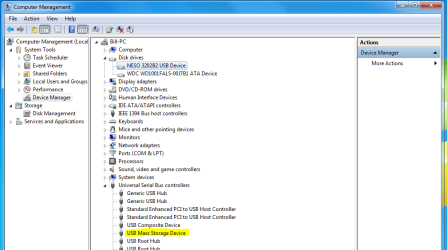
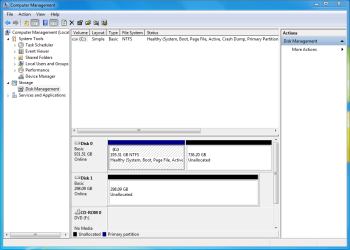
Currently, I have a problem with my external hard drive because I can't access it in My Computer. It's being detected in the driver manager and computer management, but I don't know how I can get it to show up in my computer.

I MAY have accidently formatted it during windows installation, but I'm unsure. I would really like to retrieve my files!

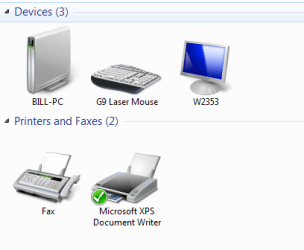
I've attached a few screen shots to help with the explanation of my situation.

Thank you in advance for your help!! :D
 

Attachments

  • computer managemnet2.PNG
    computer managemnet2.PNG
    33.1 KB · Views: 646
  • computer managemnet.PNG
    computer managemnet.PNG
    29.8 KB · Views: 808
  • devices.PNG
    devices.PNG
    14.6 KB · Views: 131

My Computer

Computer Manufacturer/Model Number
Home Built, N/A
OS
Windows 7
CPU
Intel Core i7 860
Motherboard
MSI P55-GD65
Memory
OCZ Platinum DDR3 PC3-10666 1333MHz
Graphics Card(s)
XFX ATI Radeon HD 5770 XXX
Sound Card
Onboard
Monitor(s) Displays
LG Flatron W2353V
Screen Resolution
1920 x 1080
Hard Drives
WD Caviar Black 1 TB
PSU
Seasonic M12D 850W
Case
Coolermaster 932 HAF
Cooling
Noctua NH-D14
Keyboard
IBM Standard PS/2
Mouse
Logitech G9
Internet Speed
10 Mb/s
I am assuming Disk1 298gb unallocated is the drive you are talking about ?

Can you right click on it & initialize it ? Not format it ! And assign it a drive letter.
 

My Computer

Computer type
PC/Desktop
Computer Manufacturer/Model Number
Built them myself, Science Experiments !
OS
Win7 Enterprise, Win7 x86 (Ult 7600), Win7 x64 Ult 7600, TechNet RTM on AMD x64 (2.8Ghz)
CPU
AMD fx8350 4ghz, AMD-32 2400mhz, AMD-64 3200mhz, AMDx64 2.8G
Motherboard
SIS 755, ECS-K8M890M-M (Ult 7600), GigaByte & others
Memory
2gb, 4gb on the Ult 7600, 4gb on Technet RTM, 32gb on FX8350
Graphics Card(s)
Draw my own Graphics, several nVidia cards
Sound Card
on motherboard
Monitor(s) Displays
19" flat scr, 28" I-Inc widescr,22" Emprex Widescr, 23" Acer
Screen Resolution
1280 x 1024, 1440 x 900, 1920 x 1080
Hard Drives
6 pata Ide HD's & 2 Sata HD's
added 80gb external on Ult 7600 computer,
numerous extra 1tb, 2TB, 3Tb SATA HD's
A collection of ext HD Docks w/ HDs
PSU
430w, 550w, 600w, 700, 800, etc
Case
All Generic Full Towers
Cooling
Open Air & a few fans, some w/ colored LEDs
Keyboard
Compaq & Dell recycled from GoodWill
Mouse
Made in China Optical Wired Mouse
Internet Speed
Fast Cable InterNet
Antivirus
AVG Free on 24 different Desktops, NO Problems!
Browser
IE 8 is preferred, but use FireFox sometimes
Other Info
Linksys Routers, switches, & Hubs
Too Many USB Flash Drives to count, Biggest is 64GB !
Eight computers in my home network.
Sixteen computers at my business network.
Linked via TeamViewer !
Lots of old used spare computer parts everywhere!
I am assuming Disk1 298gb unallocated is the drive you are talking about ?

Can you right click on it & initialize it ? Not format it ! And assign it a drive letter.

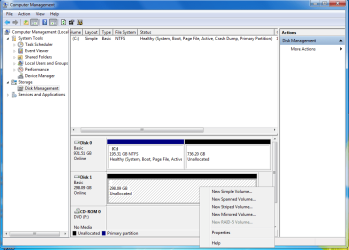
I'm not too sure how to do that. I right click it and it doesn't have an option to initialize it. So, how do you assign the drive?

Thanks!
 

Attachments

  • format.png
    format.png
    33.5 KB · Views: 364

My Computer

Computer Manufacturer/Model Number
Home Built, N/A
OS
Windows 7
CPU
Intel Core i7 860
Motherboard
MSI P55-GD65
Memory
OCZ Platinum DDR3 PC3-10666 1333MHz
Graphics Card(s)
XFX ATI Radeon HD 5770 XXX
Sound Card
Onboard
Monitor(s) Displays
LG Flatron W2353V
Screen Resolution
1920 x 1080
Hard Drives
WD Caviar Black 1 TB
PSU
Seasonic M12D 850W
Case
Coolermaster 932 HAF
Cooling
Noctua NH-D14
Keyboard
IBM Standard PS/2
Mouse
Logitech G9
Internet Speed
10 Mb/s
What Operating system was the ext HD hooked up to before.

It seems to me the last time somebody had this problem, we selected

New Simple volume and it worked.
 

My Computer

Computer type
PC/Desktop
Computer Manufacturer/Model Number
Built them myself, Science Experiments !
OS
Win7 Enterprise, Win7 x86 (Ult 7600), Win7 x64 Ult 7600, TechNet RTM on AMD x64 (2.8Ghz)
CPU
AMD fx8350 4ghz, AMD-32 2400mhz, AMD-64 3200mhz, AMDx64 2.8G
Motherboard
SIS 755, ECS-K8M890M-M (Ult 7600), GigaByte & others
Memory
2gb, 4gb on the Ult 7600, 4gb on Technet RTM, 32gb on FX8350
Graphics Card(s)
Draw my own Graphics, several nVidia cards
Sound Card
on motherboard
Monitor(s) Displays
19" flat scr, 28" I-Inc widescr,22" Emprex Widescr, 23" Acer
Screen Resolution
1280 x 1024, 1440 x 900, 1920 x 1080
Hard Drives
6 pata Ide HD's & 2 Sata HD's
added 80gb external on Ult 7600 computer,
numerous extra 1tb, 2TB, 3Tb SATA HD's
A collection of ext HD Docks w/ HDs
PSU
430w, 550w, 600w, 700, 800, etc
Case
All Generic Full Towers
Cooling
Open Air & a few fans, some w/ colored LEDs
Keyboard
Compaq & Dell recycled from GoodWill
Mouse
Made in China Optical Wired Mouse
Internet Speed
Fast Cable InterNet
Antivirus
AVG Free on 24 different Desktops, NO Problems!
Browser
IE 8 is preferred, but use FireFox sometimes
Other Info
Linksys Routers, switches, & Hubs
Too Many USB Flash Drives to count, Biggest is 64GB !
Eight computers in my home network.
Sixteen computers at my business network.
Linked via TeamViewer !
Lots of old used spare computer parts everywhere!
Since it's marked unallocated there's apparently no partition information on the drive. You can't assign a drive letter until you create a partition, and creating a new partition will probably destroy any possibility of recovering data although it appears there's nothing to recover anyway...
 

My Computer

Computer Manufacturer/Model Number
Home Grown
OS
Windows 7 Ultimate (64)
CPU
i7-2600K
Motherboard
Asus P8P67-M Pro
Memory
G.SKILL Ripjaws X Series 8GB (2 x 4GB)
Graphics Card(s)
ATI 5750
Sound Card
On-Board
Monitor(s) Displays
LG W2486L
Screen Resolution
1920X1080
Hard Drives
Intel X-25M 80 Gig SSD | Intel X-25M 160 Gig SSD | WD Black 500MB - External eSata
PSU
Zalman ZM770-XT 770 Watts
Case
Antec 180 mini
Cooling
Cooler Master V8
Internet Speed
15MB - Cable
Other Info
Sissy OC - 4.6 @ 1.3175 24/7 | 18' Idle - 55' Load
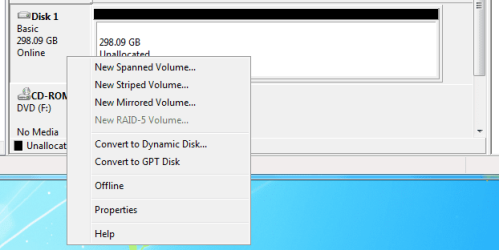
I ran into a problem with a hard drive earlier today and I tried to initialize the hard drive. I found that I had to right click on the Left-side where it says "Disk 1, Basic, Online, etc..." to get the option to Initialize it. The picture you have there is you right clicking on the longer horizontal box. Try the one to the left of where you're clicking, maybe you can initialize the drive from there.
 

My Computer

OS
Windows 7 Professional x64
CPU
AMD Phenom II X4 965 Black Edition 3.4GHz stock
Motherboard
ASUS M4A79XTD EVO
Memory
G.SKILL Ripjaws 4GB (2 x 2GB) DDR3 1600
Graphics Card(s)
EVGA GTX 260 core 216
Sound Card
Onboard
Monitor(s) Displays
Samsung 260HD TOC
Screen Resolution
1900x1200
Hard Drives
Western Digital Raptor WD740
Western Digital 6400AAKS
PSU
OCZ ModXStream Pro OCZ600MXSP 600W
Case
COOLER MASTER Storm Scout
Cooling
Scythe Ninja-Mini
Keyboard
Logitech Illuminated Keyboard
Mouse
Logitech G500
That drive has has been formatted and all data erased. You will need to right click it and create a new simple volume. To get the data back, well good luck. I'd try Easus data recovery (Free Download Data Recovery Software.) and if it can recover your files you can look at either buying it or looking for a free alternative
 

My Computer

Computer Manufacturer/Model Number
tw33k
OS
Windows 7 Ultimate (x64) SP1
CPU
Intel 3770k 4.6GHz
Motherboard
ASUS Maximus V Formula
Memory
8GB (2x 4GB) Crucial Ballistix
Graphics Card(s)
Sapphire 7950 (1060/1600)
Sound Card
On Board Realtek HD Audio
Monitor(s) Displays
27" Acer B273HU (via HDMI)
Screen Resolution
2048 x 1152
Hard Drives
Crucial M4 128GB
2TB WD Black
1TB Samsung F3 SATA
1TB WD Elite External
2TB WD USB 3.0
PSU
Corsair AX750 Gold
Case
Corsair Obsidian 800DW
Cooling
Corsair H100 (2x AP-121/2x UK-3000 push/pull)
Keyboard
Microsoft Wireless 5000
Mouse
Microsoft Wireless 5000
Internet Speed
5mb/s
Other Info
Logitech z-2300 2.1 speakers
Lamptron FC-5 v2
  • Like
Reactions: 321
I ran into a problem with a hard drive earlier today and I tried to initialize the hard drive. I found that I had to right click on the Left-side where it says "Disk 1, Basic, Online, etc..." to get the option to Initialize it. The picture you have there is you right clicking on the longer horizontal box. Try the one to the left of where you're clicking, maybe you can initialize the drive from there.

I tried right clicking on the left side of the box, but the option to initialize it is no where to be seen!

I think maybe my files are erased, if I were to try to recover them would I create a "New Simple Volume"?
 

Attachments

  • rightclick.png
    rightclick.png
    15.1 KB · Views: 93

My Computer

Computer Manufacturer/Model Number
Home Built, N/A
OS
Windows 7
CPU
Intel Core i7 860
Motherboard
MSI P55-GD65
Memory
OCZ Platinum DDR3 PC3-10666 1333MHz
Graphics Card(s)
XFX ATI Radeon HD 5770 XXX
Sound Card
Onboard
Monitor(s) Displays
LG Flatron W2353V
Screen Resolution
1920 x 1080
Hard Drives
WD Caviar Black 1 TB
PSU
Seasonic M12D 850W
Case
Coolermaster 932 HAF
Cooling
Noctua NH-D14
Keyboard
IBM Standard PS/2
Mouse
Logitech G9
Internet Speed
10 Mb/s
Your files ARE erased. To get the drive working you have to create a new simple volume
 

My Computer

Computer Manufacturer/Model Number
tw33k
OS
Windows 7 Ultimate (x64) SP1
CPU
Intel 3770k 4.6GHz
Motherboard
ASUS Maximus V Formula
Memory
8GB (2x 4GB) Crucial Ballistix
Graphics Card(s)
Sapphire 7950 (1060/1600)
Sound Card
On Board Realtek HD Audio
Monitor(s) Displays
27" Acer B273HU (via HDMI)
Screen Resolution
2048 x 1152
Hard Drives
Crucial M4 128GB
2TB WD Black
1TB Samsung F3 SATA
1TB WD Elite External
2TB WD USB 3.0
PSU
Corsair AX750 Gold
Case
Corsair Obsidian 800DW
Cooling
Corsair H100 (2x AP-121/2x UK-3000 push/pull)
Keyboard
Microsoft Wireless 5000
Mouse
Microsoft Wireless 5000
Internet Speed
5mb/s
Other Info
Logitech z-2300 2.1 speakers
Lamptron FC-5 v2
Back
Top