Cant Access Safe Mode!

ed123

New member
Member
Local time
3:33 AM
Messages
72
i am working on a dell inspiron 1750 but cant seen to get into safe mode i pressed F8 key but i think i might be another conbination of keys does anyone know how i can get in Safe Mode?
 

My Computer

Computer Manufacturer/Model Number
QE339UA#ABA
OS
Windows & Ultimate 64 bit & Linux Mint * Dual Boot
Motherboard
1.65GHz VISION E2 Technology from AMD with AMD Dual-Core E-4
Memory
4GB DDR3 SDRAM (1 DIMM)
Graphics Card(s)
AMD Radeon HD 6320 Discrete-Class Graphics
Sound Card
Altec Lansing Speakers
Monitor(s) Displays
1366x768
Hard Drives
500GB 5400RPM
Keyboard
Full-size keyboard
Mouse
Touchpad with multitouch gesture support and on/off button
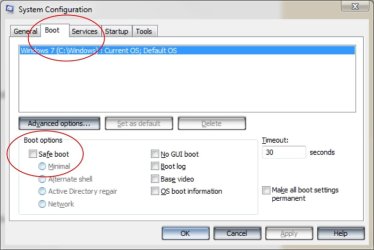
Hiya pal, if F8 isn't working for you try this.

Close all open programs
Click Start, Run and type MSCONFIG in the box and click OK
The System Configuration Utility appears, On the BOOT.INI tab, Check the "/SAFEBOOT" option, and then click OK and Restart your computer when prompted.
The computer restarts in Safe mode.
Perform the troubleshooting steps for which you are using Safe Mode.

When you are finished with troubleshooting in Safe mode, open MSCONFIG again, on the BOOT.INI tab, uncheck "/SAFEBOOT" and click OK to restart your computer ;)
 

Attachments

  • boot options.jpg
    boot options.jpg
    48.3 KB · Views: 4

My Computer

Computer type
PC/Desktop
Computer Manufacturer/Model Number
Self Built
OS
Windows 7 Ultimate 64bit
CPU
AMD Phenom Quad core 9950 black edition
Motherboard
Gigabyte
Memory
16Gb
Graphics Card(s)
2x XFX Radeon 5850
Sound Card
PCI Express X-Fi Titanium / Logitech G35
Monitor(s) Displays
2x HP 2410i
Screen Resolution
1920x1080
Hard Drives
2x 500Gb Seagate
1x 300Gb Seagate
1x 1Tb Seagate
2x 1Tb Hitatchi
PSU
Jean Tech Storm 700W
Case
Cooler Master COSMOS S
Cooling
Akasa Evo Blue Pro
Keyboard
Logitech G15
Mouse
Mad Catz M.M.O. 7
Internet Speed
12mb
Hiya pal, if F8 isn't working for you try this.

Close all open programs
Click Start, Run and type MSCONFIG in the box and click OK
The System Configuration Utility appears, On the BOOT.INI tab, Check the "/SAFEBOOT" option, and then click OK and Restart your computer when prompted.
The computer restarts in Safe mode.
Perform the troubleshooting steps for which you are using Safe Mode.

When you are finished with troubleshooting in Safe mode, open MSCONFIG again, on the BOOT.INI tab, uncheck "/SAFEBOOT" and click OK to restart your computer ;)

ok thaks ill try that but now the boot up is really slow its stays at the boot menu for like 40 seconds ??
 

My Computer

Computer Manufacturer/Model Number
QE339UA#ABA
OS
Windows & Ultimate 64 bit & Linux Mint * Dual Boot
Motherboard
1.65GHz VISION E2 Technology from AMD with AMD Dual-Core E-4
Memory
4GB DDR3 SDRAM (1 DIMM)
Graphics Card(s)
AMD Radeon HD 6320 Discrete-Class Graphics
Sound Card
Altec Lansing Speakers
Monitor(s) Displays
1366x768
Hard Drives
500GB 5400RPM
Keyboard
Full-size keyboard
Mouse
Touchpad with multitouch gesture support and on/off button
Back
Top