Can't activate aero

blackbitz45

New member
Local time
10:14 AM
Messages
26
Location
Philippines
Need help for my video card NVIDIA geforce2 mx400, can't activate aero on my system
 
Last edited by a moderator:

My Computer

Computer Manufacturer/Model Number
ASUS
OS
Windows seven ultimate x86 build 7600
CPU
1.7GhZ
Motherboard
ASUStek computer, Inc.
Memory
768MB
Graphics Card(s)
Nvidia geforce fx5200
Sound Card
Realtek AC '97
Monitor(s) Displays
PROLiNK PRO1501W 15.4” Widescreen TFT LCD
Screen Resolution
1280x800
Hard Drives
80GB and 1TB external for backup
Keyboard
SoftLine
Mouse
A4 TECH
Internet Speed
1mbps (depends on my wireless LAN signal)
Hello Blackbitz, and welcome to Seven Forums.

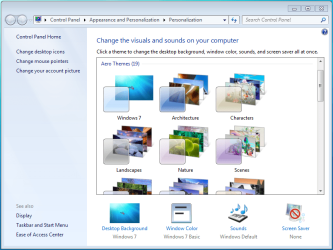
After you have installed your graphic card's drivers, check to make sure that your WEI score had been updated and that you have a Aero theme selected.

Hope this helps,
Shawn
 

My Computer

Computer type
PC/Desktop
Computer Manufacturer/Model Number
Self built custom
OS
64-bit Windows 11 Pro for Workstations
CPU
Intel i7-8700K OC'd to 5 GHz
Motherboard
ASUS ROG Maximus XI Formula Z390
Memory
64 GB (4x16GB) G.SKILL TridentZ RGB DDR4 3600 MHz
Graphics Card(s)
ASUS ROG-STRIX-GTX1080TI-O11G-GAMING
Sound Card
Integrated
Monitor(s) Displays
2 x Samsung Odyssey G7 27"
Screen Resolution
2560x1440
Hard Drives
1TB Samsung 990 PRO M.2,
4TB Samsung 990 PRO PRO M.2,
TerraMaster F8 SSD Plus NAS
PSU
Seasonic Prime Titanium 850W
Case
Thermaltake Core P3
Cooling
Corsair Hydro H115i
Keyboard
Logitech wireless K800
Mouse
Logitech MX Master 4
Internet Speed
2 Gb/s Download and 100 Mb/s Upload
Antivirus
Malwarebyte Anti-Malware Premium
Browser
Google Chrome
Other Info
Logitech Z625 speaker system,
Logitech BRIO 4K Pro webcam,
HP Color LaserJet Pro MFP M477fdn,
APC SMART-UPS RT 1000 XL - SURT1000XLI,
Galaxy S23 Plus phone
The geforce 2 may not meet the requirement for Aero. That is a good 5 yr+ card. Anyways, do what Brink said, update to the newest drivers that support your card, which may be a few years old, or just leave the default 7 drivers installed since they may be newer and run the WEI. If it still does not work, you may not have a card that is supported for Aero use.
 

My Computer

Computer Manufacturer/Model Number
Custom Made
OS
Windows 7 Build 7600|16384- 64bit
CPU
AMD Phenom II X4 810 - 2.61ghz Deneb
Motherboard
Asus M4A79T Deluxe
Memory
4GB DDR3 Mushkin (1600 O.C. Rated)
Graphics Card(s)
ATI HD Radeon 4890 1GB
Sound Card
Realtek HD Onboard Audio
Monitor(s) Displays
AOC 912vwa-1
Screen Resolution
1440x900 (Max Monitor)
Hard Drives
10000RPM 150GB Western Digital Velociraptor
PSU
Corsair TSX750W
Case
Antec Nine Hundred
Cooling
Air Cooled
Keyboard
Logitech Elite
Mouse
Logitech MX518
Internet Speed
Comcast High-Speed (+Powerboost)
Hello Blackbitz, and welcome to Seven Forums.

After you have installed your graphic card's drivers, check to make sure that your WEI score had been updated and that you have a Aero theme selected.

Hope this helps,
Shawn

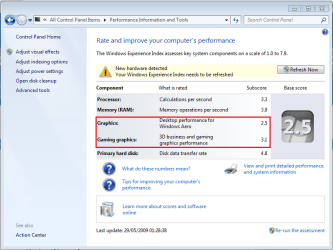
You will need an index score minimum of 2.0 in both Graphics & Gaming graphics in order for Aero to be activated.
Capture.PNG
 

My Computer

Computer Manufacturer/Model Number
Compaq Desktop
OS
Windows 7 Ultimate x64
CPU
AMD Sempron Dual Core
Memory
3GB
Graphics Card(s)
NVIDIA GeForce 6150SE nForce 430
Screen Resolution
1024x768
Hard Drives
150GB Sata
Thanks everyone!! I tried activating it again it says "The current video card may support Aero if the video card driver that is compliant with the Windows Display Driver Model (WDDM). Contact the video card vendor for the latest WDDM-compliant driver for the video card."
 

My Computer

Computer Manufacturer/Model Number
ASUS
OS
Windows seven ultimate x86 build 7600
CPU
1.7GhZ
Motherboard
ASUStek computer, Inc.
Memory
768MB
Graphics Card(s)
Nvidia geforce fx5200
Sound Card
Realtek AC '97
Monitor(s) Displays
PROLiNK PRO1501W 15.4” Widescreen TFT LCD
Screen Resolution
1280x800
Hard Drives
80GB and 1TB external for backup
Keyboard
SoftLine
Mouse
A4 TECH
Internet Speed
1mbps (depends on my wireless LAN signal)
What is your WEI score?

Also, have you tried Windows Update to see what results you get?
 

My Computer

Computer Manufacturer/Model Number
Compaq Desktop
OS
Windows 7 Ultimate x64
CPU
AMD Sempron Dual Core
Memory
3GB
Graphics Card(s)
NVIDIA GeForce 6150SE nForce 430
Screen Resolution
1024x768
Hard Drives
150GB Sata
You will not be able to utilise Aero with this card.

See the following resources.

Vista System Requirements
GeForce2 MX Datasheet

Note that for Aero Vista requires a card with DX9 support. Your card only supports DX7 (and lower).
 

My Computer

Computer type
PC/Desktop
Computer Manufacturer/Model Number
Dwarf Dwf/11/2012 r09/2013
OS
Windows 8.1 Pro RTM x64
CPU
Intel Core-i5-3570K 4-core @ 3.4GHz (Ivy Bridge) (OC 4.4GHz)
Motherboard
ASRock Z77 Extreme4-M
Memory
4 x 4GB DDR3-1600 Corsair Vengeance CMZ8GX3M2A1600C9B (16GB)
Graphics Card(s)
MSI GeForce GTX770 Gaming OC 2GB
Sound Card
Realtek High Definition on board solution (ALC 898)
Monitor(s) Displays
ViewSonic VA1912w Widescreen (VGA)
Screen Resolution
1440x900
Hard Drives
OCZ Agility 3 SSD 120GB SATA III x2 (RAID 0)
Samsung HD501LJ 500GB SATA II x2
Hitachi HDS721010CLA332 1TB SATA II
Iomega 1.5TB Ext USB 2.0
WD 2.0TB Ext USB 3.0
PSU
XFX Pro Series 850W Semi-Modular
Case
Gigabyte IF233
Cooling
1 x 120mm Front Inlet 1 x 120mm Rear Exhaust
Keyboard
Microsoft Comfort Curve Keyboard 3000 (USB)
Mouse
Microsoft Comfort Mouse 3000 for Business (USB)
Internet Speed
NetGear DG834Gv3 ADSL Modem/Router (Ethernet) ~4.0 Mb/s (O2)
Antivirus
Avast! 8.0.1497
Browser
IE 11
Other Info
Optical Drive: HL-DT-ST BD-RE BH10LS30 SATA Bluray
Lexmark S305 Printer/Scanner/Copier (USB)
WEI Score: 8.1/8.1/8.5/8.5/8.25
Asus Eee PC 1011PX Netbook (Windows 7 x86 Starter)
Also, Aero requires WDDM compliant cards in order for it to activate.
 

My Computer

Computer Manufacturer/Model Number
Compaq Desktop
OS
Windows 7 Ultimate x64
CPU
AMD Sempron Dual Core
Memory
3GB
Graphics Card(s)
NVIDIA GeForce 6150SE nForce 430
Screen Resolution
1024x768
Hard Drives
150GB Sata
There is "supposedly" a way to force Aero into submission.

Click the Start orb & type regedit and navigate to
HKEY_CURRENT_USER\Software\Microsoft\Windows\DWM

If DWM does not exist then click Edit -> New -> Key and name it DWM

Click DWM and in the right-hand pane Right-click -> New -> DWORD(32bit) Value and create 3 new values 'UseMachineCheck' 'Blur' 'Animations' and set all 3 to '0'

Next, click Start & type CMD, right-click the CMD and select 'Run as administrator'. Now type net stop uxsms then net start uxsms. This will disable Desktop Windows Management then restart it. Now try to activate a Windows Aero theme.

   Warning
If your screen goes completely blank, don't panic and don't click anything, just type net stop uxsms and your display will return. If this happens then there's no way to force Aero & you will need to delete the new registry keys


Hope this helps :)


Jeff
 

My Computer

Computer Manufacturer/Model Number
Compaq Desktop
OS
Windows 7 Ultimate x64
CPU
AMD Sempron Dual Core
Memory
3GB
Graphics Card(s)
NVIDIA GeForce 6150SE nForce 430
Screen Resolution
1024x768
Hard Drives
150GB Sata
hey there..

thanks for the force tip..will try it out.

im evaluating 7 on an old old laptop works fine but i too cant get Areo to work due to an old Intel chipset that dosnt even support Vista..!

I know the performance is going to be through the floor just want a getting usto period before i part with my hard earned..!

For what its worth i like it thus far i like it a lot. Though as ive said before the controlpanel looks botched and hurried...and dosnt follow the theme of Se7en at all IMHO.

Paul
 

My Computer

OS
XP sp3
Let me know if it works Paul, i can then post a new thread which will help everyone :)
 

My Computer

Computer Manufacturer/Model Number
Compaq Desktop
OS
Windows 7 Ultimate x64
CPU
AMD Sempron Dual Core
Memory
3GB
Graphics Card(s)
NVIDIA GeForce 6150SE nForce 430
Screen Resolution
1024x768
Hard Drives
150GB Sata
Let me know if it works Paul, i can then post a new thread which will help everyone :)

No wories will do..will be adding it in the next 30 mins or so..

Will advise then...

Dammn M$ have got so close with this one how could they F!*K up the control panel so bad...
Any 3rd party utilities out there to sort it..?


Paul
 

My Computer

OS
XP sp3
In what context do you mean F up mate?
 

My Computer

Computer Manufacturer/Model Number
Compaq Desktop
OS
Windows 7 Ultimate x64
CPU
AMD Sempron Dual Core
Memory
3GB
Graphics Card(s)
NVIDIA GeForce 6150SE nForce 430
Screen Resolution
1024x768
Hard Drives
150GB Sata
the card doesn't have pixel shader and the WEI Score should be 1.9 and 1.0 for graphics( I have the same card )
so yea theres nothing you can do but buy something better
 

My Computer

OS
Windows 7 32bit RTM
ok IMO..( and this isnt a rant) As like 7 i really doo..:D

Small Icons are too hard to see

Large icons mean I have to look too hard

THERE ARE JUST TOO MANY ICONS. It looks cluttered and disorganised.

7 groups stuff together right (its one of the OS's Unique Selling Points) so why not in control panel...??

I think XP Classic veiw layout was pretty much the best it was simple everything was just there in one quick glance. So why not just tweak it a little.

I would have "Security Centre" in it group up "Windows Firewall" "Windows Defender" "Windows Update"

Would add somthing like "System Security" and in that group "User Accounts" "Parental Controls" "credentials Manager"

Add a "Networks" icon in that group include "Home Group" "networkand Sharing"

I mean Seven is very customisable, with some great new additions. Why shouldnt the user even be able to create their own "Libaries" within "control panel" and then group together the icons they feel would best fit together within them...?

Or even if the OS grouped them but you used "windows Update" regularly why not have it so you can create you own Frequently Used" icons as shortcuts in control panel.

Another example why does "AutoPlay" have its own Icon im rarley if ever going to use it. And your standard end user never will.

In short it just isnt flexible period, XP gave you 2 options. Seven just lets you have big or small icons; WTF..? surley thats a step backwards.

If you know anyone in M$ pass this on as i cant live with what theyve given us thus far

Paul

 

My Computer

OS
XP sp3
Ok hack added..

Dumb question but how do i check if Aero is working ...?

What are some of the features and how do i Activate \ use them..

Paul
 

My Computer

OS
XP sp3

My Computer

Computer Manufacturer/Model Number
Compaq Desktop
OS
Windows 7 Ultimate x64
CPU
AMD Sempron Dual Core
Memory
3GB
Graphics Card(s)
NVIDIA GeForce 6150SE nForce 430
Screen Resolution
1024x768
Hard Drives
150GB Sata
Stilll no joy with windows glass
or
Flip 32 ..

How do i activate or check the above


paul
 

My Computer

OS
XP sp3

My Computer

Computer Manufacturer/Model Number
Compaq Desktop
OS
Windows 7 Ultimate x64
CPU
AMD Sempron Dual Core
Memory
3GB
Graphics Card(s)
NVIDIA GeForce 6150SE nForce 430
Screen Resolution
1024x768
Hard Drives
150GB Sata
Also, in regedit look for

HKEY_CURRENT_USER\Software\Microsoft\CurrentVersion\Explorer\Visual Effects

If not found, then View attachment Visual Effects.reg will add that for you too.
 

My Computer

Computer Manufacturer/Model Number
Compaq Desktop
OS
Windows 7 Ultimate x64
CPU
AMD Sempron Dual Core
Memory
3GB
Graphics Card(s)
NVIDIA GeForce 6150SE nForce 430
Screen Resolution
1024x768
Hard Drives
150GB Sata
Back
Top