Solved Can't boot after windows updates

Windowzzzz

New member
Local time
2:21 PM
Messages
7
After installing updates from windows update the computer no longer boots into windows. It starts to show the windows logo for a second then a bluescreen emerges (se attached picture. Before I no longer was aviable to boot into windows the following updates were installed:

Microsoft Update Catalog

Microsoft Update Catalog

Microsoft Update Catalog

Is it possible the updates did this or is it just a coincident? Is it possible to uinstall these updates/drivers from system recovery since I can't boot either normal or safe mode. I have followed "Troubleshooting Windows 7 Failure to Start" - guide but no luck there.
 

Attachments
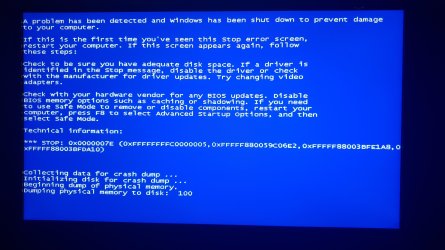
  • Bluescreen.jpg
    Bluescreen.jpg
    516.2 KB · Views: 2

My Computer

Computer type
PC/Desktop
OS
Windows 7 Professional N SP1 x64
Hi Windowzzzz,

Welcome to SevenForums!

After installing updates from windows update the computer no longer boots into windows.

I can't boot either normal or safe mode.

Have you got an installations disk?
If so, can you boot into it?
 

My Computer

Computer type
Laptop
Computer Manufacturer/Model Number
Fujitsu LIFEBOOK
OS
Win 7 HP SP1 64-bit Vista HB SP2 32-bit Linux Mint 18.3
CPU
Intel(R) Pentium(R) CPU P6200 @ 2.13GHz
Motherboard
FUJITSU FJNBB06
Memory
4.00 GB
Graphics Card(s)
Intel(R) Graphics Media Accelerator HD
Sound Card
[1] Realtek High Definition Audio [2] Intel(R) Display Audio
Screen Resolution
1366 x 768 x 32 bits (4294967296 colors) @ 59 Hz
Hard Drives
TOSHIBA MK5076GSX
Antivirus
AVG FREE
Hello,

Thank you!

I don't hade a disk however I have a USB with a windows-ISO that I original used to install the OS, that I'm able to boot into. I have tried to run startup repair from it but it doesn't fix the problem.
 

My Computer

Computer type
PC/Desktop
OS
Windows 7 Professional N SP1 x64
Hi Windowzzzz,

I don't hade a disk however I have a USB with a windows-ISO that I original used to install the OS, that I'm able to boot into. I have tried to run startup repair from it but it doesn't fix the problem.

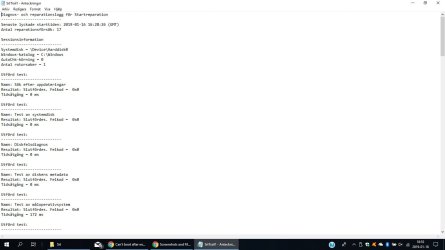
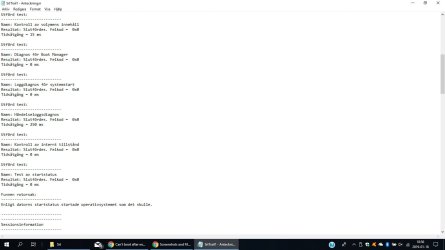
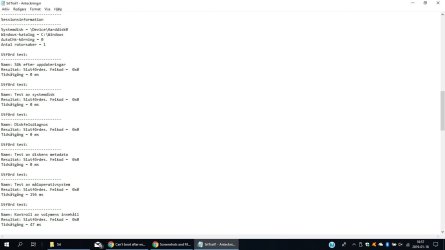
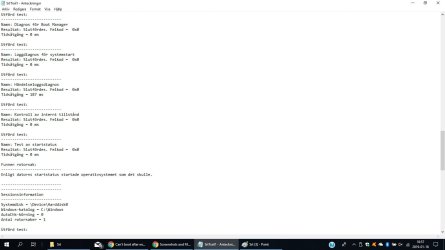
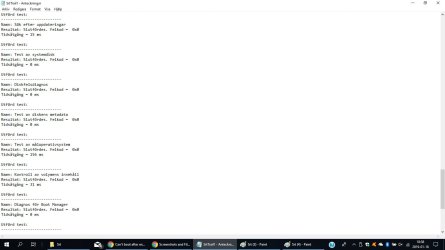
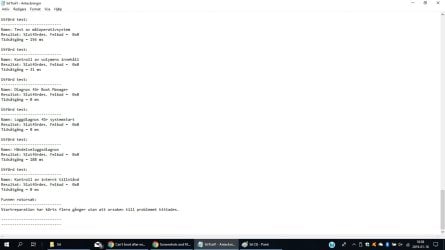
After Startup Repair has run, a text log with diagnostic information and repair results is generated. This log file is located here => C:\Windows\System32\Logfiles\Srt\SrtTrail.txt.

I hope this helps!
 

My Computer

Computer type
Laptop
Computer Manufacturer/Model Number
Fujitsu LIFEBOOK
OS
Win 7 HP SP1 64-bit Vista HB SP2 32-bit Linux Mint 18.3
CPU
Intel(R) Pentium(R) CPU P6200 @ 2.13GHz
Motherboard
FUJITSU FJNBB06
Memory
4.00 GB
Graphics Card(s)
Intel(R) Graphics Media Accelerator HD
Sound Card
[1] Realtek High Definition Audio [2] Intel(R) Display Audio
Screen Resolution
1366 x 768 x 32 bits (4294967296 colors) @ 59 Hz
Hard Drives
TOSHIBA MK5076GSX
Antivirus
AVG FREE
Okej, do you want me to upload the file so perhaps you can make some sense of it?
 

My Computer

Computer type
PC/Desktop
OS
Windows 7 Professional N SP1 x64

My Computer

Computer type
Laptop
Computer Manufacturer/Model Number
Fujitsu LIFEBOOK
OS
Win 7 HP SP1 64-bit Vista HB SP2 32-bit Linux Mint 18.3
CPU
Intel(R) Pentium(R) CPU P6200 @ 2.13GHz
Motherboard
FUJITSU FJNBB06
Memory
4.00 GB
Graphics Card(s)
Intel(R) Graphics Media Accelerator HD
Sound Card
[1] Realtek High Definition Audio [2] Intel(R) Display Audio
Screen Resolution
1366 x 768 x 32 bits (4294967296 colors) @ 59 Hz
Hard Drives
TOSHIBA MK5076GSX
Antivirus
AVG FREE
Hi Windowzzzz, as you know, this is an English speaking forum!

Maybe somebody else will be able to help you.
 

My Computer

Computer type
Laptop
Computer Manufacturer/Model Number
Fujitsu LIFEBOOK
OS
Win 7 HP SP1 64-bit Vista HB SP2 32-bit Linux Mint 18.3
CPU
Intel(R) Pentium(R) CPU P6200 @ 2.13GHz
Motherboard
FUJITSU FJNBB06
Memory
4.00 GB
Graphics Card(s)
Intel(R) Graphics Media Accelerator HD
Sound Card
[1] Realtek High Definition Audio [2] Intel(R) Display Audio
Screen Resolution
1366 x 768 x 32 bits (4294967296 colors) @ 59 Hz
Hard Drives
TOSHIBA MK5076GSX
Antivirus
AVG FREE
I know that, but alla error codes report 0x0 so I'm not really sure what to look for?
 

My Computer

Computer type
PC/Desktop
OS
Windows 7 Professional N SP1 x64
I got help from another forum but what was causing this was the windows update: Corsair - HIDClass - 5/25/2017 12:00:00 AM - 3.0.72.
 

My Computer

Computer type
PC/Desktop
OS
Windows 7 Professional N SP1 x64
Hi Windowzzzz,

I got help from another forum but what was causing this was the windows update: Corsair - HIDClass - 5/25/2017 12:00:00 AM - 3.0.72.

Are you saying that your issue is now resolved? If so, please mark this thread as Solved.
 

My Computer

Computer type
Laptop
Computer Manufacturer/Model Number
Fujitsu LIFEBOOK
OS
Win 7 HP SP1 64-bit Vista HB SP2 32-bit Linux Mint 18.3
CPU
Intel(R) Pentium(R) CPU P6200 @ 2.13GHz
Motherboard
FUJITSU FJNBB06
Memory
4.00 GB
Graphics Card(s)
Intel(R) Graphics Media Accelerator HD
Sound Card
[1] Realtek High Definition Audio [2] Intel(R) Display Audio
Screen Resolution
1366 x 768 x 32 bits (4294967296 colors) @ 59 Hz
Hard Drives
TOSHIBA MK5076GSX
Antivirus
AVG FREE

My Computer

Computer type
Laptop
Computer Manufacturer/Model Number
Fujitsu LIFEBOOK
OS
Win 7 HP SP1 64-bit Vista HB SP2 32-bit Linux Mint 18.3
CPU
Intel(R) Pentium(R) CPU P6200 @ 2.13GHz
Motherboard
FUJITSU FJNBB06
Memory
4.00 GB
Graphics Card(s)
Intel(R) Graphics Media Accelerator HD
Sound Card
[1] Realtek High Definition Audio [2] Intel(R) Display Audio
Screen Resolution
1366 x 768 x 32 bits (4294967296 colors) @ 59 Hz
Hard Drives
TOSHIBA MK5076GSX
Antivirus
AVG FREE
Back
Top