
Cant boot

gilly75

New member
Local time
6:05 PM
Messages
7
Samsung NP300V5A

Any help appreciated.

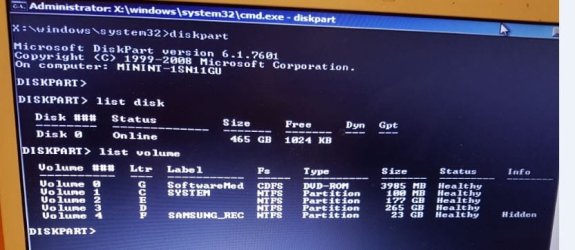
I haven't been able to boot at all for about a week. I have tried basic restore by using the repair disk but it hasn't worked. Tried chkdsk but it states the volume is in use by another process. I don't know enough about commands to know which to try in case I do more damage. From this screenshot where may the OS be or what commands should I try?
 

Attachments
  • Capture.JPG
    Capture.JPG
    52.3 KB · Views: 2

My Computer

Computer type
Laptop
Computer Manufacturer/Model Number
samsung NP300V5A
OS
windows 7 home premium 64bit
For what I can see your disk is full, only 1M free.

To run a check disk. With the repair disk, open a cmd window and type
chkdsk C: /f
 

My Computers

System One System Two

  • Computer type
    PC/Desktop
    Computer Manufacturer/Model Number
    custom build
    OS
    Windows 7 HP 64
    CPU
    i5 6600K - 800MHz to 4200MHz
    Motherboard
    GA-Z170-HD3P
    Memory
    4+4G GSkill DDR4 3000
    Graphics Card(s)
    IG - Intel 530
    Monitor(s) Displays
    Samsung 226BW
    Screen Resolution
    1680x1050
    Hard Drives
    (1) -1 SM951 – 128GB M.2 AHCI PCIe SSD drive for Windows 7 and Lubuntu
    (2) -1 WD SATA 3 - 1T for Data
    (3) -1 WD SATA 3 - 1T for backup
    PSU
    Thermaltake 450W TR2 gold
    Keyboard
    Old and good Chicony mechanical keyboard
    Mouse
    Logitech mX performance - 9 buttons (had to disable some)
    Internet Speed
    500Mb/s
    Browser
    Firefox 64
    Other Info
    TinyWall firewall
  • Computer type
    Laptop
    System Manufacturer/Model Number
    Asus Q550LF
    OS
    Windows 7 Pro
    CPU
    i7-4500U 800MHz to 3.0GHz
    Motherboard
    Asus Q550LF
    Memory
    (4+4)G DDR3 1600
    Graphics Card(s)
    IG intel 4400 + NVIDIA GeForce GT 745M
    Sound Card
    Realtek
    Monitor(s) Displays
    LG Display LP156WF4-SPH1
    Screen Resolution
    1920 x 1080
    Hard Drives
    BX500 120G SSD for Windows and programs +
    1T HDD for data
    Internet Speed
    500 Mb/s
    Browser
    Firefox
    Other Info
    TinyWall firewall
Ta, Ill try it again
 

My Computer

Computer type
Laptop
Computer Manufacturer/Model Number
samsung NP300V5A
OS
windows 7 home premium 64bit
I get this message when I try chkdsk C: /f

(this is a prev screenshot - it actually reads C:
 

Attachments

  • 23.jpg
    23.jpg
    42.1 KB · Views: 23

My Computer

Computer type
Laptop
Computer Manufacturer/Model Number
samsung NP300V5A
OS
windows 7 home premium 64bit
Your system partition is only 100 MB. (That's your C: drive.) I think that is definitely an issue, because Windows likely can't write anything to the C: drive.

I'm really concerned that you have so many partitions on this drive. If it were me, I would put the hard drive into another computer and do a backup of it. I would then install a bigger hard drive in the original computer, and restore the backup to that hard drive. (A major advantage of restoring to a different hard drive is that you won't overwrite the original hard drive - you can always fall back on the original hard drive if the backup is defective.) I would then get rid of D: and E:, and increase the size of C: so that it takes all of the previous space of D: and E:. Drive F: (the Samsung recovery partition) is at the end of the list, so I'm not sure what the impact would be at leaving it on the drive vs. deleting it and adding the freed-up space to the new partition. I would probably delete F: as well before doing the partition modification.

I would probably get some good partition software and use it to re-partition the drive, rather than using the built-in Windows tools. I can't recommend any, because I haven't done that sort of thing in a very long time, so I don't know what is out there these days.

Doing a partition modification is risky - you could lose all of your data if you make a mistake. But you'll have a good backup, and you'll have the old hard drive to fall back on, should something go wrong.
 

My Computer

Computer type
PC/Desktop
Computer Manufacturer/Model Number
Dell
OS
Linux Mint 18.2 xfce 64-bit (VMWare host) / Windows 8.1 Pro 32-bit (VMWare guest)
CPU
Haswell
Memory
4 GB
Monitor(s) Displays
Acer 23"
Screen Resolution
1920 x 1080
Hard Drives
Two hard drives, 1TB each: One for Linux, one for my data.
Keyboard
IBM Model M
Antivirus
Sophos (Linux), Trend Micro (Windows)
Browser
Firefox, Opera
Other Info
I use Samba to share my data drive with the other computers at my house and with my guest session in VMWare Workstation Player.
thanks for that - think ill get someone to do it for me.
 

My Computer

Computer type
Laptop
Computer Manufacturer/Model Number
samsung NP300V5A
OS
windows 7 home premium 64bit
Do NOT delete drive :F. That holds recovery boot files!!!!
 

My Computer

Computer type
PC/Desktop
Computer Manufacturer/Model Number
Acer AS4830TG-6457
OS
Windows 7 Professional 64-bit
CPU
Intel Core i5
Memory
8gb Crucial
Graphics Card(s)
nVidia M740 Intel 3000
Hard Drives
Seagate Hybrid
Antivirus
Windows Defender
What percentage of drive :C is available (unused)?
 

My Computer

Computer type
PC/Desktop
Computer Manufacturer/Model Number
Acer AS4830TG-6457
OS
Windows 7 Professional 64-bit
CPU
Intel Core i5
Memory
8gb Crucial
Graphics Card(s)
nVidia M740 Intel 3000
Hard Drives
Seagate Hybrid
Antivirus
Windows Defender
1024kb I think
 

My Computer

Computer type
Laptop
Computer Manufacturer/Model Number
samsung NP300V5A
OS
windows 7 home premium 64bit
As stated in the earlier post that was a previous screenshot. I actually did enter Y and run the chkdsk. No further on tho.
 

My Computer

Computer type
Laptop
Computer Manufacturer/Model Number
samsung NP300V5A
OS
windows 7 home premium 64bit
Your OS is most likely on E or D as seen from your first screenshot.

I suggest you borrow my boot media, burn it cd/dvd ( or extract to usb stick using e.g. rufus ).
Then boot it up and have a look.

It much easier to use than the standard media you are using.

17514x64-v4.iso
 

My Computers

System One System Two

  • Computer type
    PC/Desktop
    OS
    7 X64
    CPU
    i5 8400
    Motherboard
    gigabyte b365m ds3h
    Memory
    2x8gb 3200mhz
    Hard Drives
    various
    PSU
    pure power 11 400w cm
    Case
    Coolermaster
    Cooling
    cryorig m9i
  • Computer type
    PC/Desktop
    OS
    7x64
    CPU
    g5400
    Motherboard
    ga b365m ds3h
    Memory
    8gb ddr4 2400
    PSU
    xfx pro 450w
Thank you, I'll try it
 

My Computer

Computer type
Laptop
Computer Manufacturer/Model Number
samsung NP300V5A
OS
windows 7 home premium 64bit
Back
Top