Can't bypass Router, Clean Install

swamped

New member
Local time
10:10 PM
Messages
24
I did a W7 Ultimate clean install a week ago, and a couple days ago tried to access the internet while bypassing the router. Nothing. Wired through the router is fine, wireless is fine.
Checked and rechecked the drivers, uninstalled and reinstalled the Realtek Family Controller, updated the chipset this morning, and have read tons on these forums, but I can't seem to find the answer.
I never had this problem before the clean install. Appreciate some help.
 

My Computer My Computer

Computer type
PC/Desktop
Computer Manufacturer/Model Number
Homebuilt
OS
Windows 7 Ultimate x64
CPU
i7 930 A 2.8 GHz
Motherboard
Gigabyte X58A-UD3R
Memory
12 GB
Graphics Card(s)
NVidia GeForce GTX 470, NVidia GeForce 8800 GT
Monitor(s) Displays
2 Necs, 1 Dell
Hard Drives
Intel SSD
Seagate 1 TB
Seagate 1 TB
Seagate 2 TB
Seagate 500 GB
Seagate 759 GB
Case
Lian Li
Cooling
8 Fans
The modem needs reset, however there is a sequence that needs to be followed.
1. Power off the PC.
2. Reset the modem
3. AFTER the modem has resync'd connect the RJ45 ethernet cable to the modem and then power on and boot up the PC.

This procedure should work.
 

My Computer My Computer

Computer type
PC/Desktop
Computer Manufacturer/Model Number
My Own Build
OS
Windows 10 64 bit
CPU
Intel i7 6700K
Motherboard
ASUS ROG Maximus VIII Hero
Memory
16GB Corsair Dominator
Graphics Card(s)
Intel CPU Graphics
Sound Card
RealTek
Monitor(s) Displays
27" Dell S2719dgf
Screen Resolution
2560X1440
Hard Drives
1 TB Samsung 850 EVO SSD for Win 10 Pro
500GB Samsung 850 EVO SSD for Win 10 Insider
2 TB drive for backup
PSU
EVGA Supernova 750G2
Case
BeQuiet Silent Base 600
Cooling
Deepcool Captain 120EX
Keyboard
Microsoft Wireless 2000
Mouse
Microsoft wireless
Internet Speed
100 MB/sec (Cable)
Antivirus
Microsoft Defender and Malwarebytes
Browser
Edge/Firefox
Other Info
Cakewalk (Sonar) by BandLab and Studio One 4.1 Pro recording studio software. MOTU 896Mk3 Hybrid recording interface, Frontier Tranzport wireless control unit, Behringer X-Touch Control Surface.
Five USB connected optical drives for CD Audio production using Nero BurningROM
Sorry, I didn't mention that I don't have a modem. Got fiber optics, the ethernet cable runs straight from the wall to the router, a D-Link DIR 615.
 

My Computer My Computer

Computer type
PC/Desktop
Computer Manufacturer/Model Number
Homebuilt
OS
Windows 7 Ultimate x64
CPU
i7 930 A 2.8 GHz
Motherboard
Gigabyte X58A-UD3R
Memory
12 GB
Graphics Card(s)
NVidia GeForce GTX 470, NVidia GeForce 8800 GT
Monitor(s) Displays
2 Necs, 1 Dell
Hard Drives
Intel SSD
Seagate 1 TB
Seagate 1 TB
Seagate 2 TB
Seagate 500 GB
Seagate 759 GB
Case
Lian Li
Cooling
8 Fans
Then the router is also the modem. You would need a modem to connect directly to the line.
 

My Computer My Computer

Computer type
PC/Desktop
Computer Manufacturer/Model Number
My Own Build
OS
Windows 10 64 bit
CPU
Intel i7 6700K
Motherboard
ASUS ROG Maximus VIII Hero
Memory
16GB Corsair Dominator
Graphics Card(s)
Intel CPU Graphics
Sound Card
RealTek
Monitor(s) Displays
27" Dell S2719dgf
Screen Resolution
2560X1440
Hard Drives
1 TB Samsung 850 EVO SSD for Win 10 Pro
500GB Samsung 850 EVO SSD for Win 10 Insider
2 TB drive for backup
PSU
EVGA Supernova 750G2
Case
BeQuiet Silent Base 600
Cooling
Deepcool Captain 120EX
Keyboard
Microsoft Wireless 2000
Mouse
Microsoft wireless
Internet Speed
100 MB/sec (Cable)
Antivirus
Microsoft Defender and Malwarebytes
Browser
Edge/Firefox
Other Info
Cakewalk (Sonar) by BandLab and Studio One 4.1 Pro recording studio software. MOTU 896Mk3 Hybrid recording interface, Frontier Tranzport wireless control unit, Behringer X-Touch Control Surface.
Five USB connected optical drives for CD Audio production using Nero BurningROM
In the past when I've had telephone help for outages, etc, the dsl techs always insisted trying the connection directly from the wall to the pc. This, they said, was to determine if the router had problems.
And the pc always connected to internet that way.
 

My Computer My Computer

Computer type
PC/Desktop
Computer Manufacturer/Model Number
Homebuilt
OS
Windows 7 Ultimate x64
CPU
i7 930 A 2.8 GHz
Motherboard
Gigabyte X58A-UD3R
Memory
12 GB
Graphics Card(s)
NVidia GeForce GTX 470, NVidia GeForce 8800 GT
Monitor(s) Displays
2 Necs, 1 Dell
Hard Drives
Intel SSD
Seagate 1 TB
Seagate 1 TB
Seagate 2 TB
Seagate 500 GB
Seagate 759 GB
Case
Lian Li
Cooling
8 Fans
More info might help.


Microsoft Windows [Version 6.1.7601]
Copyright (c) 2009 Microsoft Corporation. All rights reserved.
C:\Windows\system32>ipconfig /all
Windows IP Configuration
Host Name . . . . . . . . . . . . : wayne-PC
Primary Dns Suffix . . . . . . . :
Node Type . . . . . . . . . . . . : Hybrid
IP Routing Enabled. . . . . . . . : No
WINS Proxy Enabled. . . . . . . . : No
Ethernet adapter Local Area Connection:
Connection-specific DNS Suffix . :
Description . . . . . . . . . . . : Realtek PCIe GBE Family Controller
Physical Address. . . . . . . . . : 6C-F0-49-E4-38-12
DHCP Enabled. . . . . . . . . . . : Yes
Autoconfiguration Enabled . . . . : Yes
Link-local IPv6 Address . . . . . : fe80::b133:9520:76e9:610d%9(Preferred)
IPv4 Address. . . . . . . . . . . : 172.168.0.103(Preferred)
Subnet Mask . . . . . . . . . . . : 255.255.255.0
Lease Obtained. . . . . . . . . . : Sunday, June 02, 2013 2:24:32 PM
Lease Expires . . . . . . . . . . : Sunday, June 09, 2013 2:24:31 PM
Default Gateway . . . . . . . . . : fe80::224:1ff:fe69:5fa6%9
172.168.0.1
DHCP Server . . . . . . . . . . . : 172.168.0.1
DNS Servers . . . . . . . . . . . : 172.168.0.1
NetBIOS over Tcpip. . . . . . . . : Enabled
Tunnel adapter isatap.{96E957D9-284D-41F8-B6A4-050D74DBCC81}:
Media State . . . . . . . . . . . : Media disconnected
Connection-specific DNS Suffix . :
Description . . . . . . . . . . . : Microsoft ISATAP Adapter
Physical Address. . . . . . . . . : 00-00-00-00-00-00-00-E0
DHCP Enabled. . . . . . . . . . . : No
Autoconfiguration Enabled . . . . : Yes
Tunnel adapter 6TO4 Adapter:
Connection-specific DNS Suffix . :
Description . . . . . . . . . . . : Microsoft 6to4 Adapter
Physical Address. . . . . . . . . : 00-00-00-00-00-00-00-E0
DHCP Enabled. . . . . . . . . . . : No
Autoconfiguration Enabled . . . . : Yes
IPv6 Address. . . . . . . . . . . : 2002:aca8:67::aca8:67(Preferred)
Default Gateway . . . . . . . . . :
DNS Servers . . . . . . . . . . . : 172.168.0.1
NetBIOS over Tcpip. . . . . . . . : Disabled
Tunnel adapter Local Area Connection* 10:
Connection-specific DNS Suffix . :
Description . . . . . . . . . . . : Teredo Tunneling Pseudo-Interface
Physical Address. . . . . . . . . : 00-00-00-00-00-00-00-E0
DHCP Enabled. . . . . . . . . . . : No
Autoconfiguration Enabled . . . . : Yes
IPv6 Address. . . . . . . . . . . : 2001:0:5ef5:79fd:14fa:2c9b:5357:ff98(Pref
erred)
Link-local IPv6 Address . . . . . : fe80::14fa:2c9b:5357:ff98%12(Preferred)
Default Gateway . . . . . . . . . :
NetBIOS over Tcpip. . . . . . . . : Disabled
C:\Windows\system32>
 

My Computer My Computer

Computer type
PC/Desktop
Computer Manufacturer/Model Number
Homebuilt
OS
Windows 7 Ultimate x64
CPU
i7 930 A 2.8 GHz
Motherboard
Gigabyte X58A-UD3R
Memory
12 GB
Graphics Card(s)
NVidia GeForce GTX 470, NVidia GeForce 8800 GT
Monitor(s) Displays
2 Necs, 1 Dell
Hard Drives
Intel SSD
Seagate 1 TB
Seagate 1 TB
Seagate 2 TB
Seagate 500 GB
Seagate 759 GB
Case
Lian Li
Cooling
8 Fans
Who is your ISP?

You have a public IP address of 172.168.0.103 that is assigned to AOL.

While directly connected to your Optical Network Translator (modem), can you ping this Google IP?
74.125.227.163
 

My Computer My Computer

Computer type
Laptop
Computer Manufacturer/Model Number
Employer provided Dell Latitude
OS
W7 Pro SP1 64bit
CPU
i7
Memory
8GB
Graphics Card(s)
Intel HD Graphics
Hard Drives
crappy SSD
Antivirus
Employer mandated Symantec Endpoint Protection
Browser
Pale Moon 64bit, IE11 64bit & Chrome 64bit
My ISP is Bellsouth.net

While connected from the wall to the pc I pinged, but could not find the host, google.com
 

My Computer My Computer

Computer type
PC/Desktop
Computer Manufacturer/Model Number
Homebuilt
OS
Windows 7 Ultimate x64
CPU
i7 930 A 2.8 GHz
Motherboard
Gigabyte X58A-UD3R
Memory
12 GB
Graphics Card(s)
NVidia GeForce GTX 470, NVidia GeForce 8800 GT
Monitor(s) Displays
2 Necs, 1 Dell
Hard Drives
Intel SSD
Seagate 1 TB
Seagate 1 TB
Seagate 2 TB
Seagate 500 GB
Seagate 759 GB
Case
Lian Li
Cooling
8 Fans
So...no more thoughts?
 

My Computer My Computer

Computer type
PC/Desktop
Computer Manufacturer/Model Number
Homebuilt
OS
Windows 7 Ultimate x64
CPU
i7 930 A 2.8 GHz
Motherboard
Gigabyte X58A-UD3R
Memory
12 GB
Graphics Card(s)
NVidia GeForce GTX 470, NVidia GeForce 8800 GT
Monitor(s) Displays
2 Necs, 1 Dell
Hard Drives
Intel SSD
Seagate 1 TB
Seagate 1 TB
Seagate 2 TB
Seagate 500 GB
Seagate 759 GB
Case
Lian Li
Cooling
8 Fans
The modem is in the telco's interface box. You are connecting to the interface there, not directly on the phone (fiber) line.

RIGHTclick on the icon for the internet link in the lower right and then click on Connect to a network and see if it can find it.
 

My Computer My Computer

Computer type
PC/Desktop
Computer Manufacturer/Model Number
My Own Build
OS
Windows 10 64 bit
CPU
Intel i7 6700K
Motherboard
ASUS ROG Maximus VIII Hero
Memory
16GB Corsair Dominator
Graphics Card(s)
Intel CPU Graphics
Sound Card
RealTek
Monitor(s) Displays
27" Dell S2719dgf
Screen Resolution
2560X1440
Hard Drives
1 TB Samsung 850 EVO SSD for Win 10 Pro
500GB Samsung 850 EVO SSD for Win 10 Insider
2 TB drive for backup
PSU
EVGA Supernova 750G2
Case
BeQuiet Silent Base 600
Cooling
Deepcool Captain 120EX
Keyboard
Microsoft Wireless 2000
Mouse
Microsoft wireless
Internet Speed
100 MB/sec (Cable)
Antivirus
Microsoft Defender and Malwarebytes
Browser
Edge/Firefox
Other Info
Cakewalk (Sonar) by BandLab and Studio One 4.1 Pro recording studio software. MOTU 896Mk3 Hybrid recording interface, Frontier Tranzport wireless control unit, Behringer X-Touch Control Surface.
Five USB connected optical drives for CD Audio production using Nero BurningROM

My Computer My Computer

Computer type
Laptop
Computer Manufacturer/Model Number
Employer provided Dell Latitude
OS
W7 Pro SP1 64bit
CPU
i7
Memory
8GB
Graphics Card(s)
Intel HD Graphics
Hard Drives
crappy SSD
Antivirus
Employer mandated Symantec Endpoint Protection
Browser
Pale Moon 64bit, IE11 64bit & Chrome 64bit
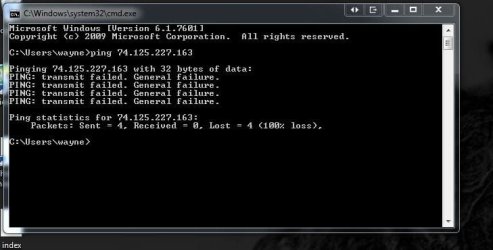
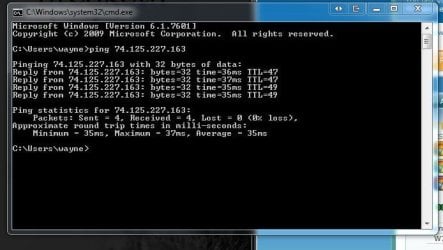
Two screenshots of pings as you requested, one wired, bypassing router. One wired through the router.
 

Attachments

  • wired.JPG
    wired.JPG
    38.9 KB · Views: 4
  • wiredtorouter.JPG
    wiredtorouter.JPG
    45.4 KB · Views: 4

My Computer My Computer

Computer type
PC/Desktop
Computer Manufacturer/Model Number
Homebuilt
OS
Windows 7 Ultimate x64
CPU
i7 930 A 2.8 GHz
Motherboard
Gigabyte X58A-UD3R
Memory
12 GB
Graphics Card(s)
NVidia GeForce GTX 470, NVidia GeForce 8800 GT
Monitor(s) Displays
2 Necs, 1 Dell
Hard Drives
Intel SSD
Seagate 1 TB
Seagate 1 TB
Seagate 2 TB
Seagate 500 GB
Seagate 759 GB
Case
Lian Li
Cooling
8 Fans
Thanks for those screenshots. The repeated "transmit failed" returns can happen if the computer was not assigned an IP address or if it has an IP address in a range that is not useful to the equipment that it is connected to. You might want to restart the computer while it is directly connected to the wall (modem).
 

My Computer My Computer

Computer type
Laptop
Computer Manufacturer/Model Number
Employer provided Dell Latitude
OS
W7 Pro SP1 64bit
CPU
i7
Memory
8GB
Graphics Card(s)
Intel HD Graphics
Hard Drives
crappy SSD
Antivirus
Employer mandated Symantec Endpoint Protection
Browser
Pale Moon 64bit, IE11 64bit & Chrome 64bit
Called my service provider and we set up a new connection. Now it works. I'd like to know what caused this, but am no closer to that answer.
The Bellsouth tech said there is definitely no modem and no interface box. This is a fiber optic setup, although wiring to the house is copper.
 

My Computer My Computer

Computer type
PC/Desktop
Computer Manufacturer/Model Number
Homebuilt
OS
Windows 7 Ultimate x64
CPU
i7 930 A 2.8 GHz
Motherboard
Gigabyte X58A-UD3R
Memory
12 GB
Graphics Card(s)
NVidia GeForce GTX 470, NVidia GeForce 8800 GT
Monitor(s) Displays
2 Necs, 1 Dell
Hard Drives
Intel SSD
Seagate 1 TB
Seagate 1 TB
Seagate 2 TB
Seagate 500 GB
Seagate 759 GB
Case
Lian Li
Cooling
8 Fans
..........The Bellsouth tech said there is definitely no modem and no interface box. This is a fiber optic setup, although wiring to the house is copper.
It is really beyond the scope of your thread to deal with the finer points of just what a modem is, but I'll ramble on a bit.

Wikipedia is not the best source to cite - but the opening paragraph is pretty good:

A modem (modulator-demodulator) is a device that modulates an analog carrier signal to encode digital information, and also demodulates such a carrier signal to decode the transmitted information. The goal is to produce a signal that can be transmitted easily and decoded to reproduce the original digital data. Modems can be used over any means of transmitting analog signals, from light emitting diodes to radio. The most familiar example is a voice band modem that turns the digital data of a personal computer into modulated electrical signals in the voice frequency range of a telephone channel. These signals can be transmitted over telephone lines and demodulated by another modem at the receiver side to recover the digital data.
There are many other (simpler) definitions for modem on the web, but most technical definitions include the fact there is an analog signal involved. Light is most definitely an analog signal. And BellSouth holds some of the earliest patents on how to modulate and switch it within a fiber optic network. Notice the date (and low speeds) on these fiber optic modems.

Starting around 2005/2006, papers started talking about digital modulation vs. the analog modulation that had been the norm for years. Once you start turning the light off and on, it could be argued that there is no more analog carrier being modulated and thus the box that turns the digitized light into digitized electricity is not a modem. I don't care one way or the other what you call the box. If you are interested, page 7 of this PDF shows what one form of digital modulation looks like.

No matter what you call it - there must be a box somewhere that turns the light in the fiber into electronic data that your computer can use.

Called my service provider and we set up a new connection. Now it works. I'd like to know what caused this, but am no closer to that answer....
I'm surprised that it ever worked without you first releasing the IP that the router had. My "optical modem" associates my router's mac address with the IP address that it assigns to the router. It will not talk to a computer unless the router releases the IP or I cycle the power to the "optical modem".

I'm not sure what changed between the last time that you connected your computer directly to the "optical modem" and this time. Maybe the firmware on the "optical modem" was updated.

 

My Computer My Computer

Computer type
Laptop
Computer Manufacturer/Model Number
Employer provided Dell Latitude
OS
W7 Pro SP1 64bit
CPU
i7
Memory
8GB
Graphics Card(s)
Intel HD Graphics
Hard Drives
crappy SSD
Antivirus
Employer mandated Symantec Endpoint Protection
Browser
Pale Moon 64bit, IE11 64bit & Chrome 64bit
The point of this thread from my side was to understand how to fix my non connection problem. Now that I'm re connected I'd like to understand what created the problem in the first place, while at the same time wondering whether the clean install performed a week ago unearthed a hidden technical fault.
It was never my intention to challenge the meaning of the word, modem. My stating of the fact that I don't have any type of modem-box in my house was an attempt to outline another of my specs for whoever helped troubleshoot this issue, much like me saying my OS is Windows 7 and my router is a D Link DIR-615 and is not a router/modem. How can I cycle the power to something I don't have in my house?

I admit that my knowledge of how routers and modems operate is shabby and needs study, but the force feeding of phrases like "optical modem" does nothing to shed light on my understanding. Perhaps you can suggest a more knowledgeable direction I might take in this quest.
 

My Computer My Computer

Computer type
PC/Desktop
Computer Manufacturer/Model Number
Homebuilt
OS
Windows 7 Ultimate x64
CPU
i7 930 A 2.8 GHz
Motherboard
Gigabyte X58A-UD3R
Memory
12 GB
Graphics Card(s)
NVidia GeForce GTX 470, NVidia GeForce 8800 GT
Monitor(s) Displays
2 Necs, 1 Dell
Hard Drives
Intel SSD
Seagate 1 TB
Seagate 1 TB
Seagate 2 TB
Seagate 500 GB
Seagate 759 GB
Case
Lian Li
Cooling
8 Fans
Maybe this will help:

What's the difference between DSL, IFITL, DFITL, and MX FastAccess Service? AT&T Southeast Forum FAQ | DSLReports.com, ISP Information

DFITL, IFITL and FITL technologies Fiber Optic Forum FAQ | DSLReports.com, ISP Information

I'm not sure which type of service you have. You mentioned DSL tech in post #5 and I don't know how you could have DSL and not have a DSL modem. Perhaps they simply call them all DSL techs even if they troubleshoot non-DSL customers.

If you have IFITL or FITL, then I'm not sure how far away the Optical Network Unit (optical modem) is... but it will not be under your control. The ISP tech will have to work with the ONU remotely. You cannot run a LAN cable for miles without adding some repeaters, so my guess is the ONU is pretty close by.

Let's assume that you have an ONU somewhere. As far what could have changed between the time when you could just swap the D-Link router with a computer and how it is acting this week:
Maybe they plugged you into a different port on the ONU.
Maybe the ONU has been changed out.
Maybe the firmware on the ONU has been changed.
You would probably have to ask your ISP what normally happens when you swap a router and a computer or find a very narrowly focused forum. Maybe the clean install of W7 has changed something about how the computer is now communicating with the ONU. Did BellSouth (or you) ever install any software on the computer? My ISP likes to load a bunch of automated troubleshooting junk on customer's computers.
 

My Computer My Computer

Computer type
Laptop
Computer Manufacturer/Model Number
Employer provided Dell Latitude
OS
W7 Pro SP1 64bit
CPU
i7
Memory
8GB
Graphics Card(s)
Intel HD Graphics
Hard Drives
crappy SSD
Antivirus
Employer mandated Symantec Endpoint Protection
Browser
Pale Moon 64bit, IE11 64bit & Chrome 64bit
Thanks for the links. Lots to study.
I spoke with the service provider again today, and asked about the situation-why no modem and do I have DSL or not. (It's always been referred to as Dsl by them). The answer was no Dsl. I have IFITL. So in reading the links material you posted I'm beginning to understand a little. One thing pops out and that's the link to (here) on the IFITL paragraph, which talks about installation. I wonder if there's a way to check if this installation (from fiber to copper and then to the house) was done correctly. One thing it stresses is that a IFITL installation requires a crossover, usually at the house plate.
My internet has always seemed slower than it should be. But it's hard to get them to come out and check things unless there's a problem in the line according to them.
 

My Computer My Computer

Computer type
PC/Desktop
Computer Manufacturer/Model Number
Homebuilt
OS
Windows 7 Ultimate x64
CPU
i7 930 A 2.8 GHz
Motherboard
Gigabyte X58A-UD3R
Memory
12 GB
Graphics Card(s)
NVidia GeForce GTX 470, NVidia GeForce 8800 GT
Monitor(s) Displays
2 Necs, 1 Dell
Hard Drives
Intel SSD
Seagate 1 TB
Seagate 1 TB
Seagate 2 TB
Seagate 500 GB
Seagate 759 GB
Case
Lian Li
Cooling
8 Fans
I'm not sure if there is a way to check the quality of the installation other than thru performance measurements. You might ask them if there is a speed test website that they host locally. One that would not leave their network. You should get speeds close to what you are paying for if you are directly connected to the wall.

My ISP hosts a speed test website where they time the downloading of a 100MB file. This seems to be a decent enough indicator of how things are working... maybe you can find something like that locally.
 

My Computer My Computer

Computer type
Laptop
Computer Manufacturer/Model Number
Employer provided Dell Latitude
OS
W7 Pro SP1 64bit
CPU
i7
Memory
8GB
Graphics Card(s)
Intel HD Graphics
Hard Drives
crappy SSD
Antivirus
Employer mandated Symantec Endpoint Protection
Browser
Pale Moon 64bit, IE11 64bit & Chrome 64bit
Back
Top